








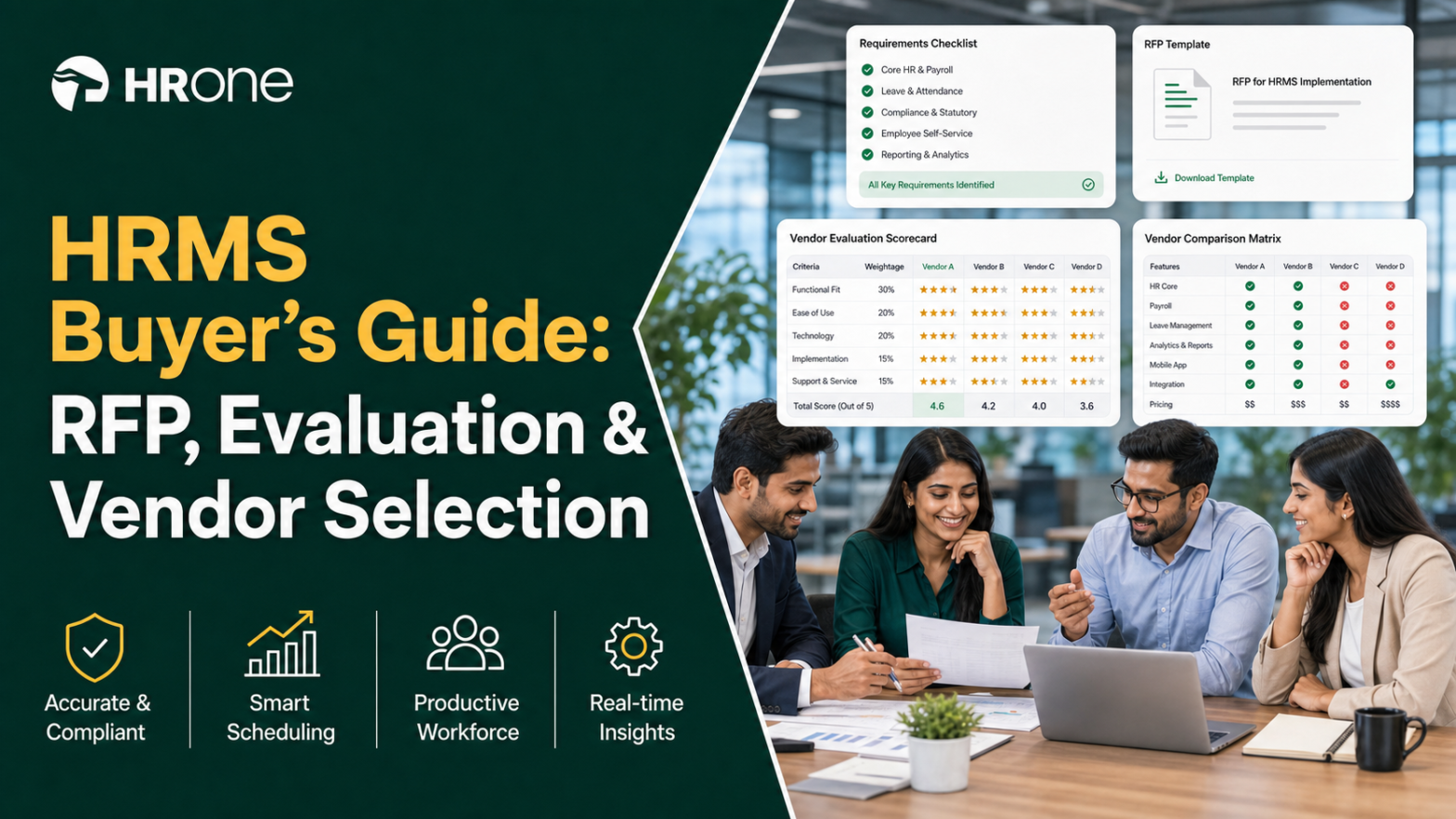
Q1. What are HRMS requirements, and why do most buyers get them wrong?
A payroll manager at a 600 person manufacturing firm once told me she had a 40 tab spreadsheet of “features” from four vendors, and still could not decide. She had a feature list. She did not have a requirements list. Those are two very different things, and mixing them up is the most common, most expensive mistake I see.
HRMS requirements are the documented, prioritized list of functional and technical capabilities your organization needs from HR software before you contact any vendor. Most buyers get them wrong by starting from a feature list instead of their own workflows. The fix: separate “essential” from “desirable” first, then map each requirement to a process you actually run every month.
🧩 What “requirements” actually means (the concept)
Think of it like this. A feature is something a vendor can do. A requirement is something your business must have. The gap between those two is where budgets die.
The right way to gather requirements is to split them into two tiers: essential (payroll breaks without it) and desirable (nice, but survivable). Every serious buyer’s guide builds this essential versus desirable spine, because it stops shiny demos from hijacking your decision. Our HRMS evaluation checklist follows exactly this logic.
🏭 A concrete example from the floor
Say you run attendance across three plants. Your requirement is not “biometric integration.” Your requirement is “sync punches from three device brands into one payroll run, with shift rules per plant.”
That specificity is the whole game. As one operator put it in a buyer discussion, you have the right to list out what you really want for your business, and then demand it from every vendor. The vendor works for your list. Your list does not bend to their demo.
✅ What to do on Monday morning
Open a blank doc. Write one line per HR process you run: hire, onboard, attendance, leave, payroll, confirmation, and exit. Beside each, write the single outcome that must not break. That is the start of a real requirements framework, and it takes about an hour.
At HROne, our 127 pre-built workflows exist precisely because requirements live at the process level, not the feature level. A workflow defines who does what, and by when, across onboarding to exit clearance. When you write requirements as processes (“who closes a confirmation letter, in how many days”), you can test any vendor honestly, including us.
The real question underneath all of this is quieter than “which tool is best.” It is: how do I stop being a data entry clerk in my own company, and become a process dependent organization that scales? Requirements, written well, are how you answer that.
Q2. HRIS vs HCM vs HRMS: which one do you actually need?
Here is a scene I have watched a dozen times. A founder asks three vendors what category they are in. One says HRIS, one says HCM, one says HRMS, and all three demo nearly the same screens. The founder walks out more confused than before. It is not their fault. The category labels are a mess.
HRIS, HCM, and HRMS overlap heavily. HRIS (Human Resource Information System) is the core data and record system. HRMS (Human Resource Management System) adds payroll and time. HCM (Human Capital Management) adds talent and strategy layers. For most Indian mid-market firms of 100 to 5,000 employees, you need an HRMS or HCM that unifies core HR, payroll, attendance, and performance in one platform, not three tools that cannot talk to each other.
🍜 The Alphabet Soup rule
One consultant I respect calls this “Alphabet Soup.” Her bottom line: every HR system falls into one of those three buckets, so stop obsessing over the acronym and look at what the buckets actually cover.
- HRIS: the system of record (employee data, org structure, and documents).
- HRMS: HRIS plus payroll, attendance, and leave.
- HCM: HRMS plus talent, performance, and workforce strategy, often built on a core HCM.
🐖 Match the bucket to your workflows, don’t overbuy
There is an old operator line I like: you don’t buy the whole hog if you are not going to eat the whole hog. Turn on only what you need, when you need it. A 200 person services firm rarely needs a full HCM suite on day one. A 3,000 person manufacturer with multi-state compliance almost always does.
The Monday takeaway is simple. List your must-run workflows first, then pick the smallest bucket that covers them with a little room to grow. Buy the bucket that matches your reality, not the biggest logo in the market.
At HROne, we built a single hire-to-retire platform on purpose, so the “softwares could not talk to each other” pain disappears. When core HR, payroll, attendance, and performance share one record, month-end reconciliation stops being a manual archaeology dig. That is the practical difference between one connected platform and five point tools stitched together with spreadsheets, a gap we cover in depth in our take on HR software vs Excel.
Q3. Which HRMS requirements are essential vs. just nice-to-have?
I once sat with an HR head who had bought a beautiful performance module and forgotten to check whether the payroll engine handled her state’s professional tax slabs. Payroll broke in month one. Performance reviews, meanwhile, were flawless. That is what happens when “nice-to-have” jumps the queue ahead of “essential.”
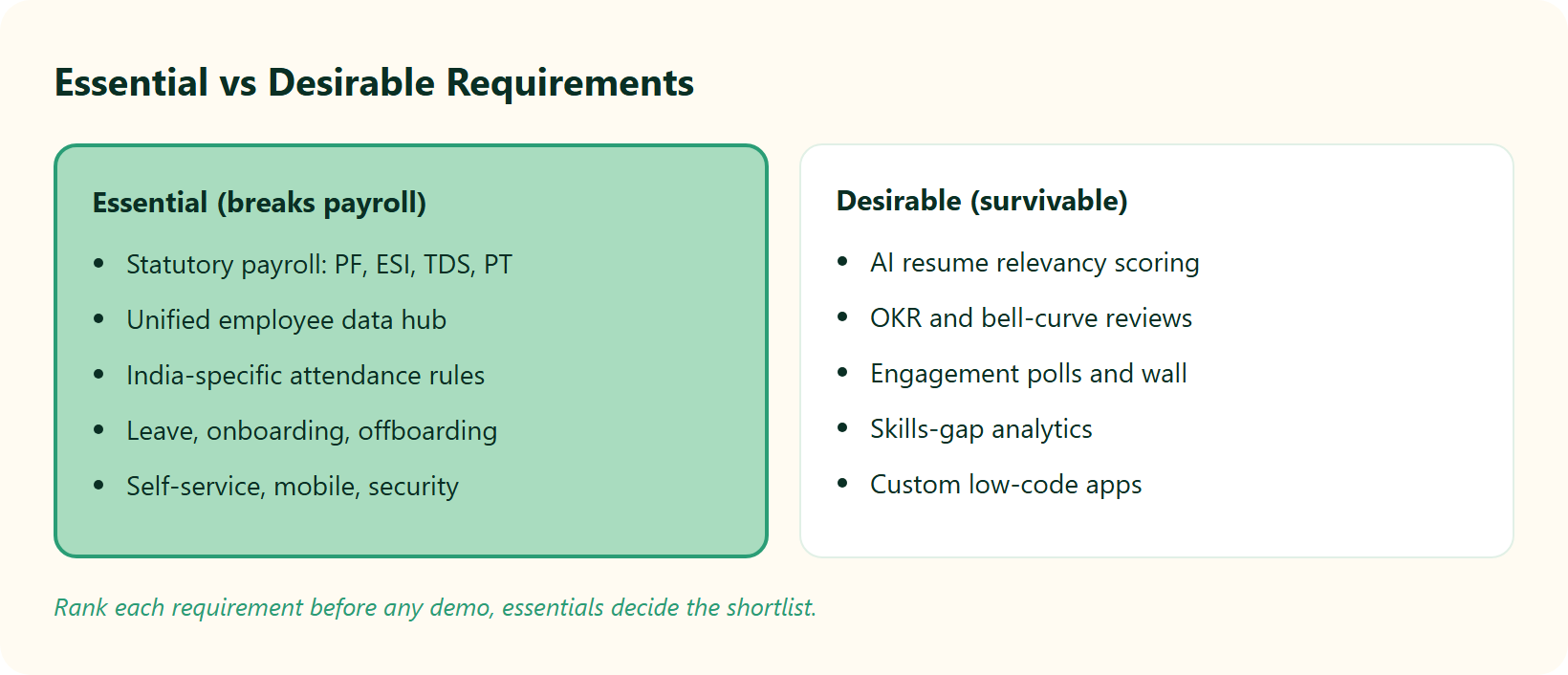
Essential HRMS requirements are the ones that break payroll, compliance, or the employee experience if missing: a unified data hub, statutory-compliant payroll (PF, ESI, TDS, and PT), attendance with India-specific punch rules, leave, onboarding and offboarding workflows, self-service, mobile access, and role-based security. Desirable requirements, like OKRs, skills analytics, and engagement, improve strategy but should not sink a shortlist.
📋 The essential versus desirable table
Score your must-haves before you fall for the extras. Here is the split I use, with HROne listed first only as the workflow-depth reference point, not because it wins every row for every buyer.
| # | Essential (payroll or compliance breaks without it) | Desirable (strategic, survivable) |
|---|---|---|
| 3.1 | Deep workflow coverage (HROne runs 127 pre-built hire-to-retire workflows) | AI resume relevancy scoring |
| 3.2 | Statutory payroll: PF, ESI, TDS, and PT auto-calculation | OKR and bell-curve performance |
| 3.3 | India-specific attendance (dual-punch or one-punch per user) | Engagement polls and social wall |
| 3.4 | Unified employee data hub / single record | Skills-gap analytics |
| 3.5 | Leave, onboarding, offboarding, self-service, mobile, and role-based security | Custom low-code apps |
⚠️ Why generic checklists fail Indian ops
Global templates miss the nitty-gritty. Attendance is a good example: for some users dual punches are needed, and for some, one punch is more than enough for the day. A rigid system cannot model both.
The same goes for money logic. Consider a referral bonus where the referrer must clock 240 days to be paid, and if the referred person exits before 300 days, the bonus is clawed back. If your HRMS cannot encode that, finance does it by hand, and mistakes multiply. Our payroll solution is built for exactly this kind of India-specific rule.
HR practitioners feel this depth day to day, and it shows up in reviews:
“Proper calculation of PF and ESI was a pain area for us before, but now with the HROne automated calculation process, results are up to the mark and following Indian tax compliances properly.”
Ajay K., HR HROne G2 Verified Review
“It handles salary calculations, statutory deductions (PF, ESI, taxes), and filings automatically, with zero manual intervention, removing payroll errors and compliance anxiety during audits.”
Waldon S., HR HROne G2 Verified Review
“Some modules, especially Payroll and Performance, have a learning curve and require more detailed guidance for first-time users.”
Shilpi M., HR HROne G2 Verified Review
The payoff: rank each requirement essential or desirable before any demo. If a vendor nails your desirables but fumbles an essential, they fail. At HROne, we frame requirements around workflow depth because that is where Indian payroll and attendance actually live or die.
Q4. How do you build an HRMS RFP and buying committee that vendors can’t wriggle out of?
The worst HRMS deals I have seen started the same way: one enthusiastic buyer, one persuasive salesperson, and no written requirements. I have watched business owners make six-figure decisions on the recommendation of someone whose background was purely sales. Sales has a one-track mind. Your RFP is how you take the wheel back.
A strong HRMS RFP (Request for Proposal, the document that states what you need and how you will judge answers) lists essential versus desirable requirements as scoreable line items, and asks every vendor the same questions, including “what do you bridge to for free?” Before sending it, map your buying committee (CHRO, HR ops, payroll, and IT) and name an internal champion, because adoption research shows social influence drives buy-in.
🗺️ The five-step RFP build
Follow these in order. By the end, you will have a document vendors cannot dodge.
- Map the buying committee and champion. List every decider: CHRO, HR ops lead, payroll manager, and IT director. Name one internal champion. Internal social influence significantly shapes whether people actually use the system, which is why CHRO solutions should be evaluated alongside IT.
- Write your business context. Two paragraphs: headcount, states, entities, current tools, and the pain. Vendors who understand context propose better.
- List essential and desirable requirements. Reuse your tiered list from earlier as numbered, scoreable lines. Make each one testable.
- Ask integration and fit questions. The sharpest one, from a seasoned buyer: ask on the front end what systems they bridge to for no charge. Free bridges reveal real architecture, so review each vendor’s integrations carefully.
- State scoring rules and demand a sandbox. Tell vendors how you will score (0 to 3 per line) and ask for hands-on access, not just a guided demo.
🧭 Give HR and IT joint ownership
An RFP is leverage, and leverage is shared. You have the right to list out what you really want, and demand it from every vendor. When HR owns the process outcomes and IT owns the technical fit, no single salesperson can steer the room.
The Monday action: draft steps one and two today. They take thirty minutes and change every conversation that follows.
At HROne, we publish our marketplace connectors (background verification, LMS, ERP, SSO, and e-signature) so the “what do you bridge to for free” question has a documented answer, not a sales promise. Our setup also lives on the front end, so an HR admin can change a leave policy or org structure without raising a developer ticket. That is a deliberate answer to a real RFP question: who can actually run this after go-live?
Q5. What evaluation criteria and scoring model actually predict success?
I once watched a CHRO pick the vendor with the flashiest AI demo, ignore the boring “ease of use” row, and then spend a year begging employees to log in. The flashy feature won the demo. It lost the rollout. That gap is exactly what a scoring model is meant to close.
The criteria that predict success are not the flashiest features. They are task-technology fit, ease of use, support quality, compliance depth, integration, and total cost of ownership (TCO, the full lifetime cost of the software). Peer-reviewed HRIS research shows facilitating conditions and ease of use statistically predict adoption. Score each vendor 0 to 3 against weighted criteria, then total the scores to rank them objectively. Our HRMS evaluation checklist lays this out step by step.
📊 The weighted scoring rubric
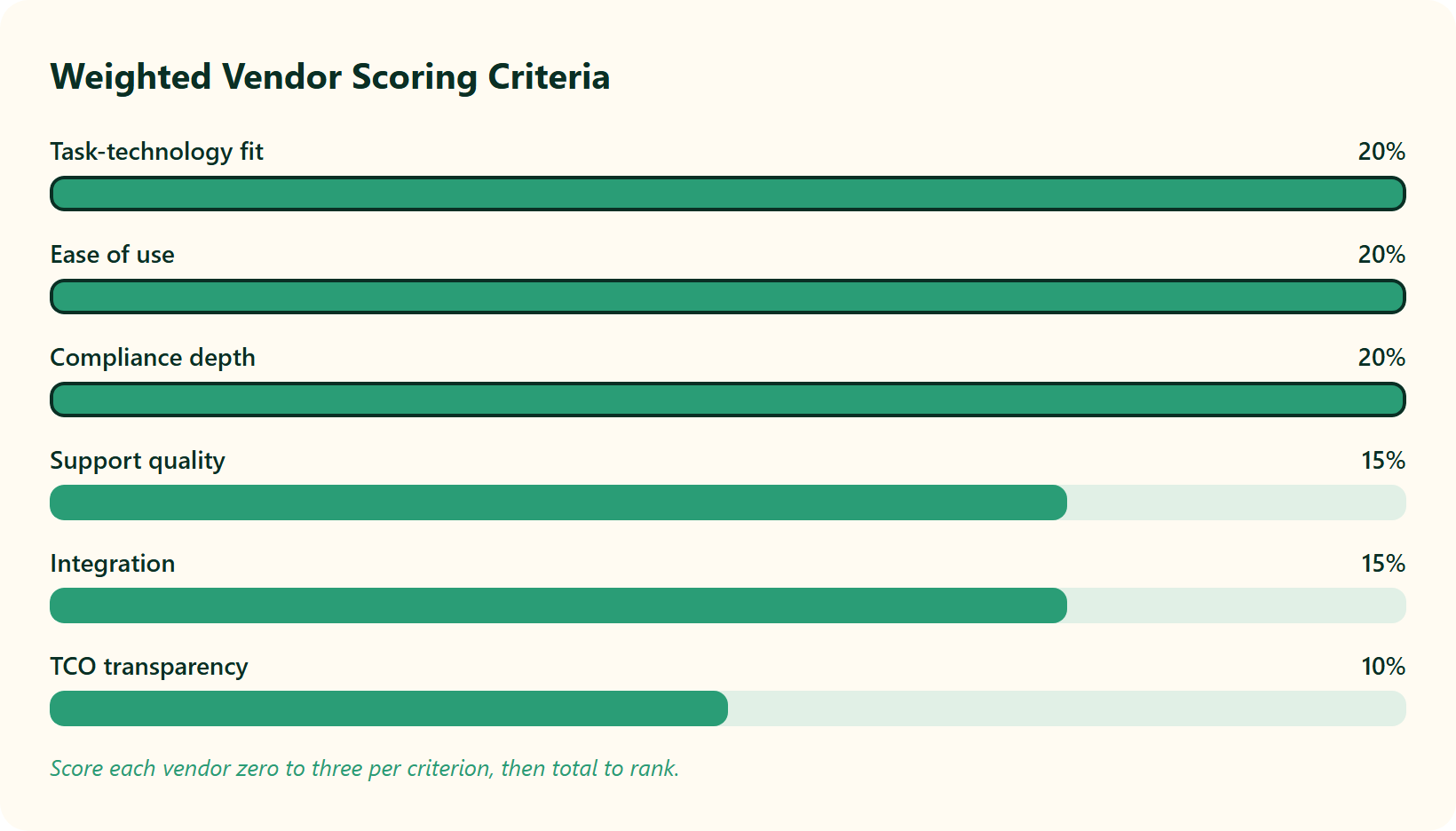
Here is the rubric I hand to buyers. Weight each criterion by importance to your business, score each vendor 0 to 3, then multiply and total. You can quantify the payoff side with our ROI calculator.
| # | Criterion | Suggested weight | 0 to 3 scale meaning |
|---|---|---|---|
| 5.1 | Task-technology fit | 20% | 0 = poor fit, 3 = fits your exact workflows |
| 5.2 | Ease of use / adoption | 20% | 0 = needs constant help, 3 = admins run it alone |
| 5.3 | Compliance depth (PF, ESI, TDS, and PT) | 20% | 0 = manual, 3 = full auto-calculation |
| 5.4 | Support quality | 15% | 0 = email-only, 3 = dedicated SPOC |
| 5.5 | Integration | 15% | 0 = none, 3 = documented free connectors |
| 5.6 | TCO transparency | 10% | 0 = hidden fees, 3 = fully itemized |
🏎️ The Ferrari test for adoption
Here is my one contrarian belief. A system cannot replace an HR professional. The best systems optimize humans by clearing tactical work off their plate, so weight ease of use heavily. This is why strong HR solution design matters more than feature count.
I call it the Ferrari test. Adoption is really about whether your own admins can drive the car without the vendor sitting in the passenger seat. HROne’s “Easiest to Use” standing across 2,000 plus verified G2 reviews is proof ease of use is a scoreable, verifiable criterion, not marketing fluff.
“Its very user-friendly with a clean UI. The initial setup was straightforward and simple, and I didnt require training to use it from the first day.”
Prajwal B., HR user HROne G2 Verified Review
“I really like how HROne has a very easy and intuitive UI. All information is readily available, which has been tough to find in other HRMS systems Ive used.”
Naman G., Team Lead HROne G2 Verified Review
“It can sometimes feel a bit overwhelming for new users. Certain features take time to understand, and without enough guided support, the learning curve can feel quite steep.”
Nijanthan R., HR user (3.5 stars) HROne G2 Verified Review
Q6. What does an HRMS really cost, and why do implementation fees ambush buyers?
A payroll manager once told me she had switched HR systems three times in under four years. Every time, the sticker price looked fine. Every time, a five-figure implementation fee showed up after she had already fallen for the demo. That is not a pricing model. That is an ambush.
HRMS TCO is more than per-employee licensing. It includes implementation fees, data migration, integrations, training, and indirect labor. The ambush is upfront implementation costs, often thousands of rupees, that turn off a client right away. Before signing, ask when billing starts, whether there is a lock-in, and demand a full TCO breakdown. Transparent pricing is the first signal of a fair deal.
💸 Where the money actually hides
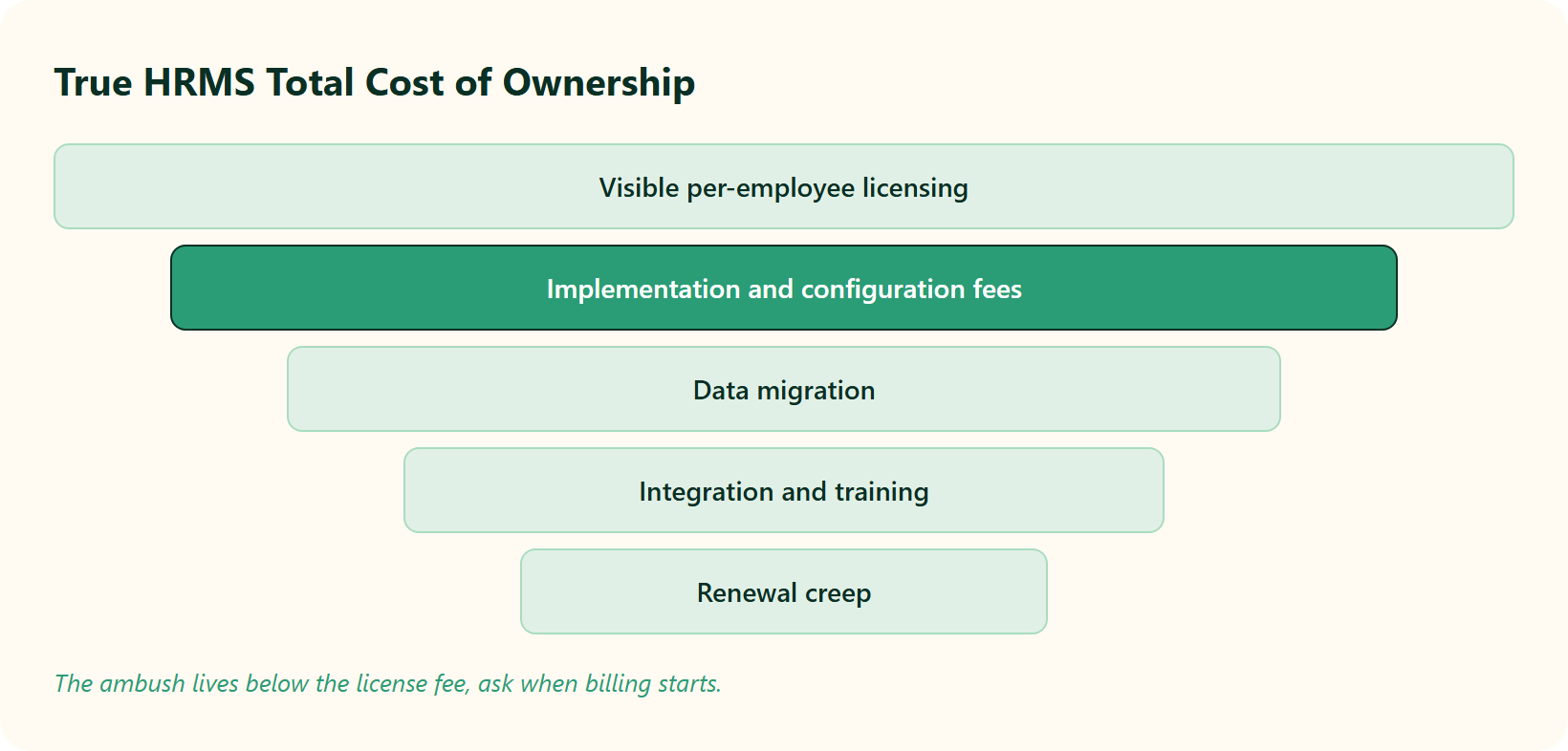
Licensing is the part you see. The hidden costs are where budgets quietly bleed. A serious selection checklist forces you to price every line, not just the subscription.
- Implementation and configuration fees (often billed before you go live).
- Data migration from your old system or spreadsheets, which our HRMS migration guide walks through.
- Integration charges for payroll, biometric, or ERP connectors.
- Training and the indirect labor of your own team during setup.
- Renewal creep, where the price rises every year because switching is painful.
That last one is real. One buyer described it plainly:
“Biggest issue is how much they have increased prices. They know that switching HRMS is painful. Every year is either a large price increase or our plan being sunsetted.”
Josh A., BambooHR user BambooHR G2 Verified Review
⏰ The questions that de-risk the deal
Ask three questions before you sign anything. When does billing start? Is there a lock-in period? Can I see a full, itemized TCO in writing? Our breakdown of the ROI of HR software helps you frame the answer.
At HROne, our answer to the implementation-fee trauma is structural. We use flat per-employee-per-month pricing, no lock-in, and the subscription meters only after go-live. You do not pay while we build, which means the ambush simply cannot happen. One reviewer chose us over a global giant partly on this math.
“I love HROne for its cost efficiency and holistic approach, which is why I prefer it over other vendors like Workday.”
Priyanka S., HR HROne G2 Verified Review
Q7. How long should HRMS implementation take, and why is “one month” sometimes a trap?
Situation: every vendor sells speed. You will hear “go live in 30 days” in almost every demo. Some of it is true. Some of it is a trap dressed as a promise.
Implementation timelines depend entirely on scope. A clean payroll-and-core-HR go-live can happen in about a month. But building job descriptions, a full performance framework, and general-ledger (GL, the accounting backbone) logic 30 layers deep can stretch to multiple months or quarters. The mortgage test is non-negotiable: whatever the timeline, people’s rent must be paid on time from month one. Our HRMS implementation timeline guide sets realistic expectations.
⚠️ The complication hiding under “30 days”
Here is the tension. Some vendors mention one-month go-live, while seasoned consultants warn that a full HR transformation often carries a multi-quarter scope. Both can be right, because they are describing different scopes.
The real trap is the 30-layer GL test. If your payroll needs GL and job-costing codes nested 30 layers deep, and the system cannot bridge that, no timeline promise saves you. Complexity, not the vendor’s optimism, sets the clock, which matters most for multi-entity companies.
✅ Resolution: match the clock to the scope
Do not ask “how fast can you go live?” Ask “how fast can you go live for my scope?” A core bundle is genuinely quick. A deep, multi-entity, performance-heavy build is honestly slower, and any vendor who denies that is selling.
Then apply the mortgage test. Whatever the go-live date, the first payroll run must pay every person, correctly, on time. That single outcome matters more than any calendar, and it is the heart of a dependable payroll software.
At HROne, our fast go-live is real for the core bundle, but I will be straight with you: complex frameworks legitimately take longer, and we scope that honestly upfront. Because our onboarding SPOCs are prior HRs, not just technical project managers, they understand which parts of your scope are quick and which need patience. That honesty, plus go-live-first billing, is how we lower timeline risk without overselling speed. You can see the full method in our HROne implementation guide.
Q8. How do you evaluate vendor support, stability, ROI proof, and future roadmap?
The standard read gets this backwards. Buyers obsess over the feature list and treat support as an afterthought. Then migration week arrives, a policy breaks, and they are stuck in an email thread that goes nowhere.
Beyond features, evaluate the support model (a dedicated single point of contact versus an email-thread “black hole”), vendor financial stability, references from similar-sized firms, and whether the platform can prove its own return on investment (ROI). Product roadmap and breadth of services rank among the top selection drivers. Ask about AI execution, analytics, and workforce planning as future-proofing requirements, not just today’s features. A capable workforce management layer signals real depth.
⚠️ SPOC vs. the black hole
Support quality splits vendors more sharply than features do. Here is the contrast I look for, with HROne as the reference point (8.1).
| # | Evaluation pillar | Strong signal | Weak signal (the “black hole”) |
|---|---|---|---|
| 8.1 | Support model (HROne: dedicated HR SPOC) | Named human who knows HR | Email-only, no escalation |
| 8.2 | ROI proof | Inbuilt ROI dashboard | No tool to track savings |
| 8.3 | Vendor stability | References at your size | No comparable clients |
| 8.4 | Roadmap | AI, analytics, and planning on the map | Feature list frozen |
The black hole is not hypothetical. Buyers of rival tools describe it directly:
“From Friday evening 6PM to Monday morning 10Am there is no source of support. Telephonic communication to a POC during emergency is not possible.”
Prem K., Keka user (2.5 stars) Keka G2 Verified Review
“Lack of timely, responsive, and easily reachable customer support. There is no escalation matrix.”
Verified User in IT, greytHR (1 star) greytHR G2 Verified Review
💰 ROI proof and future-proofing
Here is the pillar most guides skip: can the platform prove its own savings? Many tools have no method to track ROI, so the CHRO walks into a board review with a gut feeling instead of a number. Ask each vendor to show, not claim, the savings. Forward-looking capability, like a modern HROne AI layer, separates leaders from laggards.
At HROne, our dedicated HR SPOC support carries a 9.8 NPS, and India’s first inbuilt ROI dashboard calculates lifetime hours saved against average HR salary, so savings show up in rupees. HROne users feel that support difference on the ground.
“The support team is always ready to help us with any issues. Their onboarding process was thorough, with helpful training sessions for the whole team.”
Rishiraj R., HR (4 stars) HROne G2 Verified Review
Q9. Which Indian statutory and compliance requirements must the HRMS handle automatically?
A payroll manager once told me her worst month was not a data breach or a system crash. It was two small salary errors, back to back, that quietly cost her three good people. Compliance in India is not a back-office chore. It is a retention lever hiding in plain sight.
In India, your HRMS must auto-calculate and stay current on PF (Provident Fund, via EPFO), ESI (Employee State Insurance, via ESIC), TDS (Tax Deducted at Source), Professional Tax across states, gratuity, and new wage-code rules, including tight full-and-final settlement timelines. Compliance failures are not just fines. Nearly half of employees consider leaving after just two payroll mistakes, which makes automation a retention issue, not a paperwork one. Our guide to PF, ESI, and TDS compliance breaks down each obligation.
📋 The non-negotiable compliance checklist
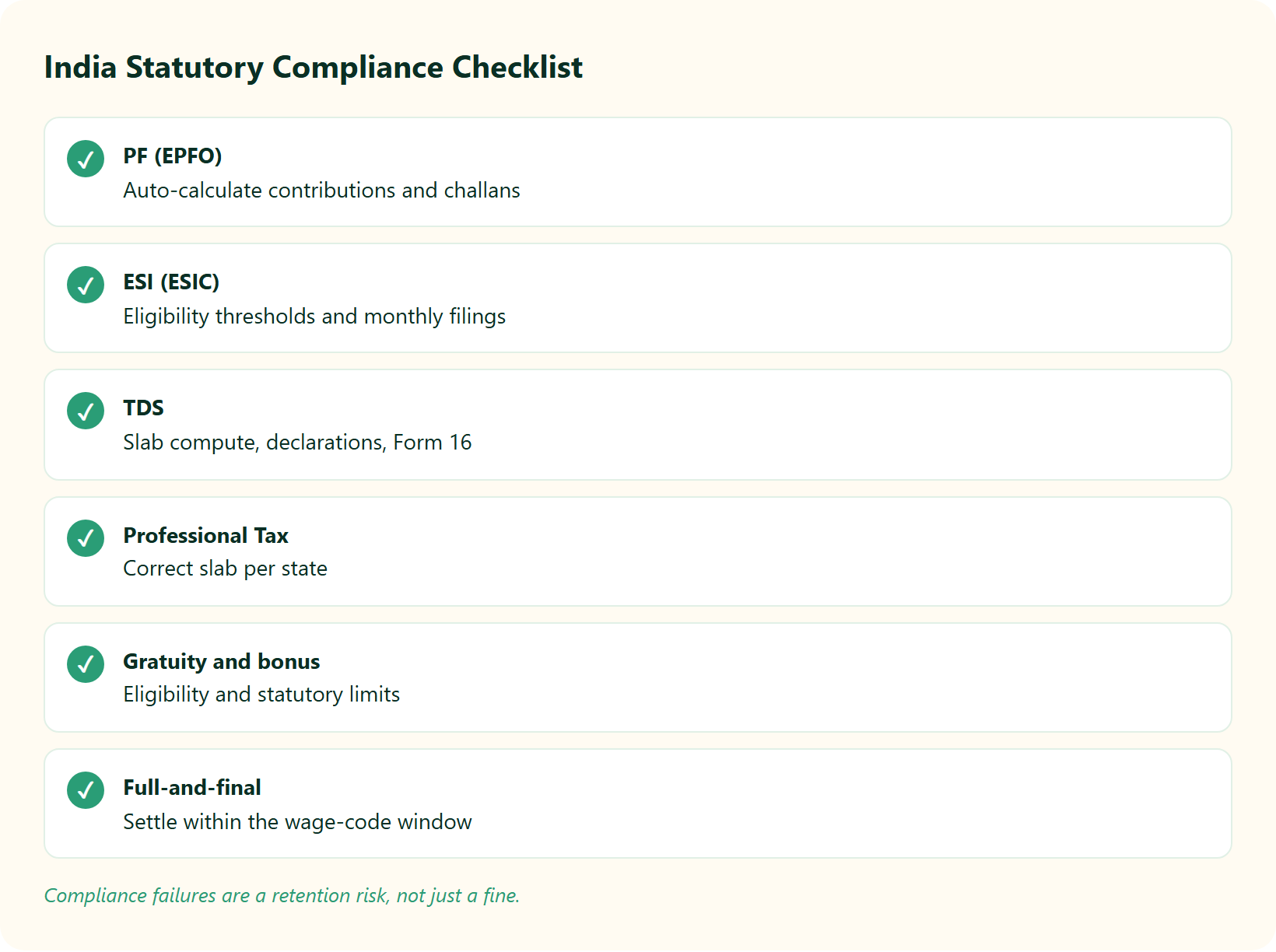
Payroll in India is not simple math. It is tied to taxes, deadlines, and rules most business owners were never taught. Here is the list your HRMS must handle on its own, and our payroll solution is built around exactly these.
- 9.1 PF (EPFO): auto-calculate contributions and generate challans.
- 9.2 ESI (ESIC): apply eligibility thresholds and monthly filings.
- 9.3 TDS: compute per slab, handle declarations, and generate Form 16, which you can cross-check with our TDS calculator.
- 9.4 Professional Tax: apply the correct slab per state, since PT differs by state, a nuance covered in our multi-state payroll compliance guide.
- 9.5 Gratuity and bonus: track eligibility and statutory limits, with help from our gratuity calculator.
- 9.6 Full-and-final settlement: clear exiting employees within the new wage-code window.
⚠️ The error-sheet audit that saves the payday
Here is a tactic I wish more teams used. Before you process salaries, download the error sheet and review every prerequisite flagged. It takes ten minutes and catches the mistakes that trigger the two-error exodus.
At HROne, our India-native payroll engine runs group payout validations before disbursal, so computation errors get caught before, not after, salaries go out. That is not an add-on. Compliance depth is our bread and butter, and HR users feel it in the details of our payroll software.
“Proper calculation of PF and ESI was a pain area for us before, but now with the HROne automated calculation process, results are up to the mark and following Indian tax compliances properly.”
Ajay K., HR HROne G2 Verified Review
“Salary processing along with exact calculation of LWF and PT slabs makes the work more convenient process.”
Komal S., HR HROne G2 Verified Review
“Steps to create PT slabs are not available in knowledge base.”
Bindu P., HR HROne G2 Verified Review
Q10. Why do the best enterprise HRMS platforms lock out the middle market, and what should you buy instead?
The standard read gets this backwards. Everyone assumes the biggest, most famous HR platform is the safest choice. In India’s mid-market, that assumption quietly drains budgets and leaves half the features switched off.
The most powerful global HR platforms, like Workday, largely sell only to enterprises with 3,000 plus employees, which leaves Indian mid-market firms locked out or overpaying for capability they never use. For a 100 to 5,000 employee company, the smarter play is a modular, India-native HRMS that turns on only what you need, proves its ROI, and does not demand a Fortune 500 budget. Our roundup of the best HR software for the Indian mid-market maps the realistic options.
🔒 The middle-market lockout
Here is the pain. Many of the “best” platforms simply do not serve the middle market well, because their model is built for giants. I have watched businesses spend enormous sums on an over-engineered ERP, only to see it fail at basic HR reality, a trap our HROne vs SAP comparison unpacks.
That failure is not always the buyer’s fault. When a platform needs back-end developers to change a leave policy, a 600-person firm is paying enterprise complexity for mid-market needs. One buyer put the trade-off plainly.
“I love HROne for its cost efficiency and holistic approach, which is why I prefer it over other vendors like Workday. It is cost-effective for mid-level and enterprise customers.”
Priyanka S., HR HROne G2 Verified Review
✅ The mid-market fit: modular and provable
The smarter buy turns on only what you need, when you need it, and proves the savings back to your board. That combination, modularity plus ROI proof, is exactly what most global suites miss for this segment, as our breakdown of scaling HR processes from 100 to 1,000 employees shows.
At HROne, we built for the locked-out middle market on purpose: flat per-employee pricing, India-native compliance, and India’s first inbuilt ROI dashboard that turns hours saved into rupees. You can model that impact with our ROI calculator. HR teams describe the practical payoff simply.
“It has been very helpful. The main benefits weve experienced with HROne are improved productivity and performance, effective employee attendance management, and smooth payroll processing.”
Vignesh J., HR HROne G2 Verified Review
You have spent this whole guide building a requirements list, separating essential from desirable, and learning how to score vendors. The last step is to pressure-test that list against a real system, not another glossy demo. If you want a head start, book a demo and bring your list.
You’ve just mapped your HRMS requirements. Now pressure-test them.
Bring your essential-vs-desirable list to a working session and see exactly which of your 127 workflows HROne closes in three clicks, with billing that starts only after go-live.
Here is the question I am sitting with as I write this. Over the next two years, I think the middle-market buyer stops asking “which platform is biggest?” and starts asking “which one can prove what it saved me?” If that shift is real, ROI instrumentation stops being a nice extra and becomes the whole decision. I might be wrong. I would genuinely like to hear which way your own buying committee is leaning.













 Secures Top Spot in
