









Q1. Is a 30-Day HROne Go-Live Actually Realistic, or Just a Sales Promise?
Yes, a focused HROne go-live in 30 days is realistic when you scope it to core modules (core HR, time office, payroll) with clean data ready on Day 1. What cannot happen in 30 days is the cultural build, meaning job descriptions, performance frameworks, and decentralised ownership. That is a 36-month scope. Separate “system live” from “culture built,” and 30 days stops being a trap and becomes a plan.
⚠️ The catch every HR head suspects is there
A salesperson says “30 days.” You nod, then quietly wonder what breaks in week five. That instinct is correct, but the fear points at the wrong target.
The standard read gets this backwards. People assume 30 days is too short to configure software. In practice, configuring core HR, attendance, and payroll in a month is very doable for a 100 to 5,000 person firm.
✅ What actually takes longer than 30 days
Here is the honest split. The system can go live fast. Your culture cannot.
Real cultural implementation, building job descriptions, a performance management framework, and decentralised ownership, usually runs on a 36-month scope. Software does not create process. It makes an already-formulated process consistent, then helps you decentralise it across the org.
Research backs this framing. A widely cited study identified 22 factors driving HRIS (Human Resource Information System, your HR database and workflow engine) success, grouped into human, organization, technology, and environment dimensions. Notice how few are about the software itself.
💡 How to scope so 30 days stays safe
I might be wrong for your exact context, but from what surfaces when you actually run these projects, the safe move is this: promise yourself a system go-live in 30 days, and a capability roadmap over the next year.
- Lock scope to the core three modules for go-live.
- Park performance, engagement, and analytics for phase two.
- Treat culture work as a separate, ongoing track, not a launch blocker.
At HROne, our go-live model front-loads discovery through a dedicated prior-HR onboarding SPOC (single point of contact), someone who has actually run HR, not a technical project manager reading a checklist. That is what makes a 30-day core-module launch a defensible plan rather than a gamble, and it is a big reason our SPOC support carries a 9.8 NPS.
Q2. What Exact Data Do You Need Ready on Day 1 So Payroll Doesn’t Break?
Before Day 1, have five data packages clean and mapped: employee master data (PAN, Aadhaar, IFSC), 12 months of historical payroll, current salary structures, statutory registrations (EPF, ESI, PT, TDS), and leave balances. Historical payroll is non-negotiable, because employees need it for accurate tax returns, and their rents and EMIs depend on the first run being right. Garbage in, broken trust out.
💰 Why the first payroll carries real stakes
Picture your payroll manager on the 30th, staring at a run that looks off by a few thousand rupees across 400 people. Someone’s home loan EMI clears that account tomorrow. That is the real weight of a botched first cycle.
Broken payroll is not a numbers problem. It is a trust problem, and trust is expensive to rebuild.
✅ The five packages to have ready
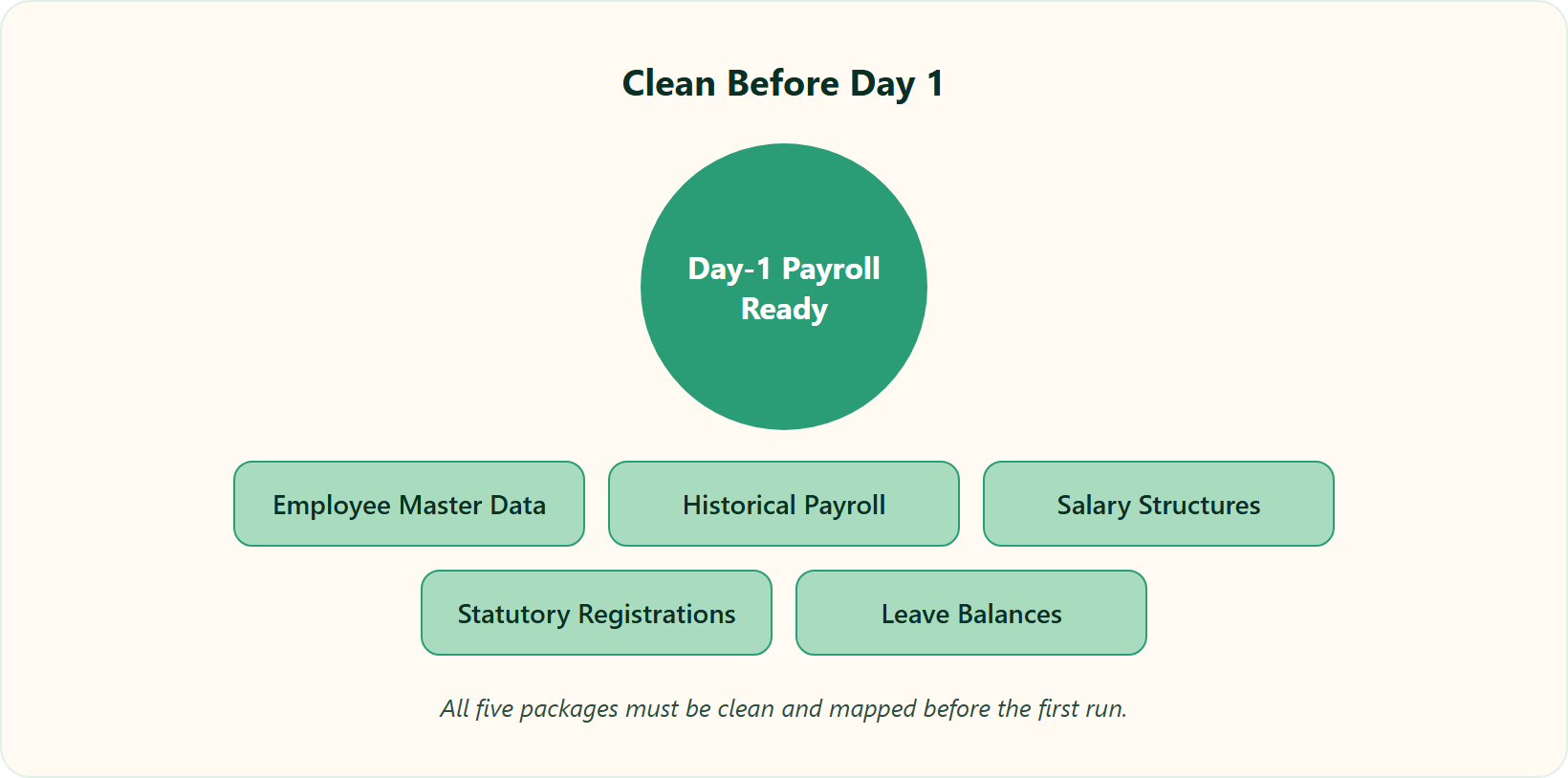
Get these clean before anyone flips a switch. Define each field once, correctly, and migration stops being scary.
- Employee master data, including PAN, Aadhaar, and IFSC for every active employee.
- 12 months of historical payroll, so year-to-date tax and Form 16 stay accurate.
- Current salary structures, mapped component by component (Basic, HRA, allowances).
- Statutory registrations, covering EPF, ESI, Professional Tax, and TDS setup.
- Leave balances, carried forward with the right accrual rules.
⚠️ The historical-data myth that burns people
Here is a claim I have earned the right to make. “Historical payroll data isn’t necessary” is a dangerous myth. The whole point of a clean implementation is that pay lands on time and employees can file correct tax returns. Skip history, and you hand your team broken Form 16s in April.
Treat your Week-1 data audit as a hard gate. No dirty data moves forward. Academic work on HRIS success repeatedly puts data quality near the top of what separates a smooth rollout from a painful one.
📋 Your Monday-morning readiness checklist
Start small. Pull one clean export of your master sheet and check for missing PAN or IFSC fields first. Then reconcile the last 12 months of payroll against your bank statements.
One tactic that saves real hours: copy salary structures straight from offer letters into the system. At HROne, our pre-boarding flow does exactly this, mapping the offer letter to the salary structure automatically, which cuts migration error at the precise point most first payroll software runs break. As one reviewer put it:
“HROne has streamlined our payroll management by allowing me to map various components of CTC during onboarding and automatically process payroll after attendance approval.”
— Rishiraj R., HR HROne G2 – Verified Review
Q3. Which HROne Modules Should You Turn On First (and Which to Skip)?
Turn on the bread-and-butter four first: core HR, workforce, time office, and payroll. This is where your organizational units get defined, the base every other module sits on. Around 98% of HROne customers run exactly this core stack. Skip advanced modules until the base is stable. You don’t buy the whole hog if you’re not going to eat it. Add modules like a parachute, only what you need, when you need it.
❌ The “turn everything on” temptation
New buyers often want every module live on Day 1. Performance, engagement, analytics, the works. It feels efficient. It is actually how go-lives slip.
Think of it plainly. If you cannot yet trust attendance feeding payroll, a performance module on top only adds noise.
⭐ The bread and butter, explained simply
Core HR, workforce management, time office, and payroll are the base for any organization. This is where you define your org units, who reports to whom, which shift, which pay group. Everything else plugs into this foundation later.
That is not just our opinion. About 98% of HROne customers use exactly these core modules, which tells you the sequence is revealed behaviour, not a sales theory. Phased rollouts like this also match how implementation specialists sequence Indian HRMS projects.
✅ The parachute rule for your own rollout
Here is the mental model I lean on. You turn on the parachute when you need it, not before. You do not buy the whole hog if you are not going to eat the whole hog.
- Go-live now: core HR, workforce, time office, payroll.
- Phase two: performance, engagement, recruitment, expenses.
- Later: analytics and custom apps once the base is trusted.
HROne lets you pick and choose modules freely, which is why bundles of four, six, or eight exist. We package the core four together because, honestly, that is what solves 98% of real go-live needs. A reviewer captured how tightly this base fits together:
“Core modules like Workforce, Time Office, and Payroll work seamlessly together. The Workforce Module acts as the core HR system for maintaining employee records and organizational data.”
— Shilpi M., HR HROne G2 – Verified Review
Q4. What Does a Realistic Day-by-Day 30-Day Implementation Sprint Look Like?
Map 30 days into four weeks: Week 1, discovery, data audit, and statutory config with your SPOC; Week 2, module configuration and workflow setup; Week 3, data migration and User Acceptance Testing (UAT, where your team tests the system before launch); Week 4, a full parallel payroll run, training, and go-live. Run one month of payroll on both old and new systems, then chase any discrepancy, even one rupee, before flipping the switch.
⏰ Why “phased guide” advice usually fails you
Most guides tell you the phases and stop there. Planning, migration, testing, go-live. Useful, until your consultant asks what happens on Day 11 and you have no answer.
A real sprint names the day, not just the phase. That is the difference between a plan you can defend to your CFO and a vague hope.
📅 The four-week sprint, week by week
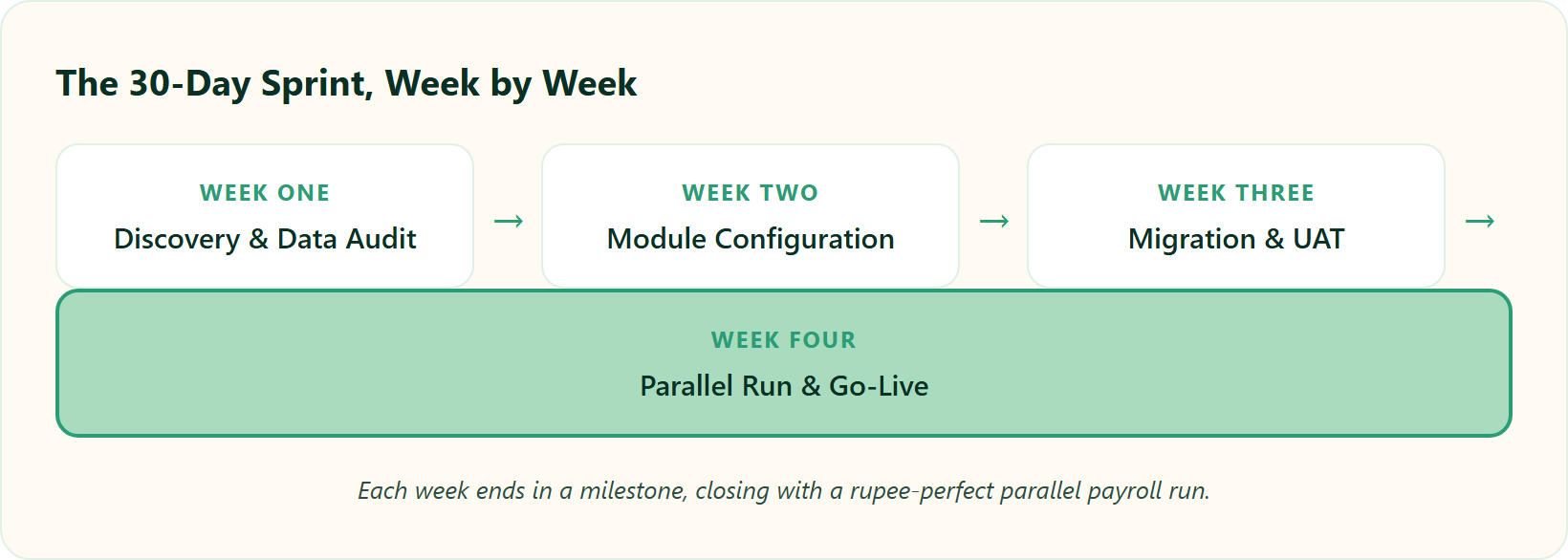
📋 The 30-Day HROne Implementation Sprint
| Week | Focus | Key milestone |
|---|---|---|
| Week 1 | Discovery, data audit, statutory config | Clean data signed off with your SPOC |
| Week 2 | Module configuration, workflow setup | Core four configured, approvals mapped |
| Week 3 | Data migration, User Acceptance Testing | UAT sign-off, no open critical bugs |
| Week 4 | Parallel payroll run, training, go-live | Parallel run matches to the rupee, then launch |
Be honest about depth. Truly understanding a module can take 10 to 11 short sittings, roughly one to one and a half hours each. Budget for that, and the timeline stays honest instead of turning into a frictionless fantasy.
✅ The two safety nets nobody should skip
Week 3 and Week 4 hold your insurance. UAT catches config errors before real money moves. The parallel payroll run is the seatbelt.
Run one full month of payroll on both the old system and HROne. Compare final payouts line by line. Chase every discrepancy, even a single rupee, before you go live. If they match, you launch with confidence, not crossed fingers.
Some teams do feel the learning curve here, and it is fair to name that:
“Some modules, especially Payroll and Performance, have a learning curve and require more detailed guidance for first-time users. Certain workflows involve many steps.”
— Shilpi M., HR HROne G2 – Verified Review
That said, the setup itself surprises people on the upside:
“The initial setup of HROne was surprisingly straightforward, much lighter than expected for a full HRMS.”
— Waldon S., HR HROne G2 – Verified Review
At HROne, our SPOC-led model runs discovery and configuration in parallel tracks, which is exactly how MR DIY India signed and went live inside a single month. Want to see a 30-day plan mapped to your headcount? You can book a demo to build a live sprint for your exact modules, or explore our full HR software to see how the core stack connects.
Q5. Why Do Most HR Software Implementations Fail, and How Do You Drive Adoption?
Implementations rarely fail on software. They fail because people never adopt the tool, and information stays trapped with corporate. The classic failure: a firm spends lakhs on a system nobody embraces, so managers keep “calling corporate” for answers the tool should surface. HRIS research confirms the top success factors are data quality, leadership support, and change management, and that admins, managers, and employees each need their own training track.
💸 The situation: a lakhs-heavy ghost town
I have walked into a company that bought a big ERP for what felt like a small fortune, then watched it sit unused. Nobody logged in. The buttons worked, but the people did not.
Six months later, managers still called head office to ask basic things. “How many leaves does Priya have left?” The system knew. The humans did not trust it.
⚠️ The complication: why adoption quietly dies
The standard read blames the software. From what surfaces when you actually run these projects, that is backwards. The tool works. The rollout skipped the humans.
Two failure patterns repeat. Data stays centralised, so line managers keep pinging HR instead of self-serving. And training gets treated as one generic session, when a payroll admin, a line manager, and an employee each need very different things. Keka buyers describe this exact stall:
“We started working with Keka HRMS in August, and to this day, we have been unable to implement the tool due to their consistently delayed responses and poor coordination between their internal teams.”
— Divya P., HR Keka G2 – Verified Review
✅ The resolution: role-based training tracks
Fix adoption by training people for their actual job, not the whole platform. Academic work on HRIS attitudes shows perceptions differ sharply by role, so onboarding should too.
- HR admins: deep config, payroll runs, statutory reports.
- Line managers: approvals, team attendance, requisitions.
- Employees: leave, payslips, self-service on mobile.
Think of it like handing someone a fast car. You train the driver first, so nobody burns the clutch on day one. Building distinct manager solutions and clear employee solutions into your rollout is what makes adoption stick.
⭐ The payoff: gates that prevent failure
Put two gates in your plan. A data-quality gate before migration, and a change-management checkpoint before go-live. HRIS success research ranks both near the top of what separates smooth rollouts from painful ones.
At HROne, we counter the “call corporate” trap with a single-screen HR inbox where every pending task, approval, and request surfaces and closes in three clicks. Information sits with the manager, not head office. One reviewer felt that shift directly:
“The InboxforHR is a game-changer, centralizing every HR task into one simple inbox, cutting down administrative time by 60-70% and preventing tasks from falling through the cracks.”
— Waldon S., HR HROne G2 – Verified Review
Q6. How Do You Configure Indian Payroll Compliance (EPF, ESI, PT, TDS) Correctly?
Configure four statutory layers during setup: EPF and ESI at central rates, Professional Tax at state-specific slabs, and TDS under the employee’s chosen tax regime, all aligned to the Code on Wages, 2019. Professional Tax varies by state, so a Karnataka employee and a Maharashtra employee need different rules. Retaining inaccurate employee data also creates DPDP Act exposure, so clean data is compliance, not just hygiene.
⚠️ Why a compliance error costs more than money
Payroll is not just numbers. It is employee trust, business credibility, and legal exposure, all in one run. Miss it, and trust breaks fast.
Here is the stark part. Surveys suggest a large share of employees consider quitting after just a couple of payroll mistakes. A wrong deduction is not a rounding issue. It is a retention risk.
✅ The four statutory layers to set up
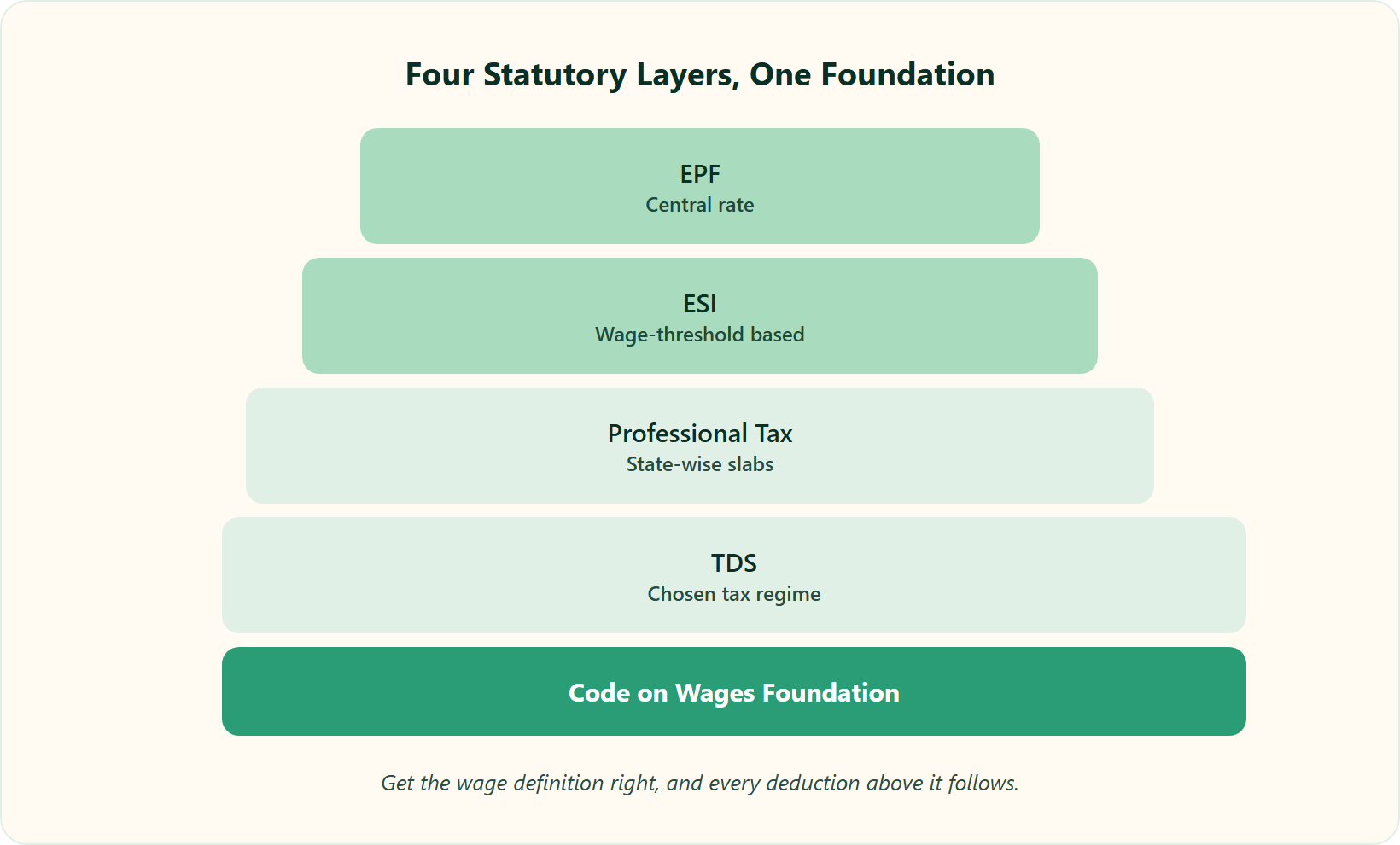
Configure these correctly, in order, and most compliance panic disappears. Each maps to a specific Indian rule.
📋 Indian Payroll Statutory Configuration Layers
| Layer | What it is | Key configuration rule |
|---|---|---|
| EPF | Provident Fund | Central rate, applied on eligible wages |
| ESI | Employees’ State Insurance | Central rate, wage-threshold based |
| PT (Professional Tax) | State levy on salary | State-wise slabs; Karnataka differs from Maharashtra |
| TDS | Tax Deducted at Source | Per employee’s chosen old or new regime |
Anchor all of it to the Code on Wages, 2019, which consolidates how “wages” are defined across these deductions. Get the wage definition right, and downstream numbers follow. Our guide to statutory compliance in payroll breaks down each of these layers in more depth.
💰 The data-accuracy angle most guides skip
Here is a point the category tends to avoid. Under the DPDP (Digital Personal Data Protection) Act, holding inaccurate employee data is itself a compliance risk, not only a payroll headache. Clean master data is a legal posture, not admin tidiness. Following strong employee data privacy best practices is now part of running compliant payroll.
At HROne, we apply state-wise Professional Tax and jurisdiction-specific statutory rules automatically at configuration, so compliance stops being a manual month-end reconciliation. Running payroll software across 2,000+ customer organisations, what I have seen is that automating the slab logic removes the exact step where teams slip. A reviewer described that relief plainly: PF, ESI, PT, and LWF calculations landing correctly, cycle after cycle, once the rules were configured once.
Q7. How Do You Set Up Approval Workflows Without Creating New Bottlenecks?
Set approvals by seniority, not one blanket rule. A junior employee’s leave should route two levels (manager, then HOD), while senior roles need fewer. Gate overtime behind actual attendance so employees cannot self-declare hours. At enterprise scale, HROne supports 127+ workflows from onboarding to offboarding, but configure only the ones your policy needs, or you will trade manual chaos for approval gridlock.
❌ The free-for-all you are replacing
Before a system, overtime is often a trust exercise. Someone writes “worked 3 extra hours” on a sheet, and it gets paid. No proof, no check.
That is where leakage lives. Manual touchpoints let hours, and money, slip through unnoticed.
✅ Two rules that fix most workflows
Start with these two configurations. They cover the majority of real approval pain.
- The two-level junior rule. Route a junior’s leave to the manager, then the HOD. Give senior roles a shorter path, since they need fewer checks.
- The attendance-gated overtime rule. Overtime should generate only after attendance is actually marked. No punch, no OT. This closes the “scot-free hours” loophole cleanly.
Build these against documented workflow logic, not gut feel, so the routing survives an audit. Tight leave management and accurate attendance management are the foundation these approval rules sit on.
⭐ Right-sizing against the 127+ ceiling
Here is the trap. A platform can offer 127+ workflows, and you can feel pressure to switch them all on. Do not. Configure only what your policy actually needs.
Use a simple usability test I lean on: the three-click rule. If a task cannot be seen and closed within about three clicks, the workflow is too heavy. At HROne, our overtime gate generates OT only once attendance is marked, which is exactly how a manufacturing HR client closed its free-hours loophole after go-live. Reviewers describe the payoff:
“The workflows are pretty handy as they allow us to map our policies automatically… automatically process payroll after attendance approval.”
— Rishiraj R., HR HROne G2 – Verified Review
One honest caveat, since not every review glows:
“Some screens require extra clicks to get things done, and parts of the UI can feel inconsistent from one module to another.”
— Rahul C., Employee HROne G2 – Verified Review
Q8. How Should You Structure the Contract So You Don’t Pay for an Unused System?
Never accept billing that starts the day you sign. Insist on a flat pricing model, no lock-in period, and a subscription that starts only after you go live. This single clause aligns the vendor’s incentive with your success. They get paid when your system actually works, not when the ink dries. It also protects you if implementation slips past 30 days.
💸 The problem: paying for a system you can’t use yet
Picture signing in August and getting billed from August, while implementation drags into November. You are paying full price for a system nobody can log into. That is money sitting idle.
This is not rare. Buyers report vendors that charge from day one while onboarding stalls, and the pain of being locked in makes it worse.
⚠️ The agitation: how billing traps compound
Two clauses quietly hurt you. Day-one billing, and multi-year lock-in with no way out. Together, they remove the vendor’s pressure to get you live fast.
BambooHR buyers describe the squeeze that follows a weak contract:
“Biggest issue is how much they have increased prices… They know that switching HRMS is painful. Every year is either a large price increase or our plan being sunsetted.”
— Josh A., HR BambooHR G2 – Verified Review
✅ The solution: clauses to negotiate
Compare the two billing models before you sign anything.
📋 HRMS Contract Terms: Buyer-Friendly vs Risky
| Term | Buyer-friendly model | Risky model |
|---|---|---|
| Billing trigger | Starts after go-live | Starts on signing day |
| Pricing | Flat PEPM, predictable | Variable, prone to hikes |
| Lock-in | None | Multi-year contract |
| ROI proof | Instrumented dashboard | No savings visibility |
At HROne, we run flat PEPM (per employee per month) pricing, no lock-in, and the subscription clock starts only after you go live. You never pay for an idle system during setup. If you want that structure priced for your exact headcount, the fastest way to get numbers is to book a demo and see why HROne aligns the contract with your success.
Q9. How Do You Prove ROI and Keep Automating After Go-Live?
Most HR tools give you no way to measure return after setup. You feel the time saved but cannot prove it. Baseline your metrics before go-live (payroll hours, error rate, occupancy), then compare after. HROne’s inbuilt ROI Dashboard, India’s first, quantifies cost and time saved directly, and one customer cut occupancy overload by 70%. From there, mature toward jurisdiction-aware, near zero-touch payroll.
📊 The ROI blind spot nobody warns you about
Here is the pattern I keep seeing. HR teams go live, feel lighter, and then get asked by the CFO to prove it. Most tools give them nothing to point at.
That gap is the real problem. Rivals help you run HR, but leave you no method to track return after setup. So “we think it is working” is all you can say in a board review.
🔬 Method and results: baseline, then measure
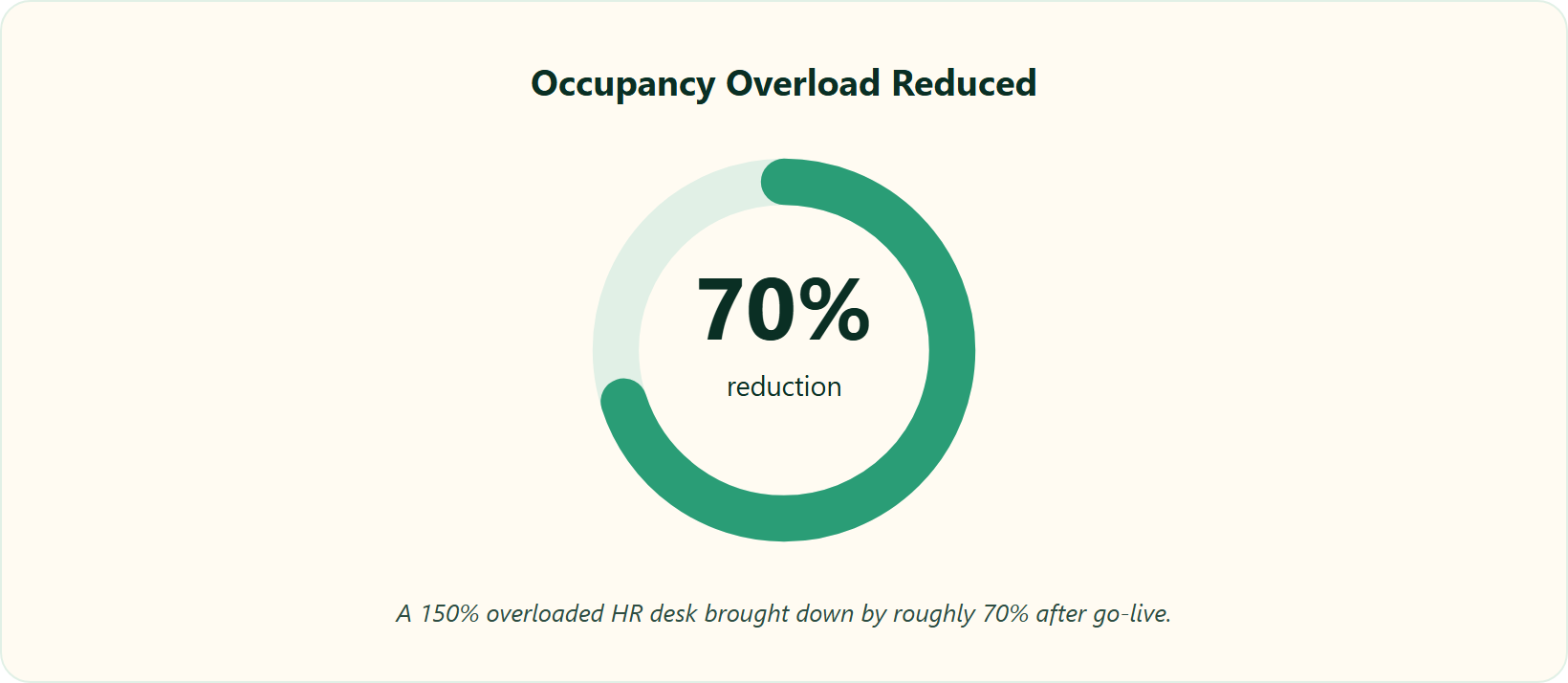
The fix is simple discipline. Measure before you switch, then measure after.
Baseline three numbers pre-go-live:
- Payroll hours per cycle, start to bank file.
- Error rate, meaning corrections and reruns per month.
- Occupancy or query load, how buried the HR desk is.
Independent SME analysis puts the typical result at a 40 to 70% cut in manual HR time after adoption. In one HROne case, an HR team brought a 150% occupancy overload (a desk doing far more than its capacity) down by roughly 70%. That is a real number, not a vibe. Our guide to payroll automation reducing errors and efficiency shows how these gains compound over cycles.
⚙️ Discussion: the automation-maturity roadmap
Go-live is the floor, not the ceiling. From what surfaces when you actually run these systems, the interesting gains come after.
The trajectory moves toward jurisdiction-aware payroll, where the system applies the right statutory rule based on location metadata automatically. Further out sits near zero-touch payroll, with validations and biometric inputs cutting manual steps toward automatic runs. Connecting payroll with attendance management software is the practical first step on that path.
💰 Payoff: build your own ROI scorecard
Do this Monday. Take your three baseline numbers, put them in a shared sheet, and set a 90-day review date. That single habit turns intuition into a board-ready figure. Our ROI calculator gives you a quick starting estimate.
At HROne, our inbuilt ROI Dashboard, India’s first, calculates lifetime hours saved against average HR salary, so a CHRO walks into the board with rupees, not adjectives. This is a big part of what our CHRO solutions are built to deliver. Reviewers describe the underlying time savings that feed it:
“It reduces HR’s admin time by 60-70% through features like InboxforHR, which centralizes tasks.”
— Waldon S., HR HROne G2 – Verified Review
One honest limit worth naming, since instrumentation is only as good as its reports:
“Search across employee records could be faster and deeper… advanced filters and saved searches for compliance audits or workforce reports would save time for HR.”
— Waldon S., HR HROne G2 – Verified Review
Q10. HRIS, HCM, or HRMS, Does the Label Even Matter for Implementation?
Don’t get stuck on whether HROne is an HRIS, HCM, or HRMS. That is alphabet soup. The only question that matters for implementation is whether the tool bridges your actual data gaps. Does it connect attendance to payroll, onboarding to records, and surface tasks in one place? Pick the tool that closes your gaps, not the one with the trendiest three letters.
🔤 The common view: agonising over acronyms
Buyers spend real hours debating labels. Is it an HRIS (a system of record for employee data), an HCM (human capital management, the broader talent suite), or an HRMS (the operational payroll-and-attendance engine)? The category loves these distinctions. Our explainer on HCM vs HRIS vs HRMS untangles the terms if you want the full breakdown.
The standard read gets this backwards. The label rarely predicts whether your implementation succeeds. Two tools with the same acronym can behave completely differently on your data.
✅ The better test: does it close your data gaps?
Here is the question I would actually ask. Does the system connect the pieces that currently do not talk to each other? Attendance to payroll, onboarding to the employee record, requests to approvals.
If it bridges those gaps and surfaces every open task on one screen, the acronym is irrelevant. At HROne, that is the whole point of the HR inbox, ending the tab-juggle where HR hops across five tools and email threads to close one task. If you are still weighing options, our checklist on how to choose the best HRIS HRMS software keeps the focus on fit, not labels. Reviewers describe both the payoff and the friction fairly:
“Having the entire visibility at one place makes it easy for me to lead my team… all information is readily available, which has been tough to find in other HRMS systems I’ve used.”
— Naman G., Manager HROne G2 – Verified Review
“Sometimes it’s not updated as soon as I open it in the morning, but in 1 or 2 minutes it reloads and gets up-to-date data. It’s not a big issue.”
— Prajwal B., Employee HROne G2 – Verified Review



















 Secures Top Spot in
