








Q1: What Exactly Does HROne Do, and What Are the “127+ HR Automation Capabilities”?
A CHRO at a 900-person logistics firm once told me her team spent the last week of every month doing one thing: chasing people. “Did you update this? Did you approve that?” That is the real job most HR software claims to fix and quietly doesn’t.
HROne is a cloud-based core HCM (Human Capital Management) platform that automates 127+ HR workflows across 10+ modules, from onboarding to offboarding. Its “bread and butter” is Core HR, Workforce, Time Office, and Payroll, the base every Indian organisation runs on. Rather than a brochure number, the 127+ figure maps to configurable tasks employees finish in three clicks from a single screen, so HR stops chasing updates and starts trusting its data.
The “bread and butter” that everything else sits on
Let me define the alphabet soup first. HRIS stores employee records. HCM manages the full lifecycle. HRMS runs day-to-day operations. Most buyers Google all three and get more confused.
HROne collapses that confusion into one operating system. The four core modules, Core HR, Workforce, Time Office, and Payroll, are the foundation. Recruitment, Performance, Engage, Helpdesk, Asset, Expense, and Integrations stack on top of that base.
One reviewer described the connective tissue better than any spec sheet could.
“It provides a complete, integrated HR solution on a single platform. Core modules like Workforce, Time Office, and Payroll work seamlessly together.”
— Shilpi M., HR Professional HROne G2 – Verified Review
Why “127+” should mean three clicks, not a feature dump
Here is where I think the standard read gets it backwards. A big feature count usually means more places to get lost, not less. HROne inverts that with its HR inbox, a Gmail-style screen where every pending task, request, and approval surfaces in one place.
The promise is simple. An employee sees what they must do and by when, then closes it within three clicks. No tab-switching across five tools, no email threads, no month-end reconciliation scramble.
From what surfaces when you actually run this, that single-screen design is the point of the “127+,” not the number itself. Users notice it fast.
“I love the self-service feature for employees. Juggling spreadsheets was always a nightmare, but now I don’t have to do that since it’s centralized in one place.”
— John C., HR User HROne G2 – Verified Review
When we built HROne, the goal was never to win a feature count. It was to give HR back the mental space that chasing updates steals every single month. That is the difference between digitising HR transactions and running an actual HR software operating system.
Q2: The Complete List of HROne Modules and 127+ Capabilities (Grouped by Module)
Every competitor page repeats the “127+” number. Almost none of them list what it contains. So here is the itemised inventory, grouped by module, so you can verify the claim instead of trusting it.
HROne’s 127+ capabilities span 10+ modules: Core HR, Workforce, Time Office, Payroll, Recruitment, Performance, Engagement, Helpdesk, Asset, Expense, and Integrations. The company also ships roughly 200+ new features a year, so treat this as a living map, not a frozen one.
2.1 Core HR and Workforce
The system of record for every employee. It maintains employee master data, organisational structure, document storage, and system-generated letters (confirmation, transfer, relieving).
- Digital employee records and org chart
- Auto-generated letters (offer, confirmation, PIP, relieving)
- Process discipline that blocks incomplete profiles from moving forward
“It doesn’t allow the process to move forward until the checklist is fully completed. This not only ensures accuracy but also brings more transparency.”
— Bindu P., HR Professional HROne G2 – Verified Review
2.2 Time Office
Attendance, shifts, leave, comp-off, and overtime, all tied to real punch data. It supports biometric sync, geofencing, and mobile marking for field staff.
- Real-time biometric and mobile punch sync
- Shift management, comp-off, and attendance regularisation
- Geofenced GPS attendance management for out-of-office teams
2.3 Payroll
Salary processing in a few steps with statutory accuracy. It handles PF, ESI, PT, TDS, arrears, and bank challan generation.
- Three-step salary processing with error checks
- Statutory deductions and Form 16 generation
- Bank challan and JV/GL code integration
2.4 One AI Suite
HROne’s AI layer for real work, not chat. It scores resume relevancy, parses expense receipts, and generates job descriptions and interview questions.
2.5 Recruitment
Requisition to onboarding, connected to the employee record. AI stacks the most relevant CVs on top so recruiters stop scrolling.
2.6 Performance
Goal setting, reviews, appraisals, and automated bell curves. It structures the review cycle instead of leaving it in Excel.
2.7 Engage
Announcements, polls, surveys, wall-of-fame badges, and celebration feeds that lift day-to-day communication.
2.8 Helpdesk
A structured ticketing queue where employees raise HR or finance issues instead of pinging people directly.
2.9 Expense
Travel and reimbursement requests with an AI receipt parser that cuts manual finance entry. It runs through HROne’s expense and reimbursement module.
2.10 Asset
Asset allocation, tracking, and recovery mapped to the employee lifecycle.
2.11 Integrations and HRV Studio
Open APIs, ERP links, and HRV Studio, a low-code builder for custom apps like visitor or vendor management, without raising a developer ticket.
“It is easy to automate all HR processes, including Recruitment, Time Attendance, Performance, Payroll, Expense, and Core HR functions. Each module is straightforward.”
— Vignesh J., HR User HROne G2 – Verified Review
The point of laying every module out is not to impress you with breadth. It is to show that each one triggers the next, so HR stops being a backlog to process. That connective tissue, not the count, is what we built HROne to deliver.
Q3: How Does HROne’s Payroll Handle Indian Statutory Complexity (PF, ESI, PT, TDS, DPDP)?
Ask any payroll manager in India about the last audit, and watch their shoulders tense. State-wise Professional Tax slabs, PF ceilings, ESI thresholds, and TDS filings are where generic global tools quietly break.
HROne’s payroll software engine automates India’s statutory stack, PF (Provident Fund, via EPFO), ESI (Employee State Insurance, via ESIC), state-wise Professional Tax slabs, and TDS (Tax Deducted at Source) with Form 16 and Form 24Q, while its multi-entity policy engine applies different rules to Company A versus Company B in one system. The Code on Wages, 2019 underpins the calculation logic, so compliance updates aren’t your manual burden.
The statutes your payroll actually has to satisfy
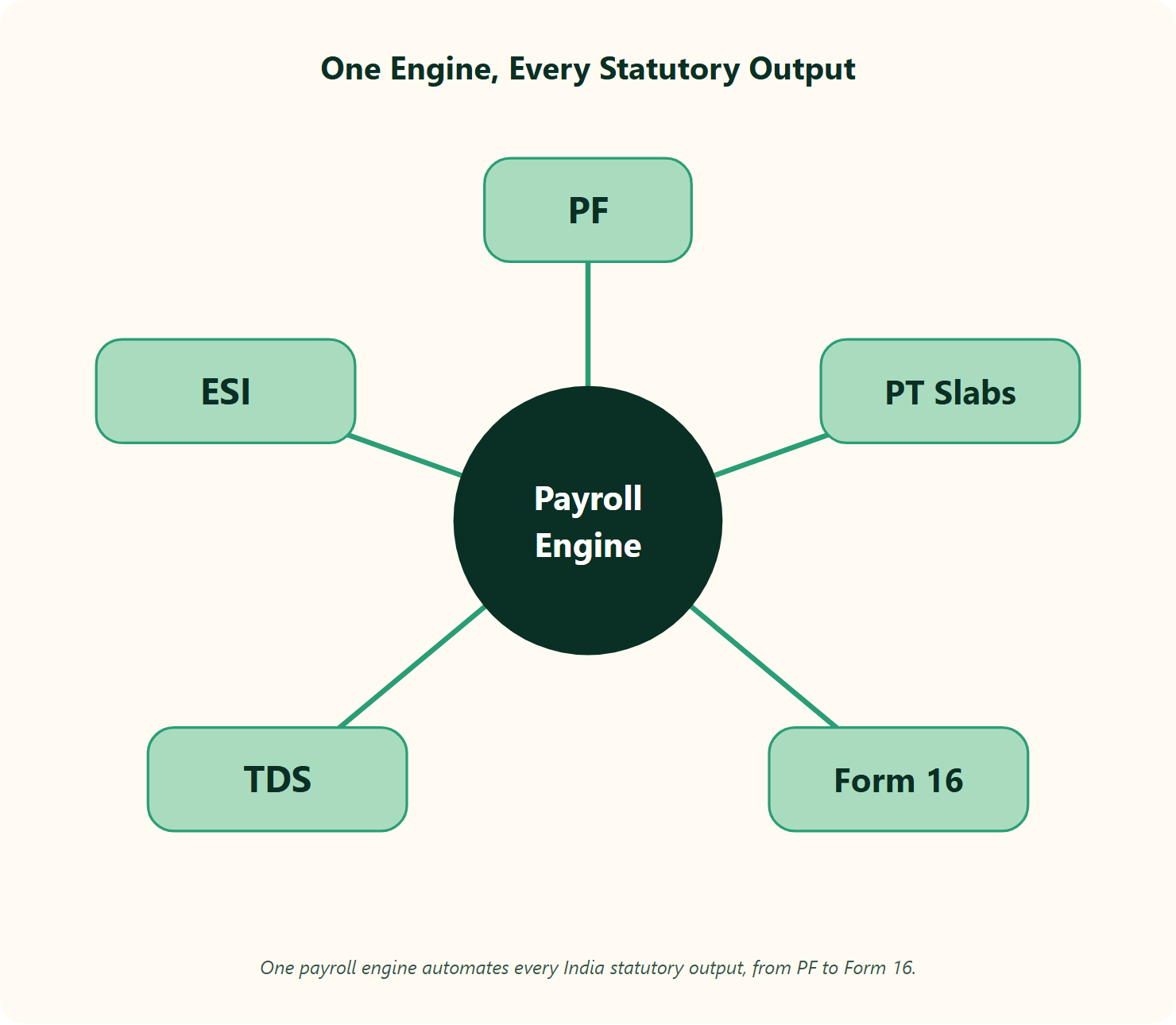
Let me define these plainly. PF is a retirement contribution. ESI funds employee medical benefits. Professional Tax is a state-level levy with different slabs per state. TDS is income tax withheld at source.
The Code on Wages, 2019 consolidated India’s wage, bonus, and minimum-wage rules into one framework. There is a newer layer too: the DPDP Act, 2023 (Digital Personal Data Protection) governs consent for personal data, including biometric attendance records. You can dig into the mechanics in this guide on statutory compliance in payroll.
Users tell us the automation removes the audit dread.
“It handles salary calculations, statutory deductions (PF, ESI, taxes), and filings automatically, with zero manual intervention, removing payroll errors and compliance anxiety during audits.”
— Waldon S., HR Professional HROne G2 – Verified Review
Multi-entity policy engine and the OU trap
Here is the micro-specificity most demos skip. A 20-unit healthcare group cannot run one leave policy across every legal entity. HROne configures multiple legal entities on a single instance, so people in Company A follow a different policy from people in Company B.
That control runs on Organizational Unit (OU) filters, the internal tags that decide which policy, slab, or approval applies to whom. Get OU logic wrong, and payroll breaks silently. This is where global generalists tend to struggle with India’s variance, a reality we cover in this look at how payroll software reduces compliance risk.
One reviewer flagged an honest gap here, worth naming for balance.
“Steps to create PT slabs are not available in knowledge base.”
— Bindu P., HR Professional HROne G2 – Verified Review
Killing manual entry from offer to payslip
The cleanest win is small and boring. Salary structures from the offer letter map straight into payroll, so no one re-keys CTC components by hand. This is the same jurisdiction-metadata approach, where region rules live as configurable data, not hard code.
“Proper calculation of PF and ESI was a pain area for us before, but now with the HROne automated calculation, results are up to the mark and following Indian tax compliances properly.”
— Ajay K., HR Professional HROne G2 – Verified Review
I might be cautious about calling any payroll “zero-error,” because edge cases always exist. But when we run payroll logic against Indian statutes for customer organisations, configurable slabs beat hard-coded ones every time an audit lands.
Q4: Can HROne’s Time Office Stop Attendance and Overtime Leakage?
Picture a factory floor lead named Ravi, closing timesheets on the 30th. Before automation, his team submitted whatever overtime hours they felt like claiming. Nobody could prove who was actually present. The overtime bill just kept climbing.
Yes, HROne’s Time Office ties overtime to verified attendance, so hours are paid only when the system confirms the employee was present. Before automation, teams let staff submit hours freely; after, overtime generates only on a marked-attendance gate. With geo-tagging, selfie attendance, and shift management, cost leakage drops measurably.
The complication: self-reported hours are a leak
The old workflow gave employees a free pass. They marked their own overtime, and finance paid it, because there was no linked proof of presence. Every unverified hour was margin walking out the door.
The fix is a gate. HROne only generates overtime once attendance is marked and validated against biometric or geofenced punch data. If you were not there, the system does not pay you for being there. That logic sits inside HROne’s time tracking engine.
Users confirm the punch layer actually holds up in the field.
“Marking attendance with geofencing is extremely smooth and accurate, and I like how easy it is to access payslips and tax documents directly from the dashboard without asking HR.”
— Priti D., HR User HROne G2 – Verified Review
Resolution: geo-tagged, selfie, and shift-aware attendance
For field and sales teams, biometric machines make no sense. HROne uses GPS-based login with geofencing, so a punch only counts inside the approved location radius. This works alongside the mobile HR app, and consent for that location and biometric data falls under the DPDP Act, 2023, worth configuring transparently.
“My most liked feature is the GPS-based login and logout with pinpoint accuracy. It helps me track my on-field employees’ status, like where they are currently.”
— Krunal S., HR User HROne G2 – Verified Review
In fairness, the mobile capture is not flawless. A few reviewers report the app lagging or geofencing misfiring on weak connections, so pilot it with your field team before a full rollout.
“Mobile application doesn’t work properly while capturing live location. Geofencing radius doesn’t work properly.”
— Manna S., HR Professional HROne G2 – Verified Review
When we deployed this attendance-gated overtime logic with customer organisations running heavy shift operations, the leakage that finance quietly absorbed for years finally showed up on a dashboard, and then stopped. That is the whole point of HROne’s Time Office: not surveillance, but paying for hours that actually happened, backed by proven workforce management practices.
Q5: What Makes HROne’s AI and Self-Service (InboxforHR, One AI) Different From Generic “AI HR”?
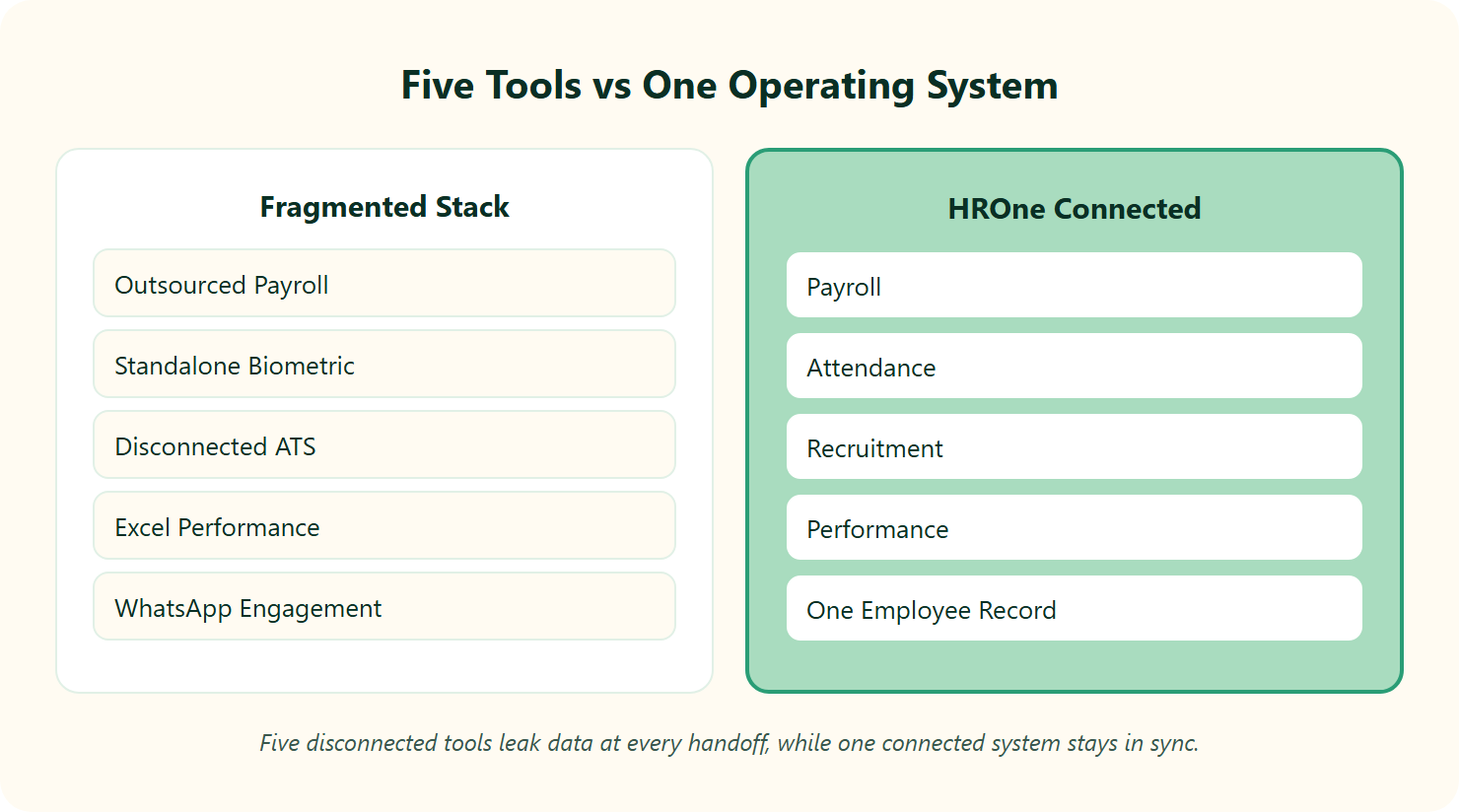
Most “AI HR” is a search box with a chatbot bolted on. You type a question, it answers, and then you still go do the work yourself. That is the part the category quietly avoids saying out loud.
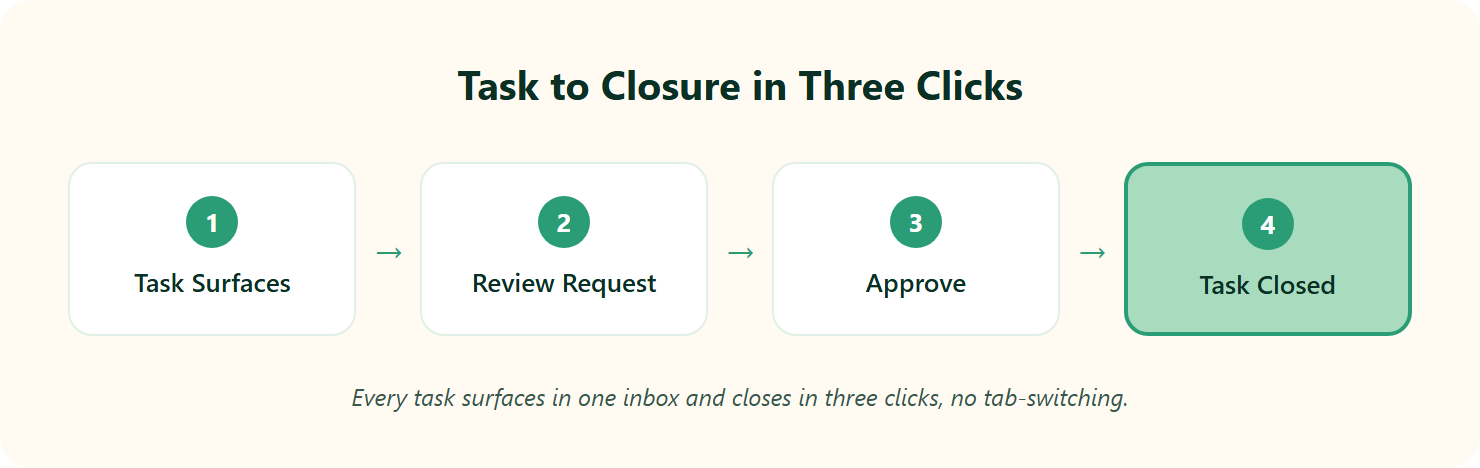
HROne’s AI is execution-first, not chat-first. InboxforHR surfaces every pending task on one screen, so employees close 110+ tasks in three clicks, while One AI is a voice-powered agent that executes actions, not just answers. It also auto-generates job descriptions from a title. Peer-reviewed studies show AI-enabled HR can cut processing time by 40 to 50 percent.
Why “answering” is the wrong bar for AI HR
Here is where I think the standard read gets it backwards. Answering a question is the easy part. Closing the task is the job.
An HR manager does not need a bot to explain how to approve leave. She needs the approval done. InboxforHR works like a Gmail inbox for HR, where every request, reminder, and approval lands in one place to plan the day around. If you want the wider context, this piece on AI in HR hype vs reality is worth a read.
Users notice the shift from theory to action fast.
“The well-known Inbox For HR has resolved many of our issues. It allows users to manage multiple tasks from a single window, eliminating the need to switch between different modules.”
— Vignesh J., HR User HROne G2 – Verified Review
One AI and the recruitment speed-up
One AI is where execution goes hands-free. You speak an instruction, and the agent runs it. Type in a role title, and the system drafts a job description ready for approval, so recruiters skip the blank-page grind. You can see the standalone tool in HROne’s HROne AI suite.
That compounds in hiring. In our experience running this with recruitment teams, daily closures moved from roughly 8 to 10 positions up to 15 to 20. I would hedge that this depends on pipeline volume, but the direction is consistent, and it mirrors the gains covered in this look at AI automation in recruitment.
Early users are still watching the AI layer mature, which is fair.
“I also used its OneAI system to apply leaves. That is what I have seen first time in a HR application system.”
— Ayush G., HR User HROne G2 – Verified Review
Where execution AI sits on the maturity curve
Zoom out, and HR tooling has crawled from manual registers, to digital records, to dashboards. Each step removed some typing. None of them removed the doing.
Execution AI is the next real step, not another reporting layer. Research on AI in HR management points to the same conclusion: the gains come from automating the task, not narrating it. That is the line I would draw between a tool that talks and a tool that works, and it is the thinking behind our employee AI agent.
When we built the One AI Suite into HROne, the design rule was simple. If the AI cannot close the task, it is a demo, not a feature. That is the difference we are trying to hold onto as the category floods with chat boxes.
Q6: How Does HROne Prove ROI When Most HR Platforms Can’t?
Most HR platforms can tell you what they cost. Almost none can tell you what they returned. That gap is where budgets quietly go to die.
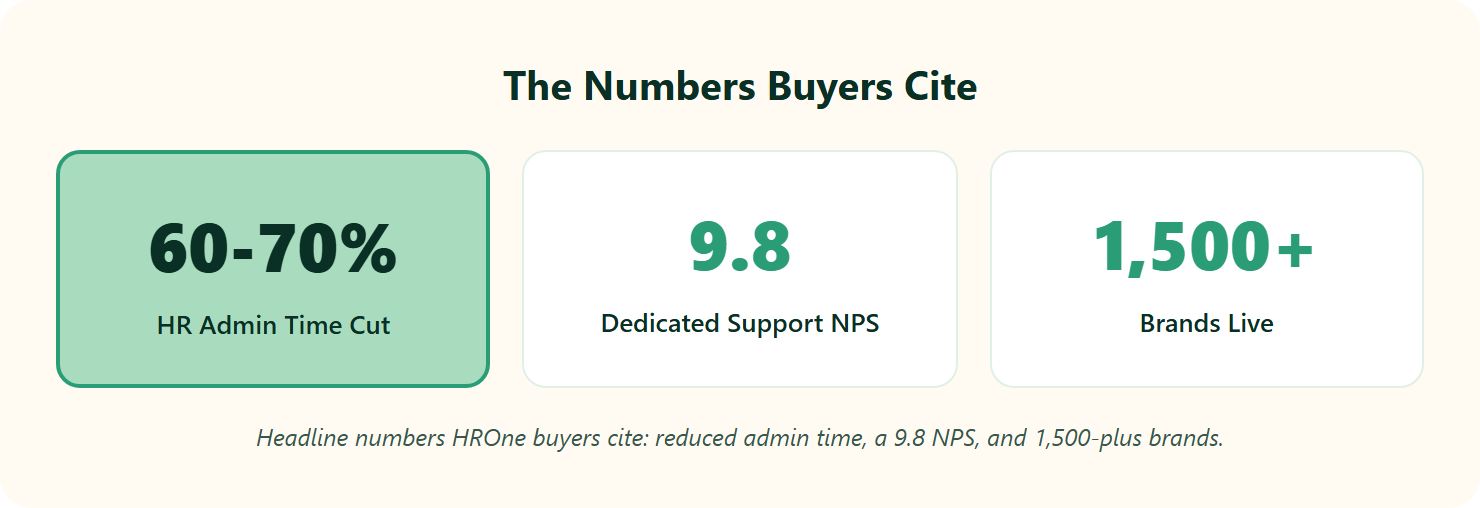
HROne ships India’s first inbuilt ROI Dashboard, letting you measure cost and time saved after rollout, where platforms like Darwinbox often leave buyers with no native tool to track ROI after setup. That closes what I call the “Implementation Trap,” where software is bought but never proven or fully used. For a 300-person Indian firm asking “can it really do all of this?”, measurable ROI turns a gut-feel purchase into a defensible one. You can model the numbers yourself with the ROI calculator.
Cost is easy, return is the hard number
Here is the uncomfortable truth. Finance signs off on the license fee, then never sees whether the tool earned it back. The CHRO walks into a board review with adoption vibes, not rupees.
HROne’s ROI Dashboard calculates lifetime hours saved against average HR salary. That gives a ballpark savings figure in money, not adjectives. It is the one number a board actually remembers, and it speaks directly to our CHRO solutions.
The proof shows up in day-to-day relief, too.
“It reduces HR’s admin time by 60 to 70 percent through features like InboxforHR, which centralizes tasks. Payroll is automated, cutting errors.”
— Waldon S., HR Professional HROne G2 – Verified Review
Escaping the Implementation Trap
The Implementation Trap is subtle. A team buys a powerful platform, uses a fraction of it, and never measures the rest. On the other side sit competitors whose own users describe being stranded during setup.
“The lack of a clear, structured implementation plan has left us unable to fully integrate the software into our operations.”
— Divya P., HR Professional Keka G2 – Verified Review
I might be biased here, but from what surfaces when you actually run this, the fix is not more features. It is instrumentation. If you cannot see the return, you cannot defend the spend, and the tool slowly gets abandoned. This is exactly why pricing transparency matters, a point covered well in this piece on HR software pricing transparency.
When ROI proof matters most
The buyer who needs this most is often invisible in the traffic data. Think of a quiet 300-person firm that never shows up in big keyword reports, yet whose HR lead is right now searching for a way to justify a switch. For that person, a rupee-denominated savings number is the whole decision.
This is where I would position HROne honestly. We are not the cheapest portal, and we are not for a five-person startup that wants a free spreadsheet. We built the ROI Dashboard for the mid-market HR leader who has to answer to a board, because proving impact, not just processing transactions, is the point. If you want to see it live, you can book a demo.
Q7: What Can You Do on the Mobile App, and What Does HROne Integrate With?
An HR manager once told me her real test for any HRMS is simple: can an employee do everything from their phone without pinging HR? Most tools fail it. HROne was built to pass it.
HROne’s mobile HR app lets employees and managers complete 110+ HR tasks, apply for leave, mark geo-tagged or selfie attendance, view payslips, approve requests, and run self-service, without pinging HR. It connects through open APIs and integrations, including ERP, background verification, and finance links, so your HR data flows instead of getting re-keyed across tabs.
The 110+ tasks that live in your pocket
Employee self-service (ESS), letting staff handle their own HR actions, is not a luxury. I would argue it is a basic right to your own data, 24 hours a day, seven days a week. The mobile app is where that promise lands, and it powers our employee solutions.
- Apply for leave, on-duty, and short leave
- Mark geofenced GPS or selfie attendance from the field
- Download payslips, Form 16, and tax documents
- Approve or reject team requests on the go
- Raise helpdesk tickets to HR or finance
Field teams feel this most, and users say so.
“Its mobile application has been particularly valuable, saving users significant time. We can easily perform various functions such as raising requests, marking daily attendance, and reading new announcements, all with just a few clicks.”
— Vignesh J., HR User HROne G2 – Verified Review
In fairness, the app is not perfect on weak networks.
“Sometimes the mobile app takes a bit longer to load, especially when the internet connectivity is low.”
— Priti D., HR User HROne G2 – Verified Review
Integrations that dodge the “Integration Trauma”
Now the part that keeps IT directors up at night. I have heard of firms spending upwards of $200,000 stitching HR tools together, then drowning in unforeseen sync costs. That is the “Integration Trauma,” and it is real.
HROne connects through open APIs, MS-SQL support, and pre-built connectors across ERP, finance, and HR-tech services. Data migration is meant to be hours, not months. You can browse the full list of integrations.
One reviewer described exactly that.
“Integration with ERP software is great. We have transferred our data from old server to HROne in fraction of hours.”
— Ruhi G., HR Professional HROne G2 – Verified Review
Why connected data is the real payoff
The point of both the app and the integrations is the same: kill the tab-juggle. When attendance, payroll, and records live in one connected system, nobody re-keys the same number three times. This matters most for teams handling a multi-location workforce management setup.
That is how we designed HROne. Every module writes to one employee record, and the mobile app reads from it live. The result is not a prettier portal, it is data that finally stops leaking between tools.
Q8: How Does HROne Compare to Keka, greytHR, Zoho People, and Darwinbox on Features?
Every Indian HRMS comparison reads like a checklist war. That misses the real question. Which platform actually proves HR reclaimed time and ran zero-delay payroll, and which one just hands you a nicer login screen for the same chaos?
HROne leads on India-specific payroll depth, multi-entity policy configuration, an inbuilt ROI Dashboard, and a dedicated HR SPOC (single point of contact) with a 9.8 NPS. That contrasts with greytHR (payroll-first, lighter customization), Keka (strong UX, thinner support at scale), Zoho People (deep ecosystem, shallow India depth), and Darwinbox (enterprise breadth, no native ROI tracking). Pick HROne if you run a 100 to 5,000-employee Indian firm that wants automation plus proof. You can see the full head-to-head breakdowns on the HROne vs Keka and HROne vs Darwinbox pages.
The five criteria that actually decide it
Feature counts do not decide HRMS fit. Five things do: India compliance depth, multi-legal-entity support, the support model, ROI instrumentation, and price-to-size fit. For a structured walkthrough, this guide on how to choose HRIS HRMS software helps.
📋 HROne vs greytHR vs Keka vs Zoho People vs Darwinbox on Key Criteria
| Criterion | HROne | greytHR | Keka | Zoho People | Darwinbox |
|---|---|---|---|---|---|
| India payroll depth | Deep (PF, ESI, PT, TDS, multi-entity) | Payroll-first, rigid config | Strong payroll, PMS weaker | Shallow India depth | Enterprise-grade |
| Support model | Dedicated prior-HR SPOC, 9.8 NPS | Ticket-based, mixed | Email or chat, gaps at scale | Slow support reported | Support gaps reported |
| ROI tracking | Inbuilt ROI Dashboard | None native | None native | None native | None native |
| Best fit | 100 to 5,000 India mid-market | SMB payroll | Mid-market UX | Zoho-stack users | Large enterprise |
Competitor users are candid about the gaps.
“Customer care support is comparatively better, but greytHR is not much good at customizing based on our requirements. We cannot properly implement our company policies due to the limitations.”
— Verified User in IT Services greytHR G2 – Verified Review
“Not all of them are intuitive at first, especially modules like performance management and recruitment tracking. Some training or support is needed.”
— Mohit V., Darwinbox User Darwinbox G2 – Verified Review
Where each tool wins, and where HROne fits
Let me be fair. Keka has genuinely clean UX. Darwinbox carries real enterprise brand weight. Zoho People is unbeatable if you already live inside the Zoho stack. greytHR is fine, cheap SMB payroll. You can compare the specifics on the HROne vs greytHR and HROne vs Zoho People pages.
No system is the end-all. I have yet to meet one. HROne’s edge is narrow and specific: it connects every module through the Super Inbox, tunes payroll for Indian statutes, and proves savings on an ROI Dashboard, backed by an HR SPOC who has actually run HR.
Do not pick HROne for a 10-person startup on a shoestring, that is greytHR or a free tool. Pick it when you are a compliance-heavy, multi-location Indian firm that needs automation and has to defend the spend to a board. If that is you, it is worth understanding why HROne fits that profile.
Q9: What Should HROne Cost, and What Should You Demand Before You Sign?
A payroll manager once told me she signed a two-year HRMS contract, then paid for eight months while the thing sat half-configured. That is the trap most buyers walk into. The fix is knowing what to demand before you sign, not after.
HROne uses tiered per-employee-per-month (PEPM) pricing, and the Indian HRMS market broadly runs from roughly Rs 30 to Rs 300 PEPM, with a free trial available. Before signing any HRMS, demand flat pricing, no multi-year lock-in, and a subscription that starts after go-live, not from purchase day. Configure approval guardrails early, and budget for real implementation, because “plug and play” actually needs practice. You can review the full breakdown on the pricing page.
💰 The pricing terms worth fighting for
Price per user is the number everyone checks. The billing model is the number that quietly costs you more. Here is the checklist I would hold any vendor to.
- Flat PEPM pricing, so the per-head rate does not creep mid-contract.
- No multi-year lock-in, so a bad fit is not a two-year sentence.
- Subscription meters only after go-live, not from the day you pay.
- A free trial or pilot before commitment.
That third point matters most. Some competitors bill from day one while implementation drags for months. We built HROne to meter only after go-live, because you should not pay for software you cannot yet use. This is the transparency argument covered well in this piece on HR software pricing transparency.
⚠️ Approval guardrails and config depth
Now the setup that saves you grief later. Set up two-level approvals from the start, so a junior’s leave goes to the manager, then the HOD (Head of Department). That single rule prevents most approval chaos, and it is core to smart leave management.
Then map your Organizational Unit (OU) rules, the tags deciding which policy applies to whom, before rollout. Get this right once, and payroll stops throwing surprises.
Be honest with yourself about depth, too. A real demo runs two to two and a half hours, because each module carries 10 to 11 settings. That is not bloat, it is control, but it needs attention. For a structured evaluation, this guide on how to choose HRIS HRMS software helps.
🏎️ “Plug, practice, play,” not “plug and play”
Here is the myth I would kill. No enterprise HRMS is truly plug-and-play. It is plug, practice, then play.
Think of it like a fast car. You do not hand someone a Ferrari and skip the clutch training, or they burn it on day one. In our experience onboarding 2,000-plus HR teams, the firms that treat setup as practice, guided by a dedicated prior-HR SPOC (single point of contact) rather than a checklist-reading project manager, are the ones live and saving time in weeks, not quarters. You can see the flow on the onboarding process page.
See your 127+ workflows priced for your headcount
Tell us what you’re building. We’ll map the modules to your team and show flat, no-lock-in pricing that starts only after you go live.
Q10: Where Does HROne Fall Short? The Honest Limitations Before You Commit
Every vendor page swears its product is flawless. That is exactly why nobody believes them. So let me do the opposite and tell you where HROne actually strains, because you deserve the trade-offs before the demo, not after.
HROne earns strong G2 marks for intuitive UI, payroll automation, and geo-attendance, but honest reviews flag an onboarding learning curve, occasional mobile-app and dashboard lag, and genuinely deep configuration that rewards practice over instant setup. It fits automation-serious Indian mid-market and enterprise teams. It is a weaker pick for a tiny team wanting a five-minute setup. You can weigh the specifics against the full HR software suite.
✅ What users consistently praise
The strengths are not marketing, they are patterns across reviews. Clean interface, accurate Indian payroll, reliable biometric and GPS attendance, and a support team people actually name. That reliability underpins our payroll software.
“Automating salary calculations, statutory deductions (PF, ESI, taxes), and filings automatically, removing payroll errors and compliance anxiety during audits.”
— Waldon S., HR Professional HROne G2 – Verified Review
I would not oversell this. It is not magic. It is a lot of connected plumbing that works when set up right.
⚠️ Where it genuinely strains
Here is what we got wrong early, and what users still flag. The onboarding curve is real, especially on Payroll and Performance, where the depth that gives you control also raises the learning cost. That depth is what powers robust performance management.
“Some modules, especially Payroll and Performance, have a learning curve and require more detailed guidance for first-time users.”
— Shilpi M., HR Professional HROne G2 – Verified Review
The mobile app and dashboards can lag, too, particularly on weak networks or heavy reports. It is worth piloting the mobile HR app with your field team first.
“The responsiveness needs a little bit of work. Switching between large reports or modules does have a delay.”
— John C., HR User HROne G2 – Verified Review
🤝 Who should buy, and who should not
So here is my honest read. If you run a 100 to 5,000-employee Indian firm with multi-location, compliance-heavy operations, and you are willing to invest a few weeks in real setup, HROne pays that back in reclaimed hours and audit calm. That profile fits our CHRO solutions closely.
If you are a ten-person team wanting something free by lunch, this is not your tool, and I would not pretend otherwise. No system is the end-all, and I have stopped looking for one.
What I keep sitting with is this question: as Indian wage codes and the DPDP Act reshape compliance over the next two years, will buyers keep judging HRMS by feature counts, or finally by whether it proves the time it saved? I genuinely want to know how you would measure that. If you are weighing HROne against your current stack, tell me where your HR week actually leaks, and let us reason through it together, so it is worth understanding why HROne fits that need.



















 Secures Top Spot in
