








Q1. What is the real ROI of HR software in India, and why does your CFO keep saying no?
Picture the standoff. An HR head walks into the quarterly review with a demo link and a gut feeling. The CFO, guarding a tight budget, asks one question: “Show me the rupees.” The demo dies right there, because enthusiasm is not a number.
The ROI of HR software in India is the net rupee return from an HRMS relative to its total cost, written as ROI (%) = [(Annual Benefit minus Annual Total Cost) / Annual Total Cost] x 100. A strong Indian ROI shows a 3 to 9 month payback, with early wins in 30 to 90 days. Mid-market firms often clear 200% annual ROI once adoption stabilises, because the return comes from using the system, not buying it.
💰 Why the CFO keeps saying no
The CFO is not being difficult. He is being trained by scar tissue. He has seen tools bought, praised for a month, then abandoned.
So he discounts your projection on instinct. His real objection is not the subscription price. It is the risk that nobody uses the thing you bought.
Here is the reframe that changes the conversation. The manual process already has a price tag, it is just hidden. One HR ops lead I spoke with described spending “at least one week with two to three manpower” every single month, only to fetch attendance data. That is a recurring salary cost disguised as “how we’ve always done it,” and modern attendance management removes it entirely.
⏰ The number that reframes the debate
Run the quick math before the meeting. If three people burn one week a month on attendance, that is roughly 36 person-weeks a year. Price that against a per-employee subscription and the “expensive” software often looks cheap.
This is the move from “culture by default” to “culture by design.” You stop reacting to month-end fires and start engineering consistency. That shift is the actual product you are buying.
One caution, and I might be slightly cautious here on purpose. The software alone earns nothing. A 2023 systematic review of Human Resource Information Systems (HRIS, the digital backbone that stores and automates HR data) found the link to organisational performance holds only when teams actually adopt and use the system. Buy the tool, skip the rollout discipline, and the ROI stays theoretical.
That is exactly why I treat HROne less as a magic ROI button and more as a consistency engine. Our core HCM takes a process you have already formulated, makes it repeatable, then lets you decentralise it across the org without losing control. The return shows up when the workflow runs the same way in Chennai as it does in Gurugram, every month, without you chasing it.
Q2. How do you calculate HR software ROI, and what benefits and metrics actually count?
A finance director once told me his rule for any software business case. “If I can’t rebuild your number from scratch, I don’t believe your number.” That is the bar. A CFO-defensible ROI is one you can reconstruct, line by line, in a spreadsheet.
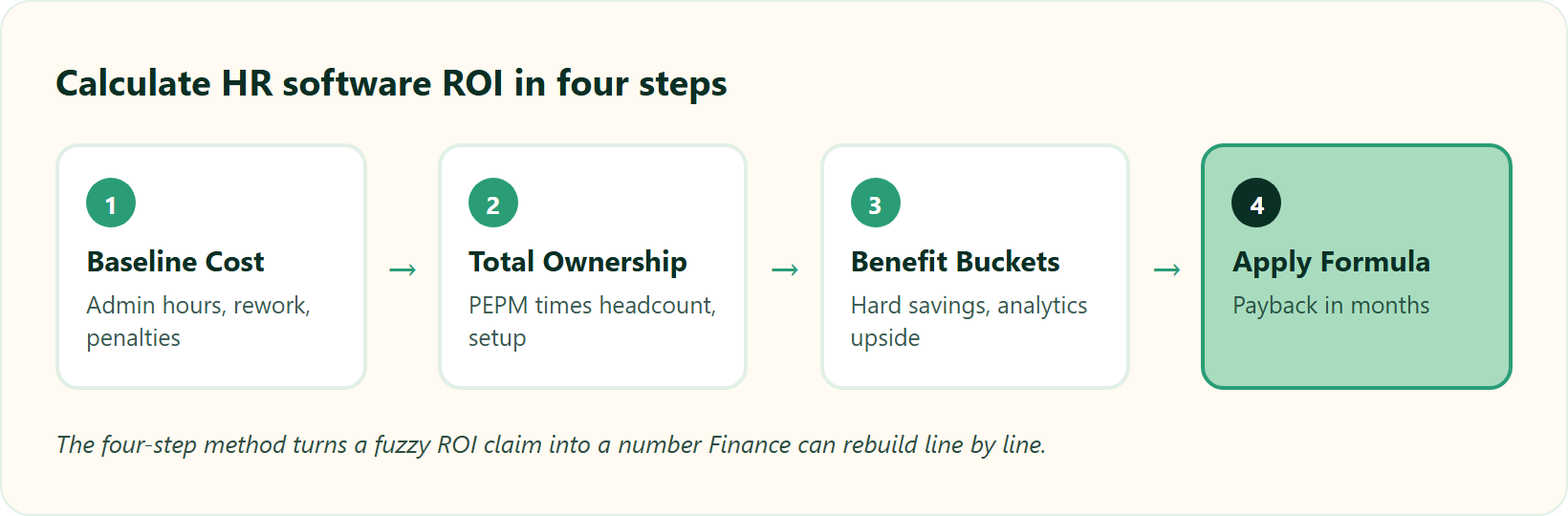
Calculate HR software ROI in four steps. First, baseline your current annual HR cost: admin hours x loaded hourly cost, plus payroll rework, penalty exposure, and tool licences. Second, total the cost of ownership (PEPM ₹30 to ₹300 x headcount + implementation). Third, quantify benefits by bucket. Fourth, apply the formula plus payback = investment / monthly benefit. Track time-to-hire, retention cost, error rate, and compliance savings, and keep intangibles out of the headline number so Finance cannot dismiss it.
🧮 Step 1 and 2: Baseline and true cost
PEPM means per-employee-per-month, the standard way HRMS vendors price in India. Indian bands run roughly ₹30 at the basic end to ₹300 at enterprise level. That is your visible cost.
The trap is the invisible cost. One operator I know watched a company “spend $200,000 on the integration” of an HRMS to their ERP, a bill they never saw coming. Always ask what the subscription clock starts on. The cleanest contracts start billing only after go-live, not on the day you sign, which is why HR software pricing transparency matters so much.
📊 Step 3: The benefit buckets that count
Not all benefits are equal. Split them into two streams, because CFOs trust them differently.
📋 Two Benefit Streams a CFO Trusts Differently
| Benefit stream | Example line items | How to value it |
|---|---|---|
| Automation savings (hard) | Payroll hours, error rework, retired tool licences | Loaded hourly cost x hours saved |
| Analytics-driven decisions (softer) | Attrition prevented, faster time-to-hire | Modelled, shown as a range |
Keep the softer stream separate. Lead your headline ROI with the hard automation savings, then present analytics gains as upside. This split is where most vendor blogs blur the line, and it is precisely what earns Finance’s trust.
✅ Step 4: Worked example, two company sizes
For a 60-person firm, say you save 40 HR hours a month at ₹500 loaded cost, that is ₹2.4 lakh a year. Against a ₹1.4 lakh subscription, you clear payback inside seven months. For a 300-person firm, the same math scales, and error-rework savings usually dominate.
Track the four metrics Finance recognises: time-to-hire, retention cost, payroll software error rate, and compliance savings. These are your proof points, not adjectives.
Here is the quiet gap in most tools. They automate the work but cannot show what they saved. HROne’s inbuilt ROI Dashboard calculates lifetime hours saved against average HR salary, so the CHRO walks into the board review with a rupee figure already computed, not a promise. You can build your own model with our ROI calculator before you talk to the CFO.
Q3. What is the hidden cost of manual payroll and attendance, the ‘credibility tax’?
Here is a scene every payroll manager knows. It is the 28th, managers are emailing overtime hours in Excel sheets, and someone is manually collating them at 9pm. In one setup I heard about, “there was no workflow, and employees used to go ahead and submit how many hours they wanted.” The spreadsheet was the honour system, and the honour system leaked money.
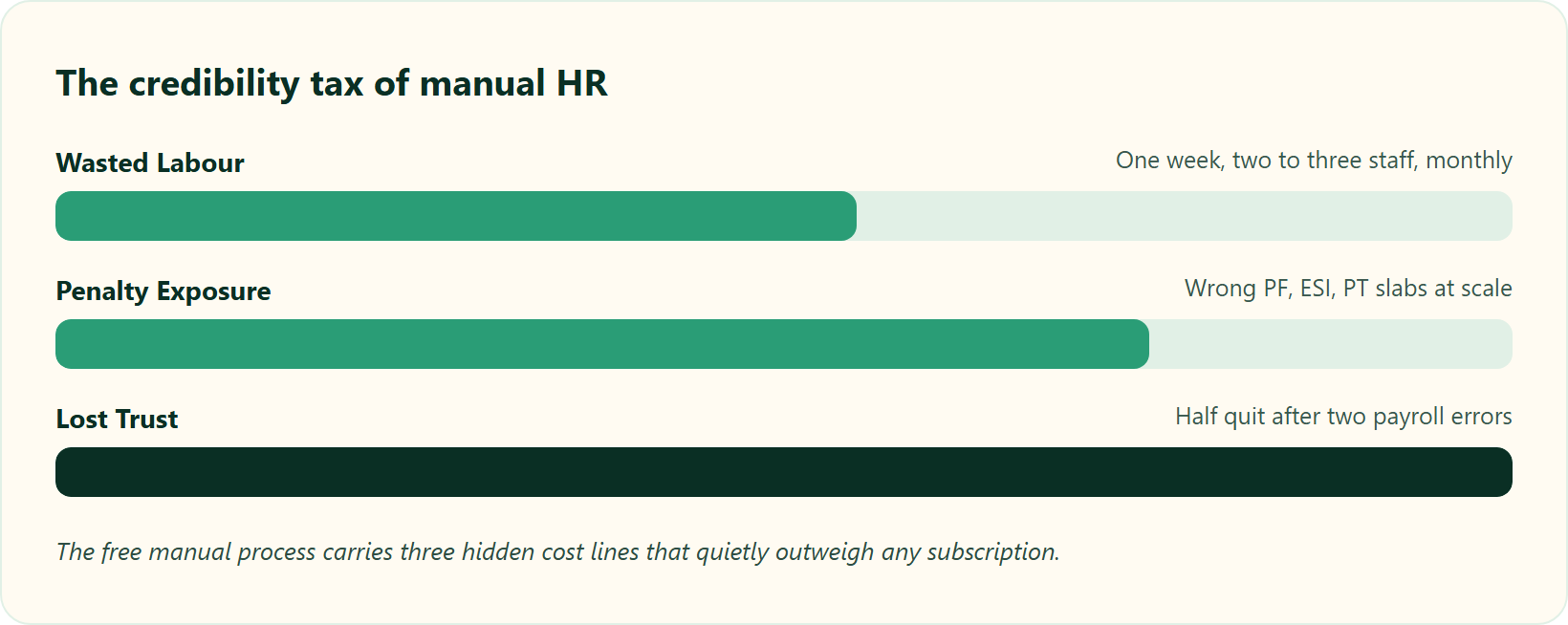
The hidden cost of manual HR is a “credibility tax”: wasted labour, penalty exposure, and lost trust. Nearly 50% of employees consider leaving after just two payroll mistakes, correcting incorrect tax filings can cost six figures, and one week of two to three staff every month chasing attendance adds up fast. The “free” manual process is often costlier than the subscription it replaces.
💸 The numbers behind the tax
The scariest cost is not the wasted hours. It is trust. When payroll breaks, faith breaks, and people quietly update their resumes.
The compliance side stings too. In the US, correcting incorrect W-4s and tax filings “can cost a business upwards of $134,975,” and fixing direct deposit issues “averages over $44,000.” India has its own version of this, through PF, ESI, and Professional Tax slabs that punish sloppy filing. Empirical HRIS research confirms automation measurably cuts processing time and error rates, which is the whole point of moving from manual vs automated attendance.
⚠️ Why manual is the expensive option
Add it up honestly. Wasted labour, penalty risk, and attrition from broken paydays. That is three cost lines the “free” spreadsheet quietly carries.
HROne closes the overtime loophole at the source. Overtime only generates when attendance is actually marked at office, so nobody bills hours they did not work. HR teams describe the shift plainly.
“Salary processing to last creation of bank Challan files is quick and systematic process with error free details.”
— Deepak K., Reviewer HROne G2 – Verified Review
“Automated payroll. Juggling spreadsheets was always a nightmare, but now I don’t have to do that since it’s centralized in one place.”
— John C., Reviewer HROne G2 – Verified Review
Not every transition is instant, and it is fair to say so. One reviewer rated HROne 3.5 stars and flagged a real onboarding process curve.
“It can sometimes feel a bit overwhelming for new users. Certain features take time to understand, and without enough guided support, the learning curve can feel quite steep.”
— Nijanthan R., Reviewer HROne G2 – Verified Review
Q4. Why do generic ROI calculators mislead Indian buyers, and how do PF, ESI, LWF and the Code on Wages change the math?
Most ROI calculators online were built for a payroll reality that does not exist in India. They assume a flat wage and a simple tax line. Then a manufacturing client with shift allowances, LWF deductions, and multi-state Professional Tax runs the number and watches it fall apart.
Generic ROI calculators mislead Indian buyers because they ignore statutory slabs (PF, ESI, LWF, Professional Tax) and the live re-computation burden of the Code on Wages 2019, which changes bonus, overtime, and PF calculations across your whole workforce. A credible India model prices statutory penalty-avoidance, an auditable trail, and DPDP Act 2023 consent-risk as distinct benefit buckets, not a vague “compliance” line.
🏛️ The statutory pillars a real model must price
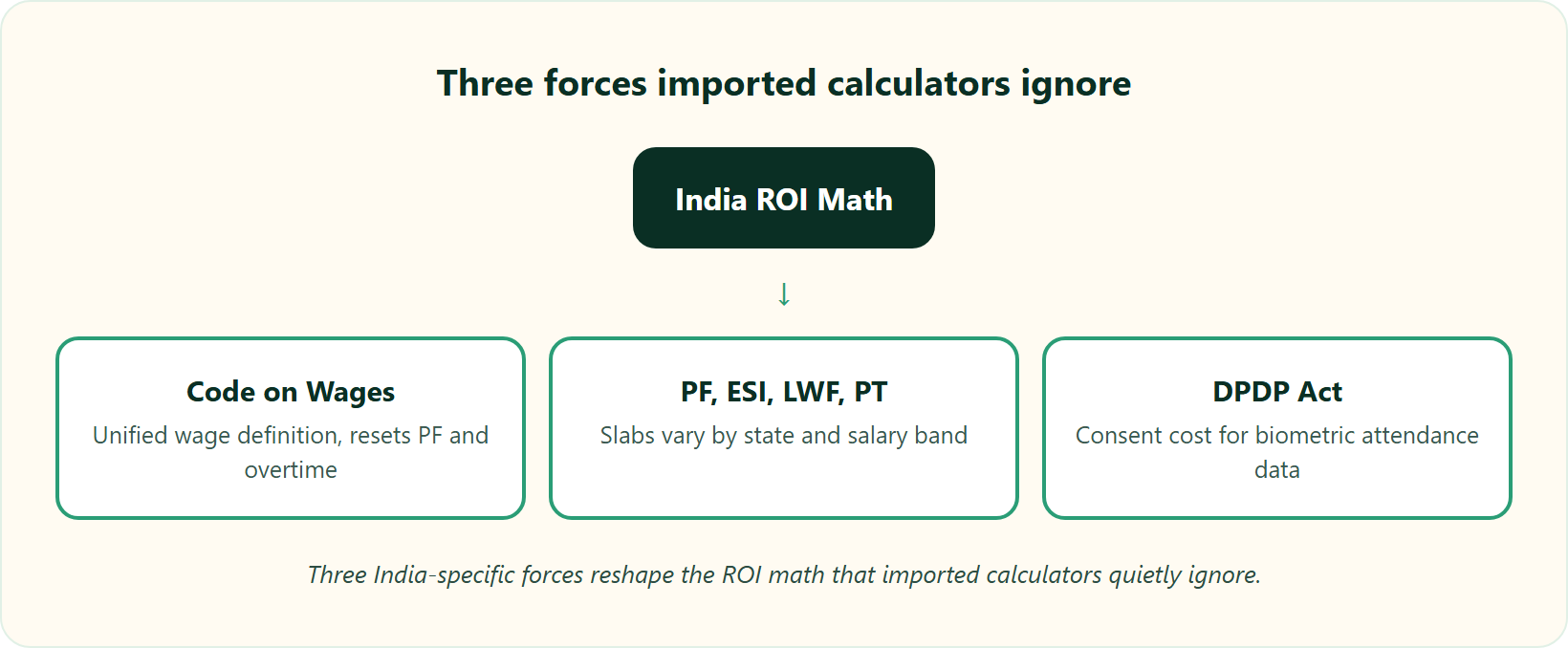
Three forces change your math, and no imported calculator accounts for them.
- Code on Wages, 2019. It creates a unified definition of “wages” that reshapes PF, bonus, and overtime calculations across the workforce. It also mandates timely payment and specific registers inspectors check.
- PF, ESI, LWF, and Professional Tax. These slabs vary by state and salary band. One wrong slab, applied across 300 people, is a penalty waiting to happen, which is why statutory compliance in payroll cannot be an afterthought.
- DPDP Act 2023. India’s data protection law adds consent obligations for biometric attendance data, a fresh cost line most models skip entirely.
⚖️ The audit trail nobody prices, and why it matters
Here is the standard read I think gets it backwards. Buyers assume “all payroll providers handle compliance automatically.” They do not. Automation without an auditable record is a liability, not an asset.
The value of an integrated payroll-and-HR record with change tracking is old and well understood. A foundational patent from 1997 describes exactly this, a system that integrates payroll and HR data while recording who changed what. That audit trail is what saves you during an inspection.
So model it differently on Monday. Add three explicit buckets: statutory penalty-avoidance, audit-readiness hours saved, and DPDP consent-risk reduction. Then insist on a subject-matter-expert audit trail before you sign anything, and check how payroll software reduces compliance risk in practice.
This is where HROne’s statutory engine earns its keep. Our manufacturing HR deployments keep PF, ESI, LWF, and wage-code changes current, and HR teams tell us it fixed a genuine pain area.
“Proper calculation of PF and ESI was a pain area for us before, but now with the HROne automated calculation process, results are up to the mark and following Indian tax compliances properly.”
— Ajay K., Reviewer HROne G2 – Verified Review
Q5. What does independent research say about HRMS ROI, beyond vendor claims?
Most ROI numbers you see in HR software marketing come from the vendor’s own case studies. A CFO can wave those away in one sentence. So let me point you to evidence a vendor cannot manufacture: peer-reviewed research and patents.
Independent research, not vendor marketing, confirms HRMS ROI. Systematic reviews show HRIS improves organisational efficiency and competitive advantage, but only when adoption succeeds; the return is mediated by HR analytics maturity, not software alone. Patents from ADP even model “workforce vitality” from payroll data, proving your payroll records are a predictive analytics asset, not just a compliance chore.
📚 What the peer-reviewed studies actually found
A 2023 systematic literature review of HRIS studies concluded the link to organisational performance is real but conditional. The software helps only when people genuinely adopt it. Shelfware returns nothing.
A 2024 study in Cogent Business and Management went further. It found HRIS measurably strengthens performance management and process efficiency. That is a controlled academic finding, not a testimonial, and it maps directly to modern performance management.
🔬 Why your payroll data is a hidden asset
Here is the reframe the category avoids. Most blogs sell HRMS as a cost-cutter. Research suggests the bigger return lives in analytics maturity, how well you turn HR data into decisions.
An ADP patent describes modelling “workforce vitality” and performance signals straight from payroll data. Read that again. The salary file you process every month through your payroll software is a predictive dataset about attrition and productivity, sitting unused.
So here is the Monday translation for an HR manager. Stop treating payroll and attendance data as a compliance chore. Start asking what it predicts, which teams show early attrition signals, and where overtime spikes hint at burnout.
This is exactly the layer we built HROne around. The HR inbox and analytics turn scattered payroll and attendance data into decisions the CHRO can act on. The research is clear that this analytics maturity, not the software licence alone, is where durable ROI actually comes from, which is why our CHRO solutions lead with data.
Q6. Is HR software cheaper than hiring more HR staff?
Every growing company hits the same fork. HR is drowning, so the instinct is to add another executive. But another salary is a fixed, recurring, linearly scaling cost, and it does not fix the broken process underneath.
For most growing Indian firms, HR software is cheaper than adding HR headcount because it scales without a linear salary increase. One HROne user cut team time-occupancy by 70%, freeing 30% capacity for strategic work, and recruiters closed 15 to 20 positions a day versus 8 to 10 manually. A single HRMS at ₹30 to ₹300 PEPM often replaces the cost of one or more full-time HR admins.
⚖️ The honest trade-off
Let me be fair here. A new hire brings judgement and empathy a tool cannot. For genuinely human work, grievances, culture, and coaching, you want people.
But most HR pain is not human work. It is repetitive processing. That is exactly where software wins on cost, and where our workforce management earns its keep.
📋 Extra HR Headcount versus an HRMS
| Factor | Extra HR headcount | HRMS (HROne) |
|---|---|---|
| Cost pattern | Fixed salary, scales linearly | Flat PEPM, ₹30 to ₹300 |
| Scalability | One person, capped hours | Handles thousands of records |
| Error rate | Human fatigue, manual slips | Automated statutory checks |
| Compliance | Depends on the individual | Built into the engine |
📈 The productivity proof
The field numbers make the case sharper than any theory. One HROne user brought team occupancy down by 70%, freeing roughly 30% capacity for strategic work. Recruiters closed 15 to 20 positions a day instead of 8 to 10 through better recruitment software. Payroll cycles that took 10 days compressed to 5 to 6.
That last one matters. When we run payroll for HROne customer organisations, the shift from manual chaos to a systematic cycle is the clearest cost signal a CFO sees.
“Automated payroll. Juggling spreadsheets was always a nightmare, but now I don’t have to do that since it’s centralized in one place.”
— John C., Reviewer HROne G2 – Verified Review
“It has streamlined processes like attendance and leave management, and the recruitment module has automated onboarding, greatly boosting efficiency. The software frees up my team to focus on employee engagement and retention strategies instead of manual data updates.”
— Priyanka S., Reviewer HROne G2 – Verified Review
Q7. How does fragmented, multi-tab HR software silently drain your ROI?
Watch an HR executive at month-end. Attendance sits in a biometric portal, leave in a second tool, payroll in a third, and approvals scattered across email. To close one task, she opens five tabs and three email threads. Nobody logs this as a cost, but it is one.
Fragmented HR software drains ROI through “tab-juggle fatigue,” closing one task across multiple tabs and email threads. When your HRMS, payroll, and attendance tools cannot talk to each other, data fractures and time leaks. A single-source system with a unified HR Inbox lets you track pending tasks and close 110+ daily actions before deadline, converting scattered effort into measurable saved hours.
🧩 The complication nobody prices
The real damage starts when tools do not integrate. One HR team I heard about ran three separate systems that “could not talk to each other.” Every month, someone reconciled the mismatches by hand.
That reconciliation is pure leakage. It is salaried hours spent fixing what proper integrations should have prevented. Competitor reviews echo the same structural pain.
“The problem of scattered and manual HR processes. Instead of using multiple tools or manual tracking for attendance, leave, payroll, performance reviews, it brings everything into one platform.”
— Saksham A., Reviewer Darwinbox G2 – Verified Review
“All the HR activities at a single point. No flexible customization. Some features are only available in a desktop mode, not in mobile application.”
— Arjun T., Reviewer greytHR G2 – Verified Review
✅ The single-source resolution
The fix is architectural, not cosmetic. Bring every pending task into one place that behaves like an email inbox. One HR leader described the shift as finally seeing “a single screen to track pending HR tasks” and closing 110+ items before their deadlines.
That is the idea behind the HROne HR inbox. It surfaces every request and approval in one Gmail-like screen, backed by 127 pre-built workflows, so tasks stop falling through the cracks between tools. If you are weighing options, our HROne vs Darwinbox breakdown shows the architectural difference clearly.
“The Inbox for HR, which has resolved many of our issues. It allows users to manage multiple tasks from a single window, eliminating the need to switch between different modules.”
— Vignesh J., Reviewer HROne G2 – Verified Review
Q8. How do you buy HR software without falling into the ‘implementation trap’?
Here is a failure I have seen more than once. A company spends a fortune on an ERP or HRMS, and it never gets fully used. The licence renews, the value never lands. “Plug and play” is a myth. The honest version is plug, practice, play, because adoption takes real effort.
The implementation trap is paying upfront for software that then sits unused, the biggest ROI killer. Protect your ROI by asking five questions before buying: does the subscription start on purchase or after go-live (demand go-live)? Which systems do you bridge to free of charge? Is there a lock-in? A dedicated HR SPOC or just email threads? An SME audit trail for PF, ESI, and LWF?
🛡️ Five questions to ask before you sign
Run this checklist in the sales meeting, not after. Each question protects a specific chunk of your ROI.
- When does billing start? Demand that the subscription meters only after go-live, not the day you sign. Otherwise you pay for months of empty implementation, so scrutinise pricing carefully.
- Which integrations are free? If a vendor charges for a standard bridge, that usually signals custom development, and hidden cost.
- Is there a lock-in? Multi-year contracts trap you before the tool has proven itself.
- A dedicated SPOC or email threads? SPOC means a single point of contact who owns your rollout. Email-only support is where migrations stall.
- Is there an SME audit trail? For PF, ESI, and LWF, insist on a subject-matter-expert audit record. Do not assume compliance is handled automatically, and review the HRIS buyer pitfalls before you commit.
⚠️ Why the SPOC question decides everything
Question four is the one people underrate. The difference between a live system and shelfware is usually the human guiding the rollout. Competitor reviews show what happens when that support is thin.
“We started working with Keka HRMS in August, and to this day, we have been unable to implement the tool due to their consistently delayed responses and poor coordination between their internal teams.”
— Divya P., Reviewer Keka G2 – Verified Review
This is precisely why we structured HROne the way we did: flat PEPM, no lock-in, billing that starts after go-live, and a prior-HR onboarding SPOC (9.8 NPS) who has actually run HR, not a technical PM reading a checklist. If you want a direct contrast, our HROne vs Keka page lays out the support model, and HROne users consistently flag the support as the reason implementation actually lands.
“The support team is always ready to help us with any issues. Their onboarding process was thorough, with helpful training sessions for the whole team.”
— Rishiraj R., Reviewer HROne G2 – Verified Review
Q9. How do you present the ROI to your CFO so they say yes?
I will say the quiet part out loud. Most HR budget requests die not because the ROI is weak, but because the pitch is built like a hope, not a model. A CFO does not buy optimism. He buys a number he can defend to the board when someone challenges it.
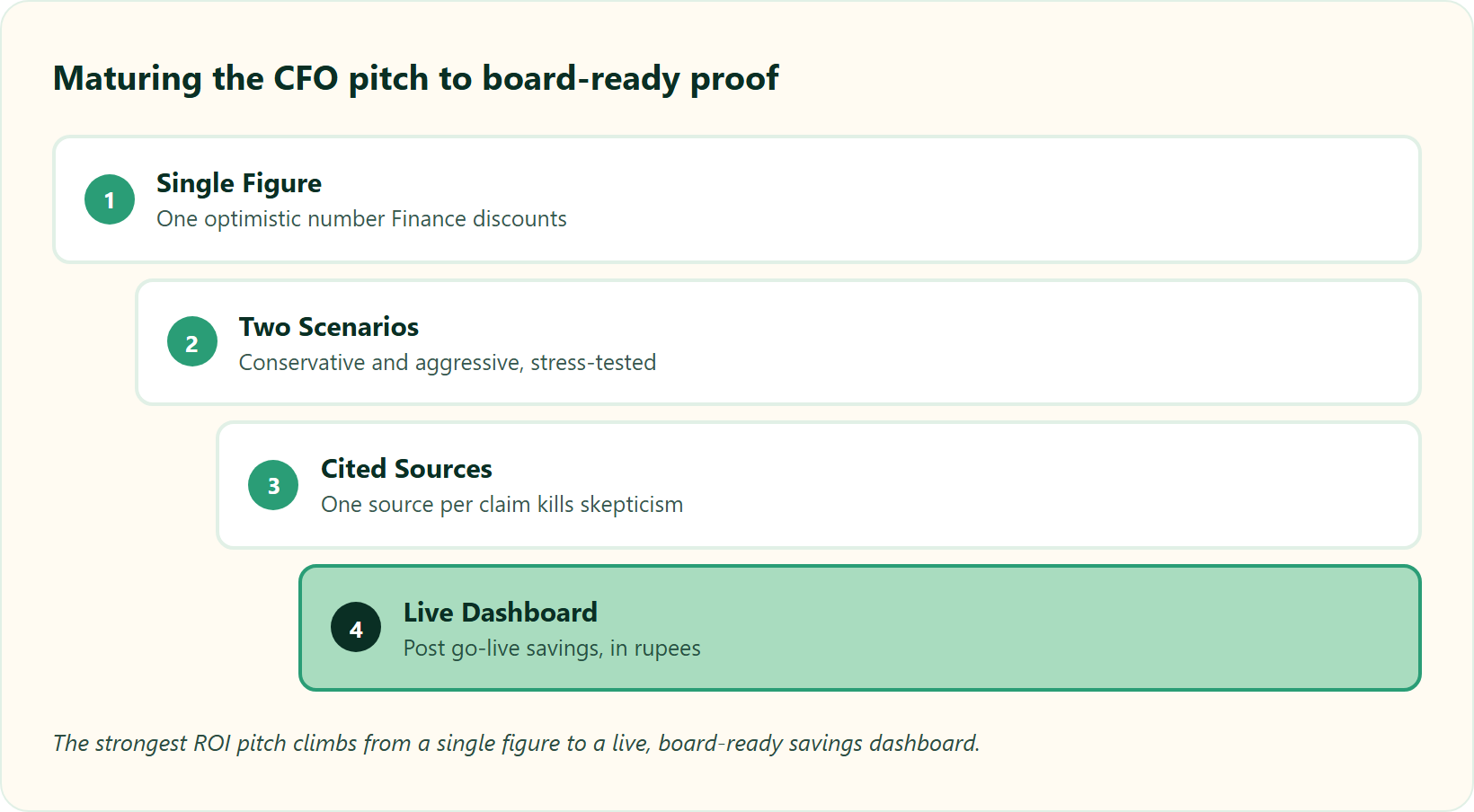
Win the CFO with risk-adjusted ROI, not optimistic single figures. Show conservative and aggressive scenarios, price penalty-avoidance as expected value, and attach one cited source to every claim so “vendor-inflated numbers” skepticism dies. Lead with payback period in months, separate automation savings from analytics gains, and prove you can measure cost and time saved after go-live, the number that closes budget approval.
💰 Structure the pitch like a CFO thinks
Lead with the conclusion, then support it. Open with the payback period in months, because that is the first thing Finance calculates anyway. Then show your working.
Present two scenarios, never one. A conservative case and an aggressive case signal that you have stress-tested the number. A single rosy figure signals you have not.
Keep your two value streams separate on the slide. Hard automation savings sit in the headline. Analytics-driven gains, like attrition prevented, sit clearly labelled as upside, so nobody accuses you of inflating the core number, and our ROI calculator keeps those streams distinct.
⚖️ Pre-empt the objection before it lands
Every CFO objection is predictable. So walk in with the answer, and the source, already attached.
📋 CFO Objection to Cited Answer
| CFO objection | Your cited answer |
|---|---|
| “Vendor numbers are inflated.” | Peer-reviewed research confirms HRIS lifts efficiency, contingent on adoption. |
| “Soft benefits don’t count.” | Headline ROI uses only hard automation savings; analytics gains shown as upside. |
| “The last tool sat unused.” | Return is mediated by adoption and analytics maturity, so we attach a rollout KPI. |
| “How do we track it after buying?” | We measure cost and time saved post go-live, in rupees. |
That last row is where most requests fall apart. A common failure I have seen is a leader walking into a review without “data at their fingertips,” unable to answer basic questions on the spot. The pitch collapses in real time, which is why our CHRO solutions put live numbers in the room.
⏰ Close on measurable proof, not promises
Here is the reframe that lands. You are not asking Finance to fund a cost centre. You are proposing to convert HR into a consistency engine that de-risks compliance and quantifies its own savings through disciplined payroll software.
The biggest ROI blind spot in this category is real. Most systems offer “no method or tool or feature to track ROI after setting up.” You buy the tool, then you cannot prove the return, which is exactly the outcome a CFO fears, so demand HR software pricing transparency.
This is where HROne’s inbuilt ROI Dashboard changes the conversation. It calculates lifetime hours saved against average HR salary, so the CHRO walks into the next board review with a rupee figure already computed, not a promise to measure later. If you want to build that number before the meeting, our pricing and HROne vs Darwinbox comparison pages are the fastest way to draft your own model.
Here is the question I keep sitting with, and I might be slightly early on this. Within the next two years, will “prove the ROI live” become a standard line item in every HRMS contract, the way uptime SLAs became standard for cloud software? My current thinking is yes, and the buyers who ask for it now will save themselves a painful renewal conversation later. What would it take for your CFO to treat HR spend as an investment with a dashboard, instead of a cost with a receipt, backed by real performance management and workforce management data?

















 Secures Top Spot in
