


Q1. Darwinbox vs PeopleStrong: which enterprise HCM should you actually pick in 2026?
Pick Darwinbox if you are a large, complex enterprise that needs deep configuration and multi-country payroll, where it scores 9.8 on enterprise fit. Pick PeopleStrong for faster rollout, a top-rated mobile app, and higher overall satisfaction (4.3 versus 3.6 stars). But the real decision is not the logo. It is whether either can handle your state-wise PF slabs and multi-entity policies without weeks of manual Excel work.
💸 The scar tissue nobody prices into the demo
I have sat in the proposal room where a CHRO signs, allocates a team, pays the implementation fee, and then finds the system cannot do what the sales deck promised. That gap between demo and go-live is where budgets die. The quiet fear behind this search is simple: “Am I buying a strategic platform, or a prettier digital filing cabinet that still needs Excel every payday?”
Both platforms are strong. Darwinbox carries genuine enterprise weight and configurability. PeopleStrong wins on mobile simplicity and speed. The honest read is that neither is universally “better.” They fit different org shapes.
⚖️ The snapshot verdict
| Decision axis | Darwinbox | PeopleStrong |
|---|---|---|
| Payroll model | Configurable, multi-country engine | Service-led, managed simplicity |
| Config depth | High (no-code Studio) | Standardized workflows |
| Enterprise fit (TrustRadius) | 9.8 | 7.1 |
| Mobile / satisfaction | Feature-rich | Number 1-rated app, higher star rating |
| Best for | Large, complex, multi-entity | Fast rollout, mobile-first teams |
| Watch out for | Setup complexity, day-one billing | Depth of configuration limits |
Real users echo the split. One Darwinbox buyer was blunt about the risk.
“Bad implementation experience, bad UI UX, configurations getting broken in production… We are ending up doing most of the products manually.”
– Verified User in Computer Software Darwinbox G2 Verified Review
PeopleStrong’s mobile-first pitch also holds up in reviews.
“It’s mobile-friendly, unlike the one we used before… Very helpful to access attendance, leaves etc.”
– Nikhil S., PeopleStrong user PeopleStrong G2 Verified Review
✅ What to test before you sign
Do not evaluate on feature lists. Run one live payroll cycle in the demo with your own state-wise PF, ESI, and PT slabs. If you want a third India-built option benchmarked on the same axes, HROne belongs on the shortlist, and its core HCM is worth a direct HROne vs PeopleStrong look before you decide.
Q2. What are Darwinbox and PeopleStrong, and how do their core modules compare?
Darwinbox is an AI-native, highly configurable hire-to-retire HCM built for large, complex enterprises, holding roughly 3.1% category market share. PeopleStrong is an APAC-focused talent operating system built around a service-led model, a top-rated mobile app, and a 68 NPS. Across core modules, Darwinbox goes deeper on configuration while PeopleStrong standardizes for speed.
🧩 The plain-English definition
Think of an HCM (Human Capital Management system) as the single record for every employee moment, from hire to exit. Darwinbox tries to be the deeply configurable platform a 5,000-person enterprise can bend to its own rules. PeopleStrong tries to be the clean, mobile-first system a distributed workforce actually opens every day.
The base layer matters most here. Core HR, workforce, time office, and payroll are the bread and butter, the foundation any organization runs on. Everything else, talent and analytics, sits on top of that base.
📊 Module-by-module, side by side
| Module | Darwinbox | PeopleStrong |
|---|---|---|
| Core HR | Deep, configurable records | Solid, standardized |
| Workforce / time office | Strong shift and attendance | Strong, mobile-led |
| Payroll | Configurable, multi-country | Service-led managed model |
| Talent (perf, succession) | Broad, feature-rich | Talent-OS focused |
| Recruitment / ATS | Integrated | Integrated |
| Analytics | AI-native insights | Standard dashboards |
A concrete example makes the contrast real. A 3,000-person manufacturer with plants in three states needs shift intelligence plus state-wise statutory rules baked into payroll. Darwinbox leans into that complexity through configuration. PeopleStrong leans toward a managed, simpler path where the vendor absorbs more of the setup, a tradeoff worth weighing against a purpose-built manufacturing HR approach.
Even happy Darwinbox users flag the depth-versus-ease tradeoff.
“Not all of them are intuitive at first, especially modules like performance management and recruitment tracking. Some training or support is needed.”
– Mohit V., Darwinbox user Darwinbox G2 Verified Review
🎯 How to map your own org
Every customer is its own special snowflake, so match the tool to your background, industry, and entity structure rather than a generic “best practice” template. If your complexity is high and multi-entity, weight configuration depth. If mobile adoption across a frontline workforce is your priority, weight the everyday app experience and a strong workforce management layer.
Q3. How configurable is each platform, and is “highly customizable” just marketing?
Most buyers think “highly customizable” is a straight win. The standard read gets this backwards. Configurability only matters when you can measure it: how many workflows you can automate, whether changes are no-code or developer-dependent, and the turnaround for a single policy change. True enterprise automation looks like 127-plus workflows running from onboarding to offboarding.
❌ Why the buzzword misleads
Darwinbox is genuinely configurable through its no-code Studio, and reviewers confirm they adapt workflows “without much technical intervention.” PeopleStrong offers more standardized workflows, faster to stand up but tighter to bend. Neither vendor tells you the number that actually counts: the turnaround time to change one leave policy.
Here is the uncomfortable truth I have learned watching rollouts. A system does not create your process. It enforces consistency once you have formulated the process, then decentralizes it across the org. So “customizable” is worthless if the config takes a developer ticket and three weeks.
⚠️ The config-depth rubric to demand
Score each platform on these, not on a marketing checklist.
- Workflow count: how many pre-built, automatable workflows ship out of the box.
- Change ownership: can HR change a rule, or does it need a back-end developer?
- Turnaround time: hours, days, or weeks to push one policy change live.
- Multi-entity: can company A and company B hold different policies on one instance?
That multi-entity point is where rigidity bites. I once watched a client with a five-person HR team forced to build a career-lattice framework outside their enterprise tool, because the system could not handle internal mobility. The tool meant to save time created shadow work in Excel, the opposite of what good performance management should deliver.
Reviews show the rigidity risk on both sides.
“I wish there was more space to customize the tool based on individual org needs and have an agile system to incorporate changes based on feedback.”
– Verified User in Automotive Darwinbox G2 Verified Review
✅ Where HROne frames it differently
We built HROne around 127-plus pre-built workflows and a multi-entity policy engine, so company A and company B rules coexist without buying separate instances, all surfaced in one HR inbox. One admin put the discipline plainly.
“HROne maintains process discipline. If any detail is missing in the policy or an employee profile, it doesn’t allow the process to move forward until the checklist is fully completed.”
– Bindu P., HR HROne G2 Verified Review
Q4. Which handles Indian payroll better, configurable engine or service-led model?
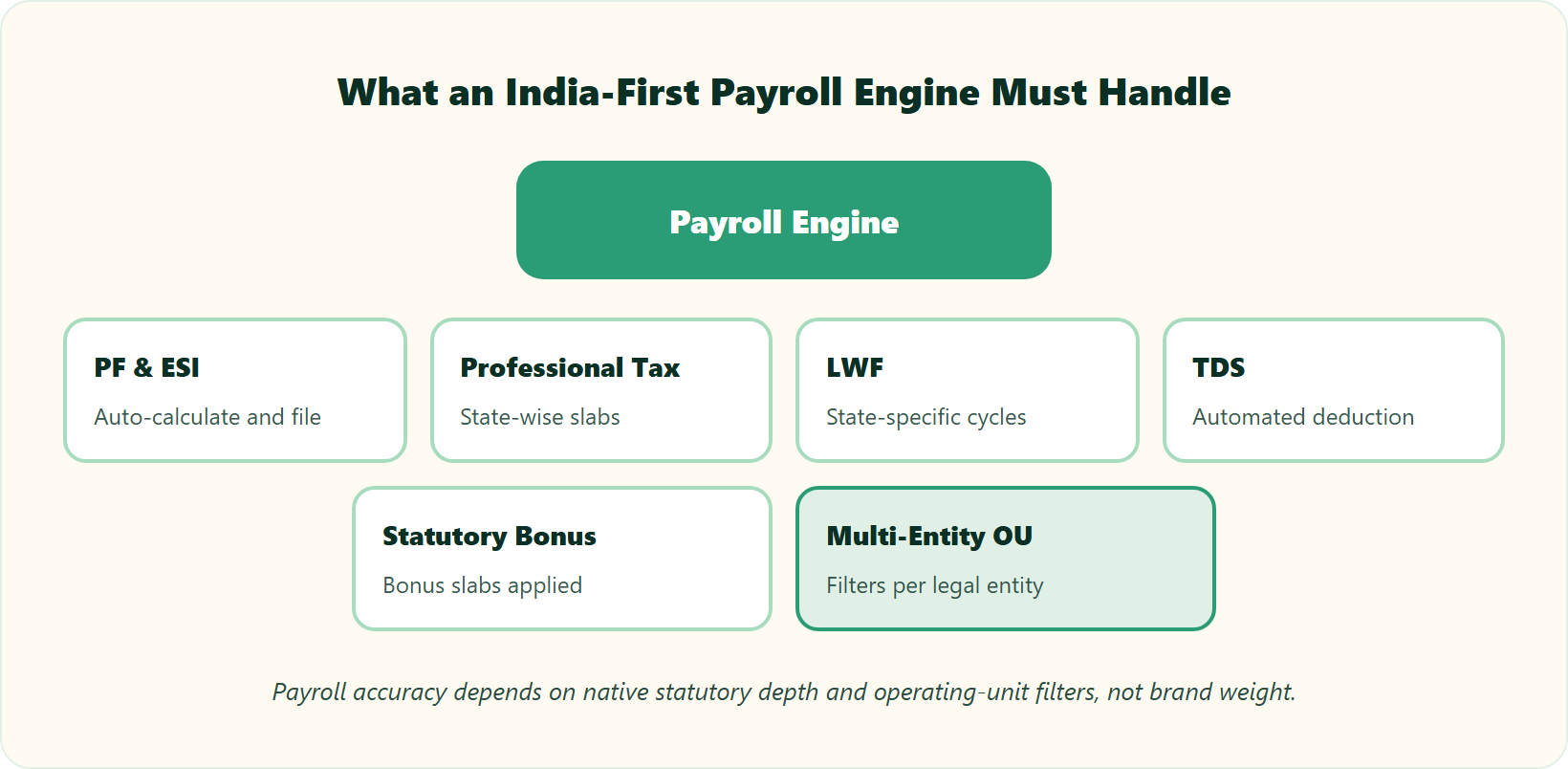
Darwinbox offers a configurable, Gartner-cited multi-country payroll engine (RIVeR); PeopleStrong leans on a service-led model that trades configurability for managed simplicity. For Indian enterprises, the real test is granular: can it maintain state-wise slabs for PF, ESI, LWF, PT, TDS, and Bonus, and apply OU (operating unit) filters for salary processing? That granularity, not brand, decides payroll accuracy.
💰 The fear that keeps payroll managers up
The unspoken worry is specific. You pay the implementation fee, then discover the engine cannot handle your regional PF slabs or multi-entity policies. Payroll is not “a few days” of setup. Getting the prerequisites right is the actual work.
And the stakes are human, not just administrative. Nearly 50% of employees consider leaving after just two payroll mistakes. Missed payroll equals broken trust, so payroll accuracy is quietly a retention strategy, which is why a reliable payroll software matters.
⚠️ Where accuracy breaks
The most common failure is a desync between attendance and payroll, which forces manual intervention and wrong paydays. India adds granularity that global tools often miss. Your system must handle state-wise slab maintenance and OU filters, or your team rebuilds it in spreadsheets every cycle.
| India statutory element | What the engine must do |
|---|---|
| PF and ESI | Auto-calculate and file per the Code on Wages, 2019 definition of “wages” |
| PT (Professional Tax) | Maintain state-wise slabs, not one national rule |
| LWF (Labour Welfare Fund) | State-specific contribution cycles |
| TDS and Bonus | Automated deduction and statutory bonus slabs |
| Multi-entity | OU filters so each legal entity processes correctly |
An objective benchmark helps here. Patented “zero-touch” payroll systems automate recording, approval, and disbursement to cut manual touchpoints. So ask each vendor a sharp question: how many manual touchpoints per pay run? Fewer touchpoints means fewer errors, and reviewing statutory compliance payroll practices upfront saves cycles later.
✅ What “good” looks like in practice
This is where an India-first build shows. We designed HROne to maintain state-wise PF, ESI, LWF, PT, TDS, and Bonus slabs natively, and to let you download an error sheet before processing salaries. Users report the difference.
“Salary processing along with exact calculation of LWF and PT slabs makes the work more convenient. Proper calculation of PF and ESI was a pain area for us before, but now results are up to the mark and following Indian tax compliances properly.”
– Komal S., HR HROne G2 Verified Review
“It handles salary calculations, statutory deductions (PF, ESI, taxes), and filings automatically, with zero manual intervention, removing payroll errors and compliance anxiety during audits.”
– Waldon S. HROne G2 Verified Review
Q5. What will each actually cost, and can you prove ROI to your CFO?
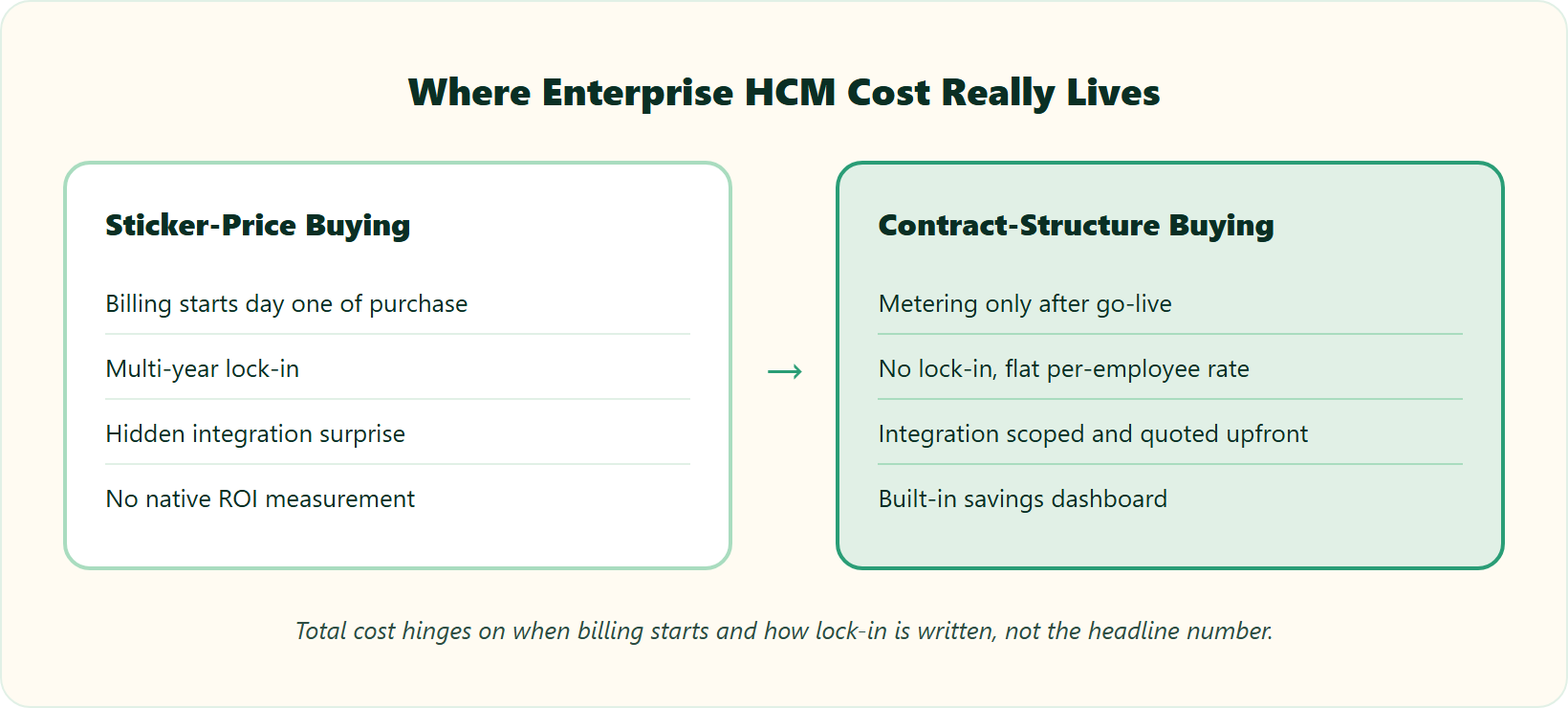
Neither Darwinbox nor PeopleStrong publishes flat enterprise pricing, so your total cost hinges on contract structure, not sticker price. The biggest trap I see is a subscription that starts on day one of purchase rather than after go-live. Demand a flat model, no lock-in, and a go-live billing trigger. Then track ROI yourself, using payroll cycle time and error rate.
💰 Why the sticker price lies
List pricing is the least useful number in the room. What actually moves your total cost of ownership is when billing starts, how long implementation drags, and what integrations cost. I have watched enterprises pay subscription fees for months while the system sat half-configured, which is why HR software pricing transparency matters.
The hidden line item is integration. I once saw a company spend $200,000 wiring their HRMS to their ERP (Enterprise Resource Planning system). Those unforeseen costs can genuinely traumatize a budget owner who never saw them coming.
⚠️ The pricing levers to interrogate
| Cost lever | The trap to avoid | What to demand |
|---|---|---|
| Billing trigger | Subscription starts day one of purchase | Metering only after go-live |
| Contract term | Multi-year lock-in | No lock-in, flat PEPM (per-employee-per-month) |
| Integration | Six-figure ERP wiring surprise | Scoped, quoted upfront |
| ROI tracking | No native measurement | Built-in savings dashboard |
Reviews confirm cost anxiety is real on the enterprise side.
“Implementing and maintaining comprehensive HR software can be costly, especially for small and medium-sized businesses with limited budgets.”
– Shefali J., Darwinbox user Darwinbox G2 Verified Review
📊 Fixing the invisible-ROI problem
Here is the gap most HCMs share: no method or feature to track ROI after setup. So HR cannot walk into a board review and prove what it saved. Track three numbers manually if the tool will not: payroll cycle time, error rate, and hours reclaimed, or use an ROI calculator to quantify it.
A strong benchmark is collapsing payroll from 10 days to 5 to 6 days per cycle. That is the difference between a change manager who reacts to complaints and a change leader who shows the CFO a rupee figure. We built HROne around exactly this contract shape, flat pricing, no lock-in, and billing that starts after go-live, all visible through our pricing model so cycle-time savings are visible to finance, not anecdotal.
“I love HROne for its cost efficiency and holistic approach, which is why I prefer it over other vendors like Workday.”
– Priyanka S., HR HROne G2 Verified Review
Q6. Which is easier to implement, better supported, and will HR actually adopt it?
PeopleStrong generally deploys faster with responsive support. Darwinbox rates 8.4 on quality of support but brings more setup complexity. Beyond features, adoption decides success. Indian research shows organizational culture and ease of use, not feature count, drive whether HR teams actually use the system. Ask for a dedicated SPOC and a defined go-live date before you sign.
⏰ A payroll manager, three months in
Picture a payroll manager who signed in Q1 and is still not live by Q3. The demo looked clean. The reality is broken configurations and a support queue.
That is the plug-and-play myth. Plug and play needs practice in the middle, because most people believe payroll finishes in a few days. It does not. Getting your prerequisites together is the real work, which is why a structured onboarding process matters.
❌ Where rollouts stall
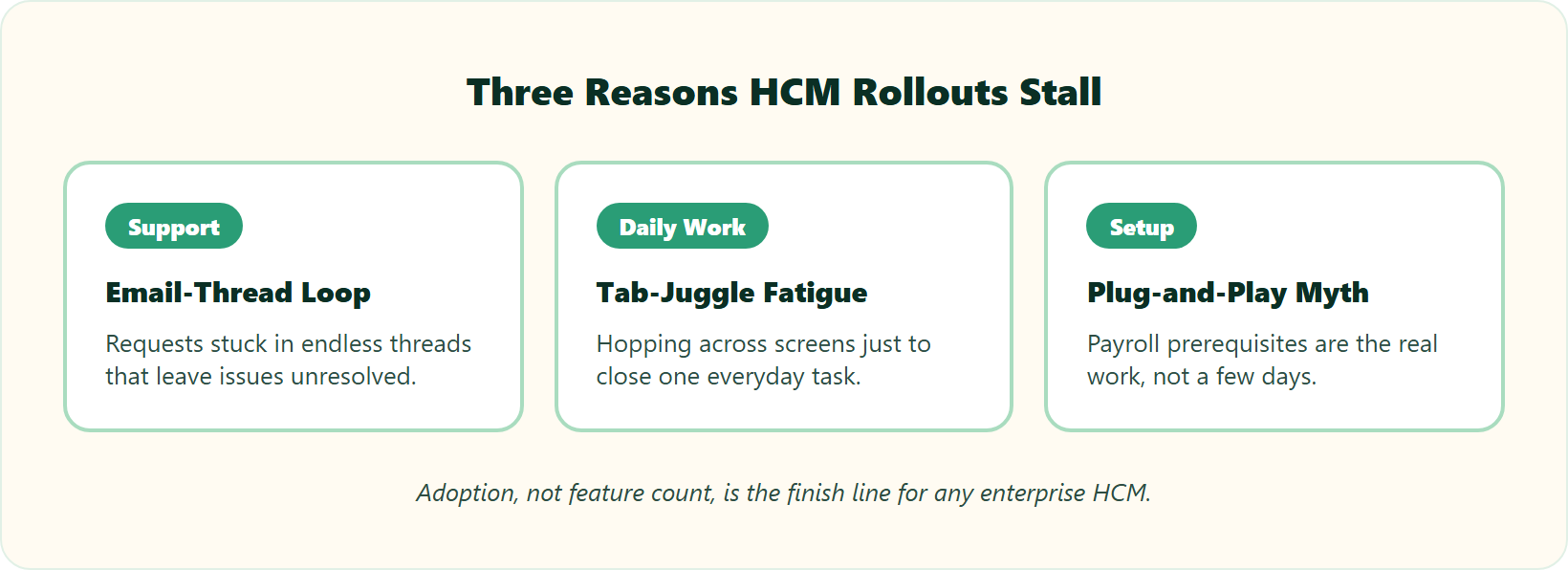
The failure modes are consistent across enterprise tools. Support gets stuck in endless email threads that leave you confused with unresolved issues. Daily work turns into tab-juggle fatigue, hopping between screens to close one task, the opposite of a unified HR inbox.
“Bad implementation experience… configurations getting broken in production on its own due to product deployments, terrible customer service.”
– Verified User in Computer Software Darwinbox G2 Verified Review
| Factor | Darwinbox | PeopleStrong |
|---|---|---|
| Setup complexity | Higher (deep config) | Lower, faster rollout |
| Support quality | 8.4 rating | Service-led, mixed threads |
| Adoption risk | Training-dependent | Mobile-led ease |
✅ What makes adoption stick
Think of a Ferrari. Processing payroll once is not enough. You must teach the trainer to drive it without you in the car, so nobody burns the clutch. Adoption, not features, is the finish line.
We answer tab-juggle fatigue at HROne with a single-screen Super Inbox plus a dedicated prior-HR onboarding SPOC (9.8 NPS) who knows the domain, and you can always book a demo to see it live. Users feel that difference during setup.
“The support team is always ready to help us with any issues… Their onboarding process was thorough, with helpful training sessions for the whole team.”
– Rishiraj R., HR HROne G2 Verified Review
Q7. Which delivers the better mobile and everyday employee experience?
PeopleStrong leads its own pitch with a #1-rated mobile app and a 68 NPS, and its overall review satisfaction runs higher (4.3 versus 3.6 stars). Darwinbox counters with a broad, feature-rich mobile experience for complex enterprises. For frontline-heavy or distributed teams, mobile adoption often matters more than back-end depth, so weight it by workforce type.
⭐ The mobile verdict
The everyday app is where adoption lives or dies. Darwinbox users praise the app for quick actions like leave and payslips, but flag slowdowns, so it helps to weigh a strong mobile HR app against your workforce needs.
“The mobile app is particularly useful, it’s intuitive and allows quick actions like applying for leaves, attendance tracking, or checking payslips on the go.”
– Mohit V., Darwinbox user Darwinbox G2 Verified Review
| Everyday axis | Darwinbox | PeopleStrong |
|---|---|---|
| Mobile app | Feature-rich, occasional lag | Number 1-rated, mobile-first |
| Satisfaction | 3.6 stars | 4.3 stars, 68 NPS |
| Best for | Complex desk workforce | Distributed, frontline teams |
📱 Match the app to your workforce
I might be wrong on the edges, but from what surfaces when you actually run this, workforce type decides the winner. A frontline sales team needs geofenced mobile punching more than deep desktop config, so a dependable attendance management layer matters. A head-office team weights reporting depth instead.
The real benchmark is not app store stars. It is whether an employee can plan the day and close tasks on one screen. We frame daily experience at HROne as an HR inbox, one screen to close 110-plus tasks before deadlines, so adoption is not buried under menus. Users single out the mobile-first design.
“Marking attendance with geofencing is extremely smooth and accurate, and I like how easy it is to access payslips and tax documents directly from the dashboard without asking HR repeatedly.”
– Priti D., HROne user HROne G2 Verified Review
Q8. Is switching or migrating mid-year really as risky as vendors claim?
The claim that switching payroll providers mid-year is “too complicated” is often a lock-in tactic. Migration is manageable when the new vendor asks the right questions upfront: prerequisites, state-wise slabs, and historical data mapping. Practical shortcuts help too. Copy salary structures directly from offer letters instead of re-keying, and run an error-sheet pre-check before your first live cycle.
❌ Who benefits from the fear
Let me say the quiet part out loud. The “wait for April” advice usually protects the incumbent vendor, not you. Migration difficulty is a discovery problem, not a calendar problem.
If the new vendor asks the right questions during onboarding, then a mid-year move is not complicated. The month you switch matters far less than the quality of the prerequisites conversation, so reviewing a choosing payroll software checklist upfront pays off.
✅ Your migration-readiness checklist
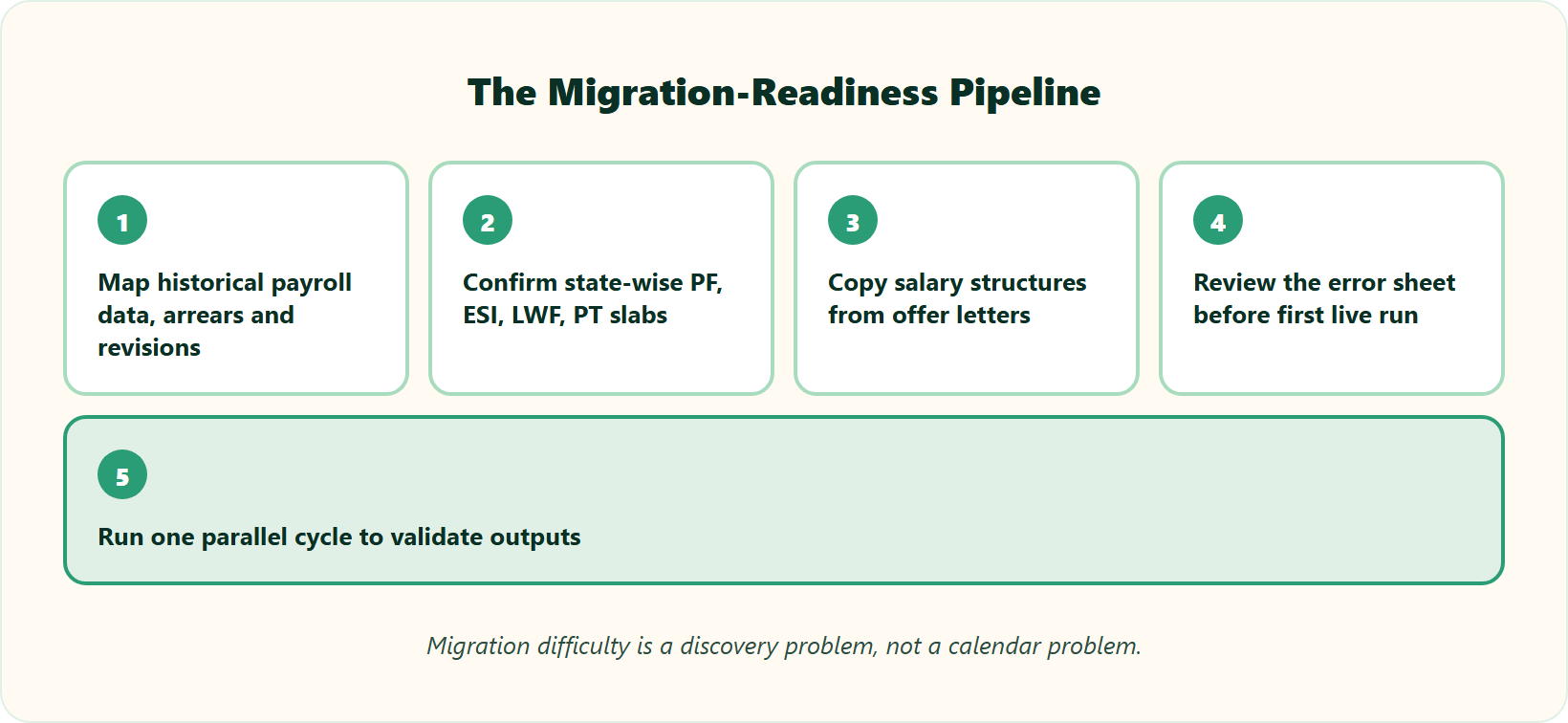
Run these steps before you commit, in order.
- Map your historical payroll data, including arrears and revisions.
- Confirm state-wise PF, ESI, LWF, and PT slabs are configured for every location, in line with professional tax slab rates.
- Copy salary structures straight from offer letters to cut manual entry.
- Download and review the error sheet before your first live salary run.
- Set a parallel run for one cycle to validate outputs.
Migration pain shows up in reviews when the old system fights the move.
“Transitioning from the old system to Darwinbox is quite difficult. User interface of Darwinbox is very outdated. Darwinbox support team is not supportive.”
– Ankush B., Darwinbox user Darwinbox G2 Verified Review
Done right, migration is fast, not fearsome. We lean into that at HROne with no lock-in and a guided migration backed by reliable payroll software, and users report moving in hours, not weeks.
“We have recently moved to HRone from Hrpearls/Webtel. I find HROne more intuitive, streamlined, better leave management system.”
– Ayush G., HR HROne G2 Verified Review
Q9. Darwinbox vs PeopleStrong vs HROne: which fits your enterprise scenario?
Choose Darwinbox for maximum configurability at global-enterprise scale, PeopleStrong for a service-led APAC rollout with a strong mobile app, and HROne if Indian statutory payroll depth, go-live billing, and ROI tracking top your list. There is no universal winner. There is the platform that meets your industry, entity structure, and payroll complexity where they actually are.
🧭 The three-way, side by side
Every customer is its own special snowflake, so the honest answer is scenario-based, not a single trophy. Here is how the three sort out on the axes that decide most Indian mid-market and enterprise deals.
| Axis | HROne | Darwinbox | PeopleStrong |
|---|---|---|---|
| India statutory payroll | Native state-wise PF, ESI, LWF, PT slabs | Configurable, multi-country | Service-led model |
| Billing trigger | After go-live, no lock-in | Often day one of purchase | Contract-based |
| ROI tracking | Inbuilt ROI Dashboard | Limited native ROI | Limited native ROI |
| Workflows | 127-plus pre-built | Deep no-code config | Standardized |
| Best fit | 100 to 5,000 India-first | Global, complex enterprise | APAC, mobile-first |
Market signals back the split. Darwinbox holds roughly 3.1% category share versus PeopleStrong’s 1.8%, while PeopleStrong carries higher review volume and satisfaction (4.3 versus 3.6 stars).
🎯 Match by scenario
Pick by your actual shape, not by brand recognition.
- Global enterprise, heavy custom config, multi-country: lean Darwinbox.
- Distributed or frontline APAC workforce wanting a fast, mobile-led rollout: lean PeopleStrong.
- India-first firm with multi-entity, shift-based, or compliance-heavy payroll: put HROne in the first slot, and a direct HROne vs PeopleStrong or HROne vs Darwinbox comparison sharpens the call.
I have sat with frugal CEOs literally running HR off Excel and Word, and also helped build a certified best-place-to-work. The pattern I keep seeing is this. The winner is whichever tool absorbs your statutory complexity without pushing work back into spreadsheets, which is the core promise of a unified core HCM.
Real users show why fit beats hype. Even satisfied enterprise buyers flag depth-versus-ease tradeoffs.
“I wish there was more space to customize the tool based on individual org needs and have an agile system to incorporate changes based on feedback.”
– Verified User in Automotive Darwinbox G2 Verified Review
On the India-first side, buyers describe the payroll and ROI payoff we designed HROne around, backed by dependable payroll software and clear pricing.
“I love HROne for its cost efficiency and holistic approach. The HR Analytics are particularly valuable for presenting data to management.”
– Priyanka S., HR HROne G2 Verified Review
“Salary processing along with exact calculation of LWF and PT slabs makes the work more convenient.”
– Komal S., HR HROne G2 Verified Review
💬 So, what does your payroll actually look like?
Here is the question I am genuinely sitting with. Over the next two years, I think the deciding factor will not be feature count, it will be which platform can prove rupee savings to your board through an ROI calculator. My current thinking is that ROI instrumentation becomes the real moat.
So before you shortlist, tell me what your payroll actually looks like. How many legal entities, how many states, how many shift patterns, and how many days does one cycle take today? Answer those honestly, and the right fit usually picks itself, and you can always book a demo to pressure-test it.













 Secures Top Spot in
