


Q1: Does PeopleStrong Automate India Payroll Compliance, or Do You Still Need Manual Inputs?
A payroll manager I sat with once framed her whole vendor hunt in one line: “Am I buying an automated system, or just a digital filing cabinet that needs a payroll bureau to run it?” That question hangs over PeopleStrong too.
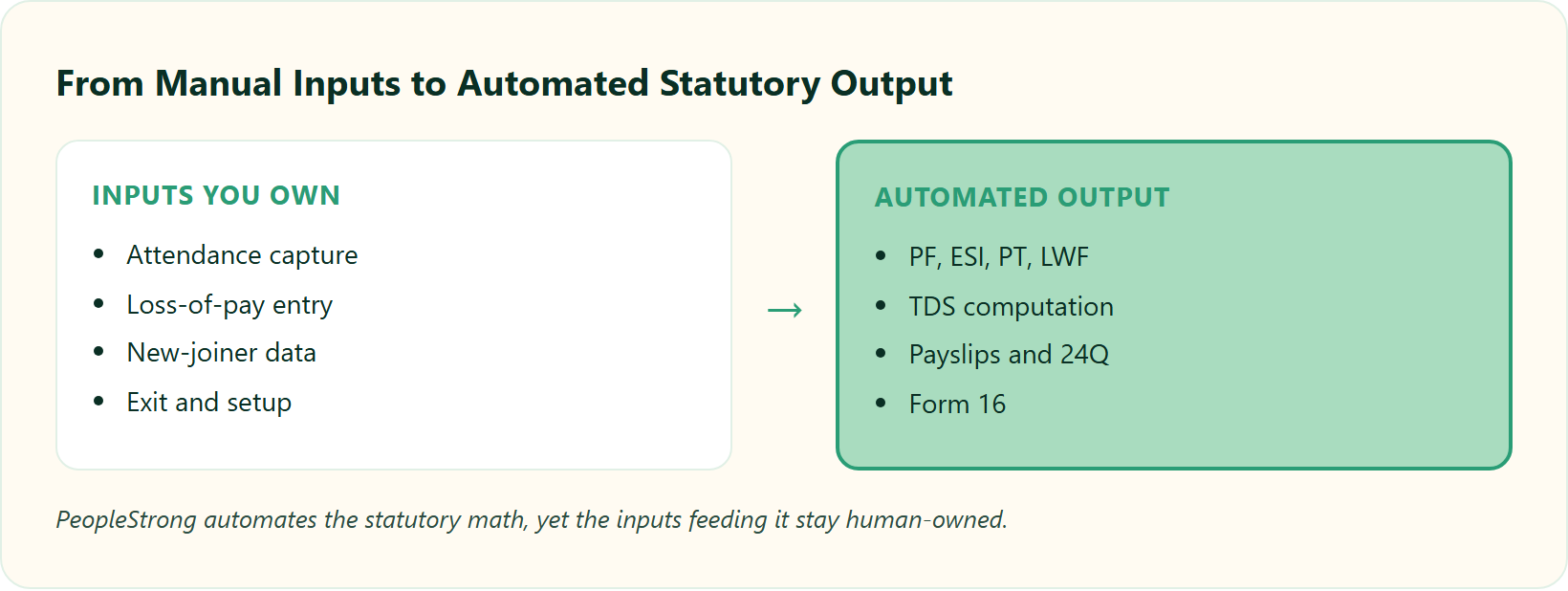
Yes, and no. PeopleStrong automates the statutory math. It calculates PF, ESI, multi-state Professional Tax (PT), Labour Welfare Fund (LWF), and TDS off your salary and attendance data, generates payslips, and prepares 24Q returns and Form 16. But it is not self-driving. New-joiner and exit data, attendance and loss-of-pay (LOP) capture, one-time statutory setup, and pre-filing validation stay human-owned. The automation is real. The “week in Excel fetching attendance” is what you must design out.
The implementation trap most buyers walk into
🪤 The digital filing cabinet problem
Here is the trap. Teams see a polished dashboard in a demo and assume the polish equals autopilot. It does not.
A pretty portal can still be a filing cabinet if attendance, joiner data, and slab setup arrive by hand. The engine only reflects what you feed it. So the honest question is not “does it automate?” but “which inputs does it still expect from me?”
Why the split actually matters
⚖️ Live rules, not a one-time toggle
Payroll compliance in India is a set of live rules, not a one-time toggle. PT and LWF vary by state, ESI eligibility flips at a salary threshold, and TDS follows the 24Q cycle. Automation handles the recurring calculation. Humans handle the exceptions and the setup.
The rest of this article maps that automated-versus-manual line at task level, which no ranking page does today. We also anchor it to a real benchmark: one field-retail operator collapsed its payroll cycle “from 10 days to 5 to 6 days” after moving to a connected system, mostly by killing the manual attendance fetch.
We take the same honest stance at HROne. Automation removes the math, not the judgment. Our own founder frames it plainly: a system “makes something consistent once it’s been formulated, and then you can decentralise it.” That is the benchmark we hold every claim to here, including our own payroll software.
Q2: What Does “Payroll Compliance Automation” Actually Mean in the Indian Context?
Ask five HR leads what “compliance automation” means and you get five answers. Ask a labour inspector in Maharashtra and you get one: show me the PT challan, the LWF cycle, and the 24Q, for this state, this month.
In India, payroll compliance automation means the software applies live statutory rules to each employee automatically. That covers EPFO provident fund, ESIC (Employee State Insurance) for anyone earning up to Rs 21,000 per month, state-wise Professional Tax slabs, Labour Welfare Fund cycles, and TDS with 24Q returns and Form 16. True automation calculates these from attendance and salary data every cycle. It does not just store them in a form you fill by hand.
The six statutory pillars, in plain terms
🧱 What each pillar covers
Think of it as six pillars, not one setting.
- PF (EPFO): provident fund contributions, filed monthly.
- ESI (ESIC): medical and insurance cover for lower-wage staff, capped at the Rs 21,000 monthly threshold.
- PT (Professional Tax): a state-level tax with different slabs per state.
- LWF (Labour Welfare Fund): a state-level fund with its own contribution cycle.
- TDS: income tax deducted at source, reconciled through 24Q.
- Form 16: the annual TDS certificate handed to each employee.
One increment, one eligibility flip
🔁 Where the friction points live
Here is where the “friction points” live, to borrow an operator’s phrase: the Indian specifics like LWF and ESI slabs. Picture a worker earning Rs 20,800 a month who gets a small increment to Rs 21,300.
That employee just crossed the ESI ceiling and should drop out of ESI mid-cycle. A national, one-size engine misses this. Real automation catches it, because compliance is “based on the regulations within that given state and within that locality.” You can see how the slabs move in this breakdown of ESI contribution calculation and the professional tax slab rates.
What “automated” should mean, per pillar
✅ Your vendor checklist
Use this as a vendor checklist. For each pillar, ask: does the system calculate it live, apply rate changes itself, and file or prepare the return? If the answer is “you configure it once and re-enter data monthly,” that is assisted, not automated.
Both PeopleStrong and HROne describe themselves as compliant with local Indian payroll, tax, and statutory law. So do not take the tag list at face value. Ask any vendor, including us, to map each claim to the specific statute and show the challan, the way statutory compliance in payroll is meant to work.
Q3: Which Payroll Tasks Does PeopleStrong Actually Automate?
Strip away the marketing and a payroll engine is judged on one thing: how many steps run without a human touching them. On that test, PeopleStrong does real work.
PeopleStrong automates a full-service payroll engine. It handles salary and CTC calculation, PF, ESI, PT, and LWF deductions, TDS computation, reimbursements, bonuses, full-and-final (F&F) settlements, and payslip generation. It also prepares statutory reports, 24Q returns, and Form 16. Its rule engine applies statutory rate changes, so you do not hand-edit slabs each cycle.
The automated task list
⚙️ What runs without a human
Here is the affirmative half, as a capability inventory.
- Salary and CTC calculation from structured pay components.
- Statutory deductions: PF, ESI, PT, and LWF.
- TDS computation across old and new tax regimes.
- Reimbursements, bonuses, and F&F settlement math.
- Payslip generation and distribution.
- Statutory report, 24Q return, and Form 16 preparation.
How the auto-updates reach the engine
🔍 The rule-engine mechanism
The “automatic updates” claim is not marketing hand-waving. It reflects a documented architecture. Content-based payroll compliance systems store per-jurisdiction rule metadata and apply the right rule to each employee based on location.
So when a slab changes, the rule engine updates the calculation without you rewriting anything. That is the mechanism behind “we apply statutory changes for you.” It is real, though it still needs a human to validate the config during big transitions, which is one reason teams read up on how payroll software reduces compliance risk.
What users say about the automation
💬 Voices from the field
Reviewers confirm the day-to-day automation holds up for pay and payslips.
“PeopleStrong makes reimbursement, claims, and payslip access much easier by bringing everything into a single platform, rather than relying on manual processes or long email threads.”
Anusha, User PeopleStrong G2 Verified Review
“It hits the bulls eye with exactly what any user would expect from their HRMS app. Very practical and easy to use.”
Aswath B., User PeopleStrong G2 Verified Review
“It hits the bulls eye with exactly what any user would expect from their HRMS app. Very practical and easy to use.”
Aswath B., User PeopleStrong G2 Verified Review
A useful yardstick for “how much” a platform automates is breadth: does it cover onboarding to offboarding, or just one process? At HROne, we measure this in 127 pre-built workforce management workflows across hire-to-retire, with triggers that copy salary structure straight from the offer letter so payroll setup is not re-keyed. One HROne user put the payroll side simply:
“Salary processing along with exact calculation of LWF and PT slabs makes the work more convenient.”
Komal S., HR HROne G2 Verified Review
Q4: Where Does PeopleStrong Still Need Manual Inputs, and What Breaks If You Feed It Bad Data?
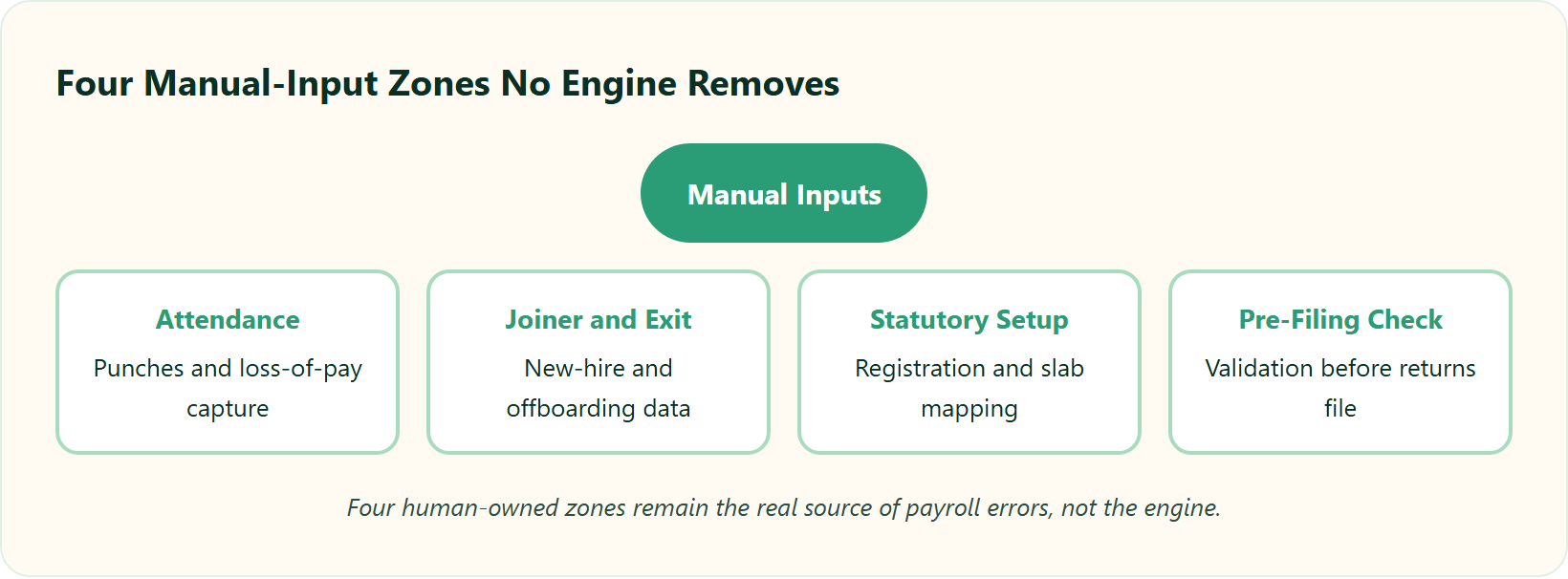
Here is the part vendors skip in the demo. A payroll manager once told me her team spent “at least one week with two to three people just fetching the attendance” every single month. The engine was automated. The inputs were not.
Manual inputs remain in four zones with PeopleStrong. Attendance and loss-of-pay capture, new-joiner and exit data entry, one-time statutory setup (registration numbers, state PT and LWF slabs, salary-structure mapping), and pre-filing validation before returns go out. PeopleStrong automates the calculation. But if attendance still arrives by Excel, you keep that lost week. The automation gain lives or dies on how cleanly you feed it data.
The garbage-in problem no engine fixes
🗑️ Bad inputs, wrong paycheque
Now agitate the real cost. Automation cannot correct a bad input it was never told was wrong.
Research on robotic process automation in onboarding and offboarding shows exactly this: automation cuts payroll inaccuracies, but the residual errors trace back to manual joiner, exit, and attendance data upstream. A wrong join date or a missed LOP flows straight into a wrong paycheque. The engine faithfully computes the mistake.
Where the errors actually originate
⚠️ A process gap, not a software gap
The barrier is rarely the software. It is the process feeding it.
Studies on AI-enabled payroll find the main adoption gap is a skills and process gap, not the engine itself. If your attendance is a biometric export nobody reconciles, no vendor, PeopleStrong or otherwise, saves you. I might be overstating it, but from what surfaces when you actually run this, most “payroll software failures” are really input-hygiene failures wearing a software costume, which is why attendance fraud prevention matters so much upstream.
The design fix that shrinks the manual break
🛠️ Capture data at source
The solution is to remove the manual handoff, not to blame the tool.
- Capture attendance at source with geo-tagged, geo-fenced mobile punches for field and blue-collar teams, so LOP is computed live, not typed in later.
- Map salary structures in bulk by copying directly from offer letters, so new-joiner setup is not re-keyed.
- Lock a pre-filing validation step so nothing files on bad data.
This is exactly the pattern we built into HROne’s attendance management, and users describe the input side working, with honest caveats. On the win side:
“Real time sync of biometric punch details of employees working at field locations. Salary processing along with arrear day amount can easily be calculated.”
Manna S., HR HROne G2 Verified Review
And a fair, critical note, because the manual break is real for everyone:
“Sometimes biometric punch don’t sync properly, we have to manually execute the services which is a time taking purpose.”
Sanjeev K., HR HROne G2 Verified Review
The lesson holds for any vendor: automation is a Ferrari, and someone still has to know how to drive it without burning the clutch. Design the inputs out with a proper mobile HR app, and PeopleStrong’s automation delivers. Leave them manual, and you keep the lost week. If you are weighing both platforms side by side, our HROne vs PeopleStrong comparison lays the manual-input burden out in full.
Q5: Automated vs Assisted vs Manual, What Does PeopleStrong Do at Each Compliance Step?
Most vendor pages promise “100% compliance” and stop there. I find that framing dishonest, because it hides the real work of fetching attendance and handling state-by-state variations.
The honest split is three-tier. Automated: PF, ESI, PT, and LWF calculation, TDS computation, payslip and Form 16 generation, and 24Q preparation. Assisted: statutory rate and slab configuration, multi-state setup, and salary-structure mapping. Manual: new-joiner and exit data, attendance and loss-of-pay (LOP) capture, and pre-filing sign-off. No ranking page draws this line at task level, which is exactly why buyers cannot tell “automated” from “digital filing cabinet” before they sign.
The PeopleStrong compliance task matrix
📊 The three-tier split
Read this the way a payroll manager would read a challan: task by task, who touches it.
| Compliance task | Automated / Assisted / Manual | Who owns it |
|---|---|---|
| PF, ESI, PT, LWF deduction calculation | Automated | Rule engine |
| TDS computation | Automated | Rule engine |
| Payslip and Form 16 generation | Automated | System |
| 24Q return preparation | Automated | System, HR reviews |
| Statutory rate and slab configuration | Assisted | HR and vendor setup |
| Multi-state PT and LWF setup | Assisted | HR and vendor |
| Salary-structure mapping | Assisted | HR |
| New-joiner and exit data entry | Manual | HR |
| Attendance and LOP capture | Manual | HR and managers |
| Pre-filing validation and sign-off | Manual | HR and finance |
The “automatic updates” claim is not fluff. It reflects a documented architecture, where engines receive and apply electronic statutory rule updates automatically. So the automated column is real. The assisted and manual columns are the ones vendors quietly skip, which is why a solid payroll audit checklist matters.
How to use this matrix in a demo
🧭 Turn the table into questions
Take this table into your vendor call and make it work. For each “assisted” row, ask who configures it and how long a slab change takes.
For each “manual” row, ask how the data enters the system, and whether it can be captured at source instead of typed in. If a rep insists everything is “fully automated,” you have found the digital filing cabinet dressed up as autopilot. This is the same lens we apply to our own payroll software.
We built this same three-tier map for HROne on purpose. Group payout validations and JV integration are our assisted-to-automated bridge. HR maps components once, and the auto-scheduler runs the calculation with pre-payout checks so bad data gets caught before disbursal, the way connected integrating payroll with attendance is meant to work. That is automation reframed as “consistent once formulated,” not a marketing absolute.
Q6: How Does PeopleStrong Keep Up With Changing PF, ESI, and Labour Code Rules, and How Accurate Is It?
Here is a number that should scare any payroll lead: employees who hit two payroll mistakes start eyeing the exit. Payroll is not a monthly button. It is trust, paid out on time, every time.
PeopleStrong applies statutory changes through a rule engine that reads jurisdiction-level metadata, so routine EPFO, ESIC, and PT slab updates flow in without you rewriting software. But during structural reform, the four Labour Codes and Code on Wages moving toward implementation in 2025 to 2026, you must validate the new configuration yourself. Automation cuts processing time roughly 40 to 50%, yet “automated” is not “infallible.” Accuracy still rides on clean inputs and audit trails.
How routine updates actually reach the engine
⚙️ A library of statutes, tagged by state
Think of the rule engine as a library of statutes tagged by state. When Karnataka changes a PT slab, the engine swaps the rule for Karnataka employees only.
You do not touch code. That is why “we handle statutory updates” is a fair claim for routine slab and rate changes, and why teams read up on how payroll software reduces compliance risk.
Where auto-update quietly breaks
⚠️ Structural reform needs a human
Here is the twist the category avoids. Auto-update handles small changes well and structural reform badly.
The Labour Codes redefine “wages” itself, which reshuffles PF, gratuity, and FFS math. No engine reconfigures your CTC philosophy for you. During that transition, a human has to validate every mapping, or the automation confidently computes the wrong number, so stay close to navigating changing labor laws.
What the accuracy data says
📈 Time saved, errors reduced
Research on AI-enabled payroll finds processing time drops roughly 40 to 50% with automation, alongside fewer manual errors. But the residual errors are audit-trail failures, not math failures.
A payroll manager once told me about a team that gamed manual overtime, submitting whatever hours they wanted until attendance-gated automation shut the loophole. Automation did not just save time there. It restored honesty to the number, much like disciplined attendance fraud prevention does.
What users report on accuracy
💬 Clean inputs, clean output
Reviewers back the accuracy claim once inputs are clean.
“Proper calculation of PF and ESI was a pain area for us before, but now with the HROne automated calculation process, results are up to the mark and following Indian tax compliances properly.”
Ajay K., HR HROne G2 Verified Review
“It handles salary calculations, statutory deductions, PF, ESI, taxes, and filings automatically, with zero manual intervention, removing payroll errors and compliance anxiety during audits.”
Waldon S., User HROne G2 Verified Review
Most providers claim compliance. Fewer provide the expert audit trails a real labour inspector wants to see. At HROne, our answer to structural transitions is a human layer: a dedicated HR SPOC (Single Point of Contact) with a 9.8 NPS validates config during rule changes, instead of leaving you stuck in email threads. Our core HCM then keeps an auditable record, because a missed payroll is a broken promise, not a rounding error.
Q7: How Does PeopleStrong Compare to HROne, Darwinbox, greytHR, Keka, and ADP for India Compliance Automation?
Every buyer starts with the wrong question: “which one is compliant?” They all are. The compliance tag list is table stakes in India, so it tells you almost nothing.
Every major India platform, HROne, PeopleStrong, Darwinbox, greytHR, Keka, and ADP, automates PF, ESI, PT, LWF, and TDS calculation. The real differences sit elsewhere. How much manual attendance work remains, whether you get a dedicated SPOC or endless email threads, and whether billing starts on purchase or after go-live. Choose on manual-input burden and support model, not on the tag list everyone shares.
The six platforms, quickly
🏷️ One honest line each
Here is the honest, one-line read on each.
- HROne: India-first, mobile-native, Super Inbox closes tasks in three clicks; subscription meters only after go-live, no lock-in.
- PeopleStrong: strong enterprise payroll engine with solid statutory automation, best suited to larger enterprise builds.
- Darwinbox: enterprise brand weight, but users report tab-and-email juggling and slower support at times.
- greytHR: capable SMB payroll, but limited workflows and rigid config on multi-entity or shift-based setups.
- Keka: polished UX, though users flag email-thread-only support and slow implementation.
- ADP: deep compliance heritage, better fit for global-payroll and MNC contexts than lean Indian mid-market.
Where they actually differ
📋 The criteria that decide
| Criteria | HROne | PeopleStrong | Others (Darwinbox / greytHR / Keka / ADP) |
|---|---|---|---|
| Statutory coverage | PF, ESI, PT, LWF, TDS | PF, ESI, PT, LWF, TDS | PF, ESI, PT, LWF, TDS |
| Auto-update of slabs | Yes, rule engine | Yes, rule engine | Yes, varies |
| Manual-input burden | Low (geo-fenced mobile punch) | Moderate | Moderate to high |
| Support model | Dedicated HR SPOC (9.8 NPS) | Account-based | Often email threads |
| Billing start | After go-live | On contract | Often day one |
What users say across the field
💬 Public pain points
The pain points are real and public, not marketing spin.
“It is a user friendly platform. GreytHR is not much good at customizing based on our requirements. For our case, from implementation onwards, there were issues with leave balance and all.”
Verified User in IT greytHR G2 Verified Review
“We started working with Keka HRMS in August, and to this day, we have been unable to implement the tool due to their consistently delayed responses and poor coordination.”
Divya P., User Keka G2 Verified Review
A single-state, 300-employee IT firm can honestly run well on most of these; compliance depth is not the deciding factor there. A multi-state firm with field or blue-collar teams is a different animal, where manual attendance is the whole ballgame, so multi-location workforce management becomes the real test.
That second scenario is where we built HROne to win: real-time geo-fenced mobile punches feed payroll directly through our attendance management, so LOP is not re-keyed. I will say the quiet part too. If you are a sub-100-employee startup, we are not your best fit, and that is fine. If you want the full breakdown, see our HROne vs PeopleStrong page.
Q8: Is PeopleStrong the Right Fit for a Mid-Market Indian Company (300 to 5,000 Employees)?
The “enterprise-grade” label seduces mid-market buyers, and I understand why. But enterprise-grade sometimes means “built for a 40,000-person conglomerate and bolted onto your 800-person reality.”
PeopleStrong fits enterprises well. But mid-market Indian firms, 300 to 5,000 employees, should test one thing: does the enterprise build meet your state-specific and vertical-specific needs, or is it one size fits all? If you run field or blue-collar teams across states, prioritise geo-fenced attendance, mobile payslips, and a real support SPOC over “Enterprise” branding. Fit is decided by regional depth and manual-input burden, not logo size.
The enterprise mirage
🏭 Built for whom, exactly?
Here is the trap I have watched mid-market teams fall into. They buy the biggest name, then discover the config assumes head-office desk staff.
Meanwhile, their real workforce is on shop floors and in retail aisles, marking attendance on phones. Every customer is its own snowflake, and the right question is “does this meet us where we actually are?” That question sits at the heart of any honest how to choose HRIS HRMS software exercise.
A field-workforce example
🛒 When the pain is attendance, not tax
Consider a retail operator with market teams spread across cities. Its payroll pain was never the tax math. It was fetching attendance from field staff who never see a biometric machine.
Moving to geo-tagged, geo-fenced mobile attendance collapsed that cycle from around 10 days to 5 or 6 days. The engine did not change the math. It changed how honestly and quickly the input arrived, the same principle behind a good geofencing attendance system.
A fit checklist by vertical
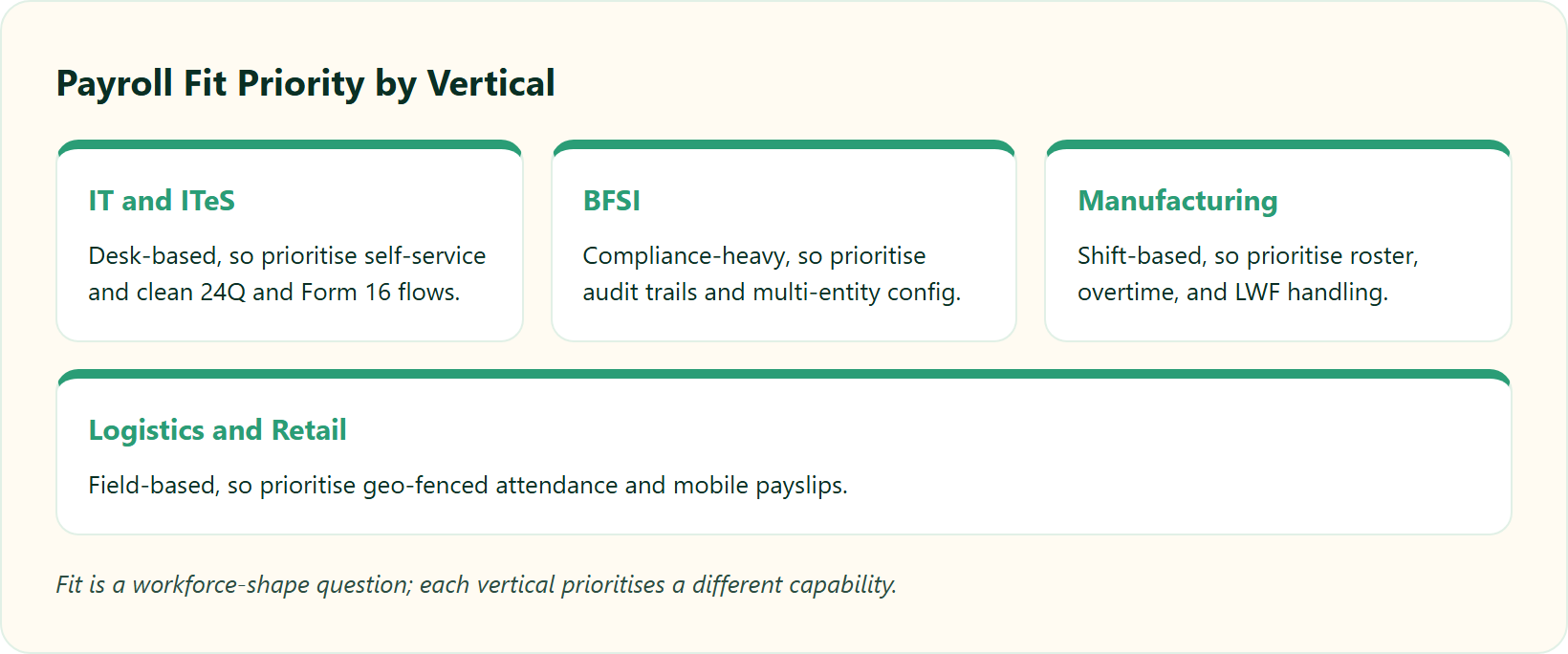
✅ Match the tool to your reality
Match the platform to your reality, not the brochure.
- IT / ITeS: desk-based, so prioritise self-service and clean 24Q and Form 16 flows.
- BFSI: compliance-heavy, so prioritise audit trails and multi-entity config.
- Manufacturing: shift-based, so prioritise roster, overtime, and LWF handling.
- Logistics / Retail: field-based, so prioritise geo-fenced mobile attendance and mobile payslips.
Reviewers confirm the field-attendance angle is where day-to-day fit is won or lost.
“The GPS-based login and logout feature allows me to track field employees’ locations. I use HROne for managing the employee life cycle and payroll.”
Krunal S., User HROne G2 Verified Review
“I love HROne for its cost efficiency and holistic approach, which is why I prefer it over other vendors like Workday.”
Priyanka S., HR HROne G2 Verified Review
We built HROne squarely for this 100 to 5,000 employee Indian mid-market, across IT/ITeS, BFSI, manufacturing HR, logistics, and retail. For blue-collar teams, password-protected mobile and WhatsApp bot payslips mean people who never open a laptop still get their payslip. Fit, in my experience, is a workforce-shape question long before it is a feature-count question.
Q9: How Do You Run a Payroll Demo That Exposes Manual-Input Gaps Before You Sign?
A payroll manager once described her worst week: paying the implementation fee, then discovering the system could not do what the demo promised. The demo was clean. Her data was not. That gap is where the money burns.
Before you sign, run a live test with your own messy data, not the vendor’s polished demo. Upload real attendance for one state, add a mid-month joiner and an exit, trigger a PT or LWF slab change, and time a full cycle. Insist on flat pricing with no lock-in and billing that starts only after go-live. If the demo cannot survive your data, the contract will not either.
The seven-step stress-test
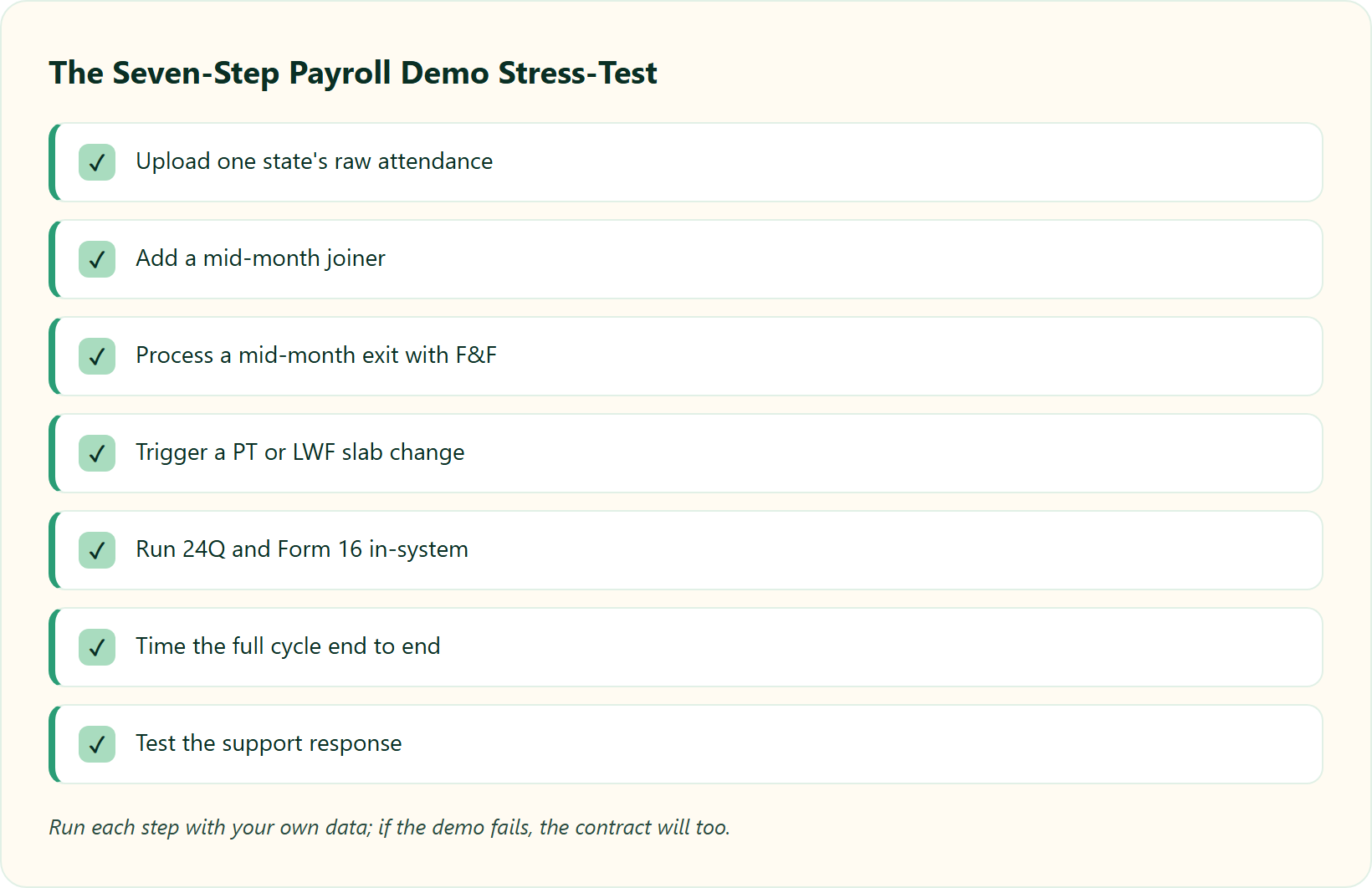
🧪 Bring your own data
Bring your own data and watch what breaks. Each step has a clear pass or fail signal.
- Upload one state’s raw attendance. Pass: LOP computes without manual cleanup. Fail: someone opens Excel.
- Add a mid-month joiner. Pass: pro-rated salary and statutory setup flow automatically. Fail: manual re-keying.
- Process a mid-month exit with F&F. Pass: full-and-final settlement calculates cleanly. Fail: side-sheet math.
- Trigger a PT or LWF slab change. Pass: the rule engine applies it per state. Fail: you edit slabs by hand.
- Run 24Q and Form 16. Pass: prepared and validated in-system. Fail: exports to a consultant.
- Time the full cycle. Pass: hours, not a week. Fail: the lost-week pattern returns.
- Test support response. Pass: a named person who knows payroll. Fail: an email queue.
If you want a ready-made scoring sheet, our payroll audit checklist and the choosing payroll software checklist map neatly onto these seven steps.
The contract terms that protect your cash
💰 Read the paperwork, not just the pitch
The demo is only half the test. The paperwork is the other half.
Watch for billing that starts on day one of purchase, because you then pay through a long implementation you have not benefited from yet. Demand flat per-employee pricing, no lock-in, and a subscription that meters only after go-live. Your money is real and finite; do not rent software you cannot yet use. This is exactly why HR software pricing transparency matters, and you can sanity-check numbers on our pricing page.
What buyers learned the hard way
💬 Public warnings worth reading
These are public, verifiable warnings about skipping the stress-test.
“We started working with Keka HRMS in August, and to this day, we have been unable to implement the tool due to their consistently delayed responses and poor coordination.”
Divya P., User Keka G2 Verified Review
“The initial setup of HROne was surprisingly straightforward, much lighter than expected for a full HRMS.”
Waldon S., User HROne G2 Verified Review
We designed HROne’s model around exactly this fear. A prior-HR onboarding SPOC (Single Point of Contact) with a 9.8 NPS runs your go-live through a proven onboarding process, and the subscription meters only after you are live, not from the day you sign. Make the trainer prove they can drive the car before you buy it, then pressure-test the numbers against our ROI calculator and our payroll software.
The question I am sitting with
🔮 What the Labour Codes will reveal
Here is the question I am sitting with as the Labour Codes roll out. When “wages” gets redefined, will buyers finally stress-test config the way I have argued, or will they trust the demo again and rediscover the lost week?
I would genuinely like to hear how your last payroll migration actually went. If you want to run this stress-test against us directly, put us through it on a book a demo call, or line us up in the HROne vs PeopleStrong comparison first.













 Secures Top Spot in
