








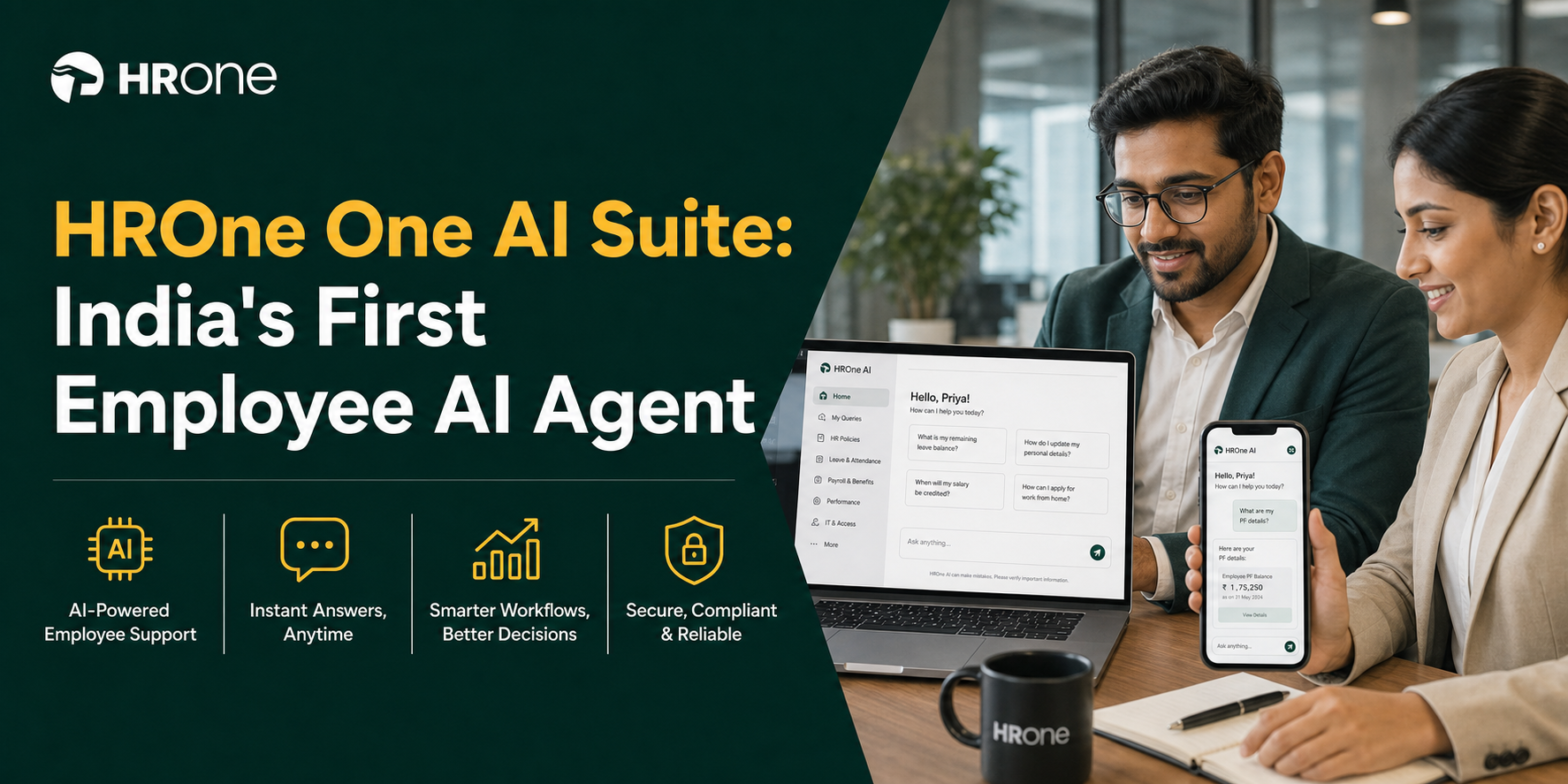
Q1. What exactly is the HROne One AI Suite (and is it just a chatbot with a new name)?
The HROne One AI Suite is an execution-first AI layer inside the HROne HRMS. Its Employee AI Agent lets staff finish HR tasks, applying for leave, filing reimbursements, and raising helpdesk tickets, through simple voice or chat prompts, with no forms or menus. Unlike a chatbot that only returns answers, One AI acts. It reads intent, chains the steps, and completes the task instantly.
🧩 It executes, it does not just answer
Picture a payroll manager at a 900-person logistics firm. She opens the app on a Monday, types “regularise my Friday punch,” and it is done before her chai cools. No ticket. No email to HR. No waiting.
That is the whole idea. HROne launched One AI in April 2025 and called it India’s first Employee AI Agent for HR task execution. Karan Jain, HROne’s founder, framed the launch in one line: “You speak. One AI acts.”
🤔 So is this just a chatbot with a fresh coat of paint?
I get the skepticism. Most of us have clicked an “HR assistant” that only spat back a policy PDF link. The suspicion is fair, and you should hold it.
Here is the honest distinction, and I might be splitting hairs for some readers, but it matters. A chatbot answers a question. An agent finishes the job. One AI is built to do the second thing, completing leave, reimbursement, and helpdesk actions inside the same chat window.
💬 The point is not the AI, it is your Monday
The real reader question is not “is this smart tech.” It is “will this stop my team from always sitting on the desk doing something on data.” That is a productivity problem, not a novelty problem.
I lean toward a view the category tends to avoid. A system should not replace an HR professional. It should optimise the human by getting tactical work out of the way and driving accuracy and consistency, which is exactly where an execution agent earns its keep. At HROne, we position One AI as the answer to tab-juggling and data-chasing, not as a replacement for the person who actually cares about people. This is the connective logic behind our entire core HCM platform.
Q2. How is an “Employee AI Agent” different from the HR chatbot you already ignore?
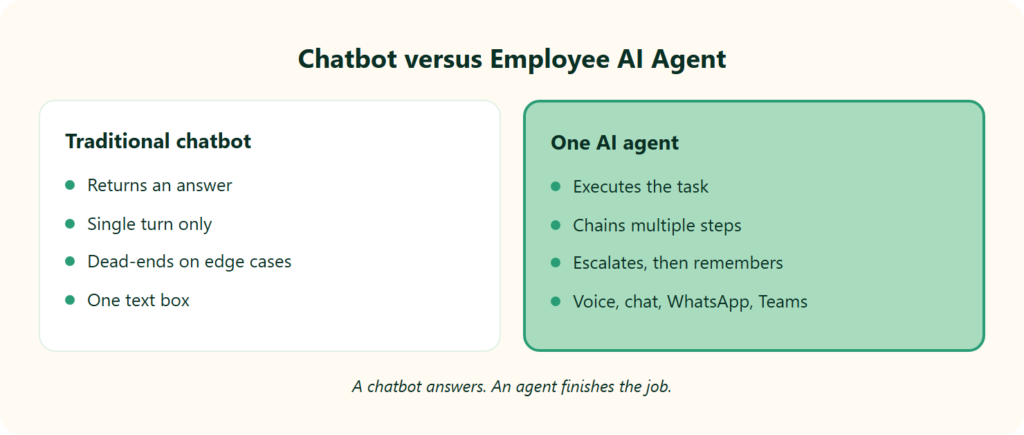
A traditional HR chatbot returns an answer and stops. An Employee AI Agent completes the task itself. One AI understands context, chains multiple steps like approving leave, syncing payroll, and notifying the manager, and escalates to a human when needed. It works over chat, voice, and regional languages inside WhatsApp and Teams, so employees never juggle tabs or wait in a ticket queue.
🪟 The tab-juggle is the real villain
Ask any HR ops lead about their worst hour. It is usually the one spent bouncing between five tabs and an email thread to close one leave request. Juggling between tabs and emails to close everyday HR tasks feels never-ending, and the cost is real time lost.
A verified HROne user captured the fix plainly.
“It allows users to manage multiple tasks from a single window, eliminating the need to switch between different modules. Additionally, searching for information is as simple and efficient as using Google.”
— Vignesh J., HR Professional HROne G2 – Verified Review
🆚 Answer-only bot versus execution agent
Here is the difference laid out cleanly. This is the table I wish someone had shown me before my first HRMS demo.
📋 Traditional HR Chatbot versus One AI Employee Agent
| Dimension | Traditional HR chatbot | Employee AI Agent (One AI) |
|---|---|---|
| Core behaviour | Returns an answer | Executes the task |
| Steps handled | Single turn, one reply | Chains multiple steps, then acts |
| When it hits an edge case | Dead-ends or repeats itself | Escalates to a human, then remembers the fix |
| Access | Text box on one screen | Voice, chat, regional languages, WhatsApp, Teams |
⚙️ Why “execution” is a real architecture, not a slogan
This is not marketing language borrowed from a bot vendor. Agentic systems are patented as orchestration engines that coordinate AI agents, automation robots, and humans in the loop, with self-healing when a task described in plain language cannot be completed. A related patent shows agents escalating to a human, then storing that resolution in memory so the next attempt succeeds on its own.
That is the quiet part most listicles skip. An agent that acts needs a way to fail safely and learn, which is exactly the mechanism behind One AI.
🧵 Where HROne fits
We built One AI as the execution layer that removes the tab-juggle, not another Q&A box bolted on top. This is the same principle behind our HR inbox, where every pending task surfaces in one place. A team lead review pointed at the gap that used to exist, and it is worth reading with fresh eyes.
“So when I was using that platform, there was no AI assistant available at that time. If AI features like AI command prompts could be added as a functionality, it would be a significant incremental improvement.”
— Naman G., Team Lead HROne G2 – Verified Review
That request is now the product. One AI turns “who do I ping” into “just say it, and it is done.”
Q3. What HR tasks can One AI actually execute, and how do employees reach it (voice, regional languages, WhatsApp, Teams)?
On day one, One AI executes the tasks that clog HR inboxes: applying and approving leave, filing reimbursements, raising and resolving helpdesk tickets, checking policy and leave balances, regularising attendance, drafting job descriptions from a prompt, and scoring resume relevancy. Employees reach it by voice or chat in regional languages, inside WhatsApp, Microsoft Teams, or the HROne app, with no forms and no training.
✅ The tasks it clears off your plate
Think in terms of what your team stops doing manually. Each line below is a job that used to need a form, an email, or a nudge.
- Leave and attendance: apply, approve, check balances, and regularise a missed punch, all by asking.
- Reimbursements: file a claim and let the receipt parser read the bill instead of you keying it in.
- Helpdesk: raise and track an HR or finance ticket without leaving the chat.
- Policy answers: ask “how many casual leaves do I have left” and get the real number, not a PDF.
A verified user described this shift better than any spec sheet.
“Employees can apply for leave, check their balances, and view key information without having to ping HR. The approval process is generally smooth.”
— Rahul C., HR User HROne G2 – Verified Review
🧑💼 For recruiters, it does the tedious first pass
Two features stand out because they are concrete, not “AI-powered future” fluff. First, One AI drafts a job description from your job title and expectations by prompting the model, then routes it through your normal approval flow. Second, it stacks the most relevant CVs on top with a visible relevancy score, so you read 95% matches before 84% ones.
That is the difference between staring at a blank JD box and reviewing a ranked shortlist over coffee. It is why our recruitment software treats screening as an execution task, not a manual chore.
📱 It speaks the way your workforce actually works
Here is a scene I keep coming back to. A field sales rep in Coimbatore, no time to open a laptop, marks duty by speaking to the agent in his language. One AI works over voice and chat in regional languages, inside the WhatsApp bot, Microsoft Teams, and the HROne app.
Pair that with geo-tagging and geo-fencing for attendance management, and you cut the old problem of buddy punching and proxy attendance for deskless teams. A verified review confirms the field-team payoff.
“The GPS-based login and logout with pinpoint accuracy helps me track my on-field employees’ status. I also found the initial setup very easy.”
— Krunal S., HR User HROne G2 – Verified Review
🔗 Where HROne fits
We connect One AI to the modules you already run, so a spoken request triggers the real workflow behind it, including our InboxForHR task hub and Teams bot. One user who recently switched vendors noticed it without being prompted.
“Sometimes I also used its OneAI system to apply leaves. That is what I have seen first time in a HR application system.”
— Ayush G., HR User HROne G2 – Verified Review
Q4. Why should you trust an agent to act, and how does “execution-first” AI work under the hood?
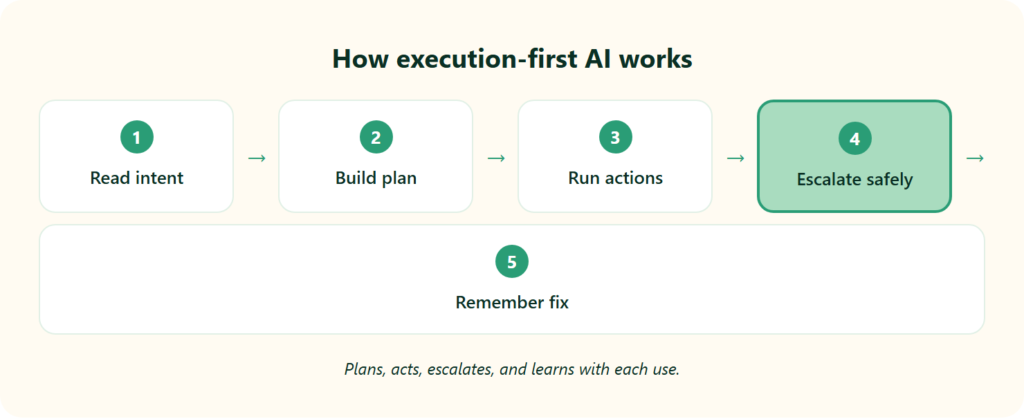
Execution-first agents do not just chat. They orchestrate. The system reads your natural-language intent, breaks it into steps, runs each action alongside rule-based automation, and escalates to a human at edge cases, then remembers that resolution for next time. This orchestration-plus-human-in-the-loop design is why One AI can act autonomously without going rogue on sensitive HR data.
🧠 Step one: intent becomes a plan
Let me explain this the way I would to a new HR ops hire, no jargon. You say “reimburse my Delhi travel.” The agent does not just find the form. It interprets the goal, then builds a small plan: read the receipt, check the policy limit, file the claim, route it for approval.
Patented agentic orchestration works exactly this way, coordinating AI agents and automation robots to run a multi-step process from start to finish. That planning layer is what separates an agent from a search box, and it powers our expense and reimbursement flows.
🛟 Step two: it fails safely and learns
Here is the part that should lower your guard, and I say that as someone naturally wary of “autonomous” anything. A well-built agent knows when it is stuck. When it cannot complete a task described in plain language, it escalates to a human, and that human’s fix gets stored in the agent’s memory, so it can handle the same case alone next time.
This is “self-healing” in plain terms. The system gets more reliable with use, instead of repeating the same dead-end.
🔒 Step three: why “no training needed” is not a hollow claim
Agents can be configured from real historical conversations, including HR scenarios as ordinary as “how much vacation balance do I have left.” That is why One AI arrives pre-trained on real-world HR situations and works out of the box, no long setup project required. You can see the full capability on the HROne AI add-on page. A verified user backed this up.
“The initial setup of HROne was surprisingly straightforward, much lighter than expected for a full HRMS.”
— Waldon S., HR User HROne G2 – Verified Review
🏛️ Where HROne fits
I hold one conviction the category tends to dodge. An organisation should not be person-dependent. It should be process and system dependent, and orchestration is how you operationalise that. We designed One AI so the execution logic lives in the system, not in the one veteran who remembers how confirmations work, which is the same thinking behind our payroll software.
That matters because the real risk with any HR platform is not the AI going wrong. It is the tool getting bought and never used, the way a costly ERP can quietly become a ghost town. An agent that plans, escalates, and remembers is built to get adopted, not shelved. If you want to weigh the fit for your team, our why HROne breakdown is a practical place to start.
Q5. Why does an Employee AI Agent matter now, what does the data on agentic AI in HR say?
Agentic AI in HR is no longer optional. Gartner reports that 82% of HR leaders plan to use AI agents within the year, and it expects half of today’s HR activities to be AI-automated by 2030, shifting from single agents to multi-agent systems. Yet HROne’s own “AI in HR 2026” study finds most Indian enterprises are not ready, a structural gap an out-of-the-box agent is built to close.
📊 The numbers say the shift already happened
Let me put the timeline plainly. When 82% of HR leaders say they will deploy AI agents within a year, the question stops being “should we” and becomes “with what.”
The direction matters as much as the pace. Gartner frames a move from single, standalone agents toward multi-agent systems, where several agents coordinate on a workflow. Read HROne AI that way. Its hiring, insights, and InboxForHR agents are the early shape of that multi-agent system, not a single novelty bot.
⏰ India is keen, but not ready, and that is the real gap
Here is the part I keep sitting with. Intent is high, but readiness is not, and that gap is where most rollouts quietly fail.
HROne’s national study, “AI in HR 2026: State of Adoption, Readiness and Impact,” documents a widening structural readiness gap across enterprise HR in India. My honest read, and I could be wrong on the exact pace, is that the winners will not be the teams that build agents from scratch. They will be the teams that adopt a pre-trained employee AI agent and skip the multi-year build.
🧩 Where HROne fits
I hold a slightly contrarian view here. The talent war is not something you win with more tooling. You win it by freeing HR to spend time on people, and that is the point of automating tactical work, whether that sits in recruitment software or in daily core HCM tasks.
We built One AI as the readiness-gap closer for exactly this moment. Instead of asking a 500-person firm to assemble its own agent stack, HROne ships one that already runs everyday HR tasks, backed by first-party India data no competitor listicle has.
Q6. What does One AI change for a real HR team, does 150% occupancy actually drop?
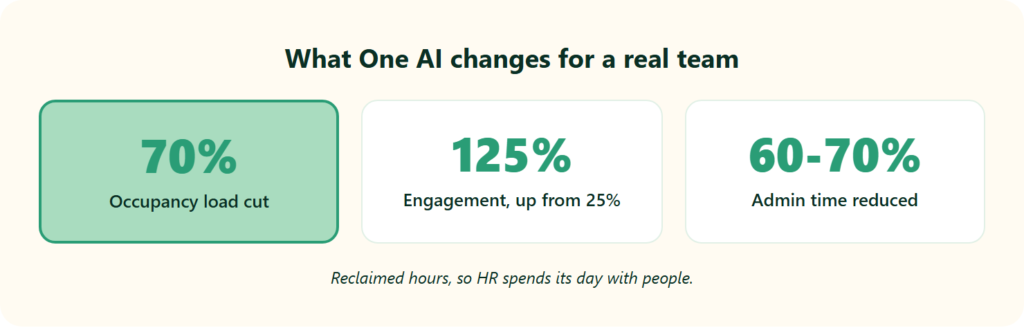
The point of One AI is not novelty. It is reclaimed hours. HROne customers describe cutting a 150% occupancy load by roughly 70%, pulling attrition reports in seconds instead of chasing spreadsheets, and lifting engagement from 25% to 125% after instant recognition. The agent clears the manual data-chasing, so HR spends its day with people, not portals.
😰 The situation: a manager stuck in the cabin, typing
Picture a mid-market HR manager at month-end. Attrition is climbing, and the answer is buried across five spreadsheets. So they sit in the cabin, typing, reconciling, and never actually talking to the people leaving.
That is the trap. The work that should serve people ends up replacing time with people. I have felt this myself, and it is the quiet reason good HR folks burn out.
🔄 The complication and turn: pull the report, reclaim the hour
The turn is unglamorous but real. When the report is one click away, the manager stops being a data-entry clerk.
A CGS leader described it as now pulling reports from HROne and allocating that reclaimed time to interact with employees, rather than sitting at the cabin. A verified user echoes the same shift, made possible by connected workforce management.
“I appreciate how HROne has revolutionized manual master data management, allowing me to pull reports rapidly without the hassle of multiple spreadsheets. The software frees up my team to focus on employee engagement and retention strategies instead of manual data updates.”
— Priyanka S., HR Professional HROne G2 – Verified Review
⭐ The resolution: hours back, engagement up
Now the numbers. One HROne customer brought a 150% occupancy load down by roughly 70%, and another lifted engagement from 25% to 125% after switching to instant recognition through employee engagement tools.
The InboxForHR moment is the one I find sticks with people. Seeing turnover set against expenditure in one view reframes a vague worry into a decision. A verified review captures the admin-time payoff plainly, a benefit that extends into faster payroll software cycles.
“The InboxforHR is a game-changer, centralizing every HR task into one simple inbox, cutting down administrative time by 60 to 70% and preventing tasks from falling through the cracks.”
— Waldon S., HR User HROne G2 – Verified Review
At HROne, this is the whole design intent. Move HR from data to people, and let the system carry the tactical load.
Q7. Is One AI enterprise-grade and India-compliant, data security, payroll, and statutes?
One AI processes sensitive employee data, so it runs on enterprise-grade security and keeps a human in the loop for approvals. Because it executes leave, payroll, and reimbursement actions, its audit trails must line up with Indian statutes: the Code on Wages, EPFO and ESIC contributions, the IT Act’s data-protection duties, and POSH or Maternity Benefit entitlements in policy answers.
🔒 Bottom line first: autonomy with guardrails
Here is my blunt take. An agent that touches payroll should never act without a safety net.
That is why execution-first design pairs automation with human approval at the sensitive steps. The agent drafts and prepares, a human confirms, and every action leaves a record inside your payroll solution.
⚖️ The four statutes an HR agent must respect
Think of these as guardrails, not legal advice. Each maps to a task the agent actually performs.
- Payroll runs to Code on Wages, 2019. This central law standardises wage and payment-timing rules, so auto-synced payroll must follow it. It is worth pairing with strong statutory compliance payroll practices.
- Attendance and reimbursement records to EPFO and ESIC. Provident-fund and state-insurance contributions depend on accurate attendance management and reimbursement data feeding the calculation.
- Employee data to IT Act, 2000 (SPDI rules). Sensitive personal data, meaning SPDI, carries reasonable-security-practice duties on whoever processes it.
- Policy answers to POSH and Maternity Benefit Acts. When the agent answers a policy question, entitlements under these laws must be reflected correctly, in line with a documented POSH policy.
💰 Where HROne fits
I have a strong view on billing that the category tends to dodge. You should not pay for software before it goes live, which is exactly why our pricing meters only after go-live, with no multi-year lock-in.
Add audit-ready records and the operational rigor our teams apply to payroll, including deep GL-code handling, and compliance becomes a byproduct of the workflow, not a scramble. A verified user names the payroll-accuracy payoff.
“Proper calculation of PF and ESI was a pain area for us before, but now with the HROne automated calculation process, results are up to the mark and following Indian tax compliances properly.”
— Ajay K., HR User HROne G2 – Verified Review
Q8. How does One AI stack up against greytHR, ZingHR, and enterprise suites?
Most rivals bolt AI onto recruiting or ship answer-only bots. One AI is an execution-first Employee AI Agent across everyday HR tasks. Against greytHR, ZingHR, and enterprise suites, HROne differentiates on India’s first inbuilt ROI dashboard, a dedicated 9.8-NPS support SPOC, voice and regional-language access, and no-lock-in billing that starts after go-live, not from purchase day.
🥇 The short version, in order
Here is how I would rank these for a 100 to 5,000-employee Indian firm, and I will be honest about fit.
- HROne One AI, best for teams that want tasks executed, not just answered, with ROI proof for the board.
- ZingHR, best for large enterprises already committed to its hire-to-retire suite. See the HROne vs ZingHR breakdown.
- greytHR, best for SMB payroll where workflow depth is not the priority. Compare on the HROne vs greytHR page.
- Enterprise suites (SAP SuccessFactors), best for global giants with in-house developers.
🆚 The comparison that actually matters
📋 HROne One AI versus ZingHR versus greytHR
| Dimension | HROne One AI | ZingHR | greytHR |
|---|---|---|---|
| Core behaviour | Executes HR tasks by voice and chat | Suite modules, manual navigation | Payroll and leave, limited workflows |
| ROI visibility | India’s first inbuilt ROI Dashboard | Not surfaced | No native ROI instrumentation |
| Support model | Dedicated prior-HR SPOC, 9.8 NPS | Users report delayed support | Users report weak escalation |
| Pricing and lock-in | Flat, meters after go-live, no lock-in | Contract-based | Budget-tier, contract-based |
Competitor pain points here are user-reported, not my opinion. On ZingHR, a verified review flags the support and rollout gap.
“System implementation experience was horrible, in 6 months the implementation was barely completed to 40%. Support is never on time. Replies to emails get delayed by days if not weeks.”
— Sanmeet S., HR User ZingHR G2 – Verified Review
On greytHR, the recurring theme is rigid configuration and escalation gaps.
“Lack of timely, responsive, and easily reachable customer support. There is a very high dependency on the greytHR team to customize, and the customization is full of gaps. There is no escalation matrix.”
— Verified User in IT greytHR G2 – Verified Review
To be fair, greytHR handles SMB payroll adequately, and ZingHR carries genuine hire-to-retire breadth. The gap is architectural, not a knock on their intent.
🌉 Where HROne fits
The fastest way to judge an execution agent is to watch it finish a task, which is why I would book a demo before comparing checklists.
At HROne, the tiebreaker is proof, not checklists. The question we keep returning to is simple: which platform gives HR the evidence that teams actually reclaim time and can show savings to the board? If you want to weigh that yourself, the why HROne breakdown lays out the case.
Q9. How do you roll out One AI without it becoming a crore ERP ghost town?
The biggest risk is not the AI. It is non-adoption. To avoid the “ERP ghost town,” where a firm buys costly software that never gets used, start with the bread-and-butter modules (core HCM, time, and payroll), train the trainer so the team can drive the Ferrari without burning the clutch, clone existing salary structures to cut setup, and insist on no-lock-in pricing that starts only after go-live.
⚠️ The real failure is a tool nobody opens
Let me say the quiet part out loud. A firm can spend a fortune on an enterprise system, and it can sit there unused, a ghost town.
That is the failure mode I worry about, not the technology. So the whole rollout should be designed around one goal: people actually use it by week two, whether that is attendance management or leave.
✅ The five-step rollout that gets adopted
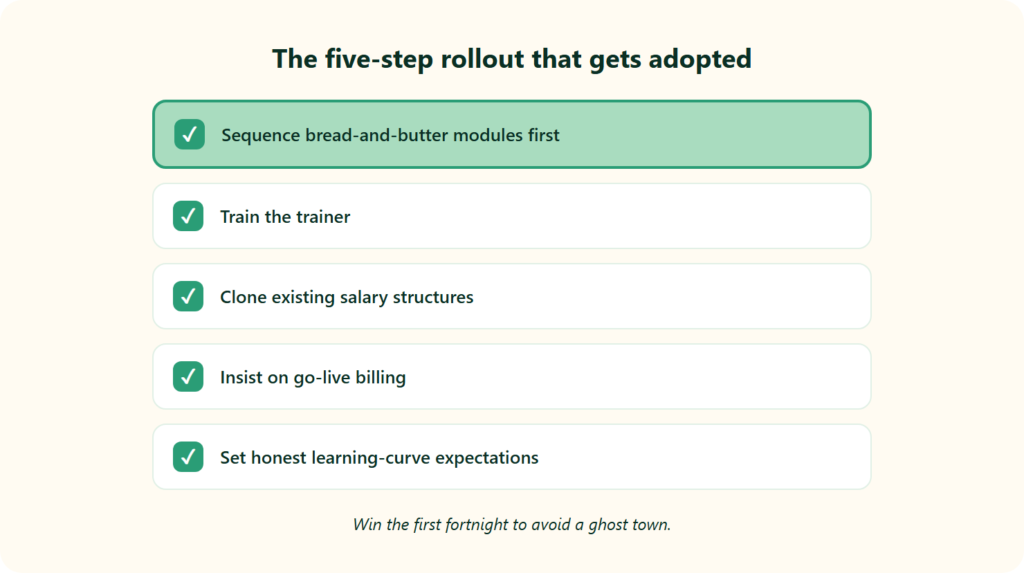
Here is the sequence I would run, in order, and the reason behind each step.
- Sequence the bread-and-butter first. Turn on core HR, time office, and payroll software before anything fancy. These touch every employee daily, so adoption compounds fast.
- Train the trainer. Teach one internal champion deeply, so they can guide the team. It is how you drive the Ferrari without burning the clutch on day one.
- Clone existing salary structures. Pull structures straight from offer letters instead of rebuilding them. This alone cuts setup time sharply, and you can sanity-check figures with a salary calculator.
- Insist on go-live billing. Do not pay before the system is live and running. No lock-in, subscription meters only after go-live, which is exactly how our pricing works.
- Set honest learning-curve expectations. Each module takes roughly an hour to 90 minutes to configure, with about 10 to 11 settings. Tell your team that upfront.
⏰ Where HROne fits
I will be candid about the trade-off, because pretending setup is instant helps no one. A verified user flagged it plainly, and a smoother onboarding process is the fix.
“It can sometimes feel a bit overwhelming for new users. Certain features take time to understand, and without enough guided support, the learning curve can feel quite steep.”
— Nijanthan R., HR Professional HROne G2 – Verified Review
That is exactly why we pair HROne with a prior-HR onboarding SPOC, someone who has run HR, not a technical PM reading a checklist. When onboarding is done right, the tone shifts.
“Their onboarding process was thorough, with helpful training sessions for the whole team. The support team is always ready to help us with any issues.”
— Rishiraj R., HR Professional HROne G2 – Verified Review
My honest view, and culture takes time, is that full behaviour change can run past a year. Plan for the long arc, but win the first fortnight.
Q10. Where do you start with One AI this week?
Start small and specific. Pick the one task that eats your team’s week, leave approvals, reimbursement chasing, or JD drafting, and let One AI run it for a fortnight. Measure the hours returned on HROne’s ROI dashboard, then expand. You keep the human in human resources. The agent just clears the tactical clutter, so your people can do people work.
⭐ Run one task, measure it, then grow
Here is the move I would make this week, and it costs almost nothing to try. Do not boil the ocean. Choose the single task that steals the most hours, and let the employee AI agent own it for two weeks.
Then measure. HROne’s ROI calculator tracks the hours returned, so you get a real number, not a vibe. That is what turns a pilot into a board-ready case, the kind of scalable, actionable reporting that lets HR be strategic instead of reactive.
💬 So, which task steals your team’s week?
I keep coming back to one belief. A system should not replace an HR professional. It should get the tactical work out of the way so the human can stay human, which is the same logic behind our HR inbox.
So I will leave you with a question rather than a pitch. Which single task quietly eats your team’s week right now, and what would your people do with those hours back? Tell us that, and we will show you what One AI does with it, so book a demo when you are ready.














 Secures Top Spot in
