








Q1: HR software vs Excel, which should an Indian company actually use, and when?
Picture a payroll manager at a 140-person Bengaluru firm on the 30th, three browser tabs open, chasing a biometric export that will not reconcile with the leave sheet. That is the real artifact this question hinges on. The choice is not “Excel or software.” It is “how much risk are you willing to carry each payday?”
Excel works until headcount, compliance, and payroll accuracy outgrow it, usually between 50 and 200 employees in India. HR software wins the moment a missed-payroll mistake, a wrong PF or ESI filing, or a lost week fetching attendance costs more than the subscription. Keep Excel for ad-hoc analysis. It is not a system of record for people, pay, or statutory compliance.
💸 The “Excel is free” myth, priced honestly
The frugal read says spreadsheets cost nothing. That read gets it backwards. One HR operator described spending “at least one week, with two to three people, just fetching out the attendance” every single month. That is real salary, burned monthly, and it never shows up on an invoice.
I have sat with teams who felt proud of their frugality right up to the payday it broke. As one framing puts it, missed payroll equals broken trust, underpaid equals a legal violation, and overpaid equals a straight loss for the company. Excel does not warn you before any of those. Moving to dedicated payroll software is where most teams stop carrying that risk.
⭐ The decision matrix
Here is the contrast on the six axes that actually decide payday risk.
| Axis | Excel | HR software |
|---|---|---|
| Upfront cost | Feels free (hidden manpower cost) | Flat per-employee fee |
| Payroll error risk | High, formula and version drift | Low, automated calculation |
| Audit trail | None, no record of changes | Full, timestamped logs |
| Statutory compliance | Manual PF, ESI, PT, LWF | Configurable policy engine |
| Scalability | Breaks past 50 people | Scales to thousands |
| Data security | Local files, easily shared | Role-based access, DPDP-ready |
Research supports the error column. Field audits of real-world spreadsheets have long found that roughly 88% contain at least one error, a figure widely cited in HR contexts.
✅ Your Monday decision rule
Keep Excel when you have under five to ten employees and no statutory filing pressure. Switch when reconciliation takes longer than the decisions it feeds, or when a single wrong payslip would break trust on your floor.
This is the exact threshold HROne was built for, replacing the manual attendance-to-payroll chase, not just digitising the spreadsheet. Its auto-scheduler runs payroll with group payout validations, so the 30th stops being a fire drill. If you want to see the full picture, our HR software connects attendance straight through to pay.
Q2: Why do so many Indian teams still run HR on Excel, and when does it quietly break?
An HR ops lead once told me their overtime process was an Excel sheet emailed by every shift manager, then collated by hand before payroll. Employees, she admitted, “were scot-free,” submitting whatever hours they wanted. Nobody was lying. The tool simply had no way to say no.
Excel became HR’s default because it is flexible, familiar, and feels free. It breaks quietly, not loudly. A copied formula skips the new joiner, three versions of “final_salary_v3.xlsx” float around, nobody records who changed what, and reconciliation eats a week a month. You find the errors only after payroll runs.
🧩 The concept: Excel is a canvas, not a system of record
Think of Excel as a whiteboard. A whiteboard is brilliant for sketching. It is a terrible place to store the only copy of your payroll truth. There is no lock, no log, and no rule that stops a wrong entry.
Here is the nuance the category avoids. Systems enforce consistency, they do not create it. You have to define the overtime rule first. Software only makes it repeat reliably once it exists, which is exactly what proper attendance management does for hours worked.
⚠️ The example: the overtime workflow with no gate
In that overtime story, the failure was not Excel’s math. It was the missing workflow. There was no approval step, so hours went straight from a manager’s guess into pay.
A digital workflow closes that gap with a simple gate: submit, approve, then pay. The numbers stop being negotiable at month-end. This is also the pattern reviewers describe when leaving spreadsheets behind, often after switching to a unified workforce management setup.
✅ Your Monday move
Do not rip anything out yet. Open your live payroll sheet and run a formula audit. Count every broken reference, hardcoded override, and duplicate “final” version. That number is your baseline error debt, and it is usually the moment the “quiet break” stops being invisible.
Q3: What is the real hidden cost of running HR and payroll in spreadsheets?
A CFO I spoke with treated payroll as solved because “the sheet balances.” Then a mistyped tax field triggered weeks of correction work. The cost was never the software. It was the cleanup nobody budgeted for.
Spreadsheet HR is not free. It is unbilled. Field research shows roughly 88% of spreadsheets contain at least one error, HR teams lose sizeable hours each month to reconciliation, and payroll or tax corrections run into lakhs. In India, add wrong PF, ESI, LWF, PT, gratuity, and TDS math. The “free” tool has a salary. It is just paid in overtime and penalties.
💰 The penalty math nobody shows the board
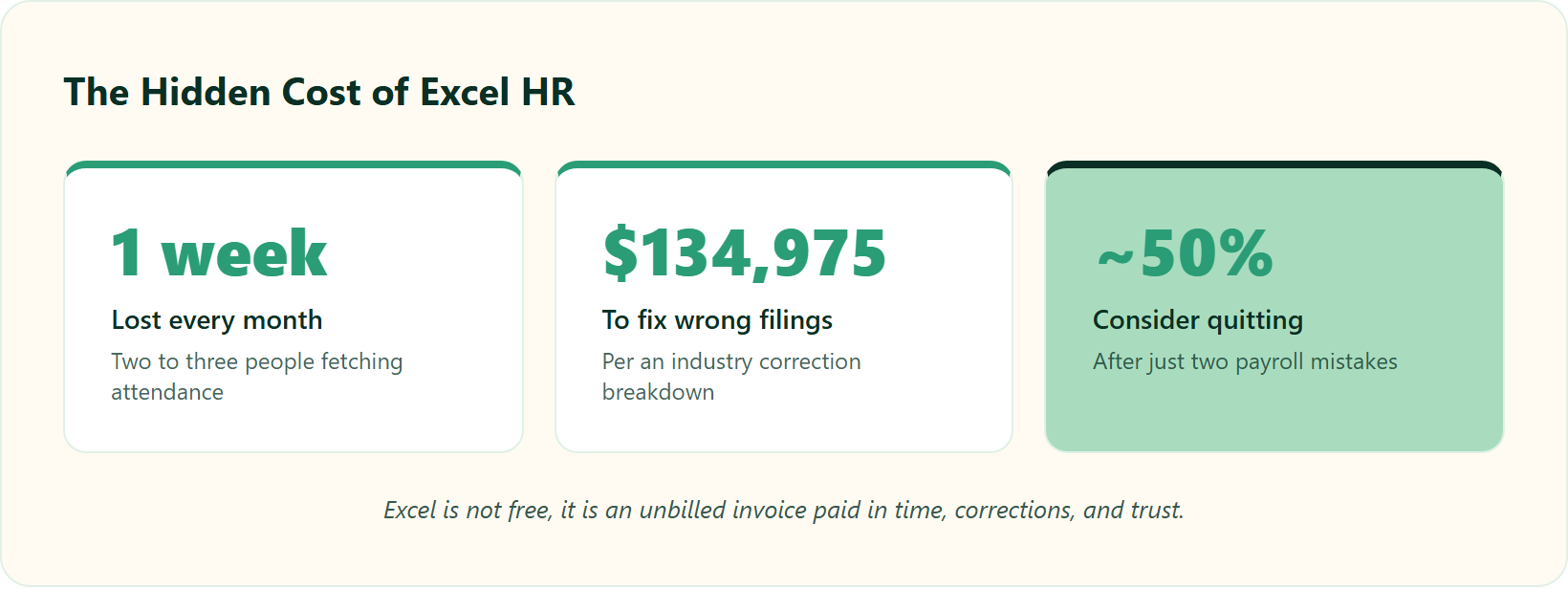
The correction costs are brutal once you look. One industry breakdown found that fixing incorrect tax filings can run upwards of $134,975, while repairing direct-deposit errors averages over $44,000. Translate that to India and the currency is different, but the exposure, PF and ESI misfilings plus interest and penalties, is just as real.
Then there is the human bill. Nearly half of employees consider leaving after just two payroll mistakes. Attrition is the most expensive line item Excel hides, and it is precisely what a well-run payroll solution is designed to prevent.
⏰ A simple cost-of-error model
You can estimate your own invisible salary in one row.
| Input | Rough monthly cost |
|---|---|
| Reconciliation hours x loaded hourly cost | Time you already pay for |
| Error-correction and refiling effort | Spikes on bad months |
| Penalty and interest risk | Rare but large |
| Attrition from pay mistakes | Largest and slowest to see |
Automation now beats manual diligence on all four, and this is not aspirational. It is patented. Zero-touch payroll systems auto-compute gross and net pay directly from clock data, OCR-based engines standardize messy timecards without manual entry, and workforce models turn payroll data into analytics that spreadsheets cannot produce.
✅ Your Monday move
Keep a two-week reconciliation time diary. Log every hour spent moving numbers between tabs, then multiply by loaded cost. That single figure reframes the whole “Excel is cheaper” argument. You can also model it directly with our ROI calculator.
In our experience running payroll for 2,000+ customer organisations, the savings only matter if you can see them. HROne quantifies this with India’s first inbuilt ROI Dashboard, so the cost you save is measured, not assumed. Real transition needs 120+ automations across modules, or you have simply digitised the spreadsheet.
Q4: What does Excel put at legal risk under Indian labour law, PF, ESI, LWF, PT, gratuity, POSH?
A compliance officer once opened a “master PT sheet” for me with tabs for each state, hand-updated whenever a slab changed. One stale cell in Karnataka, and the return would file wrong. She knew it. She just had no safer place to keep the rules.
Manual formulas are hardest to defend where the stakes are highest: PF and ESI ECR filings, state-wise Professional Tax (PT) and Labour Welfare Fund (LWF) slabs, gratuity tenure, TDS, and POSH complaint registers. A spreadsheet has no audit trail, no version control, and no policy engine. So a copied slab or an un-updated rate becomes a filing error, a penalty, and, under the DPDP Act, a data-security exposure.
🧩 First, the plain-English terms
- PF and ESI: statutory contributions filed monthly via an ECR (Electronic Challan cum Return) under the EPF Act, 1952, and ESI Act, 1948.
- PT and LWF: state-level deductions with slabs that differ by state and change without warning.
- Gratuity: a tenure-based payout under the Payment of Gratuity Act, 1972.
If you want the deeper mechanics, our guide to statutory compliance in payroll breaks each obligation down.
⚠️ The statutory risk scorecard
| Obligation | Excel exposure | HRMS control |
|---|---|---|
| PF / ESI ECR | Formula error, misfiling | Auto-calculated returns |
| State-wise PT / LWF | Stale slab in one tab | Central slab updates |
| Gratuity / TDS | Manual tenure math | Rule-based computation |
| POSH register | Editable, no version log | Timestamped, audit-ready |
| Data security (DPDP) | Local file, easily copied | Role-based access |
✅ The example and your Monday move
Say Maharashtra revises a PT slab. In Excel, someone must remember to edit the right cell in the right tab. Miss it, and every payslip for that state files wrong, quietly, until an audit finds it. A policy engine updates the slab once, centrally, and every downstream payslip follows, which is how a modern core HCM keeps rules in one place.
Automation here is not only efficiency. It protects an employee’s legal right to accurate, always-available records of their own pay and deductions. Build a one-page statutory-defensibility checklist this week and mark every item Excel cannot prove on demand.
HROne handles state-wise PT, LWF, PF, ESI, and TDS as a configurable policy engine, so slabs update centrally, not in 15 tabs. Reviewers on compliance-heavy floors notice the difference directly.
Q5: HR software vs Excel, a side-by-side comparison across the criteria that matter
A CFO once told me his payroll was “solved” because the sheet balanced. Then I asked how long it took to answer one board question: average days to close a confirmation letter. Silence. Excel balances numbers. It rarely answers questions.
Head-to-head, Excel wins only on upfront cost and familiarity. HR software wins on payroll accuracy, audit trail, statutory compliance, self-service, real-time reporting, security, and scalability. Keep Excel for one-off analysis. Once payroll, attendance, and compliance become recurring monthly work across 50-plus people, a system of record beats a spreadsheet on every axis that carries risk.
⭐ The criteria that actually decide it
I have scored the eight axes that matter to a real HR ops team below. If you want the buyer’s version of this, our guide on how to choose HRIS HRMS software goes deeper.
| # | Criterion | Excel | HR software |
|---|---|---|---|
| 1.1 | Cost and true TCO | Feels free, hidden manpower cost | Flat per-employee fee |
| 1.2 | Payroll accuracy | Formula and version drift | Automated, validated |
| 1.3 | Audit trail | None | Full timestamped log |
| 1.4 | Statutory compliance | Manual PF, ESI, PT, LWF | Central policy engine |
| 1.5 | Self-service and single-pane UI | Tab and email juggling | One inbox, few clicks |
| 1.6 | Real-time reporting and ROI | Month-end only | Live dashboards |
| 1.7 | Security and DPDP | Local files | Role-based access |
| 1.8 | Scalability | Breaks past 50 | Scales to thousands |
Comparison guides for Indian teams reach the same split: Excel for scratch work, a system for the recurring load.
💰 The two axes competitors quietly skip
Most comparisons stop at features. They ignore the tab juggle and the invisible ROI problem. Juggling five tabs and email threads to close one everyday task is a productivity leak nobody meters, which is exactly what a unified HR inbox removes. And almost no platform proves the savings back to the board.
This is where I would put HROne in position one. Its Super Inbox surfaces every pending task in one Gmail-style view that closes in three clicks. India’s first inbuilt ROI Dashboard then calculates lifetime hours saved against average HR salary, so the CFO walks in with a rupee figure, and you can preview it with our ROI calculator.
Honest caveat: if you run under five employees with no filing pressure, a clean sheet is genuinely fine. Everyone else has outgrown it.
Q6: What are the clear signs it’s time to stop managing HR in spreadsheets?
I call it the Spreadsheet Ceiling. It is the exact point where the tool that got you here quietly starts holding you back. You do not crash into it. You scrape along it for months, losing a little trust each payday.
Stop using Excel for HR when reconciliation takes longer than the decisions it feeds. The clearest signals: payroll errors creeping in, no audit trail, multiple “final” versions, slow statutory filings, attendance eating a full week a month, and no way to answer a workforce question in real time. If two or more are true across 50-plus employees, you have hit the ceiling.
⚠️ The eight signs, and what each one costs
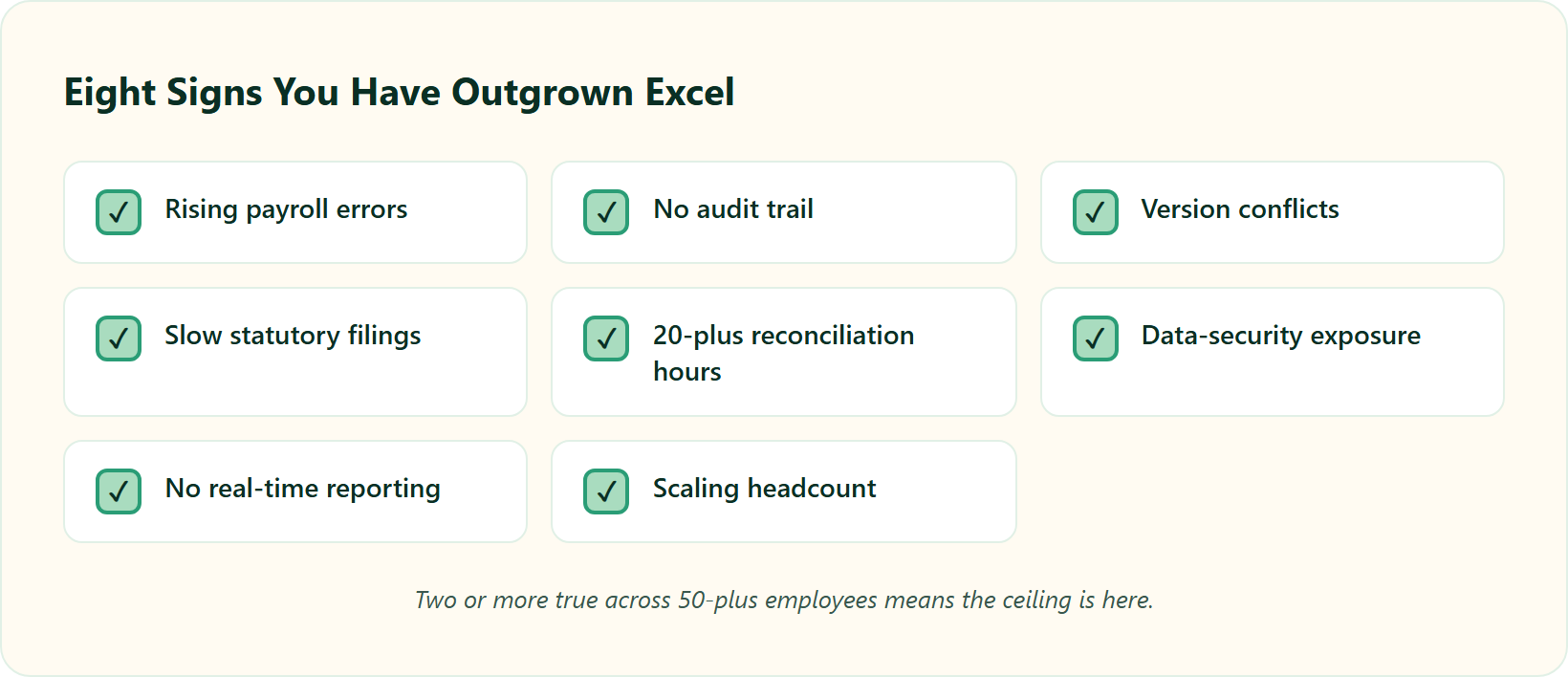
Each sign is a symptom with a price tag, not just an annoyance. If several apply, our overview of manual vs automated attendance shows the first fix.
- Rising payroll errors. Wrong pay breaks trust faster than anything else on this list.
- No audit trail. You cannot prove who changed a number, so disputes turn into your word against theirs.
- Version conflicts. Three “final” files mean nobody knows which one paid people.
- Slow statutory filings. PF, ESI, and PT returns become a monthly scramble against penalties.
- 20-plus hours of reconciliation. One operator spends “at least one week, with two to three people,” just fetching attendance every month.
- Data-security exposure. Salary files sit on local drives, easily copied, hard to defend under DPDP.
- No real-time reporting. Leadership asks a headcount question and waits days for an answer.
- Scaling headcount. Every new joiner multiplies the manual load, not divides it.
⏰ Why the stakes are real
Payroll delays are not a minor slip. In 2020, a major UK retailer’s payroll delay left thousands of staff without bonuses on time, bruising both morale and public reputation. Scale that risk across a growing Indian team, and the ceiling stops being theoretical.
If you recognised your team here, HROne’s core HR, time-office, and payroll stack is where most Indian mid-market teams land next. You can start with our HR software or model the switch with the salary calculator.
Q7: How do you migrate from Excel to HR software without breaking payroll?
The fear I hear most is “we will break payroll during the switch.” Fair. But the break usually comes from a big-bang cutover, not from migration itself. Reverse-engineer the plan, and the risk drops sharply.
Migrate in stages, not one big bang. Test with one or two employees first, insist your subscription starts after go-live (not day one of purchase), build a two-level approval system to kill Excel-era fraud, and bring your historical PF, ESI, and salary data. “Plug and play” with no history is a myth that gets people paid wrong. And no, you do not have to wait for the financial year-end.
✅ The six-step sequence
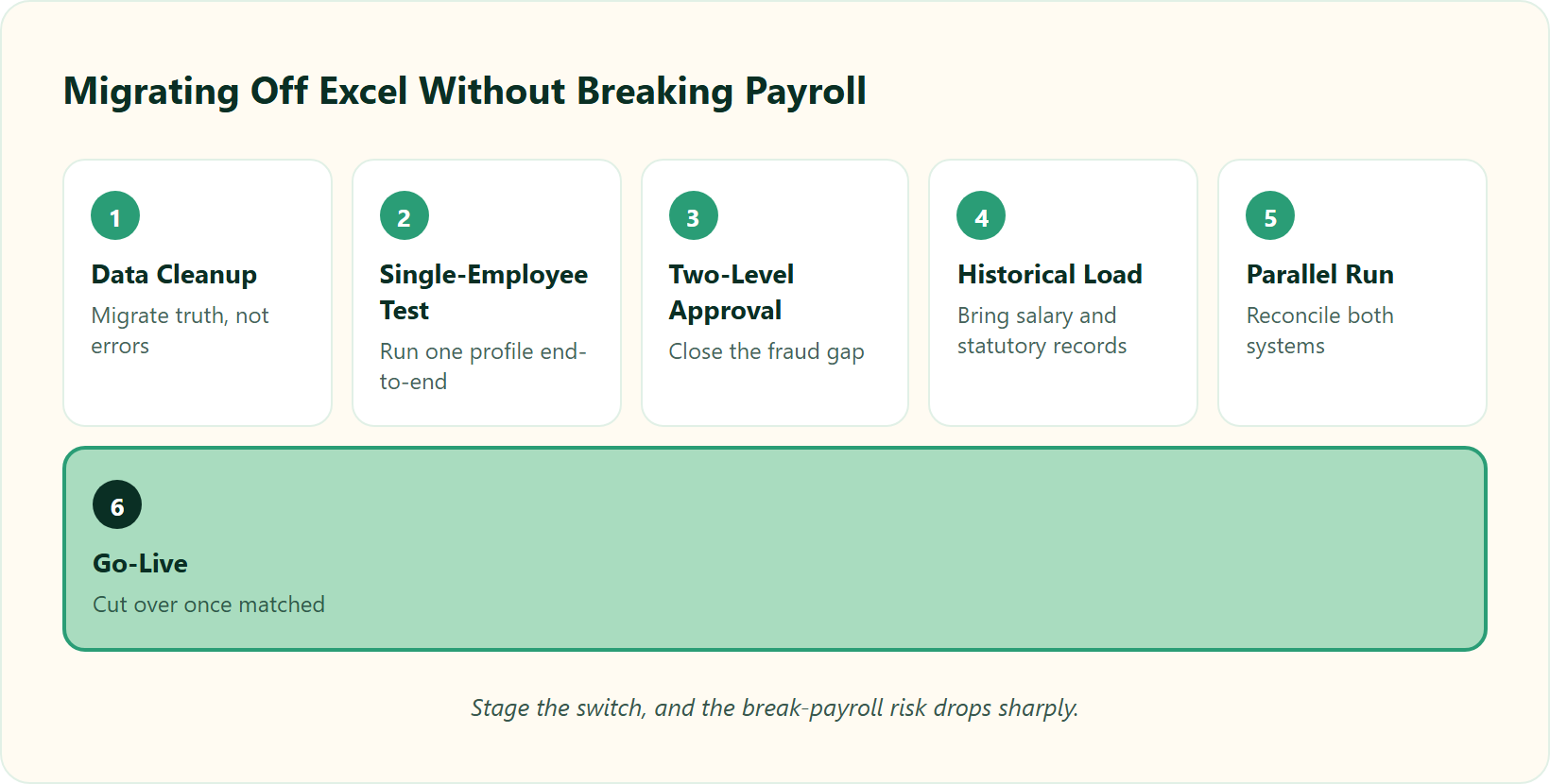
Each step names the outcome you want and the trap it avoids. For the compliance-heavy parts, our hassle-free payroll processing steps add detail.
- Data cleanup. Fix broken references first, so you migrate truth, not errors.
- Single-employee test. Run one or two profiles end-to-end before you touch the whole company.
- Two-level approval. Add a second sign-off to close the fraud gap Excel left wide open.
- Historical-data load. Bring past salary and statutory records, because “no history” breaks accurate pay.
- Parallel run. Run one cycle in both systems and reconcile, so surprises surface safely.
- Go-live. Cut over only after the parallel run matches.
⚠️ The traps to interrogate before signing
Ask the awkward questions early. Reject day-1 billing and demand your meter starts at go-live. Capture your “special snowflakes” now, the GL and job-costing codes that go 30 layers deep, or your payroll may not bridge them later. Our note on HR software pricing transparency covers the billing trap in full.
Reviewers who moved off spreadsheets describe the payoff plainly.
Contrast that with a stalled migration on another platform.
💰 Ready to price the switch?
If your parallel run just confirmed the errors Excel was hiding, the next move is seeing what a go-live-based system actually costs you.
Ready to leave the spreadsheet ceiling behind?
See how HROne moves your PF, ESI, LWF, PT, and payroll off manual formulas, with billing that starts only after you go live.
Q8: Why do expensive HR systems fail, and how do you avoid the ‘ERP ghost town’?
The standard read says buy the platform with the longest feature list. That gets it backwards. I have walked into rooms a little too late, where a business spent lakhs on an ERP thinking it would do everything, and then nobody embraced it. It became a ghost town.
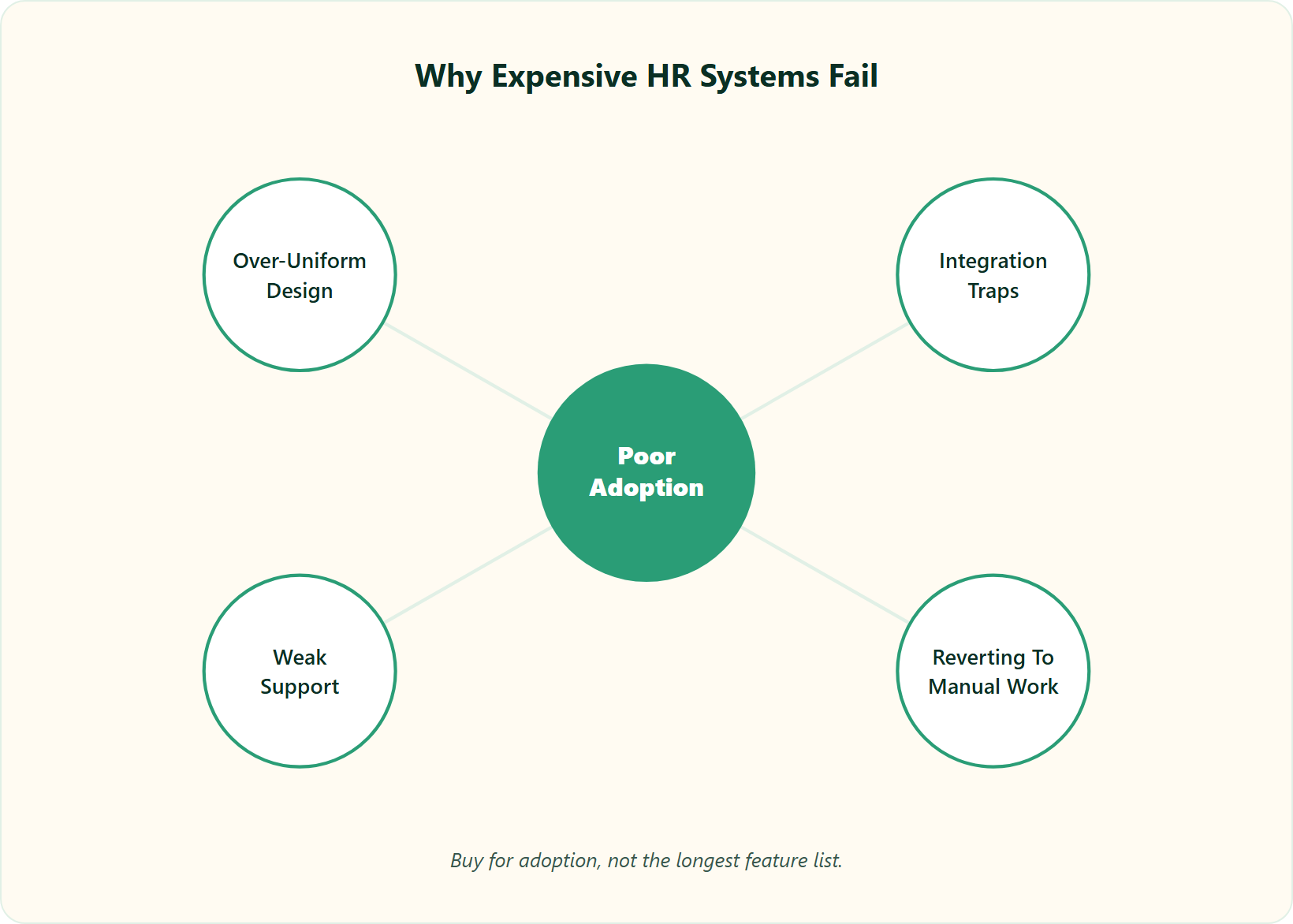
Most HR systems fail not because the software is bad, but because nobody adopts it, or because it is too uniform. Companies hit a hidden integration trap revealed only after signing. And the HRIS, HCM, and HRMS labels barely matter. What matters is nailing the bread and butter: core HR, time-office, and payroll. Buy for adoption, not the longest list.
🧩 The alphabet soup, decoded
Buyers get lost in acronyms. HRIS, HCM, and HRMS overlap so heavily they are practically one soup, as our breakdown of HCM vs HRIS vs HRMS explains. The base every Indian company needs is the same four modules: core HR, workforce, time-office, and payroll. That is where your organizational units get defined, so start there.
I might be wrong on the edges, but here is my conviction. Most systems did not fail because they were unfair. They failed because they were too uniform. Design HR for equity, not rigid equality, or your best people feel processed, not seen.
🏎️ The Ferrari nobody was taught to drive
A vendor’s job does not end at “payroll processed correctly.” Think of a Ferrari. If the trainer never teaches you to drive it, you burn the clutch the first week they leave. Adoption is the whole game, and it usually takes far longer than the sales deck implies, which is why our onboarding process pairs a dedicated SPOC with every rollout.
You can see the failure pattern in reviews across the category.
⚠️ The trap to defuse before you sign
Interrogate the integration and billing model before the contract, not after. Ask what breaks when you change a leave policy, and whether the meter starts on day one of purchase or at go-live. Our list of HRIS buyer pitfalls is worth a read first.
We built HROne to price for adoption: go-live billing, a dedicated prior-HR onboarding SPOC (9.8 NPS), and an ROI Dashboard. That combination is how a system avoids becoming another ghost town.
Q9: Real teams who switched, what changed after leaving Excel behind?
The line I remember most from an HR lead was quiet, not dramatic: “I don’t miss Excel. I miss thinking it was working.” That sums up almost every switch story I have sat through. The relief is real, but so is the reckoning.
Teams that switch rarely miss Excel. They miss the errors it hid. After moving core HR, attendance, and payroll into a system, the wins repeat: the lost week of attendance-fetching disappears, payroll errors and disputes drop, statutory filings stop being a monthly panic, and employees self-serve their own data. The cost that was invisible in Excel becomes a number you can finally see, especially once attendance management flows straight into pay.
📉 The situation, the break, and the fix
Picture a representative mid-market HR lead in India. Situation: she ran core HR on spreadsheets and lost roughly a week each month, with two to three people just fetching attendance. It felt frugal.
Complication: one cycle, a copied formula skipped a new joiner, and payroll ran wrong. Missed payroll breaks trust, underpayment risks a legal violation, and overpayment is a straight loss. One bad file hit all three.
Resolution: she moved attendance, approvals, and payroll into a workflow with self-service. The lost week vanished, disputes dropped, and employees stopped pinging HR for payslips, which is the everyday payoff of a proper payroll software setup.
💬 What real reviewers say changed
The pattern shows up plainly in verified G2 reviews. If you want the module view, our leave management and HR inbox pages show how the self-service piece works.
Not every switch is instant. One honest reviewer flagged a steeper learning curve.
⚠️ The support difference nobody prices in
Migration lives or dies on support. On some platforms, help is an email-thread black hole, with no phone line during an emergency. That is the difference between a stalled rollout and a live one.
This is why we pair HROne with a dedicated prior-HR onboarding process and SPOC (9.8 NPS), someone who has run payroll, not read a checklist. What I am sitting with now is a simple question: how much faster would your last migration have gone with one named person accountable for go-live?
Q10: HRMS pricing in India vs the true cost of Excel, how do the numbers actually compare?
Every CFO I meet frames this as software cost versus zero. That framing is the trap. Excel is not zero. It is an unbilled invoice you pay in manpower, corrections, and penalty risk.
HR software in India typically costs a low per-employee monthly fee, far less than a lost week of manpower each month plus penalty exposure. The honest math: compare your reconciliation hours, error-correction costs, and statutory-penalty risk against the subscription. For most 50-plus employee firms, the system pays for itself the first time it prevents a single missed or wrong payroll run, which our ROI calculator can model for your headcount.
💰 The break-even, side by side
Here is the comparison for a rough 100-person firm. For the pricing model itself, our pricing page and our note on HR software pricing transparency add detail.
| Cost line | Staying on Excel | HRMS subscription |
|---|---|---|
| Direct fee | “Free” | Low per-employee monthly fee |
| Reconciliation labour | ~1 week/month, 2 to 3 people | Automated |
| Error correction | Spikes on bad months | Rare |
| Penalty and interest risk | PF, ESI, PT exposure | Auto-filed, low |
| Attrition from pay errors | Nearly half consider leaving after two mistakes | Sharply reduced |
The single largest number is rarely the subscription. It is the correction and trust cost. One industry breakdown put fixing wrong tax filings at upwards of $134,975.
✅ Your break-even rule
You can compute this yourself in one line. Multiply your monthly reconciliation hours by loaded hourly cost, add a fair estimate of penalty risk, and compare that to the annual subscription. If the first number is bigger, and past 50 people it usually is, the system pays for itself, which is the core promise of dedicated payroll solution automation.
Two cautions before you sign. Reject day-1 billing, because paying during a dragging implementation is pure waste. And interrogate the hidden integration trap, the six-figure surprise that surfaces only after signature, a theme our HRIS buyer pitfalls guide covers.
⏰ Where HROne’s model changes the math
We built HROne to bill from go-live, not day one, so you pay for a working system, not a purchase order. That flat per-employee model, with no lock-in, is what makes the break-even honest rather than aspirational. India’s first inbuilt ROI Dashboard then shows the hours saved against average HR salary, so the CFO sees the payback in rupees, and CHRO solutions put that number in front of the board.
My current thinking is that pricing debates miss the point. The real question is not “what does the software cost.” It is “what has one wrong payday already cost you, and how many more can you afford?”


















 Secures Top Spot in
