








Q1. PeopleStrong vs greytHR: Which One Should You Actually Choose in 2026?
Choose greytHR if you are an SMB that needs reliable, compliance-strong payroll fast and cheap. Choose PeopleStrong if you are a 1,000-plus employee enterprise that needs deep HCM, talent, and 30-layer GL configurability. But most companies scaling through 100 to 5,000 employees fall into a painful middle, where greytHR feels too rigid and PeopleStrong feels too heavy to implement.
⭐ The honest verdict in one line
I have sat in the room while a CHRO signed a payroll contract, then watched it buckle six months later. The pattern is always the same. A small team picks greytHR because it is affordable and gets payroll running quickly. A large enterprise picks PeopleStrong for its talent depth and analytics. Neither team is wrong. They are just answering different questions.
Here is the part vendors avoid saying out loud. Most companies selling to the small and mid market are selling you a human resource information system, not a full human capital management system. So the real choice is rarely “which is better.” It is “which category do I actually need at my size.” If you are still mapping categories, this breakdown of HCM vs HRIS vs HRMS helps.
⚠️ The middle-market squeeze nobody warns you about
The trap sits in the middle. A 500-person manufacturing firm with shift workers, multiple legal entities, and deep GL codes outgrows greytHR’s configuration limits fast. That same firm rarely has the budget, or the 18-to-36-month appetite, to absorb a heavyweight enterprise rollout.
“GreytHR is not much good at customizing based on our requirements. Many times we were manually correcting the leave balance of employees. We cannot properly implement our company policies due to the limitations of greytHR.”
Verified User in IT and Services greytHR G2 Verified Review
That is the squeeze. You either accept rigid rails or take on a project that risks becoming shelfware. A good payroll solution should scale with you, not cap you.
✅ What the ratings actually say
On aggregate, both tools land close on public ratings, and both score strongest in the SMB and mid-market band while slipping for larger enterprises. The scores do not crown a winner. They confirm that fit depends on your size and complexity, not on brand noise.
If you are stuck in that 100 to 5,000 employee middle, a mid-market-native HCM like HROne is built for exactly the band both these tools strain to serve. We designed our core HCM so payroll, workforce, and performance connect on one platform, without the enterprise implementation drag. Keep reading, because the next sections show precisely where each option holds up and where it cracks.
Q2. Enterprise HCM vs SMB Payroll: What’s the Real Difference, and How Do These Two Companies Stack Up?
An SMB payroll tool like greytHR runs core HR, attendance, and statutory payroll, the “bread and butter” of any HR stack. An enterprise HCM like PeopleStrong layers talent, analytics, and heavy configurability on top. Comparing them on price alone is like comparing a scooter to a truck. Both move you, but they solve very different loads.
🧩 The alphabet soup, decoded
You could search HRIS, then HCM, then HRMS, and end up more confused than when you started. It really is alphabet soup. So let me define it plainly, in the words I use with HR teams.
- HRIS (Human Resource Information System): a system of record. It stores employee data, leave, and attendance.
- HRMS (Human Resource Management System): adds process, like payroll runs and workflows.
- HCM (Human Capital Management): adds strategy, like talent, performance, and analytics.
The bread and butter is core HR, workforce, time office, and payroll. That is the base for any organization. Everything strategic sits on top of it, from attendance management to leave management.
🏢 How the two companies actually stack up
Here is a concept made concrete. greytHR is a payroll-first veteran built for Indian SMBs. PeopleStrong is a talent-led enterprise HCM built for large, complex workforces. Their scale and history shape what they do well.
| Dimension | greytHR (SMB payroll) | PeopleStrong (enterprise HCM) |
|---|---|---|
| Founded | 1994 | 2005 |
| Core strength | Payroll, compliance, attendance | Talent, analytics, configurability |
| Typical buyer | SMB and lower mid-market | 1,000-plus employee enterprise |
| Best-fit signal | Standard structures, fast go-live | Complex, multi-entity, long rollout |
Remember one thing here. Software is only a consistency engine. It makes a formulated process repeatable. It does not invent your policy for you.
✅ How to apply this on Monday
Ask one question before you shortlist. Do I need a system to record and pay, or to record, pay, and grow my people? If it is the first, an SMB payroll tool fits. If it is the second, you need HCM.
This is where I place HROne honestly. It is a full mid-market HR software, not just an HRIS with a payroll bolt-on. That distinction is the whole reason the category exists, and it is the lens for every section that follows.
Q3. How Do PeopleStrong and greytHR Compare on Features, Modules, and Configurability?
greytHR excels at core payroll, compliance, leave, and attendance, but its configuration works within fixed rails, not fully on your terms. PeopleStrong adds talent, performance, analytics, and conditional workflows for enterprises, at the cost of a longer setup. The deeper question is whether your tool treats payroll as mere execution or as a workforce-analytics engine.
⚙️ The rigidity versus complexity trade-off
Every feature comparison hides one tension. Simple tools are rigid. Powerful tools are complex. greytHR users hit that wall when a multi-entity or shift-based reality appears.
“You can configure but not completely on your terms. GreytHR is not much good at customizing based on our requirements. For our case, from implementation onwards, there were issues with leave balance.”
Verified User in IT and Services greytHR G2 Verified Review
“No flexible customization. Some features are only available in a desktop mode, not in mobile application.”
Arjun T. greytHR G2 Verified Review
Enterprise tools solve rigidity with if-else conditional logic. That power is real, but it usually arrives with a longer, developer-heavy rollout.
| Module | greytHR | PeopleStrong |
|---|---|---|
| Statutory payroll | Strong, SMB-tuned | Strong, enterprise-scale |
| Leave and attendance | Core strength | Full, configurable |
| Performance and talent | Limited | Deep, native |
| Configurability | Within fixed rails | Conditional if-else logic |
| Workforce analytics | Reporting-led | Analytics-led |
📊 Payroll as execution, or payroll as intelligence
Here is a point the category avoids. Payroll data is not just for paying people. A patent from ADP describes deriving a workforce “vitality” performance model straight from payroll data. Intuit patented a metadata-driven engine that auto-updates payroll for changing regional laws.
Translated for an HR manager, that means the best systems mine payroll for insight, not just cut cheques. So when you compare, ask whether the tool turns payroll into analytics, or leaves it as a monthly button-press. This is why payroll automation matters more than a pretty portal.
True automation is defined by depth. I mean 127-plus prebuilt workflows from onboarding to offboarding, OU filters for salary processing, and state-wise slab maintenance for PF, ESI, and LWF. This is exactly where HROne sits, shipping 127-plus workflows and conditional logic through our performance management and onboarding process, without an enterprise-length implementation. One HROne reviewer captured the payoff.
“The InboxforHR is a game-changer, centralizing every HR task into one simple inbox, cutting down administrative time by 60 to 70 and preventing tasks from falling through the cracks.”
Waldon S. HROne G2 Verified Review
Q4. What Does Each Platform Actually Cost, and Where Are the Hidden Traps?
greytHR uses transparent tiers starting around Rs 3,495 for 50 employees. PeopleStrong uses custom enterprise quotes. The real cost is not the sticker. It is subscriptions that start on day one instead of go-live, integration fees that climb into six figures, and rigid lock-in. Always demand flat pricing, no lock-in, and billing that starts after go-live.
💰 Sticker price versus total cost
The number on the quote is the smallest number you will pay. greytHR publishes tiered pricing, and India per-employee-per-month rates typically run from roughly Rs 30 to Rs 300 depending on depth. PeopleStrong prices on custom enterprise quotes, which reflects its scale and configuration work.
But I have watched buyers anchor on the monthly fee and miss the real bill. Implementation, integration, and idle subscription time during a slow rollout are where budgets quietly bleed. This is why HR software pricing transparency should be a hard requirement, not a nice-to-have.
💸 The traps that actually hurt
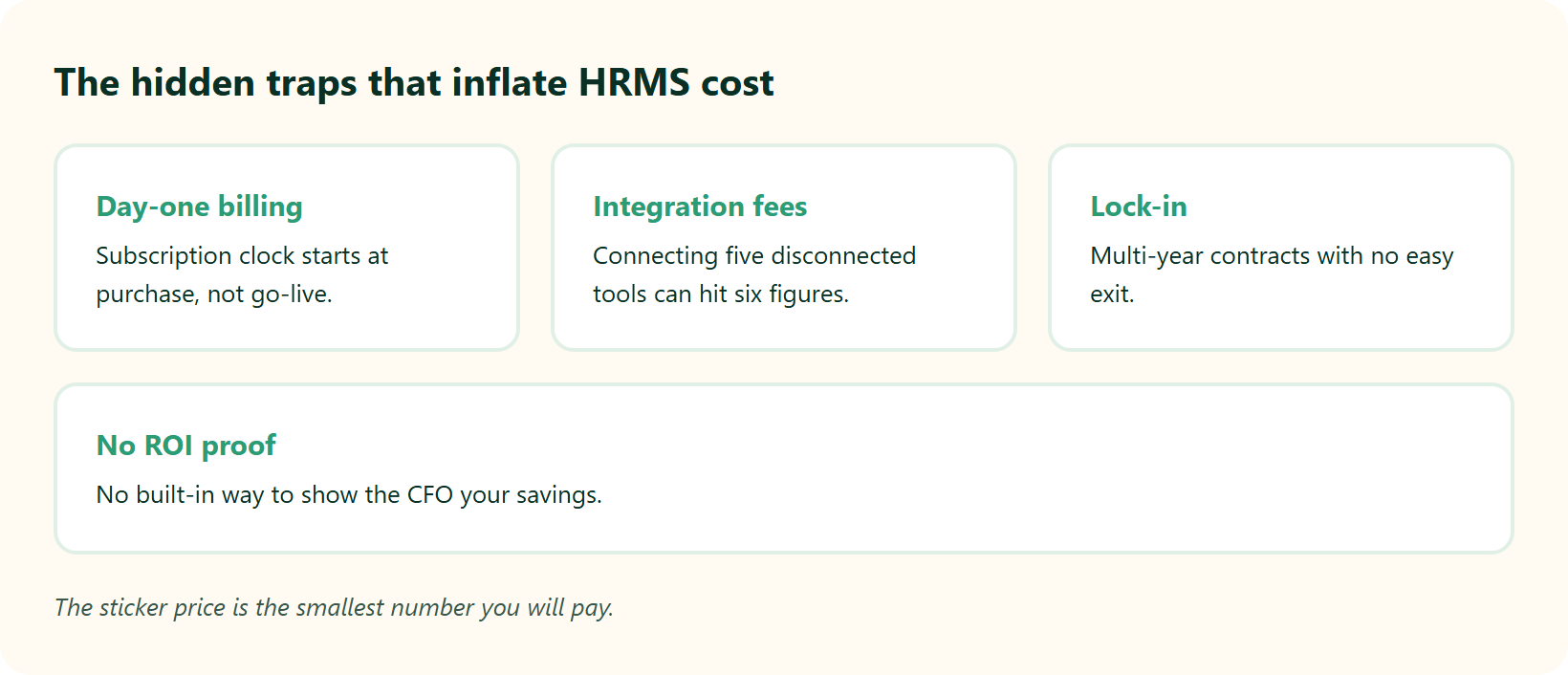
I have walked into rooms too late, after a business spent lakhs on a system thinking it would do everything, only for it to sit unused. The scar tissue is real. One founder told me they signed, put down implementation fees, allocated resources, then discovered the system could not do what they thought at all.
The costs are not hypothetical. Fixing incorrect tax filings can run upward of lakhs, and repairing direct deposit errors adds up fast. So the traps to watch are specific.
- Day-one billing: the subscription clock starts at purchase, not go-live.
- Integration fees: connecting five disconnected tools can hit six figures.
- Lock-in: multi-year contracts with no easy exit.
- No ROI proof: no built-in way to show the CFO your savings.
✅ The contract checklist to use on Monday
Never sign a deal where the subscription starts on day one of purchasing. Demand a flat pricing model, a no-lock-in period, and billing that starts after you go-live. That single clause protects you from paying for a system you cannot yet use. Our ROI calculator helps you model this before you commit.
This is precisely how we structure HROne pricing. It is flat PEPM, there is no lock-in, and the subscription meters only after go-live. It is the direct answer to the trap this whole section describes, and it is the difference between renting software and actually using it.
Q5. Which Handles Indian Statutory Compliance Better, PF, ESI, PT, TDS, and DPDP?
Both handle core Indian compliance: PF (Provident Fund via EPFO), ESI (Employee State Insurance via ESIC), state-wise Professional Tax, TDS, Form 16, and Form 24Q. greytHR is compliance-strong for standard SMB structures. PeopleStrong scales to complex multi-entity setups. In 2026, also verify DPDP Act consent handling for biometric attendance data.
⚠️ The 30-layer GL trap that quietly breaks payroll
Compliance is not a features checklist. It is a set of watchdogs standing between you and a legal notice. I have felt this on the floor, and the standard read gets it backwards.
Here is the specific failure I watch for. If your GL and job-costing codes go 30 layers deep, a rigid system cannot bridge and speak to your finance stack. You are then not even able to export data in a way that is meaningful. That is not an inconvenience. Missed payroll means trust broken, and underpaid means legal violation. A robust statutory compliance in payroll engine is the guardrail here.
📋 Statute-by-statute, what each must cover
The non-negotiables are set by law, not by vendors. The Code on Wages, 2019, standardizes wage definition and timely payment. The DPDP Act, 2023, adds consent-based handling of employee biometric and personal data.
| Statutory area | What it demands | Buyer check |
|---|---|---|
| PF, ESI, PT | State-wise slabs, LWF (Labour Welfare Fund) | Multi-state slab maintenance? |
| TDS, Form 16, 24Q | Accurate quarterly filing | Auto-generation, revision support? |
| Code on Wages 2019 | Wage definition, timely pay | Statutory pay guardrails? |
| DPDP Act 2023 | Consent for biometric data | Consent logging for attendance? |
greytHR covers the core reliably for standard structures. PeopleStrong extends to multi-entity, multi-state complexity. The gap shows up at the edges, where your org is not standard. Getting ESI contribution calculation and professional tax slab rates right across states is where most tools stumble.
✅ Your Monday compliance action
Before you sign anything in 2026, ask the vendor to show DPDP consent handling for biometric attendance data, live. Then test whether your deepest GL codes export cleanly to finance. Also confirm how the tool handles employee data privacy best practices.
This is exactly why we built HROne as a compliance watchdog, not a form filler. It maintains state-wise slabs for PF, ESI, and LWF, and it bridges multi-layer GL codes so exports stay meaningful. When we run payroll software across 2,000-plus customer organizations under Indian statutory law, that guardrail is what keeps paydays clean and audits quiet.
Q6. Why Do Most HR System Implementations Fail, and How Do You Avoid the Trap?
Most HR implementations fail not because the software is bad, but because teams over-buy complexity they never adopt, or the system cannot do what the demo promised. Enterprise tools drag through long cycles. SMB tools hit configuration walls. Avoid it by reverse-engineering the project plan, insisting on go-live billing, and remembering it is “Plug, Practice, Play,” never “Plug and Play.”
🎬 The proposal room, where it starts going wrong
Picture a CHRO, mid-scale-up, sitting across from a payroll bureau’s sales team. She signs. She puts down implementation fees and allocates her team.
Months later, she discovers the system cannot do what she thought it could at all. I have been invited into these rooms, often too late. The signature felt like progress. It was actually the start of a stall. Avoiding these HRIS buyer pitfalls starts before the pen touches paper.
👻 The ERP ghost town and the Ferrari nobody can drive
I have walked in after a business spent lakhs, sometimes the equivalent of a full enterprise budget, on a system meant to do everything. Then people never embraced the change, and it turned into a ghost town.
The deeper issue is training, not software. Think of a Ferrari. You can process payroll correctly once, but if the trainer does not know how to operate it without you sitting there, you burn the clutch. Adoption dies quietly after go-live, not during the demo. A smooth onboarding process is what prevents that.
🔧 The reverse-engineering playbook
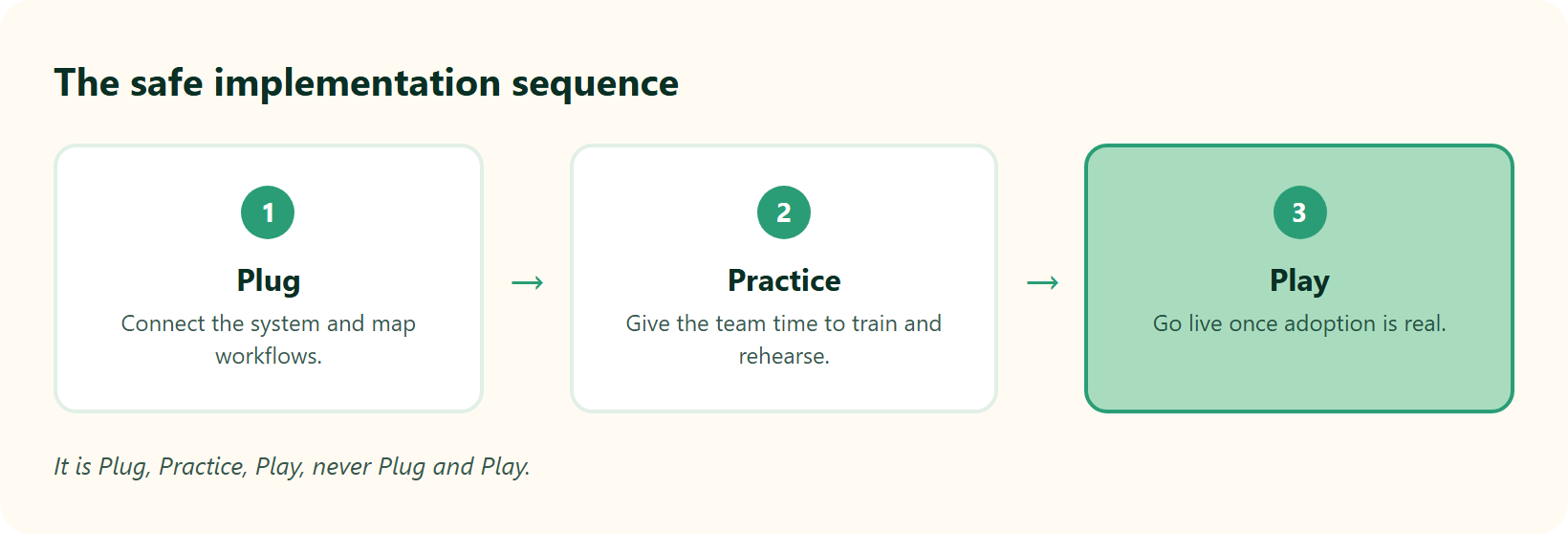
You avoid the trap by working backward from the outcome. Ask the right questions, pull the layers back, and reverse-engineer the project plan before you commit.
- Define who does what, by when, for every workflow.
- Insist billing starts at go-live, not at purchase.
- Budget for training as a real line item, not an afterthought.
- Treat it as “Plug, Practice, Play,” giving your team time to practice.
⏰ The 5-day threshold that signals success
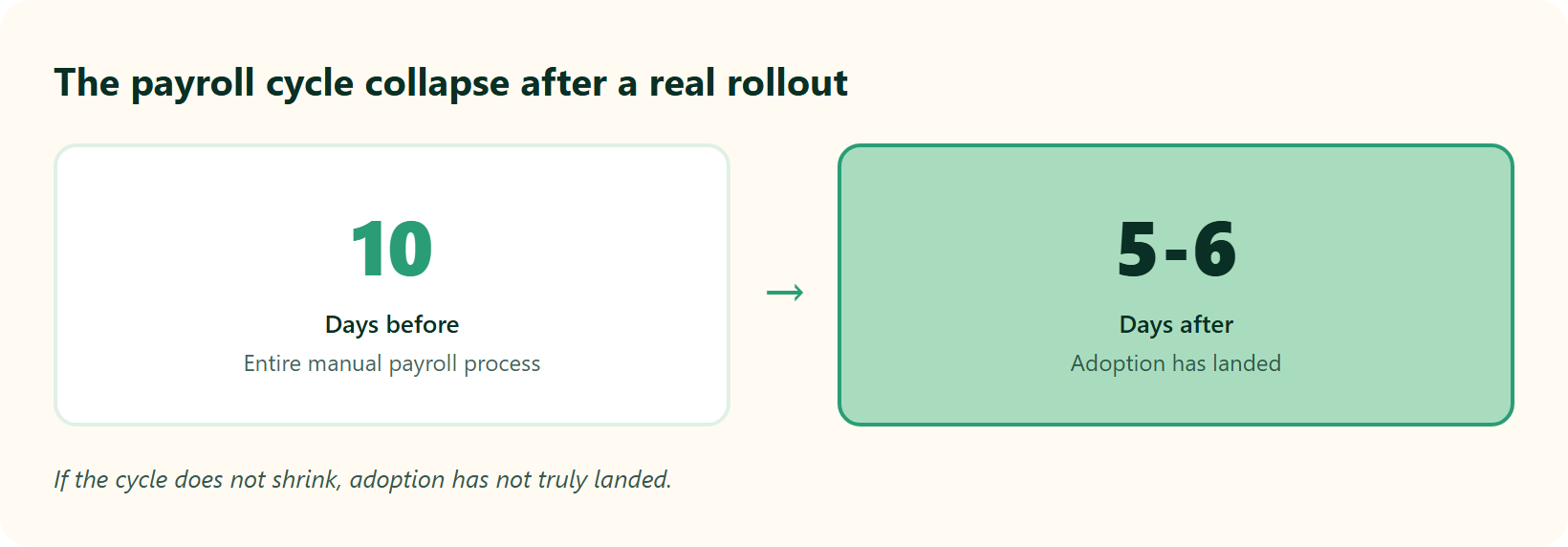
Here is a benchmark I trust. A successful rollout should pull payroll from around 10 days for the entire process down to 5 or 6 days. If it does not, adoption has not landed. This is where streamlining payroll during business growth matters most.
This is the whole reason we pair HROne with a prior-HR onboarding SPOC (single point of contact), not a technical project manager reading a checklist. That SPOC carries a 9.8 NPS because they have actually run HR. As documented in the MRDIY case study, they collapsed payroll cycles from 10 days to 5 to 6 days after moving to us, which is the threshold in action rather than in theory.
Q7. What Do Real Users Say About PeopleStrong and greytHR on G2 and TrustRadius?
On aggregate, greytHR (around 4.3) and PeopleStrong (around 4.2) score similarly, and both rate strongest for SMB and mid-market buyers while slipping for larger enterprises. Users praise greytHR’s payroll reliability and PeopleStrong’s breadth. Complaints cluster around support, tab-juggling, and the inability to prove ROI to the CFO.
📉 The enterprise score cliff
Here is the pattern almost no comparison article interrogates. Both tools review well at smaller scale, then dip as company size and complexity climb. The cliff is not random. It is where fixed rails and rigid support models start showing.
For greytHR, the recurring friction is configuration and support responsiveness under pressure.
“Lack of timely, responsive, and easily reachable customer support. There is a very high dependency on the greythr team to customize, and the customization is full of gaps. There is no escalation matrix.”
Verified User in IT and Services greytHR G2 Verified Review
“The system acts as per its own whims and gives error reports. We have to spend time manually to find errors. Not one month has passed where we have not raised a ticket.”
Maheshkumar J. greytHR G2 Verified Review
🧾 Tab-juggling and the invisible ROI
Two structural complaints repeat across single-point tools. First, staff juggle multiple tabs and email threads to close one task. Second, there is no built-in way to prove savings back to the board.
That second gap is strategic blindness. If you cannot show how much you saved after setting up, HR stays a cost centre in the CFO’s eyes. I think the standard read treats this as a nice-to-have. It is actually the difference between HR getting budget and getting cut. An ROI calculator turns that argument into numbers.
This is where HROne answers the complaints directly. Our HR inbox surfaces every pending task in one Gmail-like screen, so teams close 110-plus tasks without tab-hopping. One user described the shift plainly.
“The InboxforHR is a game-changer, centralizing every HR task into one simple inbox, cutting down administrative time by 60 to 70.”
Waldon S. HROne G2 Verified Review
India’s first inbuilt ROI Dashboard then quantifies hours saved against average HR salary, so the CFO sees the number. This is a core reason buyers pick why HROne over single-point tools.
Q8. How Do You Stress-Test a Demo and Switch Payroll Mid-Year Without Breaking Everything?
Yes, switching payroll mid-year is feasible, despite the myth that it is too complicated. Before signing, run a scripted “payroll month” in the demo, testing accuracy under exceptions, compliance workflows, and finance-closure reporting. Then migrate by copying salary structures from offer letters, running a pre-process error sheet, and reverse-engineering the project plan.
🧪 The scripted payroll-month demo test
Most demos show the happy path. Your real month is full of exceptions. So I make vendors run a scripted payroll month before I trust them.
Here is what to script into the demo:
- Exceptions first. Feed in arrears, mid-month joiners, and loss-of-pay cases.
- Compliance workflows. Watch PF, ESI, PT, and TDS calculate live.
- Finance closure. Ask for the GL export and bank challan files.
- Cut-off-week escalation. Ask who picks up the phone during crunch.
- Parallel shortlist. Run the same script on two tools to check bias.
This is the practical side of learning how to choose payroll software that actually fits.
🔄 The mid-year migration myth, busted
The industry says switching providers mid-year is too risky. In my experience, that is a comfort story vendors tell to keep you.
It is feasible if you ask the right questions and reverse-engineer the project plan. The prerequisites matter more than the calendar. Two tactical moves save the most pain:
- Copy salary structures directly from offer letters into the system during pre-boarding, which saves time and holds accuracy.
- Download the error sheet before processing salaries, so you catch missing prerequisites before they become wrong paycheques.
Following hassle-free payroll processing steps turns a risky switch into a routine one.
✅ What a clean switch feels like
A clean migration is quiet. No delayed payday, no reconciliation scramble, no angry all-staff email. That calm is the real proof the switch worked.
This is how we run HROne migrations. We copy salary structures from offer letters at pre-boarding, and the system forces a pre-process error sheet so nothing slips through. One HR lead described moving from a prior tool without the usual chaos.
“We have recently moved to HROne from Hrpearls/Webtel. I find HROne more intuitive, streamlined, better leave management system.”
Ayush G. HROne G2 Verified Review
Data migration can happen in hours, not weeks, when the prerequisites are handled up front. This is a key reason mid-market teams pick our payroll solution when they switch.
Q9. PeopleStrong vs greytHR vs HROne: Which Is Right for Your Company Size?
For a 100 to 5,000 employee mid-market company that wants enterprise-grade workflows without enterprise pain, HROne is built for exactly that squeeze. greytHR fits lean sub-250 SMBs that need affordable, compliant payroll. PeopleStrong fits 2,000-plus employee enterprises with dedicated HR ops ready for a long implementation. Match the tool to your size, not to the loudest brand.
🎯 Match the tool to your reality
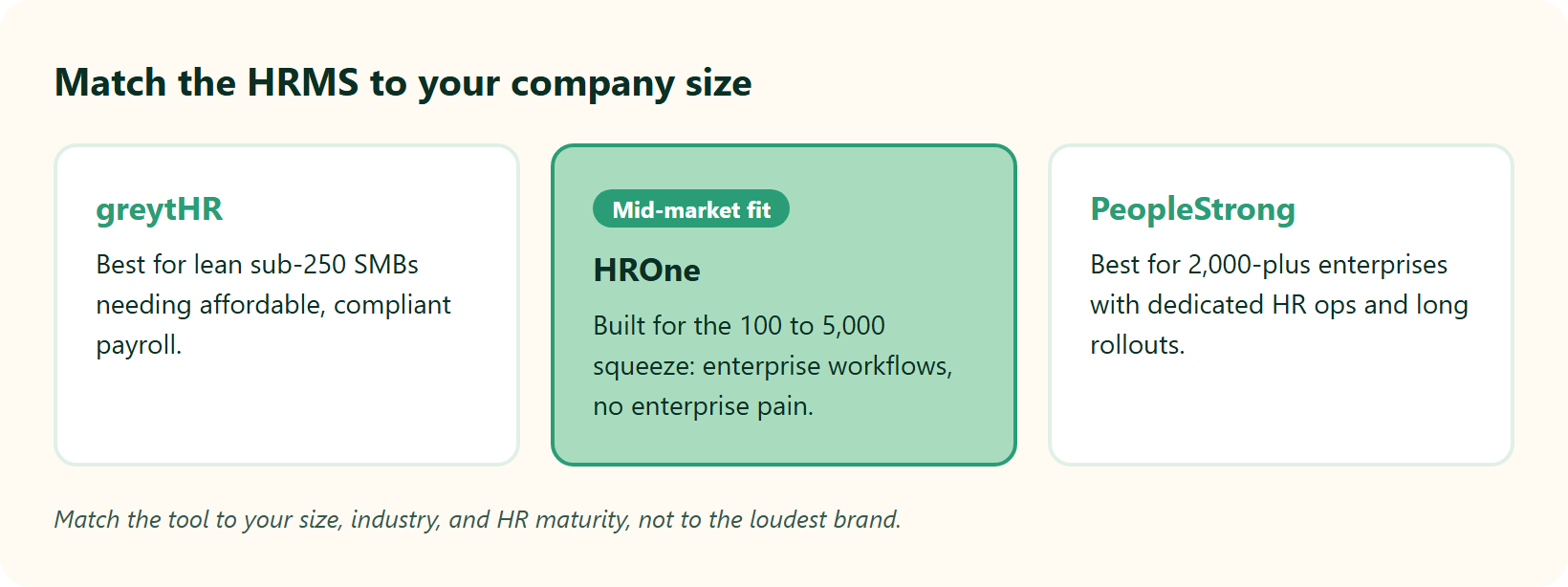
Every company is its own special snowflake. The real job is to meet your team where they actually are, not where a sales deck imagines them. So here is how I map the three by size and HR maturity.
The stakes are higher than most buyers admit. Payroll mistakes are not just admin slips. Nearly half of employees consider leaving after experiencing just two payroll errors. Fit is a retention issue, not only a budget one. This is why choosing the right payroll solution matters at every size.
9.1 HROne, best for the 100 to 5,000 mid-market squeeze
This is the band both other tools strain to serve. You get 127-plus prebuilt workflows and India-tuned compliance, without a multi-year rollout. Our core HCM connects payroll, workforce, and performance on one platform. One HR lead put the cost angle plainly.
“I love HROne for its cost efficiency and holistic approach, which is why I prefer it over other vendors like Workday.”
Priyanka S. HROne G2 Verified Review
9.2 greytHR, best for lean sub-250 SMBs
greytHR offers affordable, compliance-strong payroll for standard structures. It caps out when multi-entity or shift-based complexity appears. If you are weighing options, this HROne vs greytHR comparison shows where the line sits.
“GreytHR is fine software for payroll processing and I have been using it since 10 years. Better UI, simplicity.”
Krishnanand B. greytHR G2 Verified Review
9.3 PeopleStrong, best for 2,000-plus enterprises
PeopleStrong brings deep talent and analytics for large, complex workforces with dedicated HR ops. It is not recommended if you lack the team or timeline to absorb a long implementation. For a side-by-side, see HROne vs PeopleStrong.
🚀 Where to go from here
If your reading of this whole comparison is “we are stuck in the middle,” you are the exact company we built HROne for. As shown in the MRDIY case study, MR DIY India collapsed payroll cycles from 10 days to 5 to 6 days after switching, which is what mid-market fit looks like in numbers, not slides.
I am genuinely curious what your specific squeeze looks like, so tell us what you are building on a demo, and we will be honest about whether we fit. You can also model the numbers first with our ROI calculator.
Stuck in the 100–5,000 employee squeeze?
See exactly how HROne handles 127+ workflows, state-wise statutory compliance, and go-live-based billing — without the enterprise implementation drag.















 Secures Top Spot in
