








Q1: Why Do Most HRMS Migrations Turn Disruptive, and What Does “Without Disruption” Actually Mean?
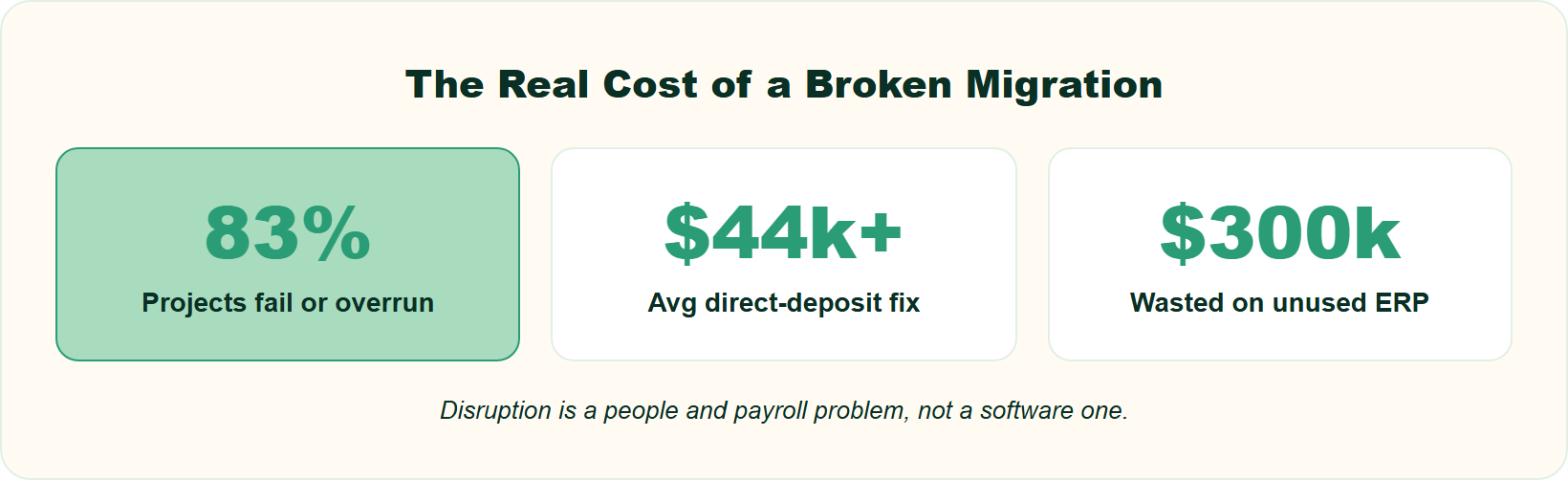
An HRMS migration turns disruptive when payroll breaks, historical data disappears, or employees lose trust, not because the software changed. Research shows 83% of data migration projects fail or overrun their budgets and schedules. Nearly half of employees consider quitting after just two payroll mistakes. “Without disruption” means paychecks land on time, PF, ESI, and TDS filings stay clean, and the switch is invisible except as a better experience.
⚠️ The $300,000 room nobody wants to enter
I have watched HR heads walk into a room too late. A mid-market firm spends a fortune on a shiny system, thinking it will fix everything, and then nobody uses it. One operator described sinking $300,000 into an ERP that “never gets utilized” because people never embraced the change. The tool was fine. The migration was not.
That is the part most guides miss. Disruption is rarely a software problem. It is a people-and-payroll problem wearing a software costume.
💸 Why the stakes are higher than a “system swap”
Here is the hard number. Roughly 83% of data migration projects either fail outright or blow past their budget and timeline. Bloor Research found similar pain years earlier, with most projects overrunning and an average overrun cost near $268,000.
Now add the human cost. When pay is late, trust breaks fast. A missed payday is not a ticket in a queue; it is somebody’s rent. That is why “disruption-free” has to mean payroll continuity first, everything else second. If you are still weighing categories, our explainer on HCM vs HRIS vs HRMS untangles the labels before you commit.
🔤 Cutting through the alphabet soup
Buyers get lost before they even start. You can search HRIS, then HCM, then HRMS, and it feels like alphabet soup. The labels overlap, so ignore them and focus on scope instead.
Every migration should protect the “bread and butter” first: core HR, workforce, time office, and payroll. Those four modules define your organizational units. They are the base for any organization, so migrate them cleanly before you touch performance, engagement, or analytics.
✅ So what does “without disruption” actually mean?
It means three things you can check. Paychecks land on the same date they always did. Historical data survives the move, so tax returns and PF balances stay intact. And employees notice nothing except a lighter, faster experience.
I might be slightly contrarian here, but “plug and play” is a myth. From what surfaces when you actually run these projects, you need practice in the middle: plug, practice, then play. The rest of this guide is that practice, step by step.
This is the lens we build HROne around, too. The mission is simple: unlock HR’s time and mental space by automating the mundane, so a migration frees people instead of trapping them. If you want the deeper reasoning, our why HROne page lays out the category stance, and our core HCM platform is where that “bread and butter” base lives.
Q2: What Belongs on Your Pre-Migration Checklist Before You Move a Single Record?
Before moving any record, audit every data source, including the shadow spreadsheets and the payroll tool nobody documented. Then decide what to archive, what to transform, and what to migrate. Over half of post-go-live defects trace back to data quality, so cleansing and deduplication happen now, with named owners and a two-level check. This readiness stage is where disruption-free migrations are actually won.
🧩 The fragmented stack you are really migrating
Most Indian mid-market firms do not run one system. They run five that cannot talk to each other. One HR leader described payroll processed by one vendor, while “attendance was being drawn through some other source,” and the real issue was that “all these three softwares could not talk to each other.”
That patchwork is your true starting point. You are not moving one clean database; you are untangling a knot. Name every thread before you pull.
✅ The pre-migration checklist, in order
Work through these before a single record moves. Each step has one owner and a clear finish line.
- Audit every source. List each system, spreadsheet, and biometric export that touches employee data.
- Inventory the fields. Map what data lives where, including the “shadow” sheets HR keeps quietly.
- Cleanse and deduplicate. Fix orphan records, duplicate IDs, and stale entries now, not after go-live.
- Decide archive vs transform vs migrate. Not all history moves; some gets archived, some reshaped.
- Assign owners. Every dataset needs a named person who signs off.
- Allocate resources. Book the people-hours honestly, because this is real work.
👥 Why “HR can handle it alone” is the trap
This is not a solo HR job, and pretending otherwise is how timelines slip. You need IT, payroll, and finance in the room, plus what one practitioner called proper “allocation of your resources” and real “checks and balances.”
I would rather over-scope this stage than rush it. From experience, the audit you skip in week one becomes the payroll fire in month three. A structured onboarding process gives you that gated discipline from day one.
“I really like the way HROne maintains process discipline. If any detail is missing in the policy or an employee profile, it doesn’t allow the process to move forward until the checklist is fully completed.”
— Bindu P., HR User HROne G2 – Verified Review
“We have transferred our data from old server to HROne in fraction of hours.”
— Ruhi G., HR User HROne G2 – Verified Review
That checklist discipline is exactly how HROne’s onboarding logic works. The system refuses to advance a process until required fields are complete, which turns a messy audit into a gated, trackable flow. Our workforce management module keeps that single, unified employee record intact through the move.
Q3: How Do You Map Fields, GL Codes, and Pay Codes So Nothing Breaks in Transfer?
Mapping is where migrations quietly succeed or fail. Match every legacy field, GL code, and pay component to its new-system equivalent before you load anything. ADP’s payroll-reconciliation patent shows old and new systems often label the same component differently, so build a PF, ESI, and TDS pay-code crosswalk and reconcile it. Keep one master mapping document that travels through every phase, and add a “view-and-correct” gate before final load.
⚠️ The 30-layer GL trap
Here is where teams get burned. If your floor operations need GL and job-costing codes to “go 30 layers deep,” a new payroll or HRIS system may not be able to bridge and speak to that depth. The data is there; the two systems just describe it differently.
A “field map” simply means a table matching each old data field to its new home. Skip it, and you get silent mismatches that surface on payday.
🔧 What the patents actually teach
ADP’s migration-reconciliation patent is blunt about the risk. It compares “projected input codes” from your legacy system against the “actual input codes” of the new one, then flags and corrects mismatches before payroll data moves. In plain terms, your old system and new system often name the same pay component differently.
Wipro’s data-migration patent adds a second lesson: build a mandatory “view-and-correct” governance gate before final load. And a 2021 study found that a mismatch across analysis, build, and test phases is a primary reason transfers break. So keep one master mapping document that never changes hands unversioned.
📋 A worked pay-code crosswalk
Build a table like this before load. It is boring. It is also the single highest-leverage artifact in the whole project.
📋 PF, ESI, and TDS Pay-Code Crosswalk
| Legacy field | New HRMS field | Statutory rule | Reconciled? |
|---|---|---|---|
| Basic + DA | Basic Pay | PF wage base | ✅ |
| HRA | House Rent Allowance | Taxable/exempt split | ✅ |
| PF deduction | EPF Employee | 12% of PF wage | ✅ |
| ESI deduction | ESIC Employee | 0.75% where applicable | ✅ |
| TDS | Income Tax | Regime + declarations | ✅ |
The only reason mapping gets complicated is when you match “apples to oranges.” Match apples to apples, sign off each row, and the load becomes routine. Our guide on statutory compliance in payroll breaks down each of these codes in detail.
“HCM supports JV integration and GL code logic also. Delivery team has expertise and is helpful during configuration phase.”
— Deepak K., HR User HROne G2 – Verified Review
“The workflows allow us to map our policies automatically, and map various components of CTC during onboarding.”
— Rishiraj R., HR User HROne G2 – Verified Review
We built HROne to shrink this workstream. As soon as a user is onboarded, the system can copy the complete salary structure straight from the offer letter, so components carry over without manual re-keying. Paired with native JV and GL-code logic, that turns the crosswalk into a checked, repeatable step, and you can model figures on our salary calculator.
Q4: How Do You Migrate Payroll and Historical Data Without Breaking a Single Paycheck?
Protect paychecks by matching the new system to exactly what you paid before, apples-to-apples, never apples-to-oranges. Ingest full year-to-date and historical payroll data so tax returns and PF balances survive. Getting incorrect W-4s and tax filings wrong can cost a business upwards of $134,975, and fixing direct-deposit issues averages over $44,000. Historical data is non-negotiable, because people’s mortgages, rents, and tax returns depend on it.
💰 The five-figure cost of getting pay wrong
Payroll mistakes are not rounding errors; they are expensive. One practitioner cited that correcting wrong tax filings can run “upwards of $134,975,” and fixing direct-deposit issues averages “over $44,000.” Those numbers should scare you into precision.
As one payroll veteran put it, it does not matter how well the implementation goes; if people are not paid correctly, “we didn’t do our job right.” Pay is the migration’s pass-fail test.
🔁 Apples-to-apples, year-to-date ingestion
The method is simpler than it sounds. Ingest the data, then check: are we matching exactly what you paid before? Match the new system’s output against the old system’s, line by line, for a full pay cycle.
“Year-to-date” ingestion means carrying over every rupee paid and deducted so far this financial year. Do that, and PF, ESI, and TDS totals stay continuous. Skip it, and Form 16 becomes a mess. Our payroll automation complete guide covers how that reconciliation runs cleanly.
📜 Why historical data is non-negotiable
Some vendors will tell you historical payroll data is not necessary. That is a myth, and a dangerous one. People need clean history so their tax returns hold up and their loan and rent records stay intact.
I will hedge on almost nothing here: keep the history. From what surfaces when you actually run these transitions, the “we’ll skip old data to save time” decision is the one teams regret first. A start-of-financial-year cutover can help, since balances reset and less history has to move.
“Proper calculation of PF and ESI was a pain area for us before, but now with the HROne automated calculation process, results are up to the mark and following Indian tax compliances properly.”
— Ajay K., HR User HROne G2 – Verified Review
“Salary processing to last creation of bank Challan files is quick and systematic process with error free details.”
— Deepak K., HR User HROne G2 – Verified Review
This is the exact job HROne’s payroll engine is built for. Zero-touch payroll software runs statutory PF, ESI, and TDS automatically, then generates bank challan files with error-free details, which is apples-to-apples matching in practice. When we run payroll across 2,000-plus customer organizations, that reconciliation discipline is what prevents delayed paydays, and our TDS calculator lets you sanity-check the numbers before cutover.
Q5: What Are the Exact Steps to Migrate to a New HRMS, From Kickoff to Go-Live?
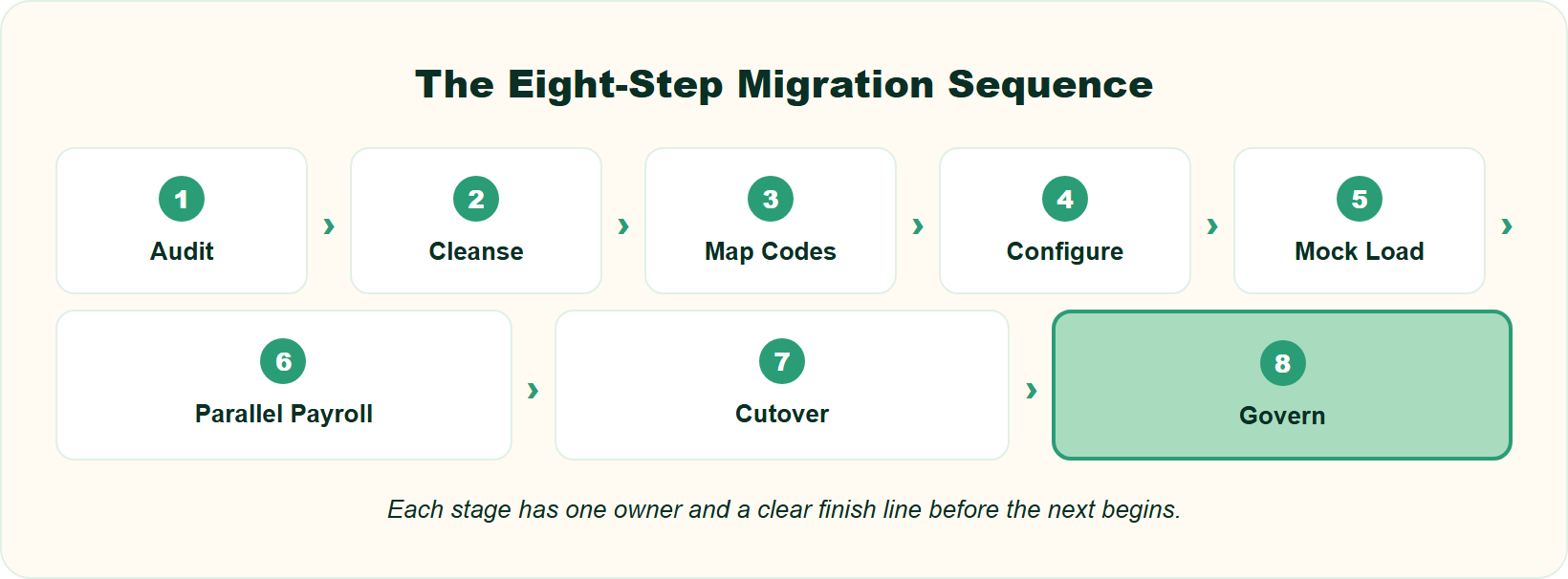
Migrate in eight steps: (1) audit and inventory data, (2) cleanse and match apples-to-apples, (3) map fields and pay codes, (4) configure workflows in the new HRMS, (5) run a mock migration, (6) run parallel payroll plus UAT with two-level approval, (7) execute cutover with a rollback plan, and (8) validate and govern post-go-live. Skipping the parallel run is where “disruption-free” migrations quietly break.
🧭 First, reverse-engineer the plan
A payroll leader once told me migration only feels complicated when you skip the questions. Ask what the team is really trying to solve, pull the layers back, and reverse-engineer the project plan. Do that, and it stops being complicated.
So before any step, agree on the outcome. Zero missed paydays, clean statutory filings, and full history intact. Every step below serves those three goals, and our HR solution is built around exactly that continuity.
✅ The eight steps, in order
Each step has a clear finish line. Do not start the next one until the current outcome is signed off.
- Audit and inventory data. Outcome: one list of every source, field, and owner.
- Cleanse and match apples-to-apples. Outcome: deduplicated records that match what you paid before.
- Map fields and pay codes. Outcome: a signed PF, ESI, and TDS crosswalk.
- Configure workflows. Outcome: onboarding, confirmation, and exit flows built in the new system.
- Run a mock migration. Outcome: a test load that proves the mapping holds.
- Run parallel payroll plus UAT. Outcome: both systems produce matching salary sheets. (UAT means user acceptance testing, where real users confirm the system works.)
- Execute cutover with a rollback plan. Outcome: a clean switch and a documented way back.
- Validate and govern post-go-live. Outcome: reconciled data and monitored KPIs.
Step 6 is where most timelines quietly slip. Q6 explains exactly why and how to run it.
⚙️ Why configuration is the real difference
Here is the part cheap tools skip. A tool swap moves data; real automation configures the workflows around it. That gap is measured in workflows.
Enterprise-grade migration means building 127-plus workflows to automate HR processes from employee onboarding to offboarding. Always add a two-level approval on the final salary sheet, too, so no error or fraud slips through during the run.
This is the step where we see HROne earn its keep. Its 127 pre-built hire-to-retire workflows define who does what, and by when, so HR stops chasing managers over email. Every pending task then surfaces in one HR inbox that closes in about three clicks, which is what turns a migration into an operating system rather than a prettier portal, and our workforce management module keeps that base intact.
Q6: Should You Choose Phased, Big-Bang, or Incremental Migration, and How Do You Run a Parallel Payroll?
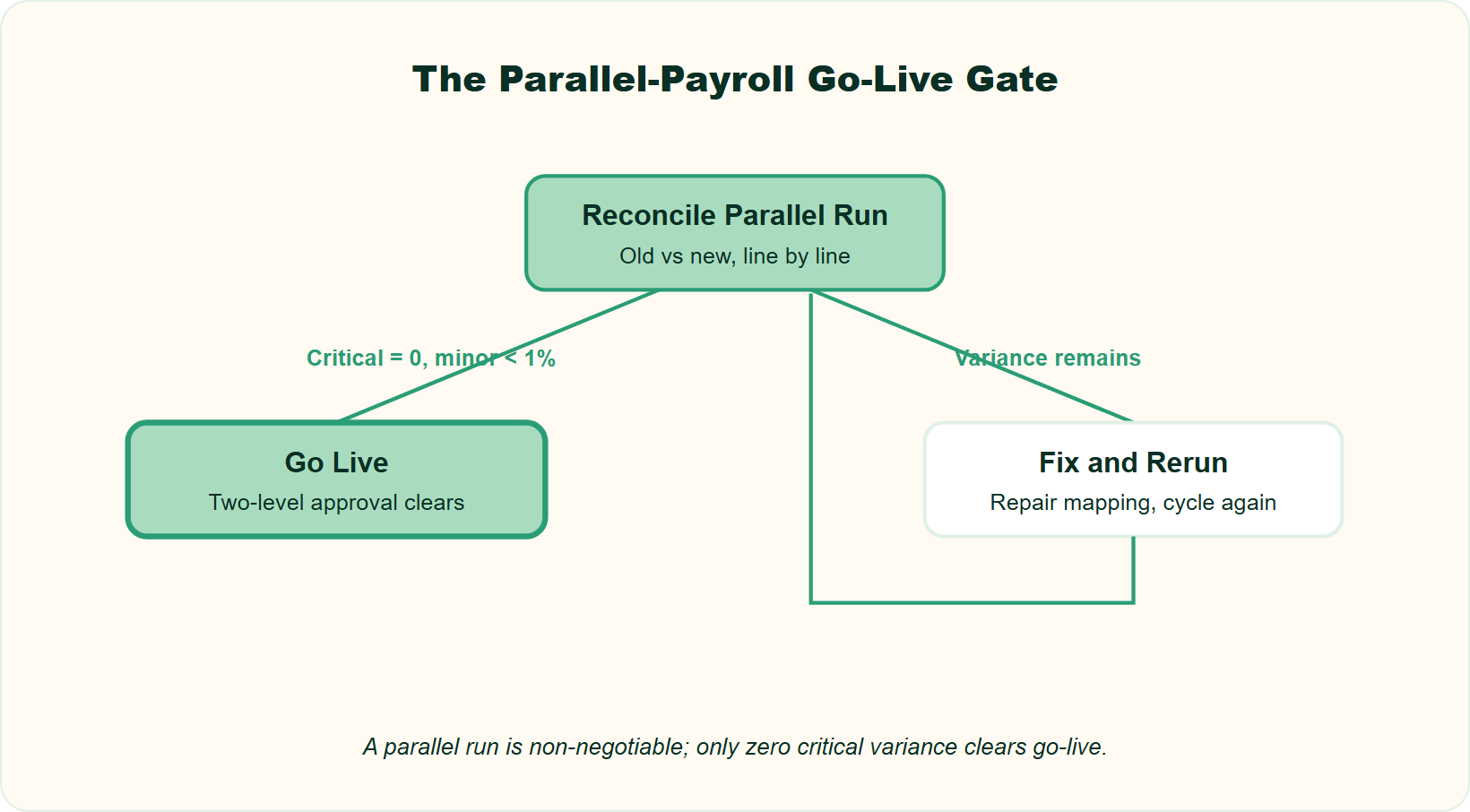
Phased and incremental migrations minimize disruption; big-bang is faster but riskier and best reserved for smaller, clean datasets. Whichever you pick, a parallel payroll run is non-negotiable: process one to two cycles on both systems, and accept go-live only when critical variances hit zero, and minor variances stay under about 1%. Add two-level approval so no error or fraud slips through during the run.
⚖️ Pick your model by data and risk
The standard read says “go big-bang, it’s faster.” I think that gets it backwards for most Indian mid-market firms. From what surfaces when you actually run these, phased and incremental win on safety, and safety is the whole point of a disruption-free move.
Here is the honest trade-off in one view.
📋 Phased vs Big-Bang vs Incremental Migration
| Model | Best for | Risk | Disruption |
|---|---|---|---|
| Phased | Multi-entity, complex payroll | Low to medium | Low, module by module |
| Big-bang | Small, clean datasets | High | High if anything breaks |
| Incremental | Large data, staged sync | Low | Very low, but slower |
Big-bang means moving everything at once. Phased means module by module. Incremental means syncing data in stages. Choose by your data volume and how much risk your board will stomach.
🔁 The parallel run is your firewall
A “parallel run” means processing payroll on both the old and new systems for the same cycle, then comparing. It is the single best defense against a broken payday.
Run one to two cycles. Accept go-live only when critical variances (net pay, PF, ESI, and TDS) hit exactly zero, and minor rounding gaps stay under roughly 1%. Add a two-level approval on the final salary sheet, so a second pair of eyes catches errors or fraud.
This connects straight back to apples-to-apples reconciliation. If the two systems disagree, you found a mapping bug before employees did, not after.
We designed HROne’s payroll to make this stage quick, not painful. Salary processing runs in a simple three-step flow with group payout validations, so a parallel cycle reconciles fast against your old output. You can see the model on our payroll solution page, and our hassle-free payroll processing steps guide walks through the cycle.
Q7: How Long Does an HRMS Migration Take in India, and Is Mid-Year Migration Really Too Risky?
For Indian mid-to-large firms, expect 6 to 12 months from planning to go-live, driven by integration count, payroll complexity, and data quality. Mid-year migration isn’t too risky; that’s a myth. With the right questions and a reverse-engineered plan, it works. Many teams still prefer a start-of-financial-year cutover, so PF, ESI, and TDS balances reset cleanly and less history moves. Rushing just shifts effort into costly post-go-live cleanup.
⏰ The realistic benchmark
Let me give you the honest number first. Six to twelve months is the working range for a 100 to 5,000 employee firm in India. More integrations, heavier payroll, and messier data push you toward the top of that range.
Anyone promising two weeks is selling, not scoping. Plug-and-play is a myth; you need practice in the middle. Our integrations approach is a big part of why that range stays predictable.
🚫 Debunking the mid-year myth
Here is the belief I want to kill. “Switching payroll providers mid-year is too complicated” is a myth. If you ask the right questions and reverse-engineer the project plan, mid-year works fine.
I will add an honest hedge, though. Some practitioners cite a much longer arc, “usually a 36-month scope,” when the goal includes building culture and frameworks, not just moving data. That is a different project. For a clean data-and-payroll migration, 6 to 12 months holds.
Remember what the software actually is. It is a “consistency engine” that makes a formulated process repeatable, not a magic wand that fixes a broken process for you.
📅 Why start-of-financial-year still wins
If you can choose your date, April is your friend. A start-of-financial-year cutover resets PF, ESI, and TDS balances, so less history has to move and Form 16 stays clean.
That said, do not delay a needed switch by months just to hit April. A well-run mid-year move beats a badly-run “perfect timing” one.
This is exactly why we help buyers scope honestly instead of trusting a sales promise. Reflecting the same 6 to 12 month reality we see across 2,000-plus HR teams, our statutory compliance in payroll guide covers the PF, ESI, and TDS resets that make an April cutover clean, and our payroll software automates them.
Q8: Is Your HRMS Migration Compliant With India’s DPDP Act 2023?
Under India’s DPDP Act 2023, your company is a “data fiduciary,” so migrating employee data (Aadhaar, PAN, salary, attendance, and health) must respect purpose limitation, storage limitation, and data minimization. That covers temporary migration extracts and test environments, not just the live system. Encrypt transfers, mask test data, delete intermediate files, and add a DPDP-compliant data-processing clause to your HRMS vendor contract before any record moves.
📖 What “data fiduciary” actually means
Let me put the law in plain words. Under the Digital Personal Data Protection Act, 2023, if your company decides how employee data is used, you are a “data fiduciary.” That is just the legal term for the party responsible for the data.
Three duties matter most during a migration. Purpose limitation (use data only for the reason you collected it), storage limitation (do not keep it longer than needed), and data minimization (move only what you actually need).
💾 The forgotten CSV on a laptop
Here is where teams get caught. Someone exports a spreadsheet of salaries and Aadhaar numbers to test the new system, then leaves it sitting on a laptop for months. That intermediate file is still regulated data.
The standard read treats compliance as a live-system problem. I think that misses the real risk. Migration extracts, test databases, and vendor sandboxes hold the same sensitive data, and they are usually the least protected. Our employee data privacy best practices guide covers how to lock those down.
✅ Your Monday checklist
Four moves protect you, and none of them are hard.
- Encrypt every transfer between old and new systems.
- Mask test data, so real Aadhaar and PAN numbers never sit in a sandbox.
- Delete intermediate extracts the moment the load is verified.
- Add a DPDP data-processing clause to your vendor contract before any record moves.
The DPDP Rules were notified in November 2025, with core obligations phasing in over roughly 18 months, so build these habits now rather than scrambling near enforcement.
This is why we treat compliance as automation at HROne, not paperwork. Statutory calculations for PF, ESI, and TDS run inside the system, and access controls keep sensitive fields gated, so fewer loose extracts float around in the first place. You can read more in our payroll software compliance risk guide, or explore the underlying core HCM platform.
Q9: What Happens After Go-Live: How Do You Govern Data and Track Migration ROI to Month 18?
Go-live is the start, not the finish. For up to 18 months, monitor data-quality KPIs, reconcile every payroll cycle, and watch adoption metrics, because success means measurable ROI and clean data, not just a live system. Keep the “view-and-correct” governance gate running, and demand a built-in ROI dashboard so you can prove the migration was worth the cost to leadership.
📊 What post-go-live governance actually means
Most teams treat go-live as the finish line. The data says that is where the real work starts. A study on migration methodology found that data drifts and defects surface for months after cutover, not on day one.
So set an 18-month horizon. “Governance” here just means a standing routine to check, correct, and prove your data stays clean. Treat it like a subscription, not a one-time event, and lean on workforce management to keep that unified record honest.
🔍 The three things you should track
Measure these from month one, then review monthly. Each one catches a different kind of silent failure.
- Data-quality KPIs. Track duplicate records, blank mandatory fields, and mismatched IDs.
- Per-cycle payroll reconciliation. Match net pay, PF, ESI, and TDS every single cycle, not just at go-live.
- Adoption metrics. Watch login rates, self-service usage, and tasks closed on time.
Keep the “view-and-correct” gate running, too. That means a person reviews and fixes flagged records before they lock, and our payroll audit checklist gives you a ready reconciliation routine.
💰 The invisible-ROI trap
Here is the failure I see most. A firm finishes migration and cannot answer the one question the board asks: was it worth it? One Darwinbox user put the gap bluntly.
“No method or tool or feature to track the ROI after setting up Darwinbox.”
— Verified User in Computer Software Darwinbox G2 – Verified Review
Demand an inbuilt ROI dashboard before you sign, not after. If a vendor cannot show savings in rupees, you cannot defend the spend.
“I find the HR Analytics particularly valuable for presenting data to management.”
— Priyanka S., HR User HROne G2 – Verified Review
This is exactly why we built India’s first inbuilt ROI Dashboard into HROne. It calculates lifetime hours saved against average HR salary, so a CHRO walks into a board review with a savings figure already quantified. Paired with an HR Ops heat map that flags which processes need attention, governance stops being guesswork, and you can model your own numbers on our ROI calculator.
Q10: How Do You Get Employees to Actually Adopt the New HRMS After Go-Live?
A migration only succeeds when people use the system. Train HR and managers to “drive the Ferrari without burning the clutch,” replace email-chasing with a single HR inbox, and give employees self-service, so routine queries drop sharply. Software is a consistency engine. It makes a good process repeatable and decentralizes it, but only if adoption is designed in from day one, not bolted on after go-live.
😩 The world before adoption
Picture a payroll manager at a mid-size firm before migration. Managers email Excel sheets of overtime hours. She collates all of them by hand, chasing stragglers over WhatsApp.
One HR ops lead described the tax of this. “Every month, we spend at least one week, with two to three people, just fetching out the attendance.” That is a week of skilled work lost to data entry, every single month, and modern attendance management ends it.
🚀 The shift when workflow takes over
Then the workflow flips the order. A team I know well described how it changed after moving to a proper system. Earlier, employees “used to go ahead and submit how many hours they wanted.”
Now attendance comes first. You mark your attendance, and only then does the system generate overtime. No workflow became a workflow, and the guesswork disappeared. That is adoption doing the heavy lifting, not a memo asking people to “please comply.”
🏎️ Drive the Ferrari without burning the clutch
Here is the analogy I keep coming back to. A payroll leader told me the goal is making sure the trainer knows how to operate the Ferrari “without us having to be there, so we don’t burn a clutch.”
Training is the clutch control. Design it into week one, not month six. From what surfaces when you actually run these rollouts, the teams that train managers early are the ones where adoption sticks.
“The Inbox for HR is a game-changer, centralizing every HR task into one simple inbox, cutting down administrative time by 60 to 70%.”
— Waldon S., HR User HROne G2 – Verified Review
“Sometimes it’s not updated as soon as I open it in the morning, but in 1 or 2 minutes it reloads.”
— Prajwal B., HR User HROne G2 – Verified Review
This is the payoff HROne is built to deliver. Instead of a maze of tabs, every pending task lands in one Super Inbox, so HR can plan the day and close 110-plus tasks on a single screen. Employee self-service on a mobile-first app then cuts routine queries sharply, which is adoption you can measure. You can see it on our HR inbox and mobile HR app pages.
Q11: What Hidden Costs and Vendor Traps Derail HRMS Migrations, and How Do You Avoid Them?
The costs that derail migrations are the invisible ones: integration overruns that can top ₹1.5 crore-plus, paying subscription fees during a migration period before you are even live, and support buried in endless email threads. Protect yourself with three moves. Insist your subscription starts only after go-live, demand a dedicated HR SPOC instead of email chains, and verify integration scope in writing before signing.
💸 The traps nobody quotes you upfront
The sticker price is never the real price. Integration costs balloon quietly, sometimes past ₹1.5 crore, when systems refuse to talk. Then billing starts on day one of purchase, while implementation drags for months.
Support is the third trap. When something breaks mid-migration, “endless email threads leave you confused, and with unresolved issues.” You are stuck, and the clock is running. Our stance on HR software pricing transparency exists because of exactly this.
🛡️ Trap versus protection
Here is the map I would hand any buyer. Match each trap to the clause that neutralizes it, before you sign.
📋 HRMS Migration Traps and How to Neutralize Them
| Trap | Protection |
|---|---|
| Billing starts day one | Subscription starts only after go-live |
| Hidden integration overruns | Integration scope fixed in writing |
| Email-thread support | A dedicated HR SPOC (single point of contact) |
| No way to prove value | An inbuilt ROI dashboard |
These are not theoretical. The complaints show up plainly in public reviews.
“It’s been 6 months since our setup has started, still the software and its mobile app have n number of glitches.”
— Shakti B. Keka G2 – Verified Review
“Bad implementation experience, bad UI UX, configurations getting broken in production, terrible customer service.”
— Verified User in Computer Software Darwinbox G2 – Verified Review
“We had to go in rounds and spend so many man hours to configure our payroll and later found so many gaps.”
— Verified User in Information Technology and Services greytHR G2 – Verified Review
To be fair, each of these tools has genuine strengths, and Darwinbox in particular carries real enterprise brand weight. The gap is architectural and commercial, not a knock on product quality.
Our stance at HROne is simple, and it is built into the contract. The subscription meters only after you go live, pricing is flat PEPM with no lock-in, and a prior-HR onboarding SPOC (9.8 NPS) runs your migration instead of a checklist-reading project manager. That is how MR DIY India cut payroll cycles from 10 days to 5 to 6 days after switching, as detailed in our MRDIY case study.
I keep asking myself one question about the next two years: will buyers finally price “who owns my go-live” as heavily as feature checklists? If you are weighing a shortlist right now, that is the conversation I would love to have with you.
Worried your shortlisted HRMS hides the same traps? See how HROne compares head-to-head on implementation, support, and total cost, with transparent pricing and a subscription that starts only after you go live. You can compare directly on our HROne vs Darwinbox, HROne vs Keka, and pricing pages.













 Secures Top Spot in
