







Q1. What Is Spine HR Suite, and Who Is It Actually Built For?
Spine HR Suite is an India-built HR and payroll platform from Spine Technologies, sold as cloud or offline on-premise software. It covers core HR, payroll, attendance, ATS, performance, and fixed-asset management. Reviewers describe it as a dependable fit for small and lower-mid-market Indian teams, and a stretch for multi-entity organisations that need deep automation or mobile-first self-service.
🧩 The moment this question actually gets asked
A payroll manager in Pune opens a vendor deck at 7 pm. She has 460 employees, two legal entities, and a biometric machine that exports a CSV nobody trusts.
She does not want a feature list. She wants to know if this software was built for a company shaped like hers.
🏗️ What Spine HR Suite actually is
Spine Technologies describes itself as a cloud and offline HR and payroll provider for India. That dual model is genuinely uncommon, and it matters for BFSI and manufacturing buyers with data-residency rules.
On G2, Spine HRMS is positioned as an all-in-one HRMS and payroll suite for businesses of all sizes in India, rated 4.3 out of 5. HRMS simply means the system of record for people data, attendance, and salary.
👥 Who it genuinely fits, in reviewers’ own words
The clearest fit signal comes from users, not brochures. Both quotes below are verified G2 reviews with very different ratings.
“The only good part I thought about this tool is that this is a complete package for small organization. If you are looking for a long-term solution, then I would recommend looking for another option.”
– Verified user, employee and recruiter, Spine HRMS G2 – Verified Review
“Simple to use, nothing complex, and helpful for the HRMS side of things. Nothing major overall, but there are a few minor bugs, and some things can’t be customized.”
– Verified user, June 2026, 3 stars, Spine HRMS G2 – Verified Review
Read those together and the profile is consistent. Small team, single entity, modest customisation appetite.
⚠️ The bouquet mistake I keep watching buyers make
Most shortlists start as a bouquet. Buyers want payroll plus attendance, priced low, live by next quarter.
What they actually need is a garden, where ten modules talk to each other without anyone re-keying data. HROne was built for the 100 to 5,000 employee band, with multi-legal-entity policies configured inside a single instance, which is a different buyer profile from Spine’s small-team sweet spot.
I might be reading the review pattern too strongly here. Still, HROne’s deployment experience points the same way, because the pain that triggers a switch is almost never a missing feature. It is a handoff nobody owns.
✅ A three-line fit test before your first demo
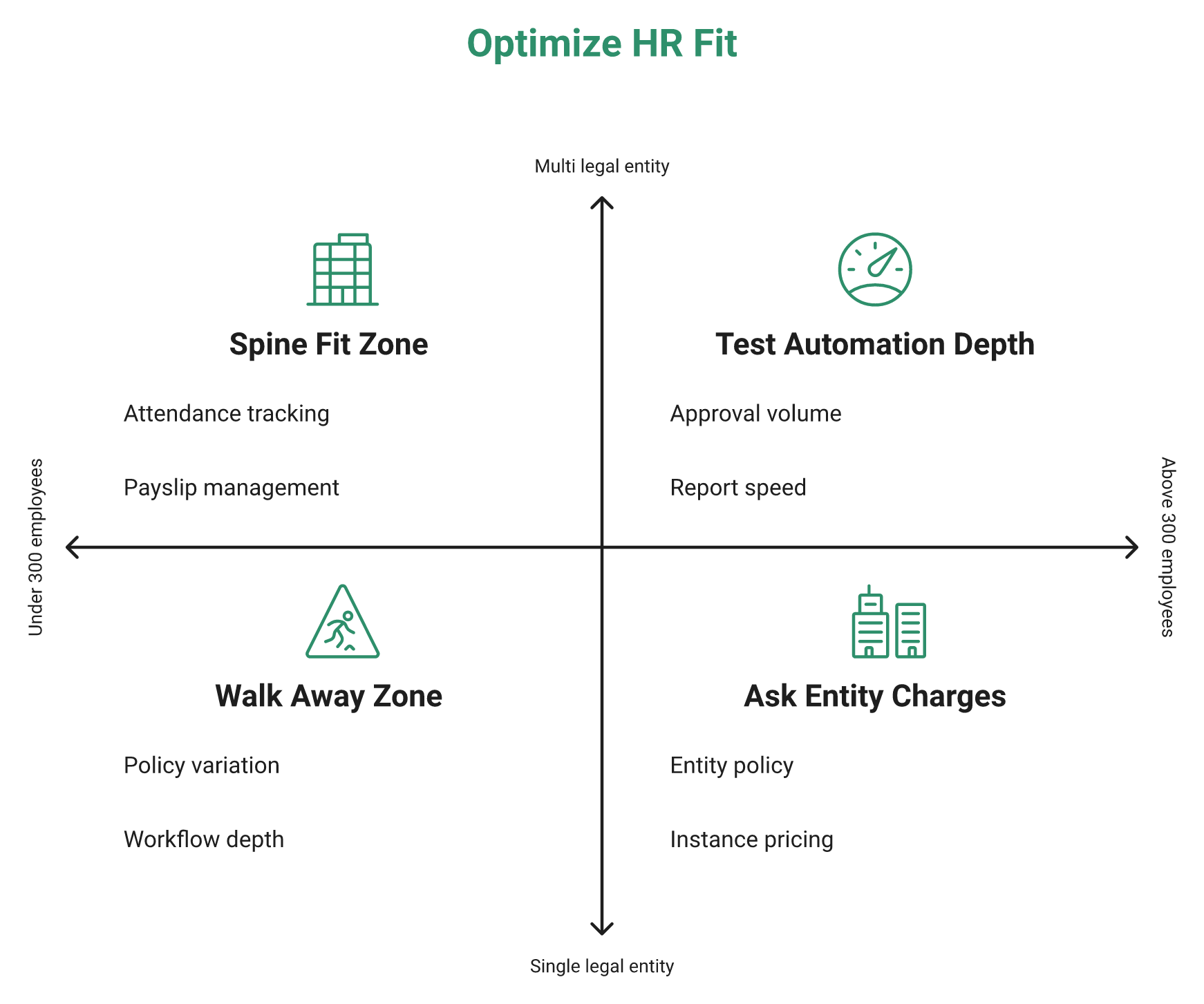
Run this before you book anything. It takes five minutes and saves five weeks.
- Headcount: under 300 in one entity, Spine stays in the race. Above that, test automation depth hard.
- Entities: more than one legal entity means you must ask about single-instance policy variation and extra entity charges.
- Automation appetite: if you want workflows you can change yourself, ask to see one built live during the demo.
Do not buy the whole hog if you will not eat the whole hog. Modules you never switch on still show up on the invoice.
HROne’s own onboarding data shows why the entity question comes first: Asia Healthcare Holdings runs 20 pan-India units on a single HROne instance with multi-legal-entity configuration, which is the structural test most small-team HRMS products fail.
Q2. Which Spine HR Modules Do Teams Actually Use Every Day?
Spine usage clusters tightly around three things in reviews: attendance and leave, payslips with tax and Form 16 handling, and employee records. Performance, LMS, ATS, and fixed-asset management exist but rarely appear in day-to-day accounts. HROne, by contrast, ships 127 pre-built hire-to-retire workflows that connect those modules, so a promotion updates the position code and the salary structure in one pass.
📋 The brochure says ten, the reviews say three
Spine’s public profile lists payroll management, employee database, attendance, performance, recruitment, and asset management. That is a wide surface area for a mid-priced Indian HRMS.
Now read the reviews. Attendance, leave, payslips, and tax dominate almost every account. The rest goes quiet.
⭐ What users actually describe using
“Track of all time daily work in the month. Easy to use. User-friendly, keep all information at one place. Taxation section help to provide small information about the tax calculation.”
– Verified user, July 2022, 5 stars, Spine HRMS G2 – Verified Review
“I have been using this tool for the last six months as an employee for attendance, LMS, and policy hub and as a recruiter for ATS activities and requisition management. Very little scope for automation.”
– Verified user, employee and recruiter, Spine HRMS G2 – Verified Review
That second quote is the useful one. The reviewer touched the ATS and still landed on limited automation as the verdict.
🔍 Evidenced versus brochure-only
| Module | Evidence level in reviews | What to verify in the demo |
|---|---|---|
| Attendance and leave | Strong, repeated across years | Shift rosters, dual punch rules, biometric sync lag |
| Payroll, payslips, tax | Strong | Form 16, arrears, PF and ESI edge cases |
| Employee records and ESS | Strong | Document upload, self-service on mobile |
| ATS and recruitment | Weak, one detailed account | CV screening, offer letter automation |
| Performance and LMS | Very weak | Appraisal cycle, bell curve, review reminders |
| Fixed-asset management | Vendor claim only | Asset issue, recovery at exit |
Treat every row in the bottom half as unproven until you watch it run with your own data.
🤖 Where module depth stops and workflow starts
A module list tells you what exists. It does not tell you who does what next.
Ask HROne to stack shortlisted CVs by relevancy score, and the ATS returns a ranked list with percentage scores against the job description, so recruiters stop opening 200 PDFs. That scoring layer is the difference between a recruitment database and a recruitment workflow.
HROne’s read is that the standard buying advice gets this backwards. Buyers compare module counts, then discover the module was never the constraint. The constraint was the handoff between modules.
🎯 Five questions per unproven module
Use these verbatim. They expose depth fast.
- Show me this module running end to end, on your test data, without a slide.
- Which fields here are configurable by HR, and which need your support team?
- What triggers automatically after this step, and who gets notified?
- Which reports come standard, and can I schedule them?
- Name one customer using this module at my headcount, live for over a year.
HROne’s HR Ops heat map answers question three visually, showing which processes are healthy and which are stalling, which is the check most module demos quietly skip.
Q3. What Does Spine HR Actually Cost in 2026, Licence Plus Total Cost?
Spine HR Suite is quote-based, and public figures contradict each other. Capterra India and SoftwareAdvice list INR 330 flat one-time. Techjockey lists monthly tiers from roughly INR 2,450 to INR 9,000. iTQlick estimates about USD 29 per user per month, plus USD 1,000 to 5,000 implementation. There is no free version and no self-serve trial, so budget total cost, not the sticker.
💰 Four sources, four prices, zero explanation
I checked every public Spine listing I could find. Not one explains why its number differs from the others.
That is not Spine being evasive. That is how quote-based Indian HRMS pricing works, and aggregators publish whatever the vendor last submitted.
📊 The pricing decoder
| Source | Published figure | What it likely represents |
|---|---|---|
| Capterra India, SoftwareAdvice | INR 330, one time | A per-user list anchor, not a full deployment |
| Techjockey | INR 2,450 to 9,000 per month | Bundled plan tiers for a small user block |
| iTQlick | USD 29 per user per month | Analyst estimate, normalised to US pricing |
| iTQlick services | USD 1,000 to 5,000 implementation | One-time setup, migration, configuration |
| SoftwareAdvice | No free version, no free trial | Evaluation happens through a vendor demo only |
Read the table as a range, not a price. Any single row quoted alone will mislead your CFO.
💸 The six lines that decide your real cost
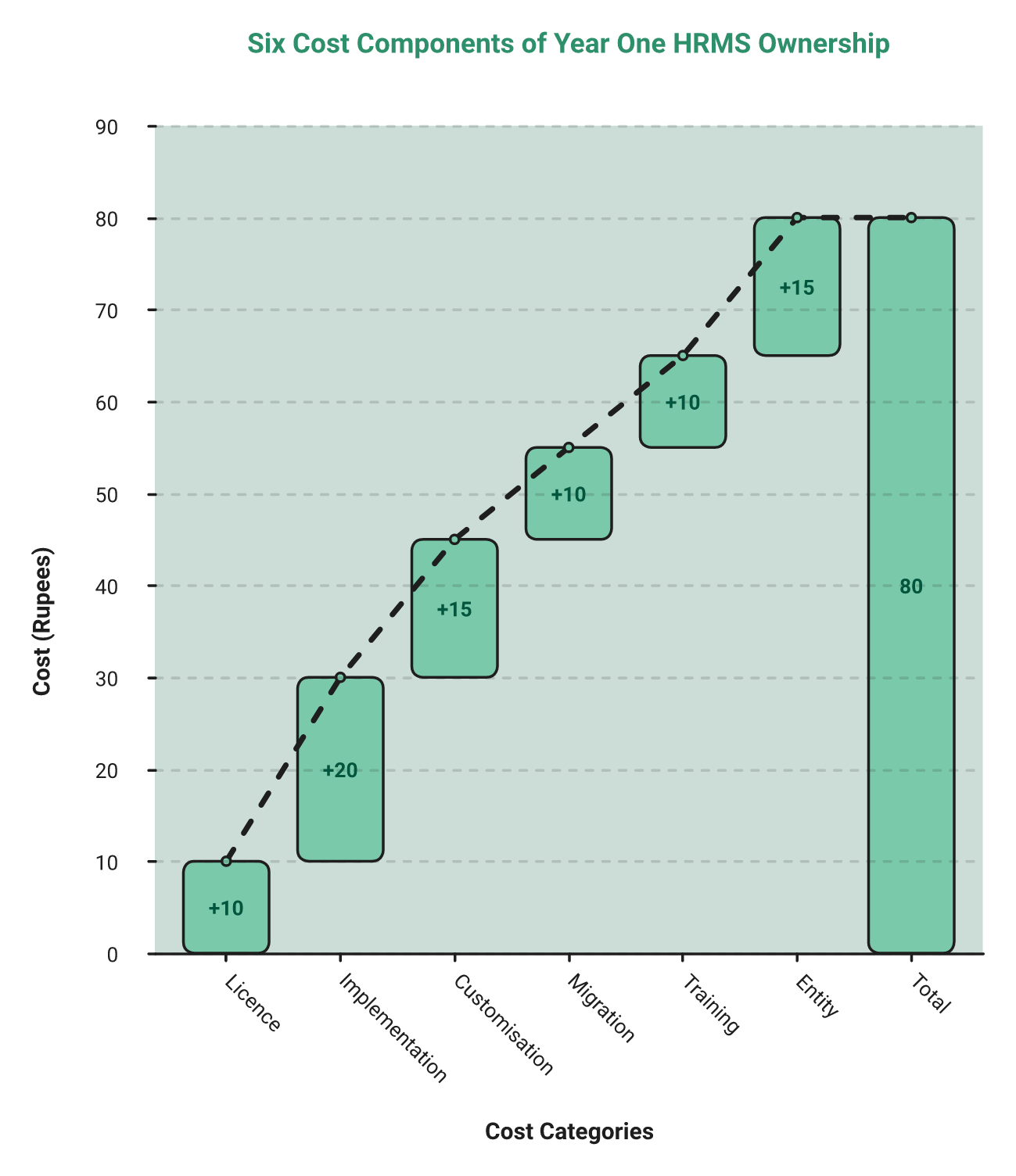
Licence fee is usually the smallest number in year one. Build your case on all six.
- Licence: per employee per month, or a flat block, and whether unused seats bill.
- Implementation: setup, configuration, and who does the work.
- Customisation: anything the standard product cannot do, quoted separately.
- Data migration: master data, balances, and how much history you actually need.
- Training: admin plus employee rollout, per location.
- Entity and location charges: extra instances or extra fees for a second legal entity.
Ask for all six in one written quote. If a vendor will only give you line one, that is your answer on transparency.
⏰ The billing trigger nobody negotiates
Here is the clause I would fight over before I fought over price. Most contracts start the subscription on the day you purchase, not the day you go live.
If implementation runs three months, you have paid for a system nobody used. HROne meters its subscription only after go-live, on flat per-employee pricing with no lock-in, which closes the paid-but-not-live gap most Indian buyers absorb silently.
⚠️ Where my confidence drops
HROne’s pricing data is clean because it is our own. On Spine, I am working from third-party listings, and listings age.
So treat the numbers above as a negotiation baseline, not a quote. My honest hedge is that your actual Spine number will land closer to the Techjockey band than the INR 330 anchor, though I would not bet a budget approval on it.
One more practical ask. Insist that your second legal entity sits inside the same instance at no extra charge, because HROne runs 20 pan-India units for Asia Healthcare Holdings on one instance, and that is the standard worth holding every vendor to.
Q4. What Do Verified Spine HR Users Genuinely Praise?
Spine’s verified praise is unglamorous and real: reliable attendance and leave tracking, single-click approvals, payslips and tax visibility in one place, and policy-level customisation that matches existing HR rules. Affordability for smaller teams comes up repeatedly. A June 2026 reviewer described it as simple, low-complexity software that supports the full employee lifecycle without drama.
⭐ Three strengths, with dates and ratings attached
Vendor pages claim ease of use. Reviews show what ease actually looked like on a Tuesday.
“It has a good, user-friendly UI and it’s easy to use. It helps with attendance tracking and maintaining records, which makes it useful for keeping everything organized.”
– Verified user, June 2026, 4 stars, Spine HRMS G2 – Verified Review
“With a single click we can have many features like access to our calendar, leaves. If I have to change my shift time it will be done by just requesting.”
– Verified user, July 2022, 4.5 stars, Spine HRMS G2 – Verified Review
“It automates HR operations. Time taken in the manual process has come down to a lot. Your work can be done in just a few clicks.”
– Verified user, December 2022, 4 stars, Spine HRMS G2 – Verified Review
Notice what all three have in common. None of them praise a dashboard. They praise a task closing quickly.
🏭 Why attendance-first strength matters more than it sounds
For a shift-based plant or a multi-location retail chain, attendance is not a module. It is the input that decides whether payroll is right.
Reviewers repeatedly say Spine keeps that record straight. HROne’s own delivery data shows the same dependency in reverse, with MR DIY India collapsing payroll cycles from 10 days to 5 or 6 after the attendance-to-payroll handoff was automated.
✅ How to quantify ease instead of trusting it
Every HRMS on earth claims user-friendly. The word is useless in a demo.
So count clicks instead. HROne holds a three-click standard, where routine actions like a CTC approval or an attendance regularisation must close from a single inbox screen without tab-switching.
Here is what our G2 reviewers say when that standard holds, and where it still bites.
“The InboxforHR is a game-changer, centralizing every HR task into one simple inbox, cutting down administrative time by 60 to 70% and preventing tasks from falling through the cracks.”
– Waldon S., 4 stars, February 2026, HROne G2 – Verified Review
“It can sometimes feel a bit overwhelming for new users. Certain features take time to understand, and without enough guided support, the learning curve can feel quite steep.”
– Nijanthan R., 3 stars, January 2026, HROne G2 – Verified Review
I include the second one deliberately. Depth costs onboarding time, and pretending otherwise would be dishonest.
🎯 Your evaluation script, borrowed from these reviewers
Pick your five highest-frequency tasks. Leave approval, attendance regularisation, payslip download, shift change, and reimbursement.
Time each one in the demo, and count the clicks. Navigation is a design failure when an HR user has to hunt for the task.
HROne’s position is simple and testable: measure ease as clicks-to-complete, because that number predicts adoption far better than any interface screenshot in a vendor deck.
Q5. What Are the Real Spine HR Complaints, and Which One Is a Deal-Breaker?
Four complaints repeat, and one is a genuine deal-breaker. Reported issues include a dated, non-intuitive interface, slow report and salary-processing windows, limited customisation on some objects, and support rated 2.4 out of 5 on Capterra. The deal-breaker is workflow blindness. A G2 reviewer reported no email or notification trigger on leave and attendance requests, so approvers must keep checking manually.
❌ What a silent approval queue costs you every day
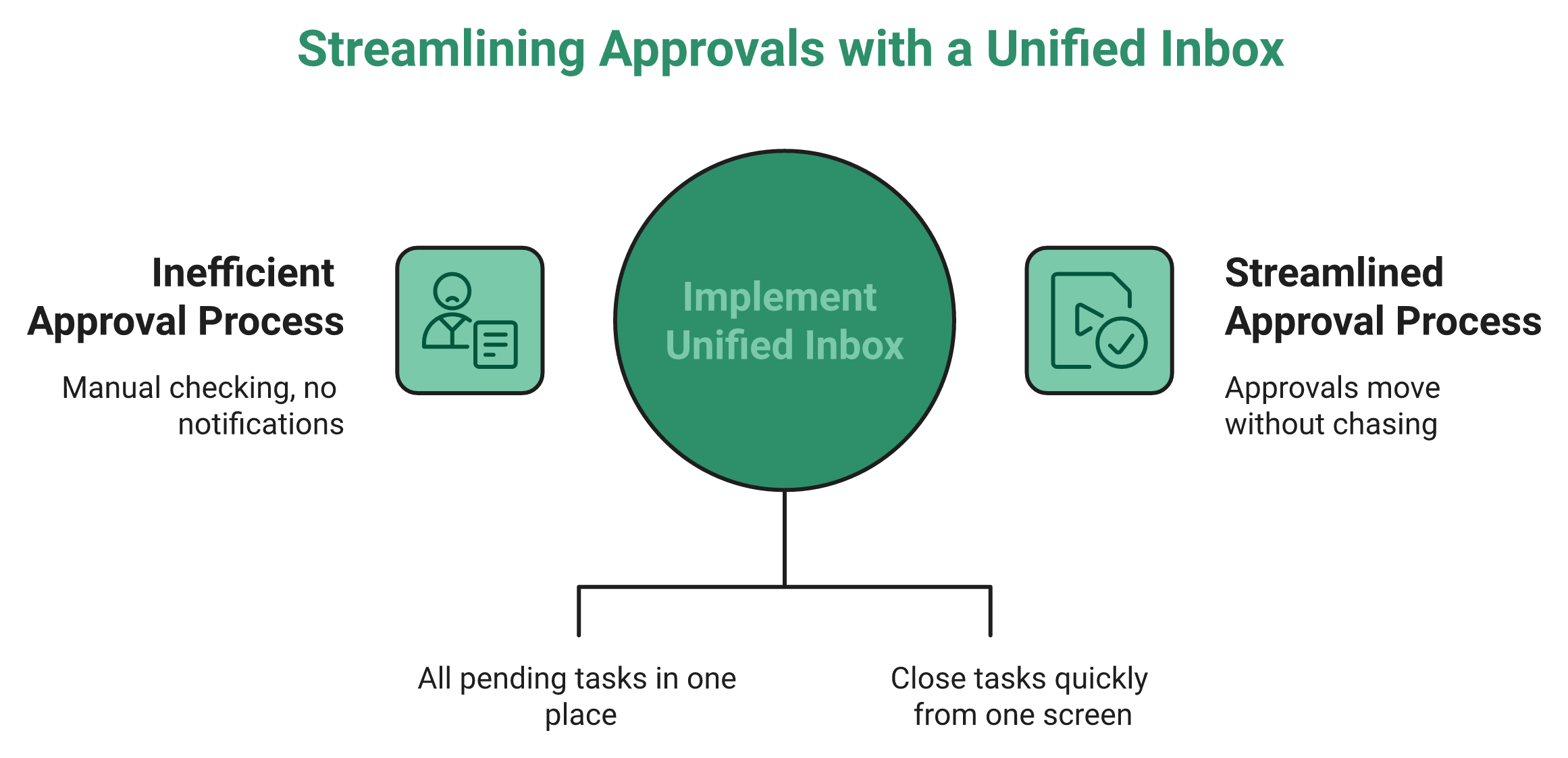
Picture a manager with eleven pending leave requests. Nobody tells him they exist.
So the HR executive calls him. Then calls the next manager, and the next, until the day is gone.
That is the real cost of a missing notification. It converts your HR team into a follow-up call centre.
⚠️ The complaint stack, with dates attached
“Awful user interface. No email trigger or notification for any activity. If someone raises an attendance or leave request, the approver will not get any notification. Very little scope for automation.”
– Verified user, employee and recruiter, 1 star, Spine HRMS G2 – Verified Review
“Sometimes it is a bit slow. The downtime usually for salary calculation and processing is a bit long, so we cannot use that in that particular phase.”
– Verified user, July 2022, 4.5 stars, Spine HRMS G2 – Verified Review
“Nothing major overall, but there are a few minor bugs, and some things can’t be customized.”
– Verified user, June 2026, 3 stars, Spine HRMS G2 – Verified Review
Notice the pattern. Even four and five star reviewers flag speed and rigidity.
💸 The complaint that costs money years later
One line in that 1 star review deserves your CFO’s attention. The reviewer said data cannot be migrated out to another HRMS without manual work.
Exit cost is a real number, not a hypothetical. If leaving takes three months of manual re-keying, your renewal negotiation has no leverage.
I have watched this play out at 400-employee firms. The switching cost, not the licence cost, is what traps a team for five extra years, which is why an HRMS migration plan belongs in the buying decision, not after it.
✅ Severity table: annoyance, workaround, or walk away
| Complaint | Severity | Why it lands there |
|---|---|---|
| Dated interface, weak CSS | Annoyance | Ugly does not break payroll |
| Slow reports, long salary-processing window | Workaround | Schedule runs off-peak, but plan for it |
| Limited customisation on some objects | Workaround | Test your three hardest policies first |
| Support rated 2.4 out of 5 | Serious | Escalation path decides your worst week |
| No notification trigger on approvals | Walk away | Every approval becomes a manual chase |
| No clean data export to another HRMS | Walk away | Locks you in without a contract clause |
Ask HROne to surface every pending approval, request, and task in one Super Inbox screen that closes an action within three clicks, and the chase disappears from the workflow entirely.
⏰ My honest read on ranking these
HROne’s deployment history shows the same pattern in reverse. The customers who switch rarely cite a missing feature. They cite chasing people for status.
Navigation failure is not a cosmetic problem. If an HR user has to hunt for the task, the design has already failed.
I might be weighting the notification gap too heavily for a 60-person company. At 500 employees across three locations, I do not think I am.
HROne treats a missing notification as a defect rather than a roadmap item, which is why 127 pre-built workflows define who acts next and by when. Our G2 reviewers report administrative time falling 60 to 70 percent once tasks stop living in inboxes and WhatsApp threads, and that is the core promise of HR process automation.
Q6. Why Do Spine HR Ratings Swing From 2.9 to 4.8, and Which Claims Survive Scrutiny?
Spine’s scores range from 2.9 out of 5 on Capterra India, based on just 7 reviews with support at 2.4, to 4.3 on G2 and 4.4 on TechnologyCounter from 16 reviews. Many Techjockey reviews date to 2020 and 2021. Sample size and recency explain the gap, not a product change. HROne publishes its denominator instead, ranking third for customer satisfaction across 1,17,579 products on G2.
📊 Two searches, two opposite verdicts
Search Spine HR review and you will find a 2.9 average. Search again and you will find 4.8.
Neither number is fake. Both are nearly useless on their own.
🔍 The variance table nobody publishes
| Platform | Score | Review count | Recency signal |
|---|---|---|---|
| Capterra India | 2.9 out of 5 | 7 | Support sub-score 2.4 |
| G2 | 4.3 out of 5 | Larger pool | Reviews through June 2026 |
| TechnologyCounter | 4.4 out of 5 | 16 | Listing updated 2024 |
| Techjockey | Mixed | 47 | Many reviews from 2020 to 2021 |
Seven reviews cannot produce a stable average. One unhappy payroll manager moves that score by half a star.
⚠️ How to read a sub-score instead of an average
The average hides the number that predicts your experience. On Capterra, Spine’s customer support sits at 2.4 out of 5.
That single sub-score matters more than the headline. Support quality is what you feel in the week payroll breaks.
HROne measures the same variable differently, tracking a 9.8 NPS on its dedicated HR SPOC support model, where the onboarding lead is a former HR practitioner rather than a technical project manager. You can see how that plays out across our published customer reviews.
❌ The claims that do not survive a check
Analyst listings for Spine repeat striking numbers. Talent-acquisition accuracy of 92 percent. Retention lift of 25 percent. Cost reduction of 40 percent.
I went looking for the study behind them. The same claim set appears on a second page from the same publisher, still with no methodology, sample, or year attached.
Treat those as marketing copy, not evidence. A percentage without a denominator is a decoration, which is exactly why an HRMS evaluation checklist should demand sources before scores.
⭐ What balanced review reading looks like
Read the middle ratings, not the extremes. Three and four star reviews carry the trade-offs.
“It has a good, user-friendly UI and it’s easy to use. Sometimes there are minor bugs, but they usually get corrected.”
– Verified user, June 2026, 4 stars, Spine HRMS G2 – Verified Review
“It can sometimes feel a bit overwhelming for new users. Certain features take time to understand, and without enough guided support, the learning curve can feel quite steep.”
– Nijanthan R., 3 stars, January 2026, HROne G2 – Verified Review
I include our own critical review on purpose. Any vendor showing you only five star quotes is editing, not reporting.
✅ Three questions that expose a padded rating
Run these on every shortlisted vendor, including us.
- How many reviews produced this average, and what is the median review date?
- What is the customer support sub-score, separate from the overall score?
- Give me three reference customers at my headcount whose reviews are under 12 months old.
HROne states the denominator with every ranking claim, including third place for easiest-to-use Core HR software on G2, because an average without a sample size is a number I would not accept from my own team.
Q7. How Good Is the Spine HR Mobile App and Employee Self-Service?
The SpineHR app covers leave, attendance, and payslips, and several reviewers find it adequate for daily punching. Store reviews also document real failures, including crashes, a non-intuitive interface, forced re-login when another account is open, and small fonts on mobile. If self-service adoption is your success metric, pilot the app with 20 employees before you sign anything.
📱 What the app actually does
Spine positions itself as a cloud and offline HR and payroll provider, with the mobile app covering leave and attendance details for employees. That is the standard employee self-service set, meaning employees handle their own requests without emailing HR.
For a field sales team or a plant, this is the whole product. Employees never see the admin console.
❌ The complaints employees actually file
App-store feedback is blunt in a way vendor pages never are.
“Terrible user interface. Keeps crashing all the time.”
– Verified user, Spine HR Apple App Store – Verified Review
“Not much, but I found the user interface is not so intuitive. Their Android Application has a lot of room for improvement.”
– Verified user, December 2022, 4 stars, Spine HRMS G2 – Verified Review
“From mobile, need log in if another account is open.”
– Verified user, December 2022, 4 stars, Spine HRMS G2 – Verified Review
Note the star ratings. These are not angry outliers. They are satisfied users describing a weak mobile layer.
⚠️ Why the app decides adoption, not the admin console
Your 460 employees will judge the entire HRMS by one screen. If punching in fails twice, they go back to WhatsApp messages to HR.
That is how an expensive rollout quietly dies. Adoption collapses at the employee layer, and nobody logs a ticket about it.
HROne’s mobile-first architecture carries the full workflow, including goal setting, reviews, and continuous feedback on the mobile HR app rather than a cut-down companion version.
✅ Our own mobile trade-offs, stated plainly
I will not pretend our app is flawless. Two HROne reviewers named specific mobile gaps this year.
“Mobile application don’t work properly while capturing live location. Geofencing radius not work properly.”
– Manna S., 4.5 stars, December 2025, HROne G2 – Verified Review
“Real time sync of biometric and mobile mark punch functionality available. Mobile mark attendance is great for employee who working from remote location.”
– Deepak K., 5 stars, January 2026, HROne G2 – Verified Review
Same product, two different verdicts on location features. That is what honest mobile evidence looks like.
⏰ A 20-employee pilot you can run in one week
Do not evaluate a mobile app in a demo. Evaluate it in a corridor.
Pick 20 employees across three roles: one desk team, one field team, one plant or store shift. Then check four things only.
- Punch reliability on weak network, twice a day for five days.
- Leave apply and approve, timed in clicks from app open to done.
- Payslip download without a desktop login.
- Session behaviour, specifically auto-logout and multi-account conflicts.
Log every failure with a screenshot. Take that log into the pricing conversation.
HROne runs offline attendance capture inside its mobile-first design, which is the single feature that decides whether plant and field teams adopt an HRMS or route around it.
Q8. Will Spine HR Fit Your Stack: Cloud, On-Premise, ERP Integration and Data Exit?
Spine offers both cloud and offline on-premise deployment, which genuinely helps BFSI, manufacturing, and data-residency-constrained buyers. It integrates with ERP systems through API or a direct database-to-database connection. Two cautions apply. On-premise slows statutory and product patches to your IT team’s release schedule, and one G2 reviewer reported you cannot migrate data out to another HRMS without manual effort.
🧩 The three-way argument in every buying meeting
IT wants the data on a server it controls. HR wants updates the moment a wage rule changes.
Meanwhile, attendance sits on a biometric machine, and payroll sits with an outsourced vendor. Nobody owns the space between them.
That gap is integration debt. It shows up as a month-end reconciliation nobody scheduled.
📊 Cloud versus on-premise, decided on four criteria
| Criterion | Cloud | Offline or on-premise |
|---|---|---|
| Product updates | Vendor pushes them | Waits for your IT release window |
| Statutory patches | Arrive centrally | Manual, and a compliance risk if delayed |
| Mobile parity | Usually full | Often lags the web build |
| Total cost | Subscription | Server, backup, and admin time added |
| Data residency | Vendor-hosted | Fully under your control |
Choose on-premise only when a written policy demands it. Otherwise you are buying slower compliance, and cloud-based HR software removes that lag by default.
🔌 How Spine connects, and where the effort lands
Spine supports API-based and database-to-database integration with third-party ERP systems. Database-to-database simply means two systems read and write to each other’s tables directly.
That method works. It also breaks quietly when either side changes a field.
I have built rigid field-mapped integrations before. They run beautifully until a payroll head renames one column, and then a whole cycle fails, which is the case for testing Tally, SAP, and biometric integrations before signing.
⚠️ The data-exit test almost nobody runs
“You cannot migrate your data to other HRMS tools. If you start using it and migrate to other tools, all the data would require manual migration.”
– Verified user, employee and recruiter, 1 star, Spine HRMS G2 – Verified Review
Read that as a contract issue, not a product issue. Ask for the export format in writing before signing.
On the internal side, HROne closes cross-module handoffs natively, so a promotion updates the position code in Core HCM and the salary structure in payroll in one pass. Integration effort then goes to external systems instead of internal gaps.
✅ What good integration feels like on a Monday
Our reviewers describe the specific handoffs that used to be manual.
“Real time sync of biometric and mobile mark punch functionality available. HCM supports JV integration and GL code logic also.”
– Deepak K., 5 stars, January 2026, HROne G2 – Verified Review
“Most of times, HCM throws internet bandwidth error while uploading CTC sheet for employees.”
– Sachin K., 5 stars, December 2025, HROne G2 – Verified Review
The second quote is ours too. Bulk uploads on weak connectivity remain a rough edge, and I would rather you hear it from me.
💰 Four asks before you sign anything
Put all four in the contract, not the email thread.
- Written export format for master data, balances, and payroll history.
- API documentation, plus named fields for attendance and payroll sync.
- Patch commitment for statutory changes, with a maximum turnaround.
- Single-instance confirmation for every legal entity, with no extra entity charge.
HROne runs 20 pan-India units for Asia Healthcare Holdings on one instance with multi-state payroll compliance configured per entity, which is the standard I would hold every vendor to before the second entity arrives.
Q9. Is Spine HR Ready for India’s New Labour Codes?
No public Spine documentation confirms labour-code automation, so test it against five Code on Wages, 2019 obligations: the 50 percent wage-exclusion cap, floor-wage checks, overtime at twice the normal rate, a wage slip every cycle, and final settlement within two working days of exit. Penalties reach INR 1 lakh. Ask whether statutory revisions arrive as automatic rule updates or manual admin edits.
⚖️ What the Code on Wages actually changed
The Code on Wages, 2019 merges four wage laws into one framework for India. Compliance guidance describes the consolidation as 163 rules becoming 58, 20 forms becoming 6, and 24 registers becoming 2.
Wages must reach employees by the seventh of the month. On exit, dues are payable within two working days.
❌ The 50 percent rule that breaks old CTC structures
Here is the clause that quietly rewrites your salary structures. Basic pay, dearness allowance, and retaining allowance together must be at least half of total remuneration.
If allowances exceed that half, the excess counts back as wages. That raises your provident fund and gratuity base, meaning employer cost rises without any salary hike.
A payroll system that cannot detect this breach does not remove the risk. It moves the risk to your payroll manager’s spreadsheet, which is precisely the gap statutory compliance software exists to close.
🧾 The five-test readiness checklist
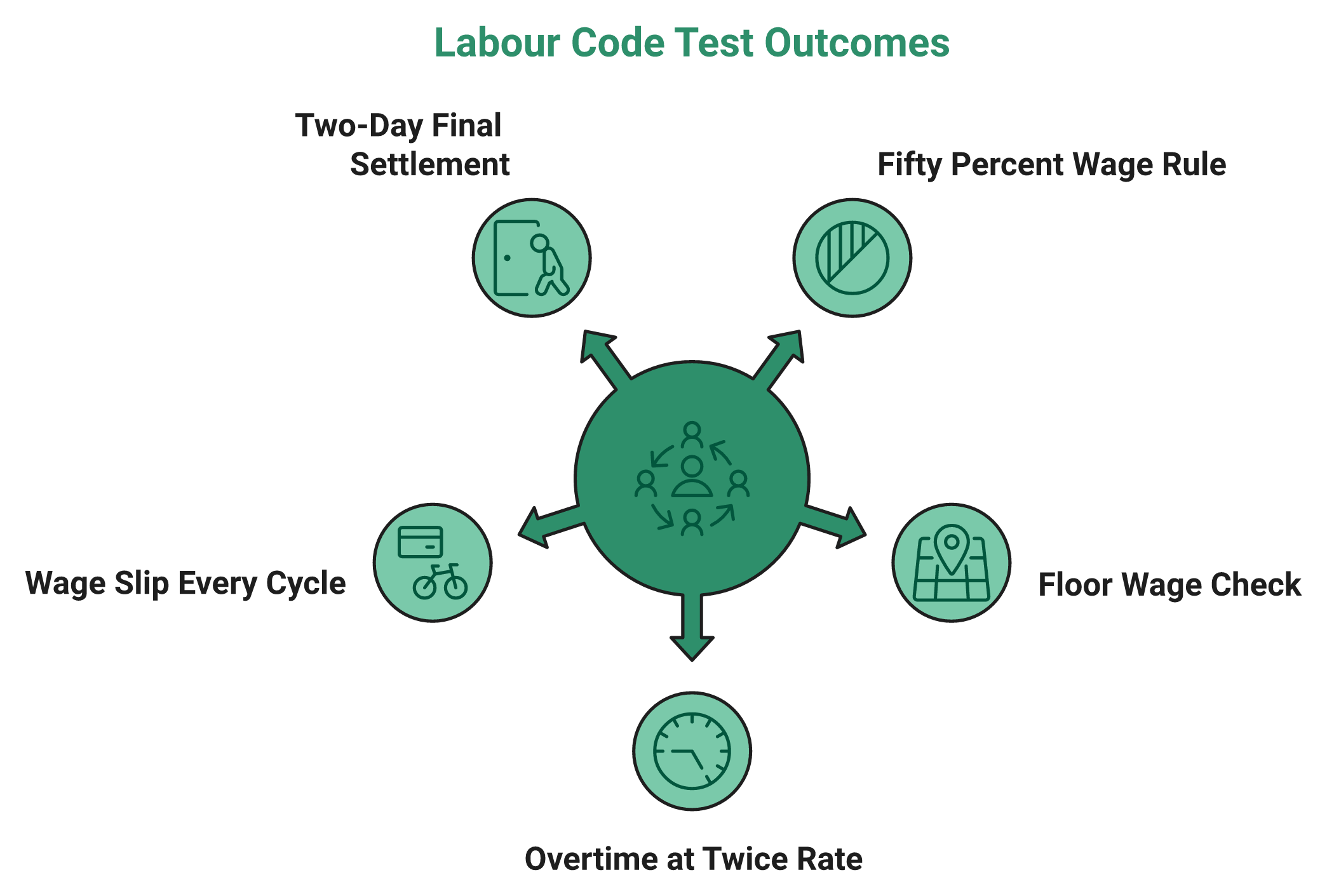
Run these on any HRMS, including Spine, during the demo itself.
- Does the system flag a CTC structure where basic, DA, and retaining allowance fall below 50 percent?
- Does it compare each employee against the applicable state or national floor wage automatically?
- Does it calculate overtime at twice the normal wage rate, not 1.5 times?
- Does it generate a wage slip for every wage period, without manual export?
- Does it hold state-specific policies for different legal entities in one instance?
Ask HROne to configure separate statutory policies per legal entity inside a single instance, and a Maharashtra plant can follow different wage rules from a Karnataka unit without a second deployment. That is the practical meaning of labour law compliance software at multi-entity scale.
⏰ How to check whether updates are automatic
This question matters more than any feature demo. Ask who updates the rule when a state revises minimum wages.
Payroll automation patents from as early as 1999 describe a central rules database that pushes statutory changes across jurisdictions automatically. If your vendor still needs an admin to edit slabs by hand, you have bought a calculator, not a compliance system.
A newer 2025 patent filing covers geolocation-verified clock-in and clock-out checks for payroll. Ask whether mobile punch data is retained in a form that survives an overtime audit, because attendance management is the evidence layer under every wage claim.
✅ What I would prioritise, honestly
I have watched teams obsess over migrating five years of payroll history. That history is rarely the thing that matters on go-live day.
What matters is that mortgages and rents get paid on time, in the correct amount, in the first cycle. Everything else can follow in month two.
HROne’s implementation data points this way, though I might be reading it too strongly. The projects that go badly are almost never the ones with less history migrated. They are the ones where nobody validated statutory calculations before the first live run.
⚠️ One caution on this whole section
Spine may well handle these rules correctly. Absence of public documentation is not proof of absence.
So treat my checklist as a test script, not a verdict. Make the vendor answer in writing, and keep that email.
HROne automates PF, ESI, professional tax, and labour welfare fund calculations inside its payroll software, and reviewers report the statutory output matching Indian compliance requirements after go-live. That is the standard worth demanding from any vendor before the wage codes bite.
Q10. What Does a Spine HR Implementation and Support Relationship Really Look Like?
SHRM India (July 2026) attributes most HR-tech implementation failures to poor data quality, integration gaps, and weak post-go-live support. Spine’s support score of 2.4 out of 5 on Capterra makes that third risk material. HROne assigns a dedicated HR SPOC per account and reports a 9.8 NPS on support, which addresses the exact variable SHRM India names as the most common failure point.
❌ The tool rarely fails, the rollout does
SHRM India’s analysis is blunt about this. Data quality problems, integration gaps, and thin support after go-live cause most HR-tech failures in India.
Notice what is missing from that list. Missing features.
📈 Why this is getting more urgent, not less
Indian payroll digitisation is climbing fast. Peer-reviewed research tracking adoption projected digital payroll systems reaching around 78 percent, citing NASSCOM data.
That means more teams migrating, and more migrations done badly. Volume does not create competence, which is why a realistic HRMS implementation timeline matters more than a launch date.
⭐ What support quality feels like from both sides
“Delivery team has expertise, energetic and helpful during configuration phase. Salary processing to last creation of bank Challan files is quick and systematic process with error free details.”
– Deepak K., 5 stars, January 2026, HROne G2 – Verified Review
“Most of times, application logs out automatically. I have raised the concern to support department but no resolution received. Apart from this all is going well with the product.”
– Komal S., 5 stars, December 2025, HROne G2 – Verified Review
Both reviews are ours, and both are real. Even a 9.8 NPS model leaves some tickets unresolved, and pretending otherwise would insult your intelligence.
🔢 The six-step sequence that protects your first payroll
Run implementation in this order. It is boring, and it works.
- Freeze master data first: employee codes, entities, locations, and cost centres.
- Assign permanent employee codes on day one, so nobody sits in a temporary silo.
- Configure statutory policies before configuring anything cosmetic.
- Run two parallel payroll cycles, comparing outputs line by line.
- Pilot attendance and mobile self-service with 20 employees before full rollout.
- Go live on payroll first, then switch on performance and engagement modules.
HROne’s onboarding SPOC is a former HR practitioner rather than a technical project manager, which is why our configuration conversations start with your leave policy instead of your database schema. The full sequence sits in our implementation guide.
💰 Six clauses to put in the contract
Verbal assurances vanish when the account manager changes. Write these down.
- Data migration acceptance criteria, with a defined error threshold.
- Named support contact, plus response and resolution SLAs by severity.
- Billing start date tied to go-live, not purchase date.
- Statutory update commitment, with maximum turnaround time.
- Data export format on exit, documented before signing.
- Three reference customers at your headcount, with reviews under 12 months old.
That last one filters faster than any feature comparison. Vendors with recent, findable references behave differently from vendors with 2021 testimonials, so read the customer success stories before the call.
⚠️ The trade-off nobody names
Some buyers want a dedicated human handling changes. Others want to build automations themselves in ten minutes without raising a ticket.
Both are valid, and they pull architecture in opposite directions. Decide which one your team actually is before the demo.
HROne runs both paths, pairing the prior-HR SPOC model with HRV Studio, a low-code builder that lets HR teams create custom apps for visitor or vendor management without a developer ticket. I still think most 500-person teams underestimate how much they will want the second option by year two.
Q11. How Does Spine HR Compare With HROne, greytHR and Darwinbox?
Compare on six criteria rather than feature counts: automation depth, multi-entity handling, mobile quality, support responsiveness, pricing transparency, and when billing starts. HROne runs 127 pre-built hire-to-retire workflows with billing that meters only after go-live. Spine competes on affordability and on-premise availability. greytHR is strongest in SMB payroll, and Darwinbox in large-enterprise scale. Pick the criterion that hurts you most today.
📊 The six-criteria table
| Criterion | HROne | Spine HR Suite | greytHR | Darwinbox |
|---|---|---|---|---|
| Best-fit size | 100 to 5,000 employees | Small to lower mid-market | SMB and small mid-market | Large enterprise |
| Automation depth | 127 pre-built workflows | Reviewers report limited automation | Payroll-centric workflows | Enterprise workflows |
| Multi-entity | Single instance, per-entity policies | Ask about entity charges | Ask about entity handling | Supported at enterprise tier |
| Mobile | Mobile-first, offline attendance | App works, reviewers flag crashes | Functional ESS app | Functional enterprise app |
| Support signal | 9.8 NPS, dedicated HR SPOC | 2.4 out of 5 on Capterra | Quote-based, varies by plan | Enterprise account model |
| Billing start | After go-live, no lock-in | Quote-based | Quote-based | Contract-dependent, confirm in writing |
Every quote-based cell is a question for the vendor, not a criticism. Ask each one when metering starts, and compare the answers against published greytHR pricing and Darwinbox pricing breakdowns.
⚖️ Why uniformity, not unfairness, kills HR systems
Most HR systems fail because they are too uniform. One leave policy, one approval chain, one shift pattern, applied to a company that outgrew all three.
Equality feels safe on paper. It breaks the moment a plant, a sales team, and a corporate office share one instance.
HROne’s read is that the standard buying advice gets this backwards. Buyers rank feature counts, then discover the constraint was policy variation per entity, which is the recurring theme in multi-entity HR software decisions.
⭐ How the review evidence differs
“There’s little to like about this HRMS tool. If you are looking for a long-term solution, then I would recommend looking for another option.”
– Verified user, employee and recruiter, 1 star, Spine HRMS G2 – Verified Review
“It has a good, user-friendly UI and it’s easy to use. Sometimes there are minor bugs, but they usually get corrected.”
– Verified user, June 2026, 4 stars, Spine HRMS G2 – Verified Review
“The initial setup was straightforward and simple, and I didn’t require training to use it from the first day.”
– Prajwal B., 5 stars, January 2026, HROne G2 – Verified Review
Spine’s spread is wide, from 1 star to 5. That variance is the honest signal here.
✅ Four scenario verdicts instead of one winner
Pick the row that matches your Monday.
- Under 300 employees, one entity, tight budget: Spine stays viable, subject to the notification and data-exit tests.
- Multi-entity, 100 to 5,000 employees, approvals stuck in email: HROne fits the shape of that problem.
- SMB payroll and statutory filing only, no workflow ambition: greytHR is a reasonable shortlist entry.
- Global enterprise headcount with a large HR technology team: Darwinbox belongs on the list.
HROne’s ROI Dashboard calculates lifetime hours saved against average HR salary, so a CHRO can present savings in rupee terms rather than adjectives. You can model the same figure yourself with the ROI calculator.
💰 The proof point I would ask every vendor for
Ask for one outcome number from a customer at your scale. Not a satisfaction score, an operational number.
MR DIY India collapsed payroll cycles from 10 days to 5 or 6 after moving to HROne. That is the shape of answer worth accepting, and the detail sits in the MRDIY case study.
HROne is live with 1,500 plus brands and ranks third for customer satisfaction across 1,17,579 products on G2. Numbers with denominators are the only ones I would let into a board deck.
Q12. Should You Buy Spine HR in 2026, and When Should You Walk Away?
Buy Spine HR if you run one legal entity under roughly 300 employees, your priority is dependable attendance and payslips, and budget is tight. Walk away if you need multi-entity policy variation, mobile-first self-service, notification-driven approvals, automation you can configure yourself, or a guaranteed data-exit path. Those five gaps appear in dated user reviews, not in vendor material.
✅ The buy-if profile, stated plainly
Spine earns a place on your shortlist under specific conditions. One legal entity. Under about 300 employees. Attendance and payroll as the core need.
Reviewers describe it consistently as a complete package for a small organisation. That is a genuine compliment, and it is also a boundary, which is why teams crossing 300 people start reading scaling HR processes guidance instead.
❌ The five walk-away signals
Any one of these should end the evaluation. Not because Spine is a poor product, but because the shape does not fit.
- You run two or more legal entities with different policies.
- Employee self-service on mobile is your adoption metric.
- Approvals must trigger notifications without anyone chasing status.
- You want HR to build or change automations without vendor tickets.
- You need a documented data-export path before signing.
“If you are part of a small organization, then it’s a good option as this tool is not very expensive. However, if you are looking for a long-term solution, then I would recommend looking for another option.”
– Verified user, employee and recruiter, 1 star, Spine HRMS G2 – Verified Review
🎯 The five-question demo script
Take these into every vendor call, ours included. Do not accept slide answers.
- Show me a leave approval closing end to end, timed, with notifications firing.
- Show two legal entities with different policies in one instance, and tell me the entity charge.
- Show a CTC structure breaching the 50 percent wage rule, and show the system flagging it.
- Give me the written data-export format for master data, balances, and payroll history.
- Name three customers at my headcount with reviews from the last 12 months.
HROne answers question one from a single HR inbox, where a pending approval closes within three clicks instead of moving across five tabs.
⏰ The honest version of this decision
I have been looking for an end-all HR system for years. I have not found one, and I build one for a living.
So do not buy the whole hog if you will not eat the whole hog. Buy the system that fits your next two years, then check whether it can grow with you.
HROne’s own reviewers remind me of the cost of depth. One flagged a steep learning curve without enough guided onboarding, and that critique was fair.
💰 What I would spend the money on
If your budget forces a choice, protect payroll accuracy and approval flow first. Engagement modules can wait a year.
Wrong paydays cost trust that no dashboard recovers. Everything else is a preference, and the practical fixes are collected in our guide to improving payroll accuracy.
“It handles salary calculations, statutory deductions (PF, ESI, taxes), and filings automatically, with zero manual intervention, removing payroll errors and compliance anxiety during audits.”
– Waldon S., 4 stars, February 2026, HROne G2 – Verified Review
⚠️ What I am still sitting with
My current thinking is that the next two years will separate HRMS products by one test only. Can HR change a workflow without asking the vendor?
I am not certain that test wins on Indian shortlists yet. Procurement still ranks price and feature count first, and I could be early.
HROne fits the buyer these reviews describe as under-served: the 100 to 5,000 employee, multi-entity Indian team that needs approvals to move without anyone chasing them. If you are running that shortlist right now, tell me which of the five walk-away signals you are hitting, and I will tell you honestly whether we are the right fix, or you can start with a product walkthrough.

















 Secures Top Spot in
