



Q1. What does “labour code ready” actually mean for an HRMS in 2026?
A labour-code-ready HRMS enforces statute at the point of entry, not in a report afterwards. It applies the 50 percent wage definition automatically, recomputes PF, ESI, and gratuity on that base, isolates state rules per entity, issues appointment letters to every worker category, closes full and final in two working days, and exports digital registers plus the unified return.
🧾 Every deck says “compliance ready”. Almost none define it
A payroll manager sent me a vendor slide in June. It said “100% Labour Code Compliant” in very large type. We opened the salary structure screen together, and the wage definition was one hard-coded formula field.
That gap is the whole problem. The Ministry of Labour and Employment has published FAQs that define wages in plain language. No statute, however, tells you which software behaviour actually satisfies it.
🗄️ A database stores what you typed. An engine stops the wrong entry
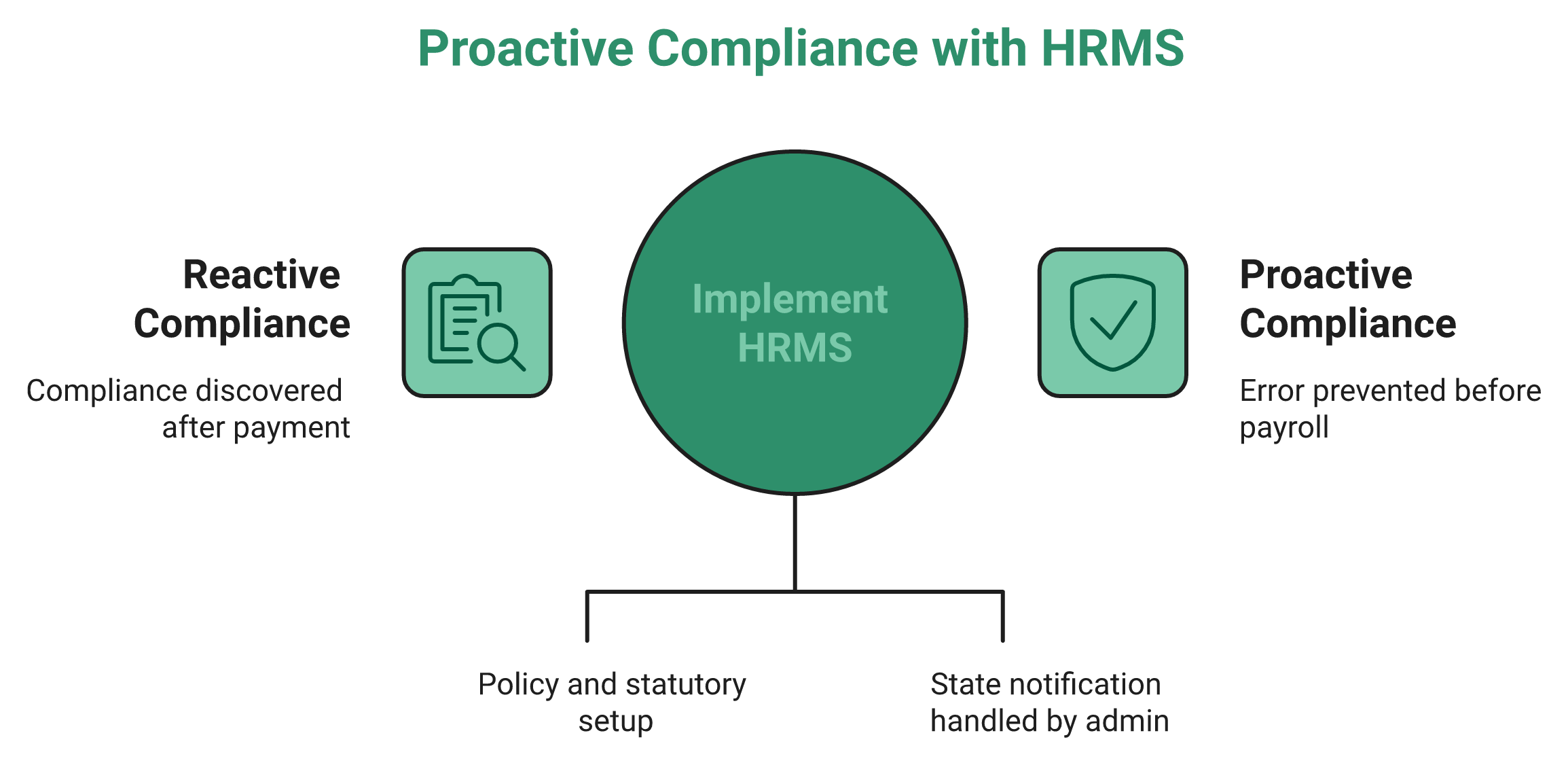
An HRIS is a registry. Someone keys in a number, and the system files it away. Ask that system whether the number is legal, and it has no opinion at all.
HROne puts policy setup, organisation unit structures, and statutory configuration on the front end, so an HR admin can inspect a rule before payroll runs. I care about this because back-end configuration means every state notification becomes a support ticket. This is why we treat statutory compliance software as an enforcement layer, not a reporting add-on.
✅ The six-part test I run before shortlisting anything
Use these six checks, in this order, on a live screen:
- Does the system add back excluded allowances above 50 percent, automatically?
- Does PF, ESI, and gratuity recompute on that revised base?
- Can two entities in one instance hold different professional tax and overtime rules?
- Can it issue and version appointment letters for every worker category?
- Can it produce a full and final settlement inside two working days?
- Can it export electronic registers and the unified return?
HROne ranks third out of roughly 1.17 lakh products for customer satisfaction on G2, though I will say plainly that satisfaction scores and statutory coverage are two different tests. Run the six checks regardless of ranking, and keep a formal HRMS evaluation checklist open while you do it.
🍊 Why a standalone payroll tool cannot prove this claim
Payroll is a downstream output. It consumes attendance, leave, shift, and time office logic before it computes a rupee. A tool that does not own those inputs is guessing at the wage base.
HROne bundles leave, attendance, and time office inside the same payroll instance used by 2,000 plus HR teams, which is why a wage definition change lands on one ledger. Moving from a record-keeping database to an enforcement engine is not an apples to apples switch. It is closer to swapping an apple for an orange, something with juice in it, and the difference is set out in our comparison of payroll software versus a full HRMS.
⚠️ One honest caveat on readiness claims
A majority of employers told the V.V. Giri National Labour Institute that they are aware of the codes and broadly support them. Awareness is not configuration. My current thinking is that most 2026 audit failures will be configuration failures, not knowledge failures.
HROne treats compliance as configuration rather than reporting. Statutory compliance, returns and challans, auto CTC breakups, and F&F settlement workflows sit as visible front-end settings, which means a buyer can inspect them during evaluation instead of trusting a slide.
Q2. Which labour code changes actually break your existing payroll setup?
Six things break: the wage definition, the PF and ESI contribution base, gratuity eligibility for fixed-term staff, appointment letter coverage, the full and final clock, and register format. The codes commenced on 21 November 2025, Central Rules were notified on 8 May 2026, and state rules are still landing, so your configuration must stay editable.
🔧 Six database objects, not four legal concepts
Stop reading this as law for a moment. Read it as fields in your system. Each of the six items below is a specific object that has to change.
The salary structure master changes first. Then the contribution base, the gratuity provision table, the letter template library, the exit ledger, and the register store. HROne holds these as configurable settings including auto CTC breakups, returns and challans, and auto attendance arrears, which is the shape I look for in any payroll software platform.
📋 What changed, in one table
| Area | Old framework | Under the codes |
|---|---|---|
| Wage definition | Basic pay, by practice | Excluded allowances above 50 percent get added back |
| PF and ESI base | Narrow basic | Revised wage base, higher contributions |
| Gratuity for fixed-term staff | Five years | One year of service |
| Full and final | Commonly 30 to 45 days | Two working days |
| Registers and returns | Physical registers, many returns | Electronic records, unified return via Shram Suvidha |
⏰ The dates that actually govern your project plan
The codes came into force on 21 November 2025. Central Rules under all four codes were notified on 8 May 2026, which ended the draft phase. Single registration through the Shram Suvidha portal is the route for new establishments.
State rules remain uneven. So do not freeze your rule tables in a one-time migration. I would keep every statutory table effective-dated and editable for at least the next four quarters, which is the same discipline we recommend for multi-state payroll compliance.
💸 The cost of waiting is arrears, not fines
Here is the part buyers underestimate. When a state notification lands mid-year, the wage base changes for periods you have already closed. That creates arrears on PF, ESI, and gratuity across every affected employee.
Reconciling that by hand is where the real cost sits. One HR head described the pre-system state to me as attendance from one source, payroll from another, and three tools that could not talk to each other. Every reconciliation in that setup was a manual run-around, and it is the most common of the payroll problems Indian companies report.
🧮 Why one ledger matters more than one dashboard
Fragmentation is the compliance risk, not the interface. If attendance lives in a biometric portal and payroll in an outsourced vendor’s file, nobody owns the wage base. Month-end becomes a negotiation between two exports.
HROne runs attendance, leave, payroll, and statutory filing on a single instance, so a wage definition change propagates to contributions and arrears inside the same payroll run. That is the architecture claim worth testing in a demo, and it is testable in about fifteen minutes.
HROne’s read is that the standard advice gets sequencing backwards. Restructuring CTC before fixing the data layer produces clean paper and dirty numbers. The platform’s returns and challans module and auto attendance arrears settings exist because arrears, not fresh payroll, is where labour code remediation actually gets expensive.
Q3. How should an HRMS handle the 50% wage rule and recompute PF, ESI, and gratuity?
The 50 percent test is not a one-time restructure. Every revision, bonus, arrear, and state notification changes which allowances get added back to wages, and therefore PF, ESI, gratuity, and bonus. A compliant HRMS stores statutory rules as effective-dated tables, re-runs closed periods, and produces a per-employee variance report instead of a fresh spreadsheet.
🧮 The add-back mechanic in plain English
The codes define wages, then list exclusions such as house rent allowance and conveyance. If those exclusions cross 50 percent of total remuneration, the excess is treated as wages anyway. Gratuity and retrenchment compensation stay outside that test.
So there is no way to engineer your way past it. You can restructure, but the ceiling holds.
💰 One worked example, on real numbers
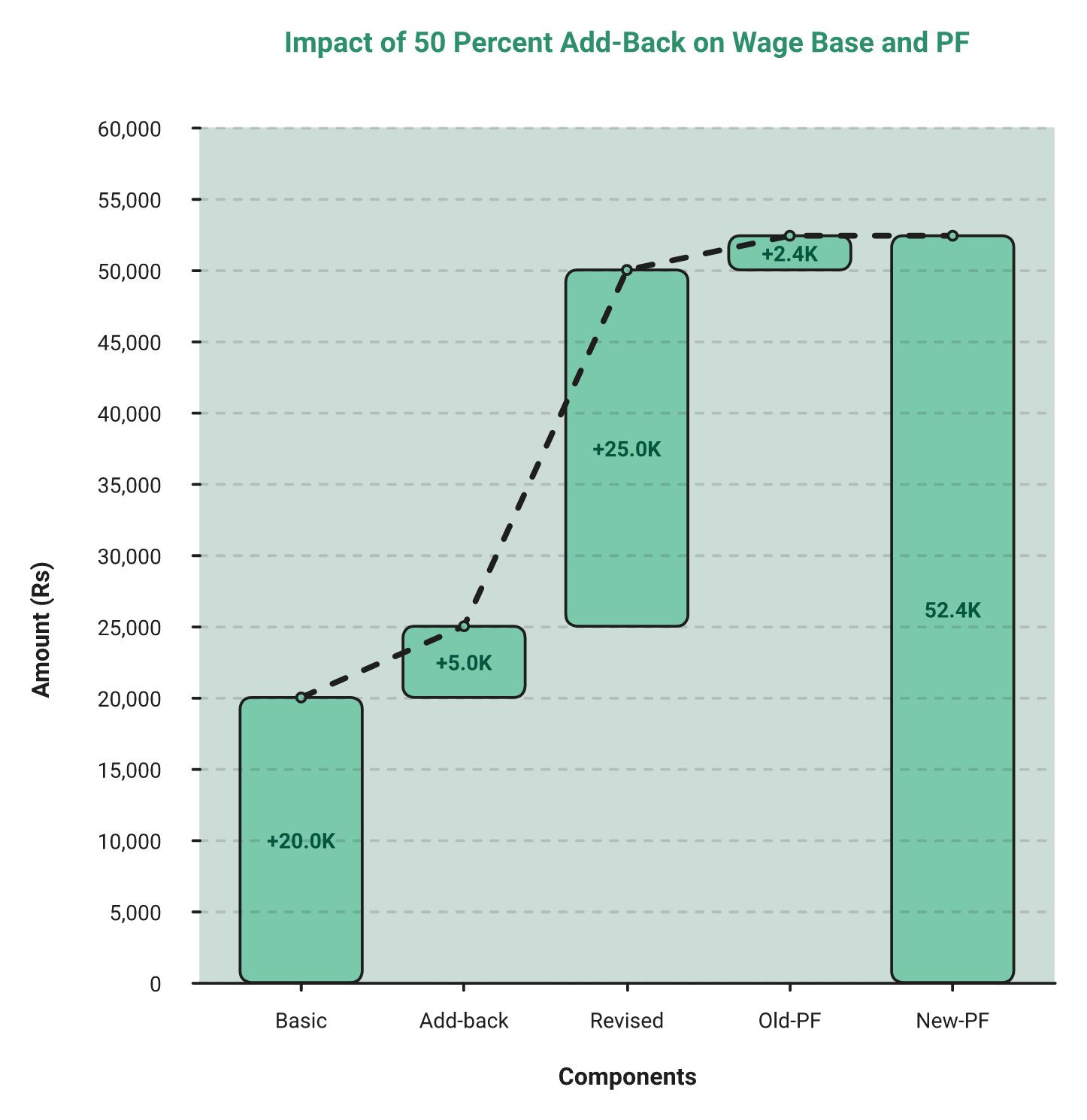
Take a monthly remuneration of ₹50,000. Basic is ₹20,000, house rent allowance ₹10,000, conveyance ₹4,000, and special allowance ₹16,000. Excluded components total ₹30,000, which is 60 percent.
The permitted exclusion is ₹25,000. So ₹5,000 gets added back, and the wage base becomes ₹25,000, not ₹20,000. Employee PF at 12 percent moves from ₹2,400 to ₹3,000, and the gratuity accrual base rises by a quarter, which you can sanity-check against our gratuity calculator.
HROne handles this shift through auto CTC breakups, so the revised base flows into the same payroll run rather than a parallel sheet. If your employer restricts PF to the statutory wage ceiling, your exposure differs, and that nuance deserves a direct question to your consultant.
“Proper calculation of PF and ESI was a pain area for us before, but now with the HROne automated calculation process, results are up to the mark and following Indian tax compliances properly.”
– Ajay K., 5/5 rating HROne G2 – Verified Review
⚠️ Where formulas break, and what retro recalculation must do
A formula field computes today correctly and yesterday incorrectly. That is the failure mode. When a rule changes with effect from a past date, you need the system to re-run closed periods and show the delta per employee.
HROne measures this through its auto attendance arrears configuration, which recalculates affected periods and surfaces arrear amounts inside payroll. Balanced reporting matters here, and reviewers do flag limits in that area.
“Arrear day calculation is correct… No option to show PF amount if arrear applicable.”
– Deepak K., 5/5 rating HROne G2 – Verified Review
🔍 Ask for effective-dated tables and variance detection
Automated compliance monitoring with overage and shortfall detection is patented territory, filed years before these codes existed. Research on AI-enabled HR systems also reports meaningful reductions in payroll error and stronger regulatory governance.
So the architecture question is fair to ask. Are statutory rules stored as effective-dated tables with variance detection, or written into payroll logic by a developer? The answer decides how much of your PF, ESI, and TDS compliance work stays inside the system.
✅ Your Monday morning move
Export current CTC structures today. Flag every employee whose excluded allowances cross 50 percent of remuneration. That list is your remediation scope, and it takes one afternoon.
HROne’s own implementation reviews start at exactly this point, because the wage base decides contributions, gratuity provisioning, and arrears all at once. I might be reading the sequencing too strongly, though every stalled remediation project I have seen skipped this export and started with policy drafting instead.
Q4. Does your system issue appointment letters and contracts to every worker category?
Appointment letters are now mandatory for every employee, including existing staff and fixed-term, contract, and field workers. HROne generates offer and appointment letters from its recruitment module and carries the salary structure into the employee master, so the letter and the payroll record cannot disagree. You still need version control, digital acknowledgement, and a retrievable audit trail.
📄 The scope is wider than new hires
Most teams read this as a joining formality. It is not. The obligation covers people already on your rolls who never received a formal letter, which in many mid-market firms means half the workforce.
Field staff, contract workers, and fixed-term employees are all in scope. HROne handles these cohorts as separate organisation units with their own policy sets, which keeps a contract worker’s letter template distinct from a permanent employee’s, a pattern we see constantly in HR software for multi-entity companies.
🔁 Back-filling existing employees, in five steps
- Pull a headcount list and mark everyone without a signed letter on file.
- Group them by entity, worker category, and state, because clauses differ.
- Build one template per group, with statutory clauses as variable fields.
- Generate in batches, then route for digital acknowledgement.
- Store the acknowledgement, not just the letter, as your audit artefact.
Step five is the one teams skip. A letter with no acknowledgement proves you drafted something, not that the employee received it.
⚠️ Version control is the real requirement
Clauses will change when state rules land. That means a letter issued in March and one issued in October carry different text, both legitimately. Your system has to know which version applied to which employee on which date.
A Word file on a shared drive cannot do this. I have watched an HR team argue for twenty minutes about which of four documents named “Appointment_Letter_Final” was the current one, which is exactly the failure mode that pushed us to build letter issuance into the onboarding process.
🤖 Rigid mapping versus flexible parsing
I have built contract generation workflows in automation tools before. They work, and they are rigid. You need exact field mapping, and if the template changes, the workflow breaks.
Semantic AI parsing reads a template more like a person would and fills it in. It is messier, and honestly more flexible when clauses shift. My current thinking is that flexibility wins under an unsettled rulebook, though I would not bet a statutory filing on it without a human review step, and that is the boundary we hold in the HROne AI suite.
✅ Close the loop with digital acknowledgement
Letters are half the artefact. Policy acknowledgement is the other half, and inspectors ask for both. Handbook acceptance, safety policy sign-off, and POSH policy receipt all need the same treatment.
HROne combines an HR handbook, handbook acknowledgement, and digital acknowledgement into one auditable trail, which removes the signature chase entirely. Ask any platform to show you an acknowledgement report filtered by policy version and date.
HROne generates offer and appointment letters inside the recruitment module and assigns the CTC automatically once the employee joins. That single link between the letter and the employee master removes the transcription step where wage base errors usually start, and it is the reason letter issuance and payroll accuracy belong in one system.
Q5. Can one HRMS instance run different state and entity policies without flattening them?
Most HRMS configurations fail under the codes because they are too uniform, not because they are unfair. A multi-state workforce needs isolated policy engines: state-wise professional tax and labour welfare fund slabs, different overtime and comp-off rules, entity-specific challan routing, and separate leave carry-forward logic. HROne holds unlimited legal entities inside a single instance with no per-entity charge, and policies configure per organisation unit.
⚠️ Uniformity is the failure mode, not unfairness
Most HR systems did not fail because they treated people unfairly. They failed because they treated everyone identically. Equality feels safe to configure, and it quietly breaks regional law.
Professional tax slabs differ by state. So do labour welfare fund deductions, holiday lists, and overtime treatment. A single global policy set cannot be correct in Maharashtra and Karnataka at the same time, which is the core argument for multi-state payroll compliance being configured, not assumed.
🗺️ What variance actually looks like on the ground
Think about an eight-hour standard day with an overtime cap in one jurisdiction, and no equivalent cap in another. Same company, same payroll cycle, two different legal answers. The Indian version of that problem is professional tax and labour welfare fund slabs, plus state-specific leave carry-forward.
HROne handles this by allowing separate policy sets per organisation unit, so a manufacturing entity and a corporate entity can hold different overtime rules. Users report the deduction side working as expected, which matters most in manufacturing HR setups running multiple plants.
“Salary processing along with exact calculation of LWF and PT slabs makes the work more convenient process.”
– Komal S., 5/5 rating HROne G2 – Verified Review
🏢 The console-level detail that decides your filing
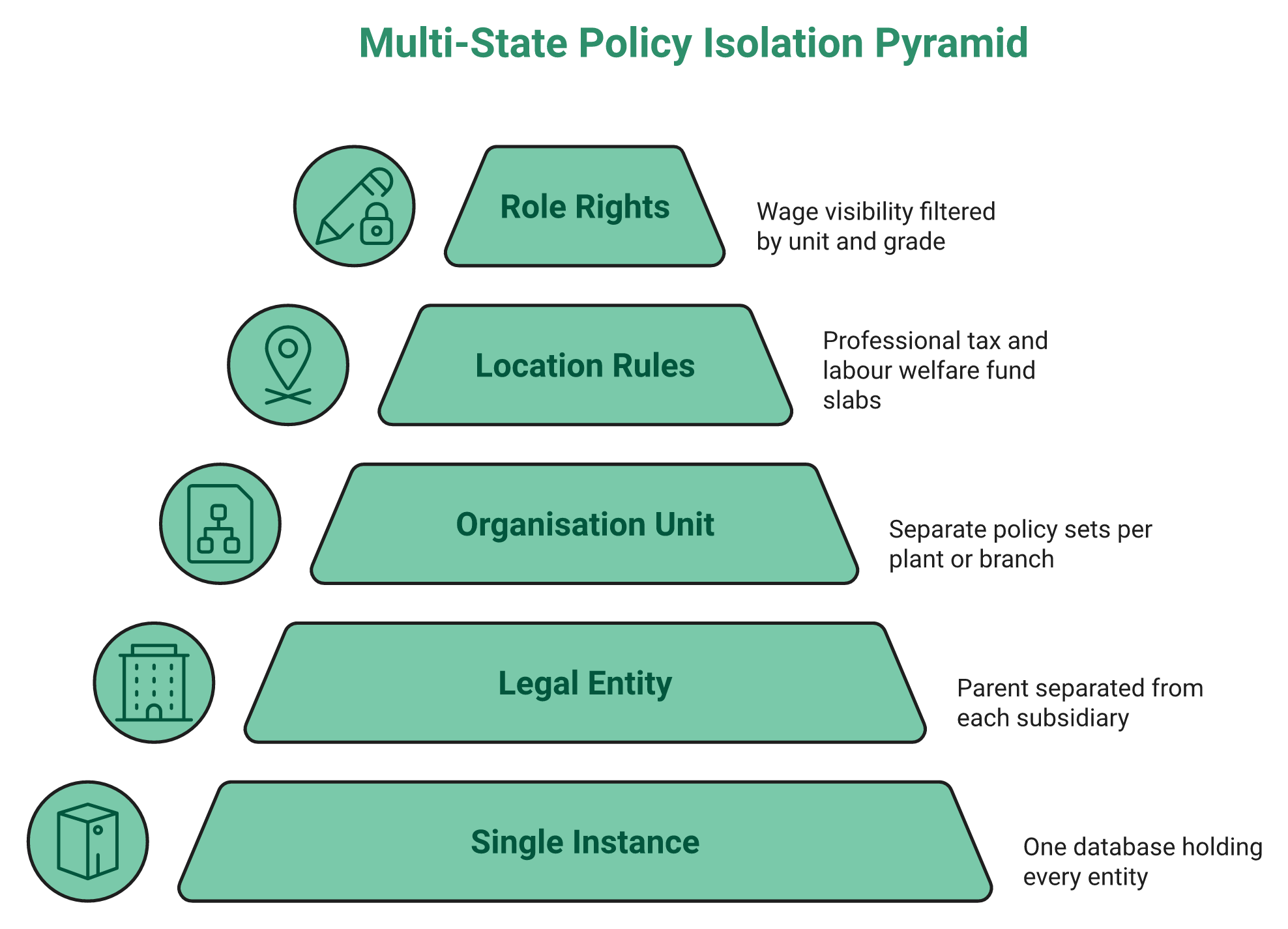
Registration under the codes moves to unified, digital registration through the Shram Suvidha portal. Existing registrations stay valid but must transition. That means your system needs entity-level data, not company-level data.
Specifically, it needs the parent company separated from each registered subsidiary. It needs location, registered address, state code, and the tax registration used for challan routing. Without those fields, every filing becomes a manual lookup, which is why we built entity mapping into HR software for multi-entity companies rather than treating it as a customisation.
Configuration honesty matters here too, and reviewers do flag mapping friction.
“Nothing is customizable and there are lot of mapping issues, For example Department & Sub department field has parent-child relationship.”
– Deepak S., 5/5 rating HROne G2 – Verified Review
🔒 Access control is a compliance control, not an IT nicety
Wage data leaks sideways in multi-entity setups. A site coordinator at one facility can often see statutory salary records from another. That is a data problem before it is a legal one.
HROne configures rights through a three-step wizard, define the role, assign the rights, then review, with filters down to business unit, department, grade, and sub-branch. I would test this with a real login, not a screenshot, and the logic behind it is set out in our note on HR software permissions.
💰 Why entity count should not be a billing lever
Several platforms price per database instance or per legal entity. That pushes buyers to merge entities in software that the law treats separately. I think that is a genuinely bad incentive.
HROne does not charge for maintaining multiple entities in a single instance, and there is no cap on entity count. Asia Healthcare Holdings runs 20 pan-India units on one instance with multi-legal-entity configuration, and the full story sits in our customer success stories.
HROne’s read is that the standard advice gets this backwards. Buyers are told to standardise policies before migration, when the codes actually reward isolation. The platform’s front-end setup module lets an HR admin configure organisation units and policies without a developer ticket, which is what keeps a state notification from becoming a three-week support queue.
Q6. How do you close a full-and-final settlement in two working days?
Two working days only works if exit computation is pre-staged, not triggered on the last working day. You need automated last-working-day proposals, a clearance checklist with named owners, attendance and leave-encashment true-up, statutory recovery on the revised wage base, and relieving letter generation. HROne ships full and final settlements as a workflow, with clearance checklist tasks and system-generated relieving letters.
⏰ The clock starts before the exit, not after it
Settlement timelines under the codes compress sharply, moving from the old thirty to forty-five day norm to two working days. Nothing about that is achievable as a month-end activity. The computation has to be ready when the resignation is accepted.
So the real change is sequencing, not speed. You are not doing the same work faster.
❌ Why manual full and final always misses the deadline
Manual settlement depends on people replying. Finance confirms recoveries, IT confirms asset return, admin confirms the ID card, and HR chases all three. Every one of those is an email waiting on someone’s inbox.
HROne routes these as clearance checklist tasks with defined owners, which converts the chase into a status view. I have watched teams shave days off exits purely by removing the follow-up, and the same pattern shows up across HR process automation projects.
✅ The six-step exit workflow that actually holds
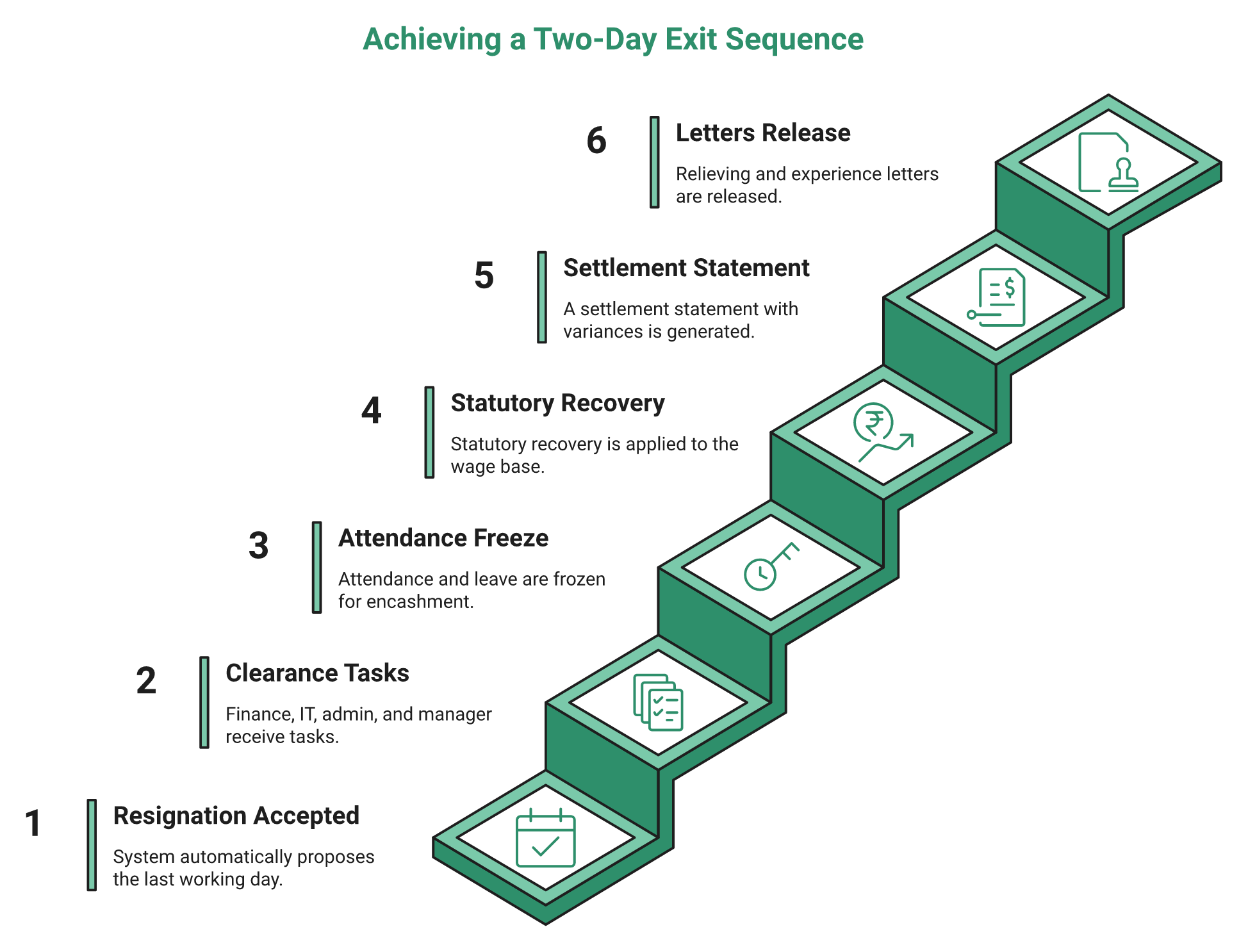
- Resignation accepted, system proposes the last working day automatically.
- Clearance tasks fire to finance, IT, admin, and the reporting manager.
- Attendance and leave balance freeze, then encashment computes.
- Statutory recovery applies on the revised wage base, including PF and gratuity.
- Settlement statement generates for approval, with variance visible.
- Relieving letter and experience letter release from the same record.
Step four is where the labour codes bite. If your wage base changed mid-year, the gratuity and encashment math changed with it, so check the numbers against a leave encashment calculator before you approve.
“Letters are now live means system generated for Confirmation and Relieved cases.”
– Deepak K., 5/5 rating HROne G2 – Verified Review
🧾 Offboarding is compliance drag nobody budgets for
Here is a question worth sitting with. How much administrative time do you want your team spending on people who no longer work for you?
That drag is real. Exit records, statutory recoveries, and letter trails all outlive the employee, and inspectors ask for them years later. Automating clearance is not a convenience choice; it is an audit choice.
HROne generates relieving and confirmation letters from the employee record itself, which keeps the letter and the settlement in one place. Reviewers also note gaps worth asking about.
“No option to enable exit interview feedback only for voluntary resignations.”
– Ajay K., 5/5 rating HROne G2 – Verified Review
⚙️ What to demand in the demo
Ask the vendor to run one exit end to end. Watch whether the settlement statement appears without anyone opening a spreadsheet. Watch whether the relieving letter pulls the same last working day.
I would also ask what happens when a recovery is disputed after approval. Very few platforms answer that cleanly, and my current thinking is that dispute handling is the next gap in this workflow.
HROne handles exits through automated last-working-day proposals, clearance checklists, and letter generation inside one settlement workflow. That design matters because the two-day clock cannot survive reminders. Process dependency beats person dependency here, and the audit exposure sits with the organisation long after the employee has moved on.
Q7. Are your registers, payslips, and returns genuinely audit-ready?
Physical wage registers no longer satisfy the OSH Code. Wage, attendance, overtime, leave, and deduction records must be electronic, retained for three years, and filed as a unified return through Shram Suvidha. HROne maintains statutory registers, returns, and challans inside the payroll module with role-scoped audit logs. Biometric attendance data also needs consent, an alternative marking method, and deletion on exit.
📁 What “electronic” actually means to an inspector
It does not mean a scanned PDF of a physical register. It means the record was created, stored, and retrieved in the system. Retention runs three years, and the export has to be readable without your vendor on a call.
Multiple returns have been consolidated under the codes, which reduces filing volume considerably. Fewer filings, however, means each one carries more weight, and that is the practical case for labour law compliance software holding the source records.
📅 The filing calendar to put on the wall
| Obligation | Timing | Where it lands |
|---|---|---|
| Unified annual return (Form V) | By 31 January | Shram Suvidha portal |
| Annual wage return | By 15 February | Shram Suvidha portal |
| Registration transition | Existing registrations must migrate | Shram Suvidha portal |
| Register retention | Three years, electronic | Your HRMS |
HROne generates bank challan files and statutory challans directly from payroll, which is the step most teams still do by hand inside a standalone payroll solution.
⚠️ The unified return reality check
States are not uniformly connected to the central system yet. So do not delete your state-format exports the day you go digital. Keep both alive for at least this filing cycle.
I might be reading the rollout too cautiously. Still, I would rather hold a redundant export than explain a missed state filing.
🔒 The DPDP layer sitting on top of your attendance data
Here is the part almost nobody writes about. The OSH Code pushes you to capture attendance electronically, often through biometrics. The Digital Personal Data Protection Act then treats that biometric data as personal data needing consent and purpose limitation.
Both obligations land on the same dataset. So you need consent capture, a non-biometric alternative for employees who decline, and deletion when someone exits. Any attendance management rollout in 2026 has to answer all three.
Role-based access is the third leg. HROne restricts wage and CTC visibility through role-level rights mapped to business unit and grade, which keeps salary records out of the wrong login.
✅ Policy acknowledgement is an audit artefact too
Registers prove what you paid. Acknowledgements prove what you told people. Inspectors increasingly ask for both, especially on safety and POSH policy documents.
Stop chasing signatures on printed circulars. HROne combines an HR handbook, handbook acknowledgement, and digital acknowledgement into one trail, so acceptance is stored against the employee record. Ask for an acknowledgement report filtered by policy version.
🧮 Your Monday morning move
Pick one month and one entity. Try to produce the wage register, attendance register, deduction register, and payslip archive as a single export. Time yourself.
If it takes more than fifteen minutes, you do not have an audit-ready system yet. That test costs nothing and tells you more than any vendor claim.
HROne keeps registers, returns, and challans inside the same payroll run that computes them, with role-scoped audit logs attached. That design gives an inspector one export trail instead of a folder hunt across branches, and it is the difference between a two-hour inspection and a two-week reconstruction.
Q8. How does the system handle gig, platform, fixed-term, and contract workers?
Fixed-term employees now earn gratuity at one year of service, which means provisioning from month one rather than year five. Aggregators owe a contribution of 1 to 2 percent of annual turnover, capped at 5 percent of the amount paid to workers. So the system must hold a worker register outside regular payroll and compute a turnover-linked levy that no payroll engine was originally built for.
🧾 Fixed-term gratuity changes your balance sheet, not just your policy
Under the older rule, gratuity liability for a fixed-term hire was mostly theoretical. Very few completed five years. At one year, almost all of them qualify.
That converts a rare payout into a routine provision. Your finance team needs the accrual from the first month, not a year-end surprise.
HROne provisions gratuity inside payroll and generates settlement math from the same employee record, so a fixed-term exit does not need a separate calculation sheet. I would still ask your auditor how they want the provision presented.
💰 The aggregator levy is a data problem first
Read the levy carefully. It is a percentage of turnover, capped by a percentage of worker payments. Neither of those numbers lives in a normal payroll master.
You need a worker register for people who are not employees. You need total payments to those workers for the year. Then you need the turnover figure from finance to apply the cap.
📋 The fields to create before the rules force you
- Worker identifier and category, separate from employee code
- Engagement start and end dates, without a payroll cycle attached
- Gross payments per worker per financial year
- Aggregator turnover reference, sourced from finance
- Levy computed value, with the cap test recorded
HROne separates these populations as their own organisation units with distinct policy and provisioning rules, inside the same instance as permanent payroll. That keeps a contract cohort from inheriting the wrong leave or overtime policy by default, which is the same discipline required for HRMS for field employees and blue-collar teams.
⚠️ What is still genuinely unclear
I will be honest about the limits here. Operational guidance on the aggregator levy remains thin, and state rules are still landing. Nobody should claim a finished playbook.
What I do think is safe: build the register now, even if the computation changes. Data you have not collected cannot be back-filled cleanly.
✅ The contract workforce question buyers forget
Contract workers on your premises create obligations even when a vendor pays them. Attendance, safety records, and register entries often still sit with the principal employer.
So ask whether the system can track a non-payroll headcount with attendance but no salary. Manufacturing and logistics HR buyers hit this in week one.
HROne runs multi-entity and multi-unit structures without charging per entity, which lets contract and fixed-term cohorts live in their own units rather than being forced into the permanent payroll structure. That separation is what makes a one-year gratuity provision and an aggregator worker register possible in the same instance, and it is worth verifying on screen before you sign.
Q9. What should you ask every HRMS vendor before you sign?
Ask only questions that can be answered on screen. Show me a structure where allowances above 50 percent are added back automatically. Show me two entities with different professional tax slabs in one instance. Show me a full and final settlement generated in two working days. Show me the unified return export. If the answer is a custom script or a consulting request, the platform is not code-ready.
⚠️ The expensive mistake happens after the cheque clears
I have watched HR teams buy a system they believed did something, pay the implementation fee, allocate three people to the project, and then discover the platform could not do that thing at all. The demo was not dishonest. The question was just too vague.
“Does it handle labour code compliance?” gets a yes from every vendor. “Show me the add-back running on this salary structure” gets a very different meeting. That is why we publish a formal HR software buyer checklist instead of a feature grid.
✅ The rubric: ask, verify, disqualify
| Ask this | What a yes looks like on screen | Red flag |
|---|---|---|
| Add-back above 50 percent of remuneration | Structure recalculates live, wage base updates | “Our team configures that” |
| PF, ESI, gratuity on revised base | Contribution changes with the wage base | Separate upload sheet |
| Two entities, different PT and LWF slabs | Both entities visible in one login | Second instance quoted |
| Effective-dated rule tables | Past period re-runs, variance shown | Formula field only |
| Full and final in two working days | Settlement generated from the exit record | Excel template shared |
| Appointment letters, all worker categories | Template library with version history | Word file download |
| Electronic registers, three-year retention | Register export by month and entity | Scanned PDF archive |
| Unified return and challan export | File generated from payroll run | Manual data entry |
| Role rights by unit, grade, sub-branch | Rights wizard demonstrated live | Admin or nothing |
| Biometric consent and delete-on-exit | Consent flag on the employee record | No answer |
| Support during a filing crisis | Named person, phone number, response time | Ticket queue only |
| Per-entity or per-instance charges | Pricing sheet with entity count stated | Vague “depends” |
💰 How to score it without overthinking
Score each row pass or fail. A red flag on the wage engine, the settlement clock, or multi-state isolation disqualifies the platform, whatever the price is. Everything else is negotiable, including pricing.
HROne asks buyers to run this list inside the live setup module rather than against a slide deck, because policy, organisation unit, and rights configuration all sit on the front end. That is a testable claim, so test it.
“I also appreciate how HROne has streamlined our payroll management by allowing me to map various components of CTC during onboarding and automatically process payroll after attendance approval.”
– Rishiraj R., 4/5 rating HROne G2 – Verified Review
⏰ Budget one hour, not one quarter
The whole rubric takes about sixty minutes with a screen share. Bring one real salary structure and one real exit case. Do not accept sandbox data.
Also ask about the learning curve honestly, because reviewers raise it.
“Certain features take time to understand, and without enough guided support, the learning curve can feel quite steep.”
– Nijanthan R., 3/5 rating HROne G2 – Verified Review
A majority of employers in the V.V. Giri National Labour Institute study reported support for digital compliance tools. Enthusiasm is not evidence. Only the screen is.
HROne exposes statutory setup, returns and challans, organisation unit structures, and role rights as front-end settings, which means every row above can be verified before a contract exists. That is the point of the rubric. Buy what you have seen working, not what you have been told works.
Q10. Which HRMS platforms handle labour code compliance best in 2026?
Score platforms on five compliance axes, not feature counts: effective-dated wage recalculation, multi-entity and multi-state policy isolation, two-day settlement automation, unified return export, and named support during a filing crisis. HROne holds unlimited legal entities in one instance with no per-entity charge and ranks third of roughly 1.17 lakh products for customer satisfaction on G2. greytHR suits SMB statutory depth, and Darwinbox and SAP fit large enterprise with longer implementations.
⭐ The five axes, side by side
| Platform | Multi-entity in one instance | India statutory depth | Support model | Best fit |
|---|---|---|---|---|
| HROne | Unlimited, no per-entity charge | PF, ESI, PT, LWF, TDS native | Dedicated prior-HR SPOC, 9.8 NPS | 100 to 5,000, multi-state |
| greytHR | Supported, tighter configuration | Strong SMB payroll | Standard support desk | SMB, single-state payroll |
| Keka | Supported | Solid India payroll | Largely email-based | Mid-market, UX-led buyers |
| Darwinbox | Supported | Enterprise breadth | Enterprise account model | Large enterprise, global |
| Zoho People | Supported | Global generalist | Ticket-based | Cost-sensitive, simple setups |
| SAP SuccessFactors | Supported | Deep, developer-driven | Partner-led | 5,000 plus, global entities |
HROne appears first here because entity count is not a billing lever and policy configuration sits on the front end, which are the two things that decide multi-state compliance. Head-to-head detail sits on our HROne vs greytHR page.
💸 The two cost lines that surface during an audit
Watch for per-instance or per-entity charges. They push you to merge entities in software that the law treats separately. That is a compliance risk created by a pricing model.
Watch the support model too. A ticket queue is fine for a password reset and useless at 9 pm before a statutory filing. Endless email threads leave you with an unresolved issue and a deadline, which is a recurring theme in Darwinbox alternatives research.
✅ Where each platform genuinely leads
greytHR is competent SMB payroll and gets simple setups live quickly. Keka has real interface polish that users like. Darwinbox carries enterprise brand weight and global coverage.
HROne’s differentiator is connective tissue, with 127 pre-built workflows spanning onboarding to exit clearance so tasks route automatically. I would not claim it wins every axis, because it does not, and the full module list is documented in HROne features.
“I like HROne for its zero-touch payroll and compliance automation. It handles salary calculations, statutory deductions (PF, ESI, taxes), and filings automatically.”
– Waldon S., 4/5 rating HROne G2 – Verified Review
⚠️ The honest limitations, stated plainly
Every platform on that table has a real weakness. Reviewers flag payroll module learning curves and multi-step workflows on HROne itself.
“Some modules, especially Payroll and Performance, have a learning curve and require more detailed guidance for first-time users.”
– Shilpi M., 5/5 rating HROne G2 – Verified Review
SAP and legacy ERP setups often need a developer to change a leave policy. That is manageable at 10,000 employees and painful at 800, which is the gap our SAP SuccessFactors alternatives analysis covers.
🗺️ Match the platform to your actual shape
- 100 to 500 employees, single state: greytHR or HROne, decided by workflow depth.
- 500 to 2,000, multi-state, multi-entity: HROne, on entity isolation and support model.
- Manufacturing or logistics with shifts and contract labour: HROne or Darwinbox.
- 2,000 plus with global entities: Darwinbox or SAP, accepting longer timelines.
HROne runs 1,500 plus brands live, including MR DIY India and Asia Healthcare Holdings, with 20 pan-India units on a single instance in the latter case. Comparison tables do not settle this. Running one entity, one exit, and one filing through each shortlisted system does.
Q11. What does remediation cost, and how should you phase the rollout?
The visible cost is licence plus implementation. The buried costs are payroll error correction, arrears on a restated wage base, and a system nobody adopts. Sequence by exposure: wage structure and statutory engine first, then attendance and leave feeding payroll, then exits and returns, then analytics. HROne meters subscription only after go-live, so setup time does not bill.
💰 Three cost buckets, in order of size
Licence is the number everyone negotiates. It is usually the smallest of the three.
Remediation is bigger. Restating the wage base creates arrears across PF, ESI, and gratuity for periods you have already closed. Adoption failure is biggest of all, because a system nobody opens produces documentation, not compliance. Model the full picture before you sign, using an ROI calculator rather than a licence quote alone.
❌ The pattern I keep seeing
A company spends heavily on an ERP believing it will solve everything. Then people do not embrace the change, and the licence quietly renews on a system nobody uses. I have seen this at six figures in dollars.
Payroll mistakes also carry a people cost that finance rarely models. Employees lose trust after repeated errors, and trust is expensive to rebuild. I have seen US benchmarks putting error correction in the tens of thousands of dollars, though I have not found a credible Indian equivalent, so treat the direction as real and the number as foreign. Practical fixes are set out in our guide to improving payroll accuracy.
⏰ The 90-day sequence that actually holds
| Window | What goes live | Owner | Exit criteria |
|---|---|---|---|
| Days 1 to 30 | Entity setup, wage structures, statutory rules | Payroll lead | One parallel payroll run matches |
| Days 31 to 60 | Attendance, leave, shift feeding payroll | HR ops | Zero manual uploads for one cycle |
| Days 61 to 90 | Exits, letters, registers, return export | HR ops and finance | One clean settlement, one export |
| Day 90 plus | Analytics, engagement, performance | CHRO | Baseline metrics agreed |
HROne runs this as a modular activation, so statutory compliance and payroll can go live before performance or engagement modules are touched. A realistic view of dates sits in our HRMS implementation timeline.
🪂 The parachute principle
You do not need the whole system on day one. Open only what you need, when you need it, and pay for that. A system that grows with you beats a big-bang launch that stalls in month two.
Onboarding quality decides this more than feature depth. Reviewers describe both sides of it.
“Their onboarding process was thorough, with helpful training sessions for the whole team.”
– Rishiraj R., 4/5 rating HROne G2 – Verified Review
“With a little more hand-holding during onboarding, clearer, simpler explanations and more proactive human assistance, the experience would feel far more reassuring.”
– Nijanthan R., 3/5 rating HROne G2 – Verified Review
⚠️ One thing to keep loose
Central Rules landed on 8 May 2026, and state rules are still arriving. So do not treat your statutory tables as final. Keep them editable, and keep someone accountable for watching notifications.
HROne assigns a prior-HR implementation SPOC rather than a technical project manager, and subscription begins at go-live instead of purchase date. Both details matter for cash, because you are not paying for a system that is still being configured. MR DIY India cut payroll cycles from 10 days to 5 or 6 after moving across, and that story is documented in the MRDIY case study.
Q12. How do you communicate the change, and what shifts in HR’s week afterwards?
Take-home pay changes when the wage base is restated, so communication has to run alongside the restructure, not after it. India’s reforms have already drawn union protest and a rocky start. Once statutory rules, attendance, and exits share one ledger, the week changes: HROne customer Caliber cut administrative occupancy from 150 percent by 70 percent, freeing roughly a third of the team’s time.
🗣️ What to tell employees, in plain words
Say three things. Gross salary is unchanged. The structure inside it has changed, so provident fund and gratuity contributions rise. Monthly take-home may dip slightly, and retirement savings go up.
Show it on one payslip, before and after. Abstract explanations create rumours, and rumours reach WhatsApp before your email does. A salary calculator makes that before-and-after conversation concrete in minutes.
⚠️ Do not let finance send this alone
Restructuring communicated as a finance exercise reads like a pay cut. Communicated as a statutory change with a worked example, it reads like information. Same facts, different reception.
HROne pushes these announcements and policy acknowledgements through the employee portal and mobile app, so the message and the acceptance record sit in one place. I would still hold a live session for anyone whose take-home moves by more than a small margin, and give managers the mobile HR app to answer follow-ups on the floor.
⭐ The Caliber arc, briefly
Before the system, Caliber’s HR team chased people to confirm whether data had been updated. Analytics existed, but nobody trusted them. Every initiative was tracked manually.
After implementation, the HR lead described it simply. The data is correct, so he sleeps at night. HROne’s Caliber deployment also doubled daily recruitment closures, moving from 8 to 10 positions a day to 15 to 20.
“The InboxforHR is a game-changer, centralizing every HR task into one simple inbox, cutting down administrative time by 60 to 70 percent and preventing tasks from falling through the cracks.”
– Waldon S., 4/5 rating HROne G2 – Verified Review
✅ The week that actually changes
Month-end stops being a reconciliation exercise between three exports. Exits stop being email chains. Filing stops being a folder hunt across branches, which is the shift described across our case studies hub.
That is the honest payoff. Not fewer features to learn, just fewer hours spent proving numbers you already had.
“We’ve cut down on manual tracking and reduced errors compared with using spreadsheets, and employees now have clearer visibility into their requests.”
– Rahul c., 5/5 rating HROne G2 – Verified Review
❌ What I am still unsure about
I have yet to find a system that is the end-all and be-all for HR, and I have been looking for a long time. I have even sat as a domain expert with people building these systems. Every platform, including ours, has edges.
State rules are still landing, and the aggregator levy has thin operational guidance. So my current thinking is that 2027 will be about retro-recalculation, not first-time configuration, a theme we return to in the future of HR technology in India.
HROne’s ROI Dashboard calculates lifetime hours saved against average HR salary, which is how Caliber’s 70 percent occupancy drop became a number a board could read. If you are mid-restructure right now, I would genuinely like to know which of the twelve checks in this article your current system fails. That answer tells you more than any vendor comparison will.













 Secures Top Spot in
