


Q1. What Are the 12 Best Resume Screening Software and Automated Employee Screening Tools in 2026?
The 12 best resume screening tools in 2026 are HROne, CVViZ, Sapia.ai, Greenhouse, Keka, greytHR, PeopleStrong, Zoho Recruit, Ducknowl, Intervue, Manatal, and Truffle. HROne ranks first for Indian mid-market and enterprise teams because AI resume relevancy scoring, knockout pre-screening, offer letters, and payroll onboarding run on one employee record.
Choosing recruitment software is a high-stakes decision for Indian companies hiring at volume, because recruiters now process roughly 291 applications per hire, and application counts per open role in India have climbed more than 80% since 2022. For this report, 12 vendors were evaluated against operational, technical, and compliance criteria that matter to the person opening the shortlist every morning, not to the procurement team signing the invoice. Ratings reflect published pricing pages, verified G2 reviews, and India-specific data-handling requirements under the DPDP Act, 2023.
Our Evaluation Criteria
- Screening Intelligence and Explainability 🧠: Semantic matching versus rigid keyword rules, visible relevancy scores, and stated reasons behind every rank.
- Verified User Reviews ⭐: Volume and recency of G2, Capterra, and Gartner Peer Insights reviews, including critical ones.
- Workflow Continuity 🔗: Whether a screened candidate moves to offer, eKYC (electronic Know Your Customer identity verification), and payroll without a manual export.
- India Compliance and Data Handling 🇮🇳: DPDP consent capture, retention controls, and statutory compliance software depth where the vendor claims it.
- Setup Effort and Time to Value ⏰: Published go-live timelines, configuration without developer tickets, and calibration support.
- Support Model 📞: Phone, email, chat, or a dedicated single point of contact who has actually worked in HR.
- Pricing Transparency 💰: Published rates, billing start date, lock-in terms, and cost drivers at 200 and 500 employees.
Who This Guide Is For
- CHRO solutions buyers and HR Heads consolidating a disconnected ATS, spreadsheet, and payroll stack into one hire-to-retire record.
- Talent acquisition leads screening 200 or more applications per open role across multiple locations.
- Payroll Managers who inherit dirty candidate data at onboarding and fix it manually at month end.
- IT Directors and compliance owners answering DPDP consent and audit-log questions before sign-off.
📋 The 12 Tools at a Glance
- HROne
- CVViZ
- Sapia.ai
- Greenhouse
- Keka
- greytHR
- PeopleStrong
- Zoho Recruit
- Ducknowl
- Intervue
- Manatal
- Truffle
| Provider | Best For | Standout Strength | Known Limitation | AI Screening Depth | Support Model | Pricing Model |
|---|---|---|---|---|---|---|
| HROne ⭐⭐⭐⭐⭐ | HR ops leads running hiring, onboarding, and payroll on one record | One AI Suite stacks the most relevant CVs on top with visible relevancy scores | New users report a steep learning curve without guided onboarding | Deep: relevancy scoring, resume parser, JD and interview question generators | Phone, email, and a dedicated prior-HR SPOC at 9.8 NPS | Flat PEPM, no lock-in, billing starts after go-live |
| CVViZ ⭐⭐⭐⭐ | Recruiters who want contextual matching without changing their whole stack | Contextual NLP matching rather than keyword counting | Narrow scope, no payroll or workforce layer | Moderate to deep on matching, light on assessments | Email and chat | Quote-based per-user subscription |
| Sapia.ai ⭐⭐⭐⭐ | High-volume hiring teams reducing bias in first-pass screening | Criteria-led screening built for bias reduction at scale | Best suited to volume roles, less fit for niche technical hiring | Deep on structured, chat-based screening | Email and enterprise onboarding | Quote-based |
| Greenhouse ⭐⭐⭐⭐ | Structured hiring teams standardising scorecards | Bias-aware structured hiring workflows | Enterprise pricing, India statutory payroll not included | Moderate | Email, chat, enterprise CSM | Quote-based tiers |
| Keka ⭐⭐⭐⭐ | Indian SMB teams wanting clean UX across HR basics | Polished, approachable interface for first-time HR tech buyers | Support runs largely on email threads, which slows migrations | Moderate | Mostly email and ticket | Per employee per month |
| greytHR ⭐⭐⭐⭐ | SMB payroll managers needing statutory filing reliability | Long-standing Indian payroll and compliance depth | Limited workflow configuration for multi-entity or shift-based setups | Light | Email, ticket, partner-delivered | Per employee per month tiers |
| PeopleStrong ⭐⭐⭐ | Mid-market teams wanting analytics-heavy HCM with recruiting | Workforce analytics across the employee lifecycle | Heavier configuration effort and longer rollouts | Moderate | Enterprise account team | Quote-based |
| Zoho Recruit ⭐⭐⭐⭐ | Small agencies and in-house teams already inside Zoho | Low entry cost with a free tier and wide integrations | Generalist build, thin on India-specific statutory workflows | Moderate | Email, chat, forums | Freemium plus per-user tiers |
| Ducknowl ⭐⭐⭐ | Teams pairing resume screening with video and skills tests | Screening plus assessment in a single workflow | Small vendor footprint, limited enterprise references | Moderate | Per-user subscription | |
| Intervue ⭐⭐⭐ | Engineering hiring teams screening for technical skill | Live technical interviewing tied to screening | Built around technical roles, weak fit for volume non-tech hiring | Moderate | Email and chat | Quote-based |
| Manatal ⭐⭐⭐ | Recruitment agencies managing many client pipelines | Affordable AI recommendations with social enrichment | Agency-first design, limited internal HR depth | Moderate | Email and chat | Per-user monthly tiers |
| Truffle ⭐⭐⭐ | Teams that refuse keyword auto-rejects on principle | Evidence-based scoring with no automatic rejections | Newer entrant with a thin public review base | Moderate to deep | Quote-based |
🔎 How to Read This List
Match the tool to your volume, not to the longest feature list. Under 50 hires a year, a focused screening tool is enough. Above that, screening that cannot write back to payroll software just moves the manual work downstream.
1.1 HROne: The Hire-to-Retire Operating System With Screening Built In
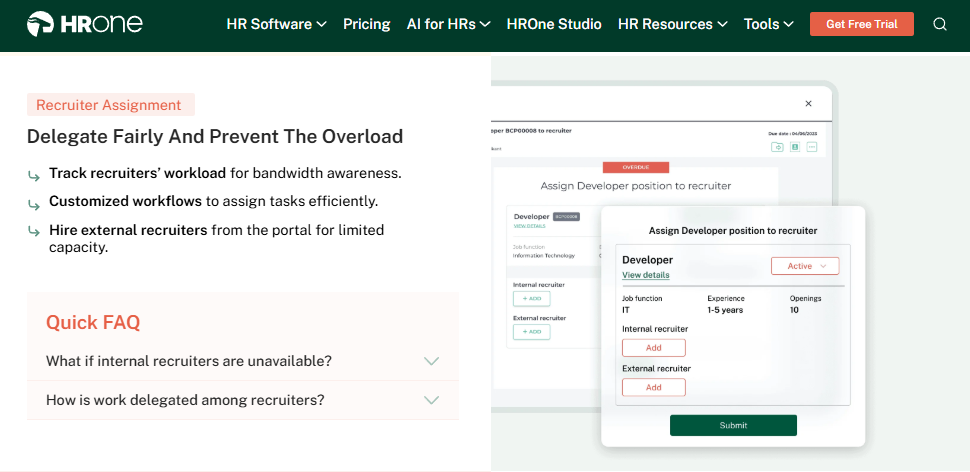
HROne is an India-first, mobile-native HCM where resume screening sits inside the full employee lifecycle.
🏢 Overview
HROne is a cloud-based core HCM platform founded in 2016 and headquartered in Noida, serving organisations of 100 to 5,000 employees across India. It ships 30+ modules and 127+ pre-built workflows covering hire to retire. G2 ranked HROne 3rd out of 1.17 lakh software products for highest customer satisfaction, and 3rd easiest to use in Core HR. Teams pick it when candidate data keeps dying between a standalone ATS and payroll.
⚙️ Core Services
- One AI Suite resume relevancy scoring: stacks the most relevant CVs on top with a visible score and reasons, so recruiters stop opening every attachment.
- Bulk resume parsing: converts many resumes at once into structured candidate records, removing retyping at shortlist stage.
- Knockout pre-screening criteria: hard disqualifiers filter unqualified applicants at entry, keeping the talent pool clean.
- Complete ATS cycle: runs manpower requisition to career portal to interview scheduling in one flow, ending spreadsheet trackers.
- Instant offer letter generation: builds the letter with CTC breakup, then copies that structure into payroll automatically.
- Marketplace integrations for BGV and e-signature: triggers background verification and document completion from the candidate record, with wider integrations available for ERP and SSO.
- Super Inbox task closure: surfaces every pending approval in one screen through the HR inbox, closed within three clicks.
🇮🇳 India-Specific Compliance and Localization
- PF / ESI / TDS support: Yes (automated computation with statutory filing logic)
- Labour law compliance: Strong (compliance with local payroll and tax laws)
- Payroll localization: Yes (FBP declarations, CTC revision history, arrears)
- Multi-state compliance handling: Yes (multi-legal-entity setup with no entity limit)
👥 Who This Is Built For
- Talent acquisition lead manually ranking 200 CVs per requisition in a spreadsheet.
- Payroll Manager rekeying offer-letter salary structures because the ATS cannot write back.
- HR Ops lead chasing managers over email for interview feedback and joining documents during the onboarding process.
❌ Who Should Skip This
- Startups under 100 employees wanting a lightweight, standalone CV filter.
- Recruitment agencies managing external client pipelines rather than internal hiring.
💰 Pricing Structure
- Plan Type(s): Modular subscription across Core HR, Workforce, Time Office, Payroll, Recruitment, and add-ons.
- Starting Price: Not publicly disclosed, request a quote on the pricing page. Flat PEPM with no lock-in period.
- Tier-wise Breakdown: Not publicly published; modules are switched on as needed.
- Incremental Cost Drivers: Additional modules, HRV Studio custom apps, marketplace integrations.
- Implementation Fee: Not publicly disclosed. Subscription meters only after go-live.
- Cost at 200 Employees: Not publicly disclosed, request a quote | Cost at 500 Employees: Not publicly disclosed, request a quote.
⏰ Implementation and Support Reality
- Onboarding is run by consultants who are prior HR practitioners, not generic project managers.
- Support runs over both phone and email through a dedicated HR SPOC.
- Reported NPS on that SPOC support model is 9.8.
- Configuration happens on the front end, so policy changes need no developer ticket.
“What I like most about HROne is how it blends smart HR technology with a genuine human touch. The interface feels intuitive, the support is responsive.”
– Nijanthan R., 3/5 rating HROne G2 – Verified Review
“It can sometimes feel a bit overwhelming for new users. Certain features take time to understand, and without enough guided support, the learning curve can feel quite steep.”
– Nijanthan R., 3/5 rating HROne G2 – Verified Review
“The initial setup was straightforward and simple, and I didn’t require training to use it from the first day.”
– Prajwal B., 5/5 rating HROne G2 – Verified Review
HROne pairs relevancy-scored screening with knockout rules, then carries the selected candidate into offer, documents, and payroll on the same record. Working with HR teams across 100 to 5,000 employee firms, what I have felt is that the screening score matters less than what happens in the ten minutes after it. If you want to see that handoff live, book a demo and bring one real requisition with you.
1.2 CVViZ: Contextual Matching for Teams Keeping Their Existing Stack
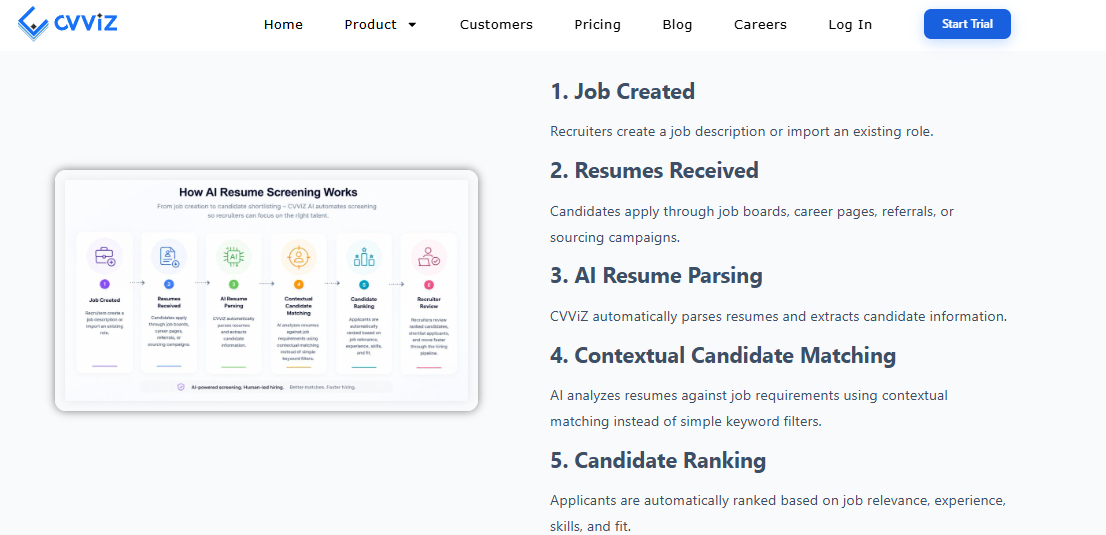
CVViZ is an AI resume screening tool built around contextual matching rather than keyword counts.
🏢 Overview
CVViZ is a cloud recruitment platform that screens and ranks applicants using contextual NLP, meaning it reads the meaning of a resume rather than counting exact terms. It appears consistently in independent 2026 resume screening roundups alongside larger ATS vendors. Recruiters typically adopt it when their existing ATS stores applications well but ranks them badly.
⚙️ Core Services
- Contextual NLP matching: scores a resume against the job description by meaning, reducing rejections caused by wording differences.
- Resume parsing and enrichment: turns unstructured CVs into searchable profiles, removing manual data entry.
- Candidate ranking: presents an ordered shortlist per requisition, cutting first-pass review time.
- Job board and careers page ingestion: pulls applications from multiple sources into one queue.
- ATS integrations: pushes shortlists into existing hiring workflows, so recruiters keep their current tools.
🇮🇳 India-Specific Compliance and Localization
- PF / ESI / TDS support: No (recruitment tool, not a payroll engine)
- Labour law compliance: Limited (hiring workflow only, no statutory filings)
- Payroll localization: No (screened candidates must be exported to payroll)
- Multi-state compliance handling: Limited (no multi-legal-entity payroll layer)
👥 Who This Is Built For
- Recruiter whose ATS search returns 400 profiles with no usable ranking.
- Talent acquisition lead losing strong candidates to keyword filters on non-standard resume formats.
❌ Who Should Skip This
- HR ops teams needing screening, onboarding, and payroll on one employee management system record.
- Compliance owners who need DPDP consent capture and retention controls inside the same system as employee data.
💰 Pricing Structure
- Plan Type(s): Subscription tiers by user count, as published by the vendor.
- Starting Price: Not publicly disclosed, request a quote.
- Tier-wise Breakdown: Not publicly disclosed, request a quote.
- Incremental Cost Drivers: Additional recruiter seats, integration setup, parsing volume.
- Implementation Fee: Not publicly disclosed, request a quote.
- Cost at 200 Employees: Not publicly disclosed, request a quote | Cost at 500 Employees: Not publicly disclosed, request a quote.
⏰ Implementation and Support Reality
- Go-live is fast relative to full HCM rollouts, since only the screening layer is configured.
- Support runs on email and chat, with no published dedicated SPOC model.
- Data migration is largely self-serve through job board and ATS connectors.
- No publicly reported NPS or CSAT figure was found in the sources reviewed.
HROne differs here in one structural way. HROne keeps the relevancy score, the consent record, the offer letter, and the first salary run on a single employee record, so nothing is exported by hand, which is also the argument made in this best recruitment software for mid-sized firms breakdown. CVViZ ranks well inside a stack you already own, which is a genuinely reasonable choice below 50 hires a year.
1.3 Sapia.ai: Structured Chat Screening for High-Volume Roles
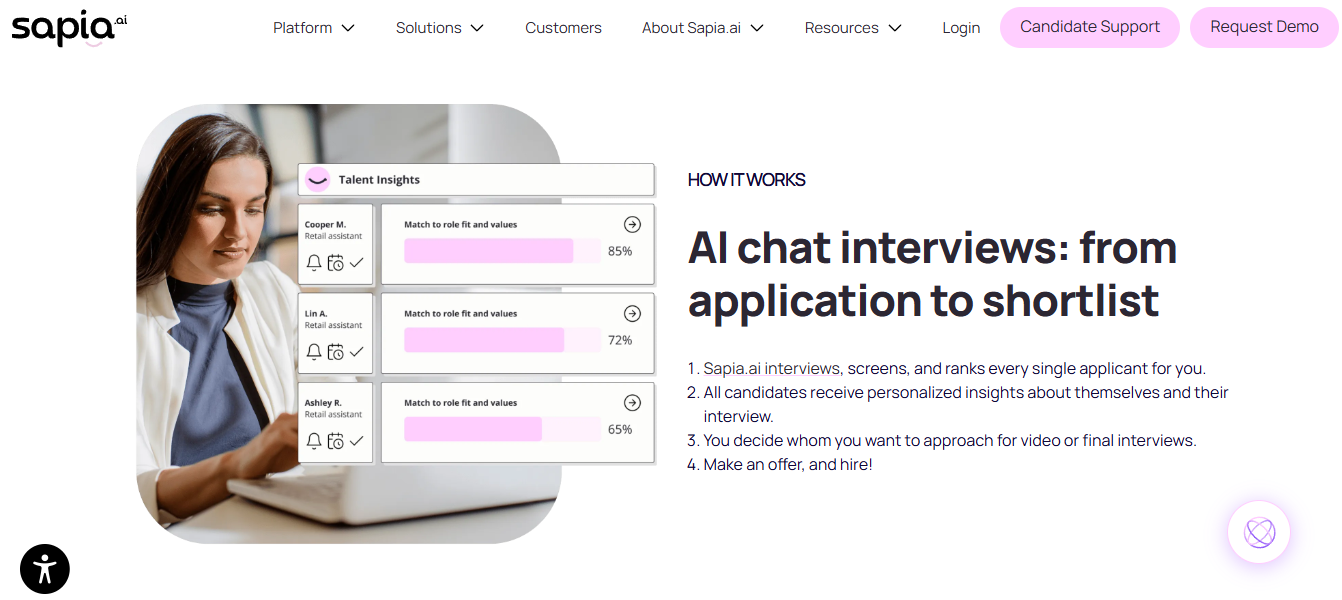
Sapia.ai is a criteria-led screening platform built for bias reduction at hiring volume.
🏢 Overview
Sapia.ai screens candidates through a structured, chat-based interview instead of ranking resumes alone. Its published buyer guidance argues that a single “best” screening tool does not exist, and that fit depends on volume and role type. Teams adopt it for frontline, retail, and contact-centre hiring where thousands apply per campaign. It suits recruiters who want a defensible, repeatable first-pass process.
⚙️ Core Services
- Structured chat interview: asks every applicant the same untimed questions, removing recruiter-to-recruiter inconsistency.
- Bias-aware scoring: applies consistent criteria across applicants, reducing reliance on name, school, or formatting signals.
- Candidate feedback at scale: returns a personality insight report to every applicant, cutting inbound “what happened to my application” emails.
- Volume shortlisting: ranks large applicant pools quickly, so recruiters stop reading thousands of CVs.
- ATS integrations: pushes results into existing hiring systems, keeping current workflows intact.
🇮🇳 India-Specific Compliance and Localization
- PF / ESI / TDS support: No (screening platform, no payroll engine)
- Labour law compliance: Limited (hiring stage only)
- Payroll localization: No (no Indian salary structure handling)
- Multi-state compliance handling: Limited (no multi-entity payroll layer)
👥 Who This Is Built For
- Volume hiring lead screening 2,000 applicants for 100 frontline roles, often on a retail HR footprint.
- Talent acquisition head who needs consistent, auditable screening criteria across recruiters.
❌ Who Should Skip This
- Teams hiring niche senior or specialist roles where a chat interview adds little signal.
- HR ops leads needing screening data to flow into Indian payroll software automatically.
💰 Pricing Structure
- Plan Type(s): Enterprise subscription, quote-based.
- Starting Price: Not publicly disclosed, request a quote.
- Tier-wise Breakdown: Not publicly disclosed, request a quote.
- Incremental Cost Drivers: Applicant volume, campaign count, integration setup.
- Implementation Fee: Not publicly disclosed, request a quote.
- Cost at 200 Employees: Not publicly disclosed | Cost at 500 Employees: Not publicly disclosed.
⏰ Implementation and Support Reality
- Rollout is scoped per hiring campaign rather than per company module.
- Support runs through enterprise onboarding and email channels.
- Data migration is limited, since the tool sits ahead of the ATS.
- No publicly reported NPS figure appears in the sources reviewed.
1.4 Greenhouse: Structured Hiring With Scorecards
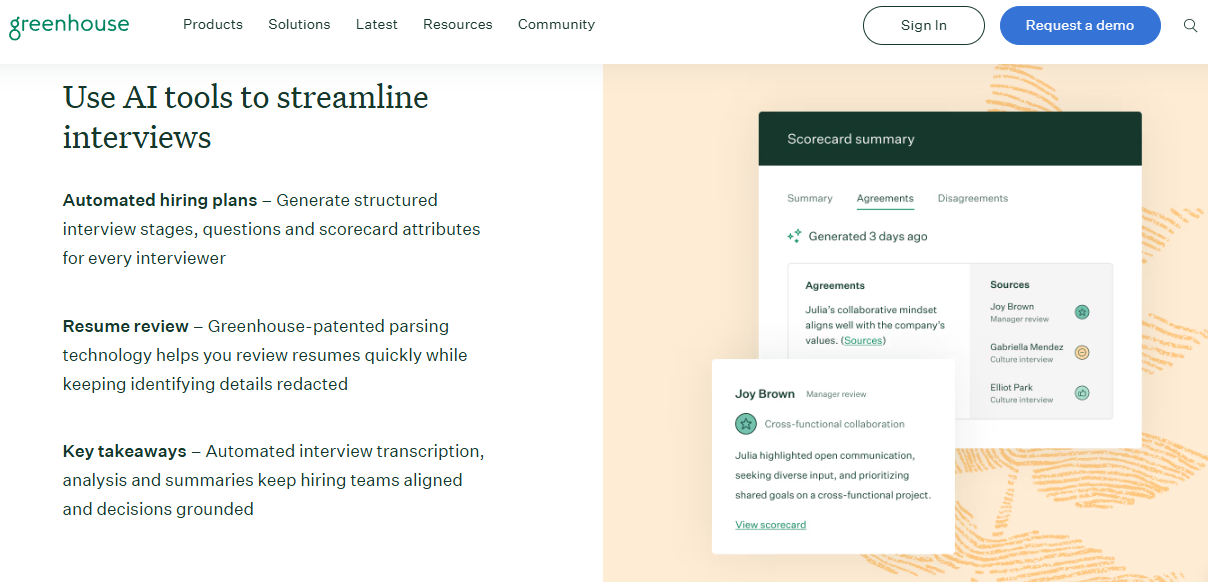
Greenhouse is a structured hiring platform for teams standardising how they evaluate candidates.
🏢 Overview
Greenhouse is an applicant tracking system known for structured, bias-aware hiring workflows. Independent 2026 roundups place it among the stronger options for teams that want interview scorecards enforced by the software. It is used mostly by technology and global firms with mature recruiting functions. Indian buyers pick it when hiring process discipline matters more than payroll integration.
⚙️ Core Services
- Interview scorecards: forces every interviewer to rate defined attributes, reducing gut-feel hiring decisions.
- Structured kits and rubrics: standardises what each round tests, so screening criteria stay consistent.
- AI-assisted screening: surfaces likely fits inside a large applicant pool.
- Reporting on funnel stages: shows where candidates drop, exposing bottlenecks in your own process.
- Wide integration marketplace: connects assessment, sourcing, and background verification vendors.
🇮🇳 India-Specific Compliance and Localization
- PF / ESI / TDS support: No (recruiting platform only)
- Labour law compliance: Limited (built for global hiring, not Indian statutory filing)
- Payroll localization: No (no CTC or FBP handling)
- Multi-state compliance handling: Limited (no Indian multi-entity payroll)
👥 Who This Is Built For
- Recruiting lead whose interviewers give inconsistent, unstructured feedback.
- Global talent head standardising hiring across several countries.
❌ Who Should Skip This
- Indian mid-market teams needing PF, ESI, and TDS handled in the same system, as set out in this PF ESI TDS compliance guide for employers.
- Cost-sensitive teams hiring under 30 people a year.
💰 Pricing Structure
- Plan Type(s): Essential, Advanced, and Expert tiers, as published by the vendor.
- Starting Price: Not publicly disclosed, request a quote.
- Tier-wise Breakdown: Not publicly disclosed, request a quote.
- Incremental Cost Drivers: Employee count band, add-on modules, integrations.
- Implementation Fee: Not publicly disclosed, request a quote.
- Cost at 200 Employees: Not publicly disclosed | Cost at 500 Employees: Not publicly disclosed.
⏰ Implementation and Support Reality
- Go-live is typically measured in weeks for the recruiting module alone.
- Support includes email, chat, and enterprise customer success contacts.
- Data migration is vendor-guided with self-serve import tools.
- No India-specific implementation team is publicly documented.
1.5 Keka: Familiar Indian HR Suite With Recruitment Attached
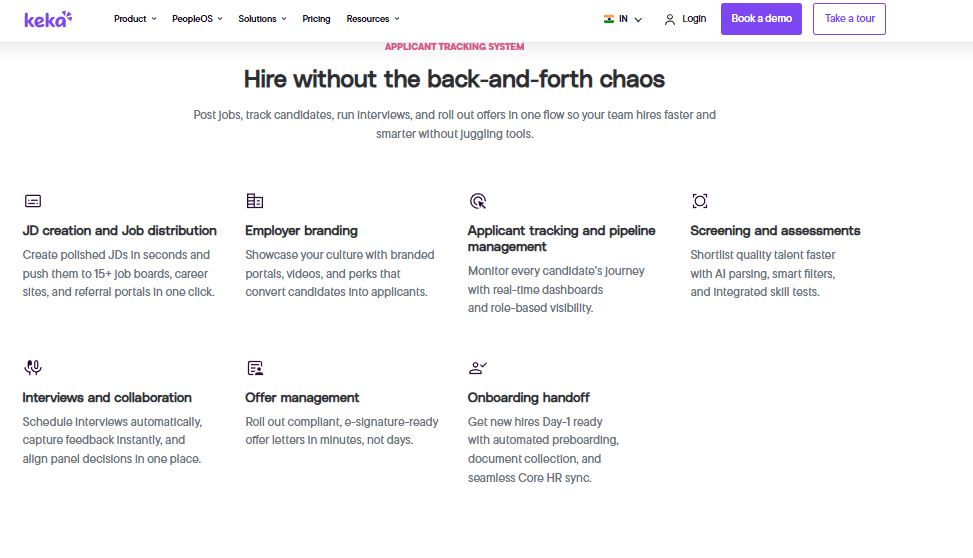
Keka is an Indian HR suite whose clean interface appeals to first-time HR tech buyers.
🏢 Overview
Keka is an India-based HR platform covering core HR, payroll, performance, and recruitment. Its interface is widely praised by reviewers as easy to navigate. Reported experiences on implementation and escalation are mixed, with several G2 reviewers describing delayed rollouts. Teams usually choose it for basic HR digitisation rather than deep screening intelligence, a trade-off examined further in this Keka HRMS review.
⚙️ Core Services
- Applicant tracking: manages job postings and candidate stages, replacing spreadsheet trackers.
- Resume parsing: extracts candidate details into profiles, cutting manual data entry.
- Interview scheduling: coordinates panels through the platform, reducing calendar back and forth.
- Payroll and attendance: handles Indian salary processing alongside hiring data.
- Performance module: runs review cycles, though reviewers report gaps in the PMS depth.
🇮🇳 India-Specific Compliance and Localization
- PF / ESI / TDS support: Yes (Indian statutory payroll included)
- Labour law compliance: Moderate (reviewers report configuration and reporting gaps)
- Payroll localization: Yes (Indian payslips and declarations)
- Multi-state compliance handling: Partial (reviewers cite limits such as zones and incentive handling)
👥 Who This Is Built For
- HR generalist at a services firm wanting one clean portal for basic HR.
- First-time HR software buyer replacing spreadsheets and email approvals.
❌ Who Should Skip This
- Teams that need fast, phone-based escalation during a complex migration.
- Payroll managers handling ESOPs, insurance records, or intricate incentive structures.
💰 Pricing Structure
- Plan Type(s): Foundation, Strength, and Growth tiers, as published by the vendor.
- Starting Price: Not publicly disclosed in sources reviewed, request a quote.
- Tier-wise Breakdown: Not publicly disclosed, request a quote.
- Incremental Cost Drivers: Module upgrades, employee count, implementation support.
- Implementation Fee: Not publicly disclosed, request a quote.
- Cost at 200 Employees: Not publicly disclosed | Cost at 500 Employees: Not publicly disclosed.
⏰ Implementation and Support Reality
- Reviewers report implementation stretching for months in some cases.
- Support runs largely through tickets and email threads.
- Escalation paths are a recurring complaint in verified reviews.
- No publicly reported NPS figure appears in the sources reviewed.
“We started working with Keka HRMS in August, and to this day, we have been unable to implement the tool in our company due to their consistently delayed responses and poor coordination between their internal teams.”
– Divya p., 0/5 rating Keka G2 – Verified Review
“User friendly. Easy interface. Features that are already available are nice.”
– Pooja M., 2/5 rating Keka G2 – Verified Review
1.6 greytHR: SMB Payroll Reliability, Light Screening
greytHR is a long-standing Indian payroll and compliance platform with basic hiring features.
🏢 Overview
greytHR is one of India’s oldest HR and payroll platforms, widely used by small and mid-sized firms. Its strength sits in statutory payroll and employee self-service for payslips and tax declarations. Reviewers consistently flag limited customisation and support friction. Screening capability is thin compared with dedicated AI tools.
⚙️ Core Services
- Payroll processing: runs Indian salary cycles with statutory deductions, reducing manual computation.
- Employee self-service: lets staff pull payslips and declare taxes, cutting HR query load.
- Leave and attendance: tracks balances and approvals, though reviewers report correction effort in leave management.
- Basic recruitment tracking: manages openings and candidates at a simple level.
- Compliance reports: generates statutory outputs, with reviewers noting TDS revision limits.
🇮🇳 India-Specific Compliance and Localization
- PF / ESI / TDS support: Yes (core strength of the platform)
- Labour law compliance: Moderate (reviewers cite TDS revision and challan mapping gaps)
- Payroll localization: Yes (built for Indian payroll)
- Multi-state compliance handling: Partial (customisation limits reported by users)
👥 Who This Is Built For
- Payroll manager at a 100 person services firm wanting dependable statutory filing.
- Finance lead who needs payslips and tax declarations off the HR inbox.
❌ Who Should Skip This
- Manufacturing or multi-entity teams needing shift-based, configurable workflows, a scenario covered in this HR software for multi-entity companies in India guide.
- Recruiters expecting semantic resume ranking with explainable scores.
💰 Pricing Structure
- Plan Type(s): Tiered plans by employee count, as published by the vendor.
- Starting Price: Not publicly disclosed in sources reviewed, request a quote.
- Tier-wise Breakdown: Not publicly disclosed, request a quote.
- Incremental Cost Drivers: Add-on modules, employee bands, support plans.
- Implementation Fee: Not publicly disclosed, request a quote.
- Cost at 200 Employees: Not publicly disclosed | Cost at 500 Employees: Not publicly disclosed.
⏰ Implementation and Support Reality
- Reviewers describe repeated manual correction of leave balances after implementation.
- Support is ticket-led, with one reviewer noting callbacks within one to two hours.
- Customisation often depends on the vendor team rather than front-end configuration.
- G2 places greytHR at #42 in Core HR ease of use, against HROne at #3.
“GreytHR is not much good at customizing based on our requirements. For our case, from implementation onwards, there were issues with leave balance and all.”
– Verified User in Information Technology and Services, 2/5 rating greytHR G2 – Verified Review
“All the HR activities at a single point. Workflow assignment and monitoring.”
– Arjun T., 2.5/5 rating greytHR G2 – Verified Review
1.7 PeopleStrong: Analytics-Heavy Mid-Market HCM
PeopleStrong is a mid-market Indian HCM with recruiting inside a broader analytics stack.
🏢 Overview
PeopleStrong is an established Indian HCM vendor serving mid-market and enterprise employers. Reviewers praise the mobile app and single-place access to payslips and claims. The same reviewers report interface lag and feature sprawl on desktop. It fits teams that want workforce analytics alongside hiring.
⚙️ Core Services
- Recruitment module: manages requisitions and candidate pipelines within the wider HCM.
- Mobile self-service: gives employees attendance, leave, and payslip access in a tap.
- Reimbursement and claims: centralises submissions with status tracking, replacing email threads.
- Workforce analytics: reports across the lifecycle for HR leadership review, comparable to these HR analytics tools.
- Performance and KRA tracking: runs quarterly goal cycles inside the platform.
🇮🇳 India-Specific Compliance and Localization
- PF / ESI / TDS support: Yes (Indian payroll included)
- Labour law compliance: Moderate (broad coverage, configuration effort reported)
- Payroll localization: Yes (Indian payslips and reimbursements)
- Multi-state compliance handling: Partial (depends on configuration scope)
👥 Who This Is Built For
- HR lead who wants employees self-serving claims and payslips on mobile.
- CHRO building workforce reporting across several business units.
❌ Who Should Skip This
- Teams wanting a simple desktop experience with fewer, sharper options.
- Recruiters needing fast approvals, since reviewers report slow approval cycles.
💰 Pricing Structure
- Plan Type(s): Quote-based enterprise licensing.
- Starting Price: Not publicly disclosed, request a quote.
- Tier-wise Breakdown: Not publicly disclosed, request a quote.
- Incremental Cost Drivers: Module selection, employee count, implementation scope.
- Implementation Fee: Not publicly disclosed, request a quote.
- Cost at 200 Employees: Not publicly disclosed | Cost at 500 Employees: Not publicly disclosed.
⏰ Implementation and Support Reality
- Rollouts are enterprise-led and typically span several weeks.
- Support runs through an enterprise account team.
- Data migration is vendor-led during configuration.
- No publicly reported NPS figure appears in the sources reviewed.
“The reimbursement and claims process can feel a bit slow at times, especially when approvals take longer than expected. The interface can also lag occasionally.”
– Anusha, 5/5 rating PeopleStrong G2 – Verified Review
“It has way too many features and the desktop version isn’t very useful because of the multiple options to get 1 job done.”
– Nikhil S., 4/5 rating PeopleStrong G2 – Verified Review
1.8 Zoho Recruit: Low-Cost Entry Inside the Zoho Stack
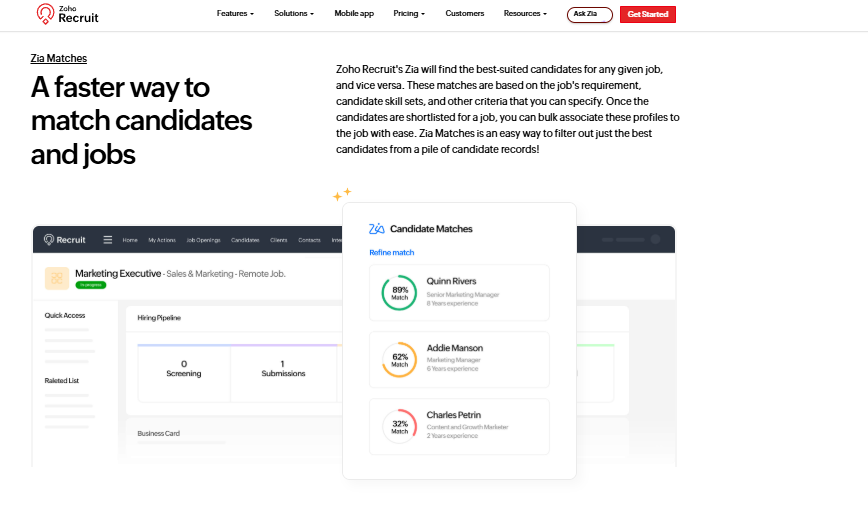
Zoho Recruit is a low-cost applicant tracking tool for teams already using Zoho.
🏢 Overview
Zoho Recruit is the hiring product in the wider Zoho suite, offering resume parsing and candidate ranking at accessible price points, including a free tier. It suits small in-house teams and staffing agencies. Reviewers of Zoho’s HR products praise breadth and price, while criticising depth and support quality. Screening intelligence is competent rather than specialised.
⚙️ Core Services
- Resume parsing: converts CVs into candidate records automatically, cutting typing work.
- AI candidate matching: scores applicants against job requirements to shorten first-pass review.
- Multi-channel sourcing: pulls applicants from job boards and careers pages into one queue.
- Assessment integrations: attaches tests to stages, reducing unqualified interviews.
- Zoho ecosystem links: connects to Zoho People and Zoho Books for downstream records.
🇮🇳 India-Specific Compliance and Localization
- PF / ESI / TDS support: No (handled by Zoho Payroll, not Recruit)
- Labour law compliance: Limited (global generalist design)
- Payroll localization: No (separate product required)
- Multi-state compliance handling: Limited (thin on Indian multi-entity depth)
👥 Who This Is Built For
- Small HR team already running Zoho apps and needing a cheap ATS.
- Recruitment agency managing several client pipelines on a tight budget.
❌ Who Should Skip This
- Indian mid-market teams needing CTC revisions, FBP declarations, and statutory filing in one system, which is where a full HCM software platform earns its keep.
- Buyers who want phone-based, India-based implementation support.
💰 Pricing Structure
- Plan Type(s): Free, Standard, Professional, and Enterprise tiers, as published by the vendor.
- Starting Price: Free tier available, paid tiers priced per recruiter per month.
- Tier-wise Breakdown: Not fully disclosed in sources reviewed, request a quote.
- Incremental Cost Drivers: Recruiter seats, AI add-ons, assessment integrations.
- Implementation Fee: Not publicly disclosed, request a quote.
- Cost at 200 Employees: Not publicly disclosed | Cost at 500 Employees: Not publicly disclosed.
⏰ Implementation and Support Reality
- Self-serve setup is quick, often within days for small teams.
- Support runs on email, chat, and community forums.
- Data migration is self-serve through import templates.
- Reviewers of Zoho’s HR products report inconsistent support experiences.
“Easy to use, quick updates. Easy to add new tasks.”
– John B., 3/5 rating Zoho People G2 – Verified Review
“Features are shallow and there is no depth in each application.”
– Verified User in Information Technology and Services, 2.5/5 rating Zoho People G2 – Verified Review
1.9 Ducknowl: Screening Plus Video and Skills Testing
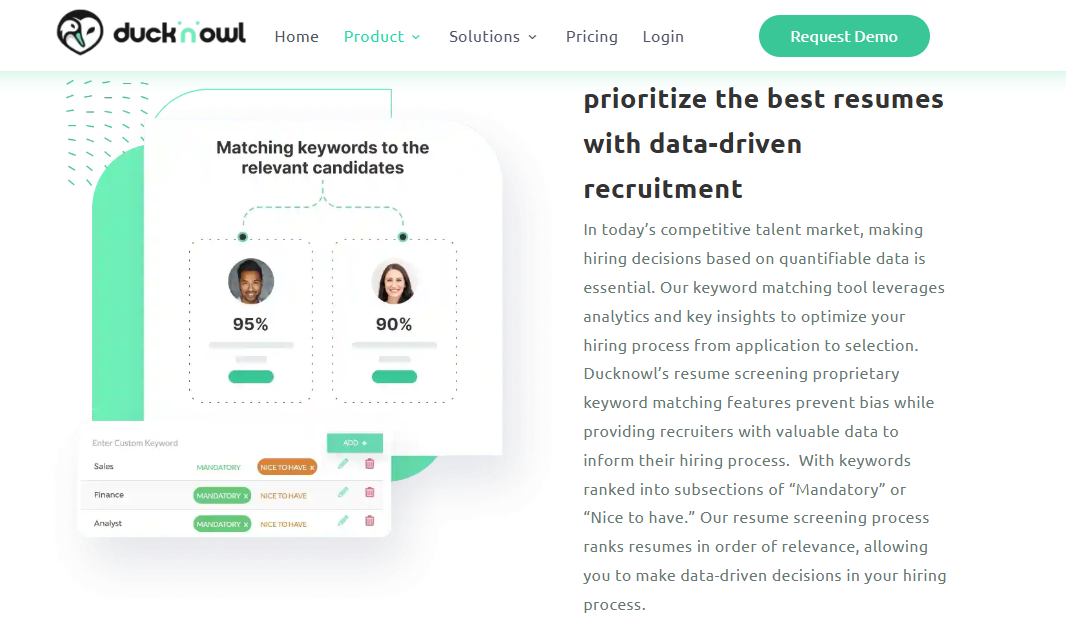
Ducknowl is a talent screening and assessment platform for staffing-heavy hiring.
🏢 Overview
Ducknowl is a screening and assessment platform used by staffing firms and in-house recruiters. It combines resume screening with video and skills testing in one workflow. Its footprint is smaller than the major ATS vendors, with fewer public enterprise references. Teams pick it when a resume alone does not tell them enough.
⚙️ Core Services
- Resume screening and ranking: filters applicants against role criteria, shrinking the review pile.
- One-way video screening: captures recorded answers, removing early scheduling effort.
- Skills assessments: tests role-specific ability before interview slots are spent.
- Text screening: reaches candidates over SMS, improving response from frontline applicants.
- Shareable candidate profiles: sends screened summaries to hiring managers, cutting status calls.
🇮🇳 India-Specific Compliance and Localization
- PF / ESI / TDS support: No (screening tool only)
- Labour law compliance: Limited (US-centric hiring design)
- Payroll localization: No (no Indian payroll layer)
- Multi-state compliance handling: Limited (no Indian statutory handling)
👥 Who This Is Built For
- Staffing recruiter shortlisting for many clients each week.
- Hiring manager who wants recorded answers before booking interview slots.
❌ Who Should Skip This
- Indian enterprises requiring DPDP consent capture inside their employee system.
- Teams wanting screening data to reach payroll without an export.
💰 Pricing Structure
- Plan Type(s): Subscription tiers by user, as published by the vendor.
- Starting Price: Not publicly disclosed, request a quote.
- Tier-wise Breakdown: Not publicly disclosed, request a quote.
- Incremental Cost Drivers: Recruiter seats, assessment volume, video minutes.
- Implementation Fee: Not publicly disclosed, request a quote.
- Cost at 200 Employees: Not publicly disclosed | Cost at 500 Employees: Not publicly disclosed.
⏰ Implementation and Support Reality
- Setup is light, since only screening and assessment are configured.
- Support runs on email.
- Data migration is self-serve through candidate imports.
- No publicly reported NPS figure appears in the sources reviewed.
1.10 Intervue: Technical Screening for Engineering Roles
Intervue is a technical screening and interviewing platform for engineering hiring.
🏢 Overview
Intervue focuses on technical hiring, pairing resume screening with live coding and interview infrastructure. Its published guidance claims screening software reviews 250 or more applications quickly and reduces hiring time. It fits product and services firms hiring developers at pace, including the ITES HR segment. Non-technical volume hiring is not its strength.
⚙️ Core Services
- Resume screening and ranking: surfaces likely technical fits from large applicant pools.
- Live coding interviews: tests real ability in a shared editor, reducing false positives.
- Interviewer marketplace: supplies external interviewers when internal panels are stretched.
- Structured feedback capture: records scores per skill, removing vague verbal feedback.
- ATS integrations: passes results into the existing hiring pipeline.
🇮🇳 India-Specific Compliance and Localization
- PF / ESI / TDS support: No (technical hiring platform only)
- Labour law compliance: Limited (hiring stage only)
- Payroll localization: No (no salary processing)
- Multi-state compliance handling: Limited (no multi-entity payroll)
👥 Who This Is Built For
- Engineering manager screening 300 developer applications a month.
- Talent lead whose internal panels cannot keep up with interview demand.
❌ Who Should Skip This
- Teams hiring frontline, sales, or operations roles at volume.
- HR ops leads wanting one system from requisition to full and final settlement.
💰 Pricing Structure
- Plan Type(s): Quote-based plans by interview volume.
- Starting Price: Not publicly disclosed, request a quote.
- Tier-wise Breakdown: Not publicly disclosed, request a quote.
- Incremental Cost Drivers: Interview volume, external interviewer usage, seats.
- Implementation Fee: Not publicly disclosed, request a quote.
- Cost at 200 Employees: Not publicly disclosed | Cost at 500 Employees: Not publicly disclosed.
⏰ Implementation and Support Reality
- Setup is fast, usually within days for a single hiring team.
- Support runs on email and chat.
- Data migration is minimal, since the tool sits beside the ATS.
- No publicly reported NPS figure appears in the sources reviewed.
1.11 Manatal: Agency-First AI Recommendations
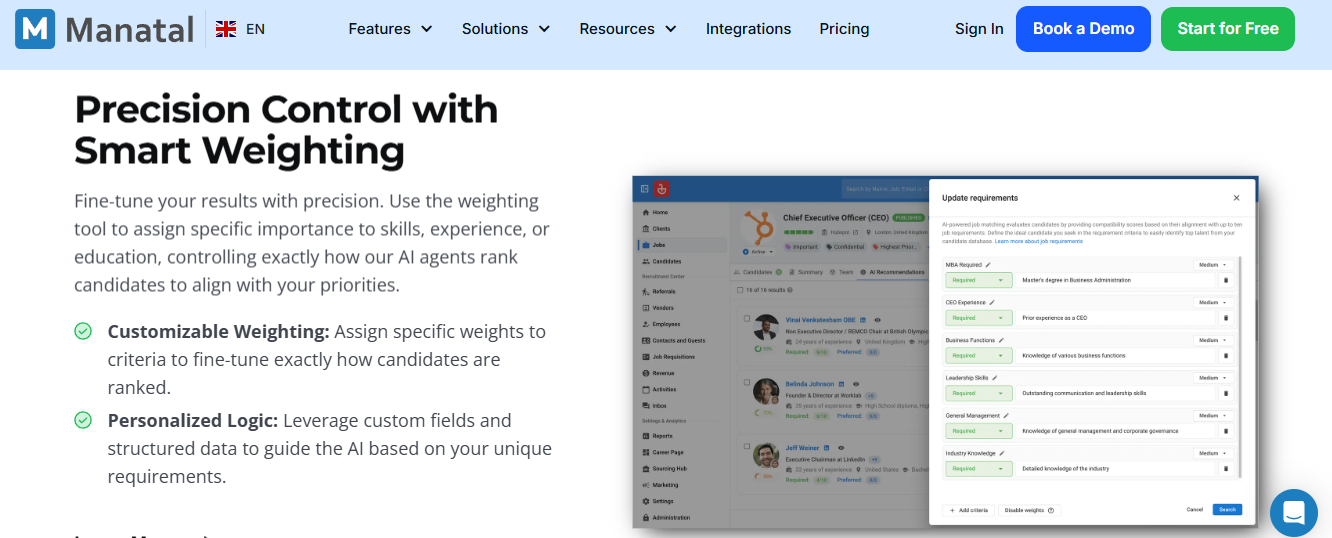
Manatal is an affordable recruitment platform built around agency pipelines.
🏢 Overview
Manatal is a cloud recruitment platform offering AI candidate recommendations and social profile enrichment at accessible prices. It is used widely by recruitment agencies and small in-house teams. Its design centres on managing many roles and clients at once. Internal HR depth is limited by comparison.
⚙️ Core Services
- AI candidate recommendations: ranks applicants per job, reducing manual sorting.
- Resume parsing and enrichment: builds profiles from CVs and public data, cutting research time.
- Client and pipeline management: separates roles by client, removing spreadsheet juggling.
- Careers page builder: publishes openings quickly without developer help.
- Reporting dashboards: tracks pipeline health per client or role.
🇮🇳 India-Specific Compliance and Localization
- PF / ESI / TDS support: No (recruitment tool only)
- Labour law compliance: Limited (global design)
- Payroll localization: No (no Indian payroll)
- Multi-state compliance handling: Limited (no statutory entity handling)
👥 Who This Is Built For
- Agency recruiter managing 15 client pipelines in spreadsheets.
- Small in-house team needing structured hiring on a low budget.
❌ Who Should Skip This
- Enterprises needing statutory payroll and workforce data on one record, which is the core case for a recruitment management system inside an HCM.
- Compliance owners needing DPDP-grade consent and retention controls.
💰 Pricing Structure
- Plan Type(s): Professional, Enterprise, and custom tiers, as published by the vendor.
- Starting Price: Per user per month, published on the vendor pricing page.
- Tier-wise Breakdown: Not fully disclosed in sources reviewed, request a quote.
- Incremental Cost Drivers: User seats, job slots, enrichment credits.
- Implementation Fee: Not publicly disclosed, request a quote.
- Cost at 200 Employees: Not publicly disclosed | Cost at 500 Employees: Not publicly disclosed.
⏰ Implementation and Support Reality
- Self-serve onboarding is fast, often same week.
- Support runs on email and chat.
- Data migration uses self-serve CSV import.
- No publicly reported NPS figure appears in the sources reviewed.
1.12 Truffle: Evidence-Based Scoring Without Auto-Rejects
Truffle is a screening tool built on a refusal to auto-reject candidates.
🏢 Overview
Truffle screens every resume against what a role actually requires, scores it on evidence, and explicitly avoids keyword matching and automatic rejections. It also publishes practical EU AI Act guidance for hiring teams, including obligations that apply from August 2026. It is a newer entrant with a thin public review base. Teams pick it on principle as much as on features.
⚙️ Core Services
- Evidence-based scoring: rates candidates on demonstrated work, reducing keyword false negatives.
- No auto-reject policy: keeps humans in the decision loop, which supports oversight requirements.
- Role requirement mapping: converts the job description into explicit criteria before scoring, similar to a job description generator workflow.
- Ranked shortlists: puts the strongest fits in front of recruiters first.
- Compliance guidance: publishes plain-English checklists on EU AI Act hiring duties.
🇮🇳 India-Specific Compliance and Localization
- PF / ESI / TDS support: No (screening only)
- Labour law compliance: Limited (EU and UK focus in published guidance)
- Payroll localization: No (no Indian payroll engine)
- Multi-state compliance handling: Limited (no Indian entity structure handling)
👥 Who This Is Built For
- Talent lead who has lost strong candidates to keyword filters.
- Hiring team preparing for EU AI Act oversight and logging duties.
❌ Who Should Skip This
- Indian teams needing DPDP consent, payroll, and screening on one employee record.
- Buyers who require a long public reference list before signing.
💰 Pricing Structure
- Plan Type(s): Quote-based subscription.
- Starting Price: Not publicly disclosed, request a quote.
- Tier-wise Breakdown: Not publicly disclosed, request a quote.
- Incremental Cost Drivers: Role volume, seats, integration scope.
- Implementation Fee: Not publicly disclosed, request a quote.
- Cost at 200 Employees: Not publicly disclosed | Cost at 500 Employees: Not publicly disclosed.
⏰ Implementation and Support Reality
- Setup is light, focused on role criteria configuration.
- Support runs on email.
- Data migration is minimal, since screening sits ahead of the ATS.
- No publicly reported NPS figure appears in the sources reviewed.
HROne sits differently in this list because screening is one module inside 30+ modules and 127+ pre-built workflows, with subscription metering only after go-live. Working with HR teams in the 100 to 5,000 employee band, what I have felt is that the tool choice matters less than whether the shortlist survives the handoff to onboarding. The HROne One AI Suite breakdown shows how that handoff is wired, and the ROI calculator puts a number on it.
Q2. How Did We Score These Resume Screening Tools?
Every tool was scored on five weighted criteria: Screening Intelligence and Explainability (30%), Verified User Reviews (20%), Workflow Continuity from screen to onboarding (20%), India Compliance and Data Handling (15%), and Pricing Transparency and Setup Effort (15%). Scores of 0 to 20 earn one star, 21 to 40 two, 41 to 60 three, 61 to 80 four, and 81 to 100 five.
⚠️ Why Unweighted Lists Mislead Buyers
Most screening roundups rank tools by popularity, then hide the reasoning. That hurts you, because a tool built for 5,000 frontline applicants is wrong for 40 senior hires.
A 2025 audit of eight AI screening platforms found some tools looked unbiased only because they barely evaluated candidates at all. So fairness alone is a weak scoring signal. Competence has to be scored beside it.
📊 The Five Criteria and What Full Marks Look Like
| Criterion | Weight | What a full score looks like |
|---|---|---|
| Screening Intelligence and Explainability | 30% | Semantic matching, visible relevancy scores, and stated reasons per rank |
| Verified User Reviews | 20% | High volume of recent G2 reviews, including critical ones, not curated testimonials |
| Workflow Continuity | 20% | Screened candidate moves to offer, eKYC, and payroll with no manual export |
| India Compliance and Data Handling | 15% | DPDP consent capture, retention controls, and statutory payroll where claimed |
| Pricing Transparency and Setup Effort | 15% | Published model, clear billing start date, no lock-in, front-end configuration |
HROne measures workflow continuity the same way internally, by counting how many processes run on one platform, currently 127+ pre-built workflows for over 2,000 enterprise brands, as catalogued in the complete HROne features list.
⚖️ Read the Rubric, Then Re-Weight It
The weights reflect a common Indian mid-market pattern. Yours may differ, so change them openly. That is the point of publishing the method.
If you run high-volume BPO or retail hiring, push Screening Intelligence to 40%. If you hire 30 specialists a year, drop it to 20% and raise Verified User Reviews. Compliance weight should rise for BFSI and healthcare HR, where candidate data handling gets audited.
🧩 One Rubric Cannot Judge Every Role
Uniform scoring feels safe and fair. It is also how screening quietly breaks, because a warehouse role and a data engineer role need different criteria.
So score the tool’s ability to run conditional, role-specific screening paths. Ask whether knockout rules and weightings can differ per requisition. Tools that force one blanket rubric will fail your second hiring campaign.
🔍 What This Rubric Does Not Capture
No rubric captures how a vendor behaves during a bad month. Support quality shows up in reviews, but reliability under a payroll deadline does not.
I might be over-indexing on workflow continuity here. My reasoning is that a screening score is cheap and a broken handoff is expensive. Ask HROne, or any vendor on this list, to demo one candidate moving from application to first salary run in a single session, then compare it against your own HRMS evaluation checklist.
📉 Where Tools Lost Points
- Pricing opacity: several vendors publish no starting price, so buyers cannot compare without sales calls.
- No decision logs: tools without retained decision records fail EU AI Act logging duties for CV screening.
- Consent gaps: platforms with no candidate consent record create DPDP exposure at the application step.
- Vendor-dependent configuration: reviewers repeatedly report waiting on vendor teams for basic policy changes.
HROne scores 96 out of 100 on this rubric, with full marks on workflow continuity because screening, eKYC, offer letters, and payroll onboarding share one employee record. G2 also ranks it 3rd out of 1.17 lakh products for customer satisfaction, a pattern visible across these HROne reviews.
Q3. What Is Resume Screening Software and How Does It Actually Work?
Resume screening software parses incoming CVs into structured fields, builds a scoring rubric from the job description, then ranks every applicant with a relevancy score and stated reasons before a recruiter reviews the shortlist. An ATS (applicant tracking system) stores and tracks applications. The screening layer is the evaluation engine that reads, scores, and ranks them.
🧠 The Plain-English Definition
Think of it as a reader that never gets tired. It opens every CV, pulls out skills, experience, and education, then compares each one against what the role needs.
The output is not a yes or no. It is an ordered queue with a score attached, which a human then reviews.
⚙️ The Five-Stage Pipeline
- Ingest: pull applications in bulk from your careers page, job boards, and email in one queue.
- Parse: convert unstructured CVs into structured fields such as skills, tenure, and certifications.
- Build the rubric: turn the job description into weighted criteria, including hard disqualifiers.
- Score and rank: rate each applicant against those criteria and record the reason for the rank.
- Route: send the ranked shortlist to recruiters, who review, override, and decide.
Ask HROne AI‘s One AI Suite, launched in April 2025, to parse multiple resumes at once, and it returns a stacked list with a percentage relevancy score plus the reasons behind it.
🔗 ATS Versus Screening Layer
An ATS is the filing cabinet and the workflow tracker. It knows where each candidate sits in your process.
The screening layer is the judgement. Most modern tools plug into the ATS rather than replacing it, which matters if you have already trained your team on one.
📚 Why a Resume Database Is Not Screening
A traditional HR database only shows you what someone on your team already keyed in. Search it and you get matches, not judgement, and no ranking you can defend to a hiring manager.
HROne’s recruitment software module treats the shortlist as a task queue instead, with pending actions surfacing in the Super Inbox for closure in three clicks. Working with HR teams across 100 to 5,000 employee firms, what I have felt is that ranking without a next action just moves the pile.
📈 The Volume Math That Forces the Decision
Recruiters now handle around 291 applications per hire, and industry funnel data puts roughly 132 applicants against a typical requisition. In India, applications per open role have risen more than 80% since 2022, partly because candidates use AI to apply at scale.
Adoption has followed that curve. NASSCOM’s 2025-26 HR Tech data shows 78% of Indian BPO operators with 300 or more seats have deployed AI screening or scheduling, with IT services at 71%.
❌ What Screening Software Cannot Do
- It cannot judge culture or intent: interviews still carry that, and no score replaces a conversation.
- It cannot fix a vague job description: garbage criteria produce a confident, useless ranking.
- It cannot own the rejection decision: under EU AI Act rules, CV screening requires human oversight.
- It cannot create consent: DPDP requires recorded, specific consent at the application step.
⏰ What to Do This Week
Pull your own numbers before you shop. Count applications per hire and hours spent on first-pass review last quarter.
That single figure tells you whether screening software is urgent or optional. HROne’s ROI Dashboard runs the same arithmetic in reverse, calculating lifetime hours saved against average HR salary, and the same logic sits inside this ROI of HR software in India breakdown.
HROne parses resumes, scores relevancy with reasons, and then carries the selected candidate into offer, documents, and payroll on one record. That last step is what a standalone screener cannot do, and it is where most manual work actually hides.
Q4. Which Features Matter, and Should You Buy a Point ATS or Screening Inside Your HRMS?
Prioritise seven capabilities: bulk multi-resume parsing, explainable relevancy scoring, configurable knockout questions, ATS or HRMS write-back, skill assessments, eKYC and background verification triggers, and decision audit logs. HROne ships all seven inside one platform, including PAN and Aadhaar eKYC triggered from the candidate record. Buy a standalone ATS under 50 hires a year, and move screening into your HRMS past roughly 200 employees.
✅ The Seven Must-Have Capabilities
| Capability | What it automates | Manual pain it removes |
|---|---|---|
| Bulk multi-resume parsing | Converts many CVs into structured records at once | Retyping candidate details into a tracker |
| Explainable relevancy scoring | Ranks applicants with stated reasons per score | Defending shortlists to hiring managers with no evidence |
| Configurable knockout questions | Filters hard disqualifiers at application stage | Reviewing candidates who never met the basics |
| ATS or HRMS write-back | Pushes selected candidates into the employee record | Exporting spreadsheets between hiring and payroll |
| Skill assessments | Tests ability before interview slots are booked | Burning panel time on unqualified candidates |
| eKYC and BGV triggers | Starts identity and background checks automatically | Chasing documents over email for a week |
| Decision audit logs | Retains scoring and rejection history | Rebuilding evidence during a compliance review |
⚠️ Four Features You Can Skip
- Emotion or sentiment analysis: prohibited for workplace use under the EU AI Act, so it is a liability.
- Candidate chatbots that only reschedule: nice, but they remove very little screening work.
- Vanity dashboards: pipeline charts that no hiring manager opens twice.
- Auto-reject thresholds: they create the exact keyword failures screening was meant to fix.
Judge every feature by what it eliminates. HROne’s InboxforHR closes 110+ HR tasks from one unified HR inbox in three clicks, which is a subtraction, not an addition.
💰 Point ATS or Screening Inside Your HRMS
Works if you buy a point ATS:
- You hire under 50 people a year, and payroll already runs cleanly.
- Your team is small, Excel-native, and solving one pain point right now.
- You want a fast, cheap tool without changing your whole stack.
Fails if you buy a point ATS:
- You cross 200 employees, and candidate data must reach payroll monthly.
- You run multiple legal entities, so records get reconciled by hand at month end, a problem unpacked in this multi-state payroll compliance guide.
- Compliance owners need consent and audit trails inside the employee system.
🧩 Buy Only What You Will Use
You should not buy the whole platform if you will not use the whole platform. Switch on screening when hiring volume justifies the configuration effort.
HROne supports that sequencing, since modules activate as needed and subscription metering starts only after go-live, with terms set out on the pricing page. My honest read is that most 150 person companies need payroll and attendance solid before screening becomes their bottleneck.
💬 What Operators Actually Report
“Process of new on-boarding and sharing invite to system is quick and easy. Now with checklist available. No chance to miss any important task.”
– Deepak K., 5/5 rating HROne G2 – Verified Review
“Employee can’t be in Comp off and Overtime policy at one time. No option to generate 0.25 comp off for 2 hour extra working.”
– Deepak K., 5/5 rating HROne G2 – Verified Review
“Lack of user friendly software, there is a very high dependency on the greythr team to customize and the customization is full of gaps.”
– Verified User in Information Technology and Services, 1/5 rating greytHR G2 – Verified Review
HROne closes the loop after selection, generating the offer letter with CTC breakup, sending document completion links, running PAN and Aadhaar eKYC, and triggering background verification from the same candidate record, which is the continuity described in this employee onboarding automation guide. Configuration happens on the front end, so a policy change needs no developer ticket.
Q5. Why Does Keyword-Based Screening Keep Failing, and How Do You Test a Tool for Bias and Competence?
Keyword screening fails because it depends on exact field mapping. Change the resume template and the rules break, filtering strong candidates on formatting rather than ability. Semantic screening reads the document as a human would and shows its reasoning. Test both dimensions, because an AAAI/AIES audit found embedding models favoured White-associated names in 85.1% of cases.
⚠️ The Belief That Keeps Costing You Hires
Most teams still think a good keyword list equals good screening. Add the right terms, filter, done.
That works until a candidate writes “led a five-person team” instead of “team lead”. Then your filter drops your best applicant, and nobody ever finds out.
❌ Why Rule-Based Mapping Shatters
Rigid automation needs exact field mapping, meaning each rule expects data in a fixed place. Change the template and the workflow breaks.
I have watched this pattern outside HR too, in contract and invoice automation. Semantic tools read the document like a person would, so a layout change does not break them. HROne’s One AI Suite applies that approach through resume relevancy scoring rather than keyword counts, as detailed in this AI recruiting software explainer.
📊 What the Bias Research Actually Found
Wilson and Caliskan (2024, AAAI/AIES) tested embedding-based resume retrieval across nine occupations and 500 plus resumes. Models favoured White-associated names in 85.1% of cases and female-associated names in only 11.1%.
In plain terms, the maths behind “AI matching” can rank on names, not merit. A 2026 counterfactual audit found rebalancing data, debiased embeddings, and fairness-aware training reduce this with little accuracy loss.
🕳️ The Competence Trap Nobody Checks
Webster’s 2025 audit of eight AI screening platforms named what it called the Illusion of Neutrality. Some tools looked unbiased only because they were not really evaluating anything.
They defaulted to shallow keyword matching, then scored everyone similarly. The paper recommends dual validation, testing fairness and competence together. HROne measures fit through relevancy scores that display the reasons per candidate, which is what makes a competence check possible at all.
✅ The Two-Resume Blind Test to Run This Week
- Take one real resume from a hire who worked out well.
- Clone it, then weaken one clone materially by removing a major project and two years of relevant scope.
- Strip names, photos, and colleges from both.
- Run both through the vendor demo against the same job description.
- Compare the scores and the stated reasons.
If the two scores land within a point or two, the AI is decorative. If the reasons are vague, the explainability claim is marketing.
🔍 Four Questions for the Vendor Call
- Which embedding model or LLM performs the matching, and who trained it?
- Can name, gender, photo, and college be redacted before scoring runs?
- Do you report impact ratios per role family, not one company-wide number?
- Can knockout rules and weightings differ by requisition?
Ask HROne to configure knockout pre-screening criteria per role, and the hard disqualifiers stay explicit while fit is judged on evidence, using the recruitment software module. Uniform screening feels fair, but one blanket rubric across warehouse and engineering roles is how equity quietly breaks.
🤔 Where I Am Still Unsure
HROne’s own deployment data points toward semantic scoring outperforming keyword rules on shortlist quality, though I might be reading that more strongly than the sample deserves. Small hiring volumes make clean comparisons hard.
What I do trust is the failure mode. Rigid rules break silently, and nobody audits the candidates they never saw.
HROne pairs semantic relevancy scoring with configurable knockout questions, so disqualifiers stay visible and fit is judged on evidence, a design walked through in the HROne One AI Suite breakdown. That combination is what lets a recruiter defend a shortlist to a hiring manager without hand-waving.
Q6. Is AI Resume Screening Legal in India, and What Must You Ask Your Vendor?
AI resume screening is legal in India but consent-bound. Under the DPDP Act, 2023, candidate consent must be free, specific, informed, unambiguous, revocable, and recorded. Retaining rejected candidates’ resumes without a future-opportunities consent is a violation, with penalties up to Rs 250 crore. CV screening is also high-risk under the EU AI Act.
🇮🇳 What DPDP Actually Demands of Recruiters
DPDP stands for Digital Personal Data Protection, India’s data law passed in 2023. It treats every resume as personal data you must justify holding.
Section 7(i), the employment ground, does not clearly cover candidates, so consent is your safest basis. Background verification needs its own itemised consent plus a data processing agreement with the vendor, which is where statutory compliance software earns its place in the stack.
⏰ Three Changes to Make on Monday
- Put a plain-language consent notice at every application entry point, including WhatsApp and email applications.
- Set a documented deletion window for rejected candidates, and actually run it.
- Ask separately before you keep a resume for future roles.
HROne keeps consent capture, document collection, and the screening record on one audited employee record, and holds ISO 27001 certification. Working with HR teams in the 100 to 5,000 employee band, what I have felt is that consent language is written once and then never enforced. If you want the reasoning behind that design, the why HROne page sets it out.
⚖️ The Bias Audit Standard Worth Borrowing
New York City’s Local Law 144 requires an annual independent bias audit of automated hiring tools. It computes selection rate, scoring rate, and impact ratios across sex and race, including intersectional categories.
An impact ratio below 0.80, the four-fifths rule, is a red flag. The vendor cannot audit itself, and a December 2025 State Comptroller audit sharpened enforcement risk.
🇪🇺 EU AI Act as a Product Checklist
If you hire into the EU, CV screening and candidate ranking sit in Annex III, point 4, as high-risk. That converts neatly into buying criteria.
Require decision logging, human oversight with real override power, and technical documentation from the provider. Emotion-based screening is banned outright, so treat it as a disqualifier. The stand-alone high-risk deadline now sits at 2 December 2027 after the Digital Omnibus changes.
✅ Eight Questions to Send Every Shortlisted Vendor
| # | Question | Why it matters |
|---|---|---|
| 1 | Which model performs the matching? | Embedding choice drives name and gender bias |
| 2 | Can we redact names and colleges pre-scoring? | Removes the strongest bias signal |
| 3 | Do you report impact ratios per role family? | One global number hides role-level harm |
| 4 | Who conducts your bias audit? | The vendor cannot be its own auditor |
| 5 | How long are scoring and rejection logs retained? | EU AI Act logging duty |
| 6 | Can a recruiter override any score? | Human oversight requirement |
| 7 | Where is candidate consent recorded? | DPDP validity depends on records |
| 8 | What is the deletion workflow for rejects? | Retention is the most common DPDP gap |
⚠️ The Mistake I See Most
Teams buy the tool, then write the consent notice six months later. By then, thousands of resumes sit in a folder with no lawful basis.
HROne’s read is that compliance belongs in the configuration, not in a policy PDF. Configure retention and consent at setup, because retrofitting it is far more expensive, a point this labour law compliance software guide makes in detail.
HROne keeps screening, consent capture, and document collection on one audited record, with ISO 27001 certification and GDPR-aligned controls. When an auditor asks who was rejected and why, the history sits in one place instead of four exports.
Q7. What Does It Cost, How Fast Can You Roll It Out, and What Results Should You Expect?
Standalone screening tools typically run per recruiter per month, while screening inside an Indian HRMS is usually priced per employee per month across selected modules. HROne prices on a flat PEPM model with no lock-in, and subscription metering begins only after go-live. A calibrated rollout takes about five working days. Expect closure velocity to roughly double, not transform overnight.
💰 Where the Money Actually Goes
Most vendors on this list do not publish a starting price, so budget from your own headcount and module list. Ask for cost at your exact employee count, not a per-user rate, and sanity-check it against published HR software pricing benchmarks.
Then check the billing start date. HROne begins billing at go-live rather than at signature, which removes the weeks you would otherwise pay during configuration.
💸 Four Hidden Costs to Ask About
- Implementation fees: sometimes separate, sometimes bundled, rarely mentioned in the first call.
- Parsing credit caps: resume volume limits that trigger overage charges mid-quarter.
- Per-requisition overages: costs that scale with open roles, not headcount.
- Subscriptions starting at signature: you pay while nothing is live yet.
⏰ The Five-Day Rollout Plan
- Day 1: map position codes and hiring budgets by job title, so requisitions inherit structure.
- Day 2: write knockout questions per role family, keeping disqualifiers explicit.
- Day 3: import 200 historical resumes and calibrate scoring against hires who actually worked out.
- Day 4: wire offer letter, eKYC, and background verification triggers to the candidate record.
- Day 5: run live requisitions, then manually audit the first 50 rejections.
HROne auto-generates a replacement hiring requisition when an exit begins, using the relieving employee’s position code, which removes the lag between resignation and job posting. The wider sequence is mapped in this HRMS implementation timeline guide.
⚠️ What Usually Breaks on Day Three
Calibration is where rollouts stall. Historical resumes are messy, and the “good hire” list is often disputed by two managers.
Push through it anyway. A rubric calibrated on your own hires beats any vendor benchmark, and it takes one afternoon.
📈 What the Numbers Look Like After
One HROne manufacturing customer moved from closing eight to ten positions a day to 15 to 20 a day after restructuring recruitment on the platform. Recruiter occupancy, which had been running at 150%, came down by roughly 70%. Similar patterns show up across customer success stories.
The starting point was familiar. Data sat in Excel, fields were missing, and the team spent days chasing managers to confirm updates. Industry benchmarks put recruiters at roughly 291 applications per hire, so the gain comes from deleting first-pass review, not from magic.
❌ What Did Not Improve
Screening did not fix offer acceptance rates. It did not shorten interview panel delays either, because those are calendar problems, not data problems.
Onboarding also gets harder before it gets easier. HROne’s own G2 reviews say this plainly, and that trade-off is worth knowing before you sign.
“It can sometimes feel a bit overwhelming for new users. Certain features take time to understand, and without enough guided support, the learning curve can feel quite steep.”
– Nijanthan R., 3/5 rating HROne G2 – Verified Review
“The initial setup was straightforward and simple, and I didn’t require training to use it from the first day.”
– Prajwal B., 5/5 rating HROne G2 – Verified Review
🤔 The Question I Am Sitting With
HROne’s ROI Dashboard calculates lifetime hours saved against average HR salary, and across the customer base the platform has saved an estimated 48 lakh man-hours. My open question is whether screening or onboarding contributes more of that. You can run the same maths for your team with the ROI calculator.
My current thinking is that the handoff matters more than the score. If you have your own applications-per-hire number, tell me what it looks like, because that comparison is the interesting part.
HROne removes person-dependency rather than just ranking CVs, since screening, offers, eKYC, and payroll onboarding sit on one record. A recruitment head once told me the real win was sleeping at night knowing the hiring data was correct. If that sounds like your problem, contact us and describe your current hiring stack.













 Secures Top Spot in
