


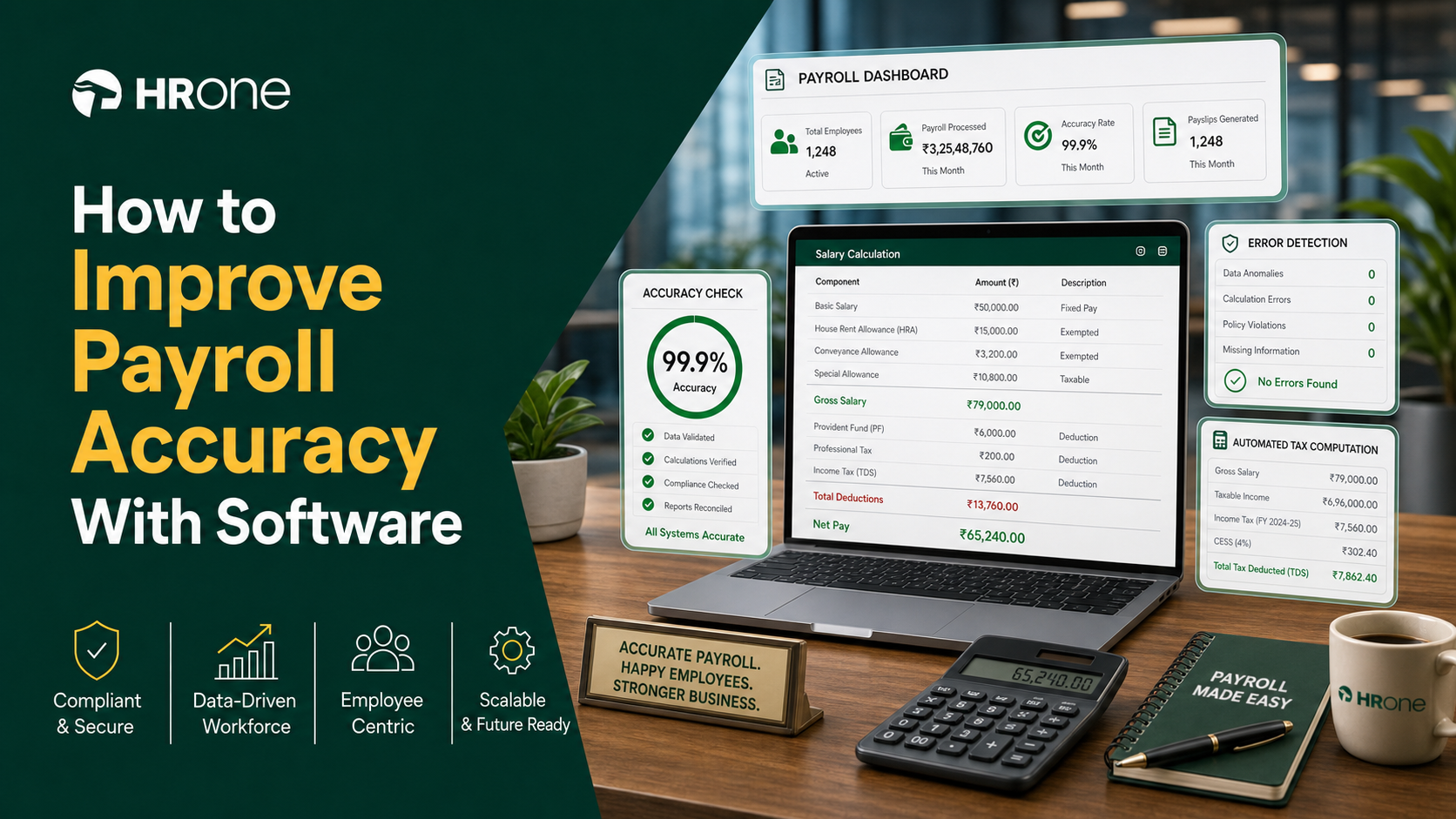
Q1. What does payroll accuracy actually mean, and why is 78% the number that should worry you?
Payroll accuracy is the share of pay runs completed with every employee’s gross-to-net pay, deductions, and statutory dues correct and on time. The global average sits at only about 78%. Roughly one in five payrolls contains an error. Accuracy is not a math problem. It is whether your people can pay their rent this month.
💰 The mortgage test most owners fail quietly
A founder once told me payroll felt simple until a teammate messaged at 11 pm asking why her salary was short. That night, she could not pay her rent. Payroll is not just cutting cheques. It is tied to taxes, deadlines, and rules most owners were never taught.
I think the standard read gets this backwards. We treat accuracy as an accounting metric. It is really a promise, and a reliable payroll software is what protects it. As one HR leader puts it, the real question is how we make sure people can continue to sustain their lives based on what we do within our systems.
⚠️ Why 78% is scarier than it sounds
Here is the plain version. If your accuracy sits at the 78% global average, roughly one run in five carries a mistake. Research found one in five payrolls contains an error. Even a 1.2% average error rate per pay period, reported in HR research, stacks up fast across a 2,000-person company.
Think of accuracy like a bank vault. A vault that is open 22% of the time is not mostly secure. It is a breach waiting to happen. Every open cycle is a real person underpaid, which is why a dependable payroll solution matters.
✅ What accuracy looks like when it works
Accurate payroll is boring, and boring is the goal. Salaries land on the same date. PF and ESI match the law. Nobody messages HR in a panic.
That reliability is exactly what HROne is built to protect. We treat every pay run as a promise to a named human, not a spreadsheet cell. The rest of this guide shows how to get there, starting Monday.
Q2. Why do companies get stuck in accurate salary processing without payroll software?
Companies stay stuck because manual, spreadsheet-driven payroll depends on error-prone human data entry across disconnected tools. Around 51% of firms still run payroll on spreadsheets, and 19% use paper-based processes. When your HR, time, and payroll systems cannot talk to each other, someone re-keys data every cycle. Every re-key is a chance to underpay a real person.
📋 The data-entry-clerk trap
I have watched capable HR leads turn into part-time data-entry clerks by month-end. Attendance lives in one portal. Salaries live in a spreadsheet. Someone copies numbers between them by hand.
More than half of companies still run payroll on spreadsheets, and nearly one in five still touch paper. That is not laziness. It is a structural trap, and it scales badly as headcount grows, which is why teams eventually move to a unified core HCM.
“Juggling spreadsheets was always a nightmare, but now I dont have to do that since its centralized in one place.”
John C., HR User HROne G2 Verified Review
❌ When your softwares cannot talk to each other
Here is where it gets painful. When your tools cannot talk to each other, data gets reconciled by hand every single month. HR strategists describe teams going through three system changes in less than four years before landing on a system that actually fits.
Some firms spend heavily on an ERP expecting it to do everything, then discover it cannot. The cost is not just money. It is the trust that leaks with every mismatched number, a pattern we unpack in our guide on payroll problems Indian companies face.
“Weve cut down on manual tracking and reduced errors compared with using spreadsheets.”
Rahul C., HR User HROne G2 Verified Review
✅ The structural fix: one connected system
The way out is not a prettier spreadsheet. It is automation plus integration, so attendance, leave, and payroll share one record. When data flows instead of getting copied, the re-keying errors simply disappear.
This is exactly why HROne keeps Core HR, Time Office, and Payroll on one connected platform, with 98% of our customers using these modules together. One record, one source of truth, no more softwares that cannot talk to each other, all reinforced by tight integrations.
Q3. What does a single payroll error really cost you, in rupees, penalties, and trust?
One payroll error averages about $291 to fix, 20% of payrolls contain one, and correcting them can cost a 1,000-employee firm up to $922,131 a year, plus roughly 29 lost work-weeks. Add statutory penalties and the human cost. Nearly half of employees start job-hunting after just two paycheck mistakes. Accuracy is cheaper than cleanup.
💸 The direct bill nobody budgets for
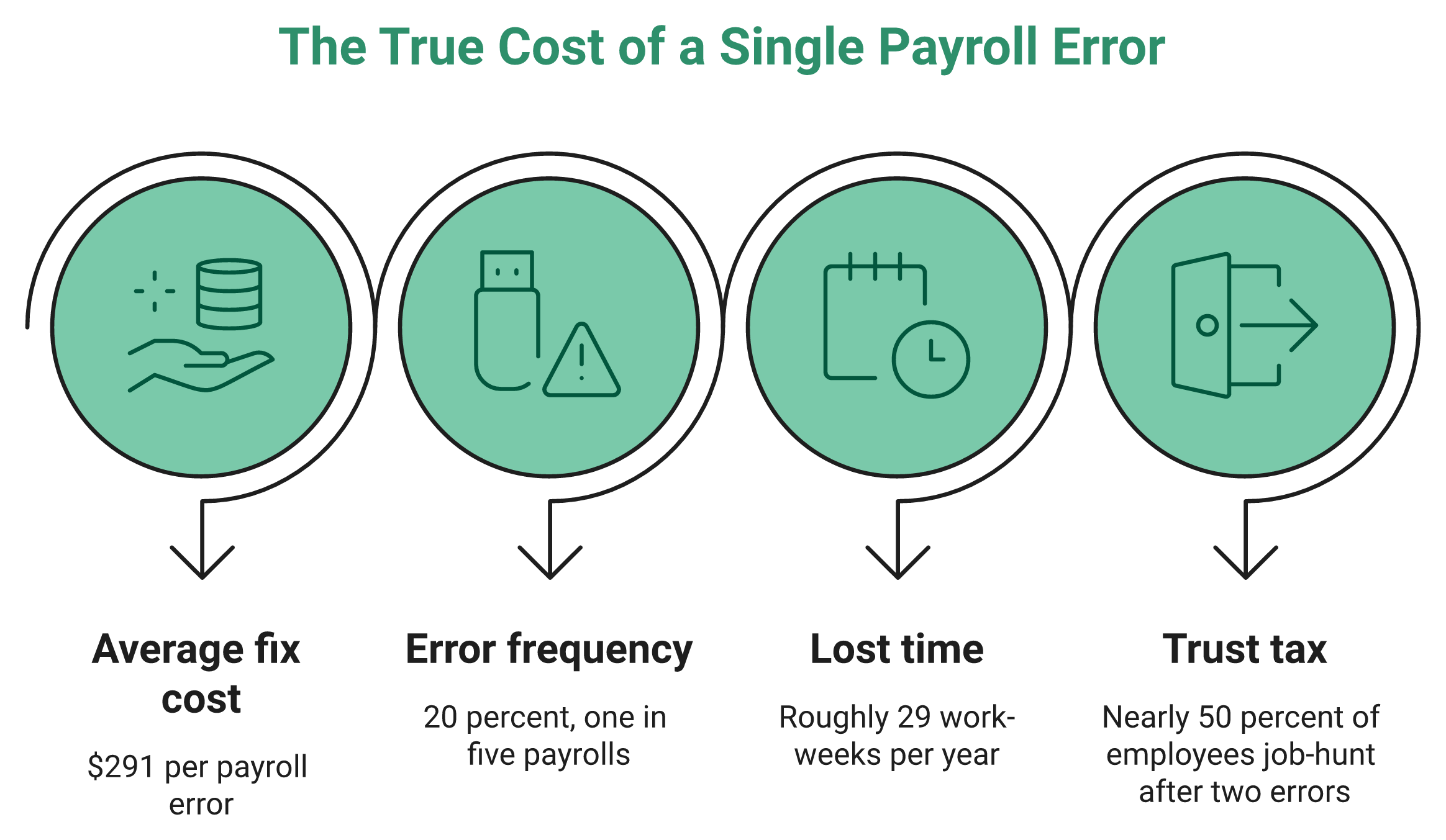
Let me put real numbers on the table. Research found each payroll error costs about $291 to correct. One in five payrolls carries one. For a 1,000-person firm, cleanup can hit $922,131 a year and eat nearly 29 work-weeks of staff time.
That is a full-time person, gone, just fixing mistakes. In India, the parallel is our own statutory exposure, where wrong filings trigger penalties fast, a risk detailed in our PF, ESI, and TDS compliance guide.
⚠️ Where the cost concentrates
Not every error costs the same. Here is roughly how the annual burden breaks down per 1,000 employees, based on error-category data.
| Error category | Approx. annual cost per 1,000 employees |
|---|---|
| Time and attendance, expenses | $250,000 |
| PTO and sick-time requests | $220,000 |
| Benefits | $140,000 |
| Earnings and deductions | $135,000 |
The pattern is clear. Most of the money leaks at the data-input stage, not the calculation engine. Clean attendance management is the first place to plug it.
⏰ The trust tax is the biggest one
Here is the cost that never shows on a P&L. Nearly half of employees start looking for a new job after just two payroll mistakes. You can absorb a $291 fix. You cannot easily absorb attrition.
I might be wrong on the exact percentage across every market, but the direction is not in doubt. Errors are both a compliance tax and a trust tax. This is why HROne runs group payout validations before disbursement, targeting zero computation errors and zero salary delays, so the cost surface shrinks before money moves.
Q4. Where do payroll errors actually come from, and which one should you fix first?
Most payroll errors are born at the data-input stage, not the calculation engine. Data shows time-and-attendance and expense errors cost the most, around $250,000 per 1,000 employees a year, followed by PTO and benefits errors. So fix this first. Automate how time, leave, and expenses enter your system before touching anything downstream.
🔍 The three-layer error pyramid
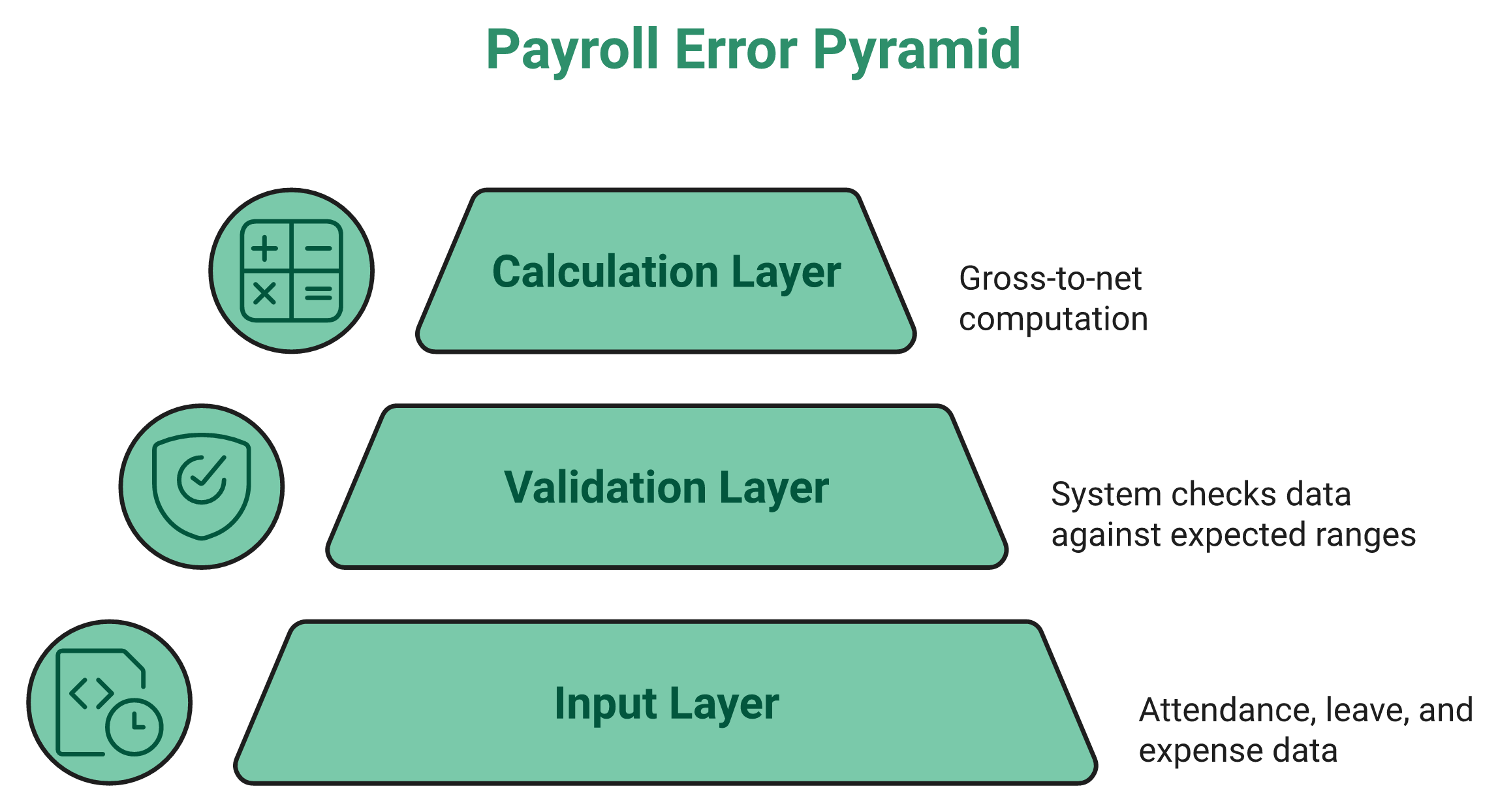
Think of payroll as three stacked layers. The bottom is input, meaning attendance, leave, and expense data. The middle is validation, where the system checks that data. The top is calculation, the actual gross-to-net math.
Almost everyone obsesses over the top layer. In my experience, the errors are born at the bottom. Bad input flows upward and quietly corrupts a perfect formula, which is why solid time tracking matters more than most teams think.
💰 Why input errors cost the most
The numbers back this up. Time-and-attendance and expense mistakes carry the heaviest annual cost, near $250,000 per 1,000 employees. PTO and benefits errors follow close behind.
One wrong punch does not stay small. It cascades into wrong paid days, wrong overtime, and a wrong net salary. When operational data goes many layers deep, a shallow system cannot bridge and speak to it, and you cannot even export data to make it meaningful, a gap that clean expense and reimbursement capture helps close.
✅ Fix the input layer first
So here is the rule I would give any HR lead on Monday. Do not start by auditing formulas. Start by automating how time, leave, and expenses enter the system.
Clean the source, and the calculation mostly takes care of itself. This is precisely how HROne is wired. Real-time biometric and mobile punches sync directly into Time Office, offline attendance auto-syncs when connectivity returns, and precise paid-day counts flow straight into Payroll through smart leave management. One customer summed up the shift plainly.
“Salary processing to last creation of bank Challan files is quick and systematic process with error free details.”
Deepak K., HR User HROne G2 Verified Review
“Proper calculation of PF and ESI was a pain area for us before, but now with the HROne automated calculation process, results are up to the mark.”
Ajay K., HR User HROne G2 Verified Review
Q5. How do you improve payroll accuracy with payroll software, the step-by-step process?
Improve payroll accuracy in seven steps: automate time and attendance capture, enable employee self-service, unify HR-leave-payroll on one system, copy salary structures from the offer letter, run a pre-processing error sheet, reconcile after every run, and keep statutory rules auto-updated. Each step removes a place where a human currently re-keys data, and errors happen.
📋 The seven-step accuracy playbook
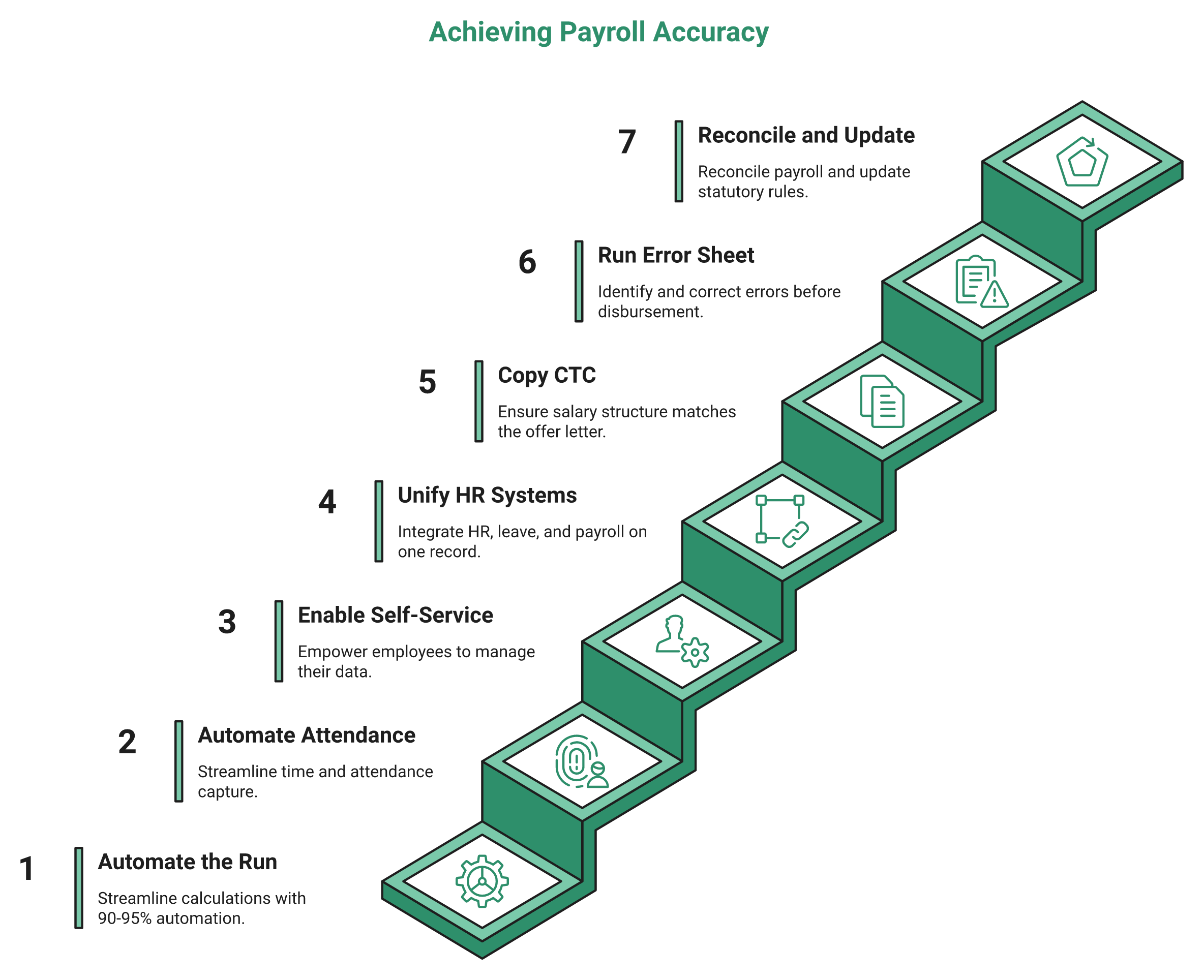
Here is the process I would hand any payroll manager who wants fewer surprises on payday. Work through it in order, because each step feeds the next.
- 1.1 Automate the whole run with HROne. Start with an integrated engine, not a spreadsheet. HROne’s auto-scheduler and group payout validations automate 90% to 95% of calculations, so most re-keying simply disappears. This is the foundation the other steps build on, and it starts with the right payroll software.
- 1.2 Automate time and attendance capture. Pull punches directly from biometric or mobile sources. When attendance flows in automatically, you kill the single biggest source of wrong paid-day counts, which is where strong attendance management pays off.
- 1.3 Enable employee self-service (ESS). ESS lets employees update their own details and view payslips without pinging HR. Fewer manual updates mean fewer typos in the master data.
- 1.4 Unify HR, leave, and payroll on one system. Keep all three on a single record, so data never gets copied across tools. One source of truth removes reconciliation errors at month-end, especially when paired with connected leave management.
⚡ The two moves most teams skip
- 1.5 Copy the salary structure from the offer letter. In HROne, assigning a salary triggers a task where you copy from the offer letter, and the complete structure copies over. This removes manual CTC entry, a classic error point that begins at the onboarding process.
- 1.6 Run a pre-processing error sheet. Download the error sheet before processing salaries to review prerequisites. It catches missing inputs and mismatches while you can still fix them cheaply.
- 1.7 Reconcile after every run, and auto-update statutory rules. Compare this run to the last one, and confirm PF, ESI, and tax rules are current. Reconciliation is your safety net after the money math is done.
✅ Why this order works
Notice the logic. Steps 1.2 to 1.4 clean the input. Steps 1.5 to 1.7 verify the output. Clean input plus verified output is what accuracy actually means.
“I also appreciate how HROne has streamlined our payroll management by allowing me to map various components of CTC during onboarding and automatically process payroll after attendance approval.”
Rishiraj R., HR User HROne G2 Verified Review
“Salary process is fast, error less, as per Indian Tax compliances.”
Sachin K., HR User HROne G2 Verified Review
Working with 2,000+ HR teams, what I have felt is that teams who follow this order stop firefighting. The error sheet and offer-to-salary copy are the two moves inside HROne that operators tell me save them the most panic, a shift we cover in our guide to HR process automation.
Q6. How does payroll software catch errors before payday, through validation, audits, and reconciliation?
Good payroll software catches errors before release by learning each employee’s normal pay range and flagging anything outside it, like a bonus keyed with an extra zero. Patented systems from Intuit and UKG validate values against variance thresholds and location rules in real time. Pair that with a pre-run audit and a post-run reconciliation, and errors die before payday.
🔍 Variance detection, in plain language
Think of it like your bank flagging a strange card swipe. The software learns what normal looks like for each employee. When a number falls outside that range, it stops and asks.
A simple example makes it clear. If someone’s usual net pay is 60,000 and a bonus gets keyed as 6,00,000, variance detection flags it. You catch the extra zero before the money moves, not after, which is the whole point of a modern payroll solution.
⚙️ What the patents actually describe
This is not marketing. Intuit’s Proactive Payroll Support patent describes flagging payroll values against expected ranges before release. UKG’s real-time validation patent describes checking entries against location-specific rules as they are entered.
Translated for a buyer, the lesson is simple. Ask any vendor whether it validates at the point of entry, and whether it explains why something was flagged. This kind of validation depth is exactly what belongs on any HRMS evaluation checklist.
✅ The prevent-audit-reconcile loop
Detection alone is not enough. Wrap it in a standing control. Run a pre-processing audit to catch missing inputs, then a post-processing reconciliation to confirm this run matches expectations.
As HR strategists put it, a system cannot replace an HR professional, but systems can optimize the humans by driving accuracy and consistency. That framing matches how we built HROne. Group payout validations and the pre-run error sheet prevent errors instead of just reporting them, and the HR inbox lets you verify and close tasks fast when something needs a second look.
Q7. How do you keep payroll accurate under Indian statutory rules, PF, ESI, PT, and state-wise slabs?
In India, accuracy means correct statutory deductions under the Code on Wages, EPFO (PF/ECR), and ESIC, plus state-wise professional tax and minimum-wage slabs that differ across every state. Payroll software updates these slabs automatically and generates compliant ECR and challan files, so a rule change in one state never quietly breaks a paycheck.
📜 What accurate means under Indian law
Indian payroll accuracy is not just clean math. It is legal compliance. You must get Provident Fund (PF), Employees’ State Insurance (ESI), Professional Tax (PT), and wage-code rules right, every cycle.
The Code on Wages, 2019 reshaped how wages and deductions are defined. EPFO governs PF contributions and the ECR file you must submit. ESIC sets ESI contribution rules. Miss any one, and you face penalties, not just an unhappy employee, so dedicated statutory compliance software is not optional.
🗺️ Why state-wise slabs are the hidden trap
Here is the part US-centric tools miss. Professional tax and minimum wages differ across every Indian state. Maintaining those slabs by hand is, in practice, very hard to configure correctly.
A firm running units in Karnataka, Maharashtra, and West Bengal juggles three different slab sets. One outdated slab quietly breaks a paycheck. This is exactly where fragmented global platforms leave Indian teams exposed, a problem we break down in our guide to multi-state payroll compliance.
“PT slabs are not available in knowledge base.”
Bindu P., HR User HROne G2 Verified Review
✅ How software keeps you safe
The fix is auto-updated slabs plus compliant file generation. Good software refreshes PF, ESI, and PT rules for you, then produces the ECR and challan files ready to file.
This is native ground for HROne, which we built India-first. It maintains state-wise slabs, tracks CTC revision history and Flexible Benefit Plan (FBP) declarations, and generates ECR and challan files, with the mobile HR app even available in local languages like Bengali and Tamil so ground staff can actually use it.
“Proper calculation of LWF and PT slabs makes the work more convenient process.”
Komal S., HR User HROne G2 Verified Review
Q8. In-house vs. outsourced, HRIS vs. HCM, which payroll setup keeps you most accurate?
There is no universal answer. It depends on your in-house resources and complexity. Outsourcing suits lean teams. In-house payroll on an integrated HCM suits mid-market firms wanting control and analytics. The bigger trap is buying a simple database HRIS that only stores data. For 100 to 5,000-employee Indian firms, an integrated HCM unifying payroll, leave, and attendance drives the most accuracy.
🔤 First, the alphabet soup
HR strategists call it alphabet soup, and they are right. Let me define the three terms plainly before you choose.
| Term | What it really does | Accuracy risk |
|---|---|---|
| HRIS | A database that stores employee records | Often just storage, so payroll still lives elsewhere |
| HCM | A connected suite: payroll, leave, attendance, performance | Highest accuracy, one source of truth |
| HRMS | Similar to HCM, sometimes narrower | Depends on module depth |
The trap is buying a simple database HRIS and expecting accurate payroll from it. A connected core HCM avoids that gap.
⚖️ In-house vs. outsourced
This one genuinely depends on the resources you have in house. Here is how I would frame it.
- Outsource if you have a lean team and standard, low-complexity payroll, an option covered in our take on payroll outsourcing.
- Run in-house on an HCM if you want control, analytics, and multi-entity handling.
- Not recommended: outsourcing when you need real-time data and board-level reporting.
Competitors show the risk of the wrong fit. greytHR users report manual leave-balance corrections due to limited customization, a scenario we explore in our guide to HR software for multi-entity companies.
“Many times we were manually correcting the leave balance of employees. We cannot properly implement our company policies due to the limitations of greytHR.”
Verified User in IT, greytHR greytHR G2 Verified Review
“This platform is terrible for companies with more than 20 employees, a lot of changes in the system need to be done manually.”
Verified User in Construction, BambooHR BambooHR G2 Verified Review
✅ The mid-market lockout
Here is the gap I keep seeing. Large global suites often chase 3,000-plus-employee accounts, leaving 100 to 5,000-employee Indian firms underserved. That is the exact segment we built HROne for. With payroll comes leave, attendance, everything, so HROne unifies them on one instance, with flat PEPM pricing, no lock-in, and subscription that starts only after go-live, as detailed on our pricing page.
Q9. What does accurate payroll look like once it’s working, a real team’s before-and-after?
It looks like sleeping at night knowing your data is correct. Teams that moved off manual tracking cut HR-operations occupancy by 70%, automated 90% to 95% of payroll calculations, and let managers pull their own reports instead of chasing HR. Accuracy stops being a monthly panic and becomes a quiet, dependable event.
⚠️ The situation: drowning in manual tracking
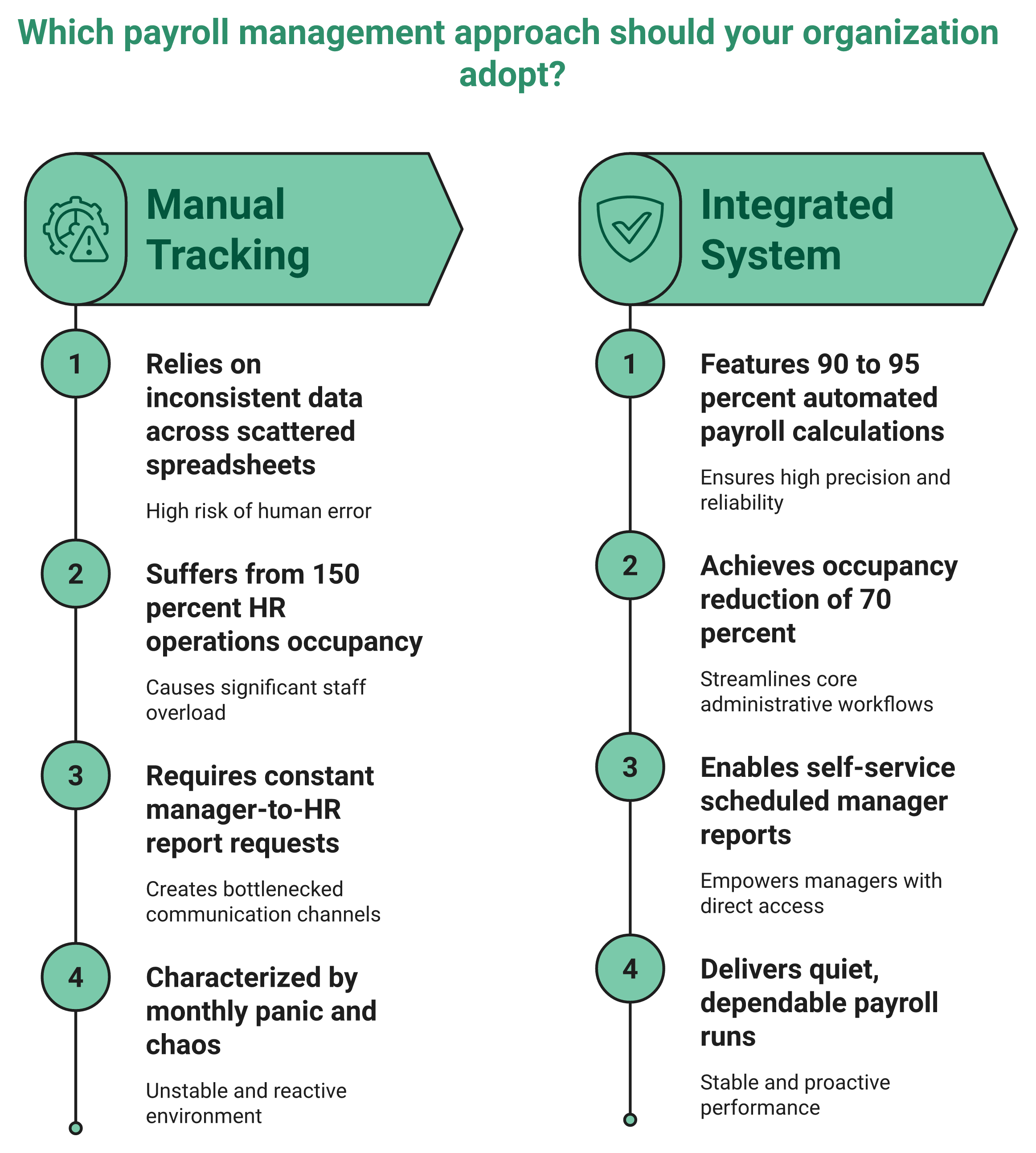
Picture a mid-market HR lead I will call the before state. Employee data sat in inconsistent spreadsheets. Attendance was tracked by hand across units.
Her team ran at what she described as 150% occupancy. That is HR-speak for a team doing far more manual work than its headcount can absorb. Every payroll cycle felt like a scramble to reconcile numbers before payday, a pattern we see across firms scaling HR processes from 100 to 1,000 employees.
😩 The complication: the constant bug-HR cycle
The deeper pain was not the data. It was the interruptions. Managers could not see their own team reports, so they pinged HR again and again for basic numbers.
This is what I call the shadow cycle. HR becomes a lookup service instead of a strategic function. Add multiple system switches over a few years, and trust in the numbers erodes further, which is why an employee self-service portal matters so much.
“Its user-friendly, saves time, and reduces manual work with a clean UI.”
Prajwal B., HR User HROne G2 Verified Review
✅ The resolution: quiet, dependable accuracy
Here is the after once she moved to HROne. Occupancy dropped by 70%. Around 90% to 95% of payroll calculations ran automatically.
Managers got their own report section and stopped constantly bugging HR. They could even schedule reports to hit their inboxes on a set timeline. In her words, she could peacefully sleep in the night that okay, her data is correct, an outcome echoed across our customer success stories.
At scale, this is not a one-off. HROne completes up to 1.5 crore tasks monthly across customers, and the HR Ops adherence dashboard shows which processes are healthy and which need attention, backed by strong HR analytics tools.
“It reduces HRs admin time by 6070 through features like InboxforHR, which centralizes tasks. Payroll is automated, cutting errors.”
Waldon S., HR User HROne G2 Verified Review
That is what accurate payroll actually feels like. Not a heroic month-end sprint, just a boring, reliable run.
Q10. How do you make payroll software actually stick, and what still needs a human?
Software only improves accuracy if your team can drive it without the vendor in the room. Plan for adoption, not just go-live. Simple setups launch in about a month, but complex multi-entity payroll needs time to get prerequisites right. Automate the tactical work, but keep a human owning judgment, edge cases, and the promise behind every paycheck.
🏎️ Adoption beats go-live
Here is a mistake I see smart teams make. They treat go-live as the finish line. It is really the starting line.
Think of new payroll software like handing someone a Ferrari. The real question is whether the admins under you can operate that Ferrari without the vendor sitting beside them. If they cannot, accuracy slips the moment support steps away, which is why a smooth onboarding process matters.
“Their onboarding process was thorough, with helpful training sessions for the whole team.”
Rishiraj R., HR User HROne G2 Verified Review
⏰ Be honest about timelines
Let me be straight, because vendors rarely are. A simple, single-entity setup can go live in about a month. A complex, multi-entity payroll takes longer.
The delay is not the software. It is getting your prerequisites together, meaning clean data, defined policies, and mapped structures. Rushing that step is how accuracy problems get baked in from day one, a risk we map out in our HRMS implementation timeline guide.
🤝 What still needs a human
Here is the twist the category avoids saying. Automation does not remove the human. It frees the human for the work that matters.
A system cannot replace an HR professional’s judgment on edge cases, exceptions, and the human promise behind each paycheck. It can only optimize the humans, driving accuracy and consistency underneath. That is the line we hold with HROne, backed by a prior-HR onboarding SPOC (9.8 NPS) who understands the domain, not a technical project manager reading a checklist while you sit stuck in email threads, and it is a big part of why HROne works for mid-market teams.
I might be wrong on the exact split two years out. My current thinking is that AI will own more of the tactical math, while humans own more of the trust. If you are weighing your own payroll accuracy problem, that trade-off is the real conversation worth having, and you can start by mapping the numbers with our ROI calculator or a quick book a demo session.
Ready to make your next payroll run boringly accurate?
See how HROne automates 90% to 95% of payroll calculations, runs pre-processing error sheets, and keeps PF, ESI, and state-wise slabs updated for you, with a dedicated HR SPOC and no billing until you go live.














 Secures Top Spot in
