


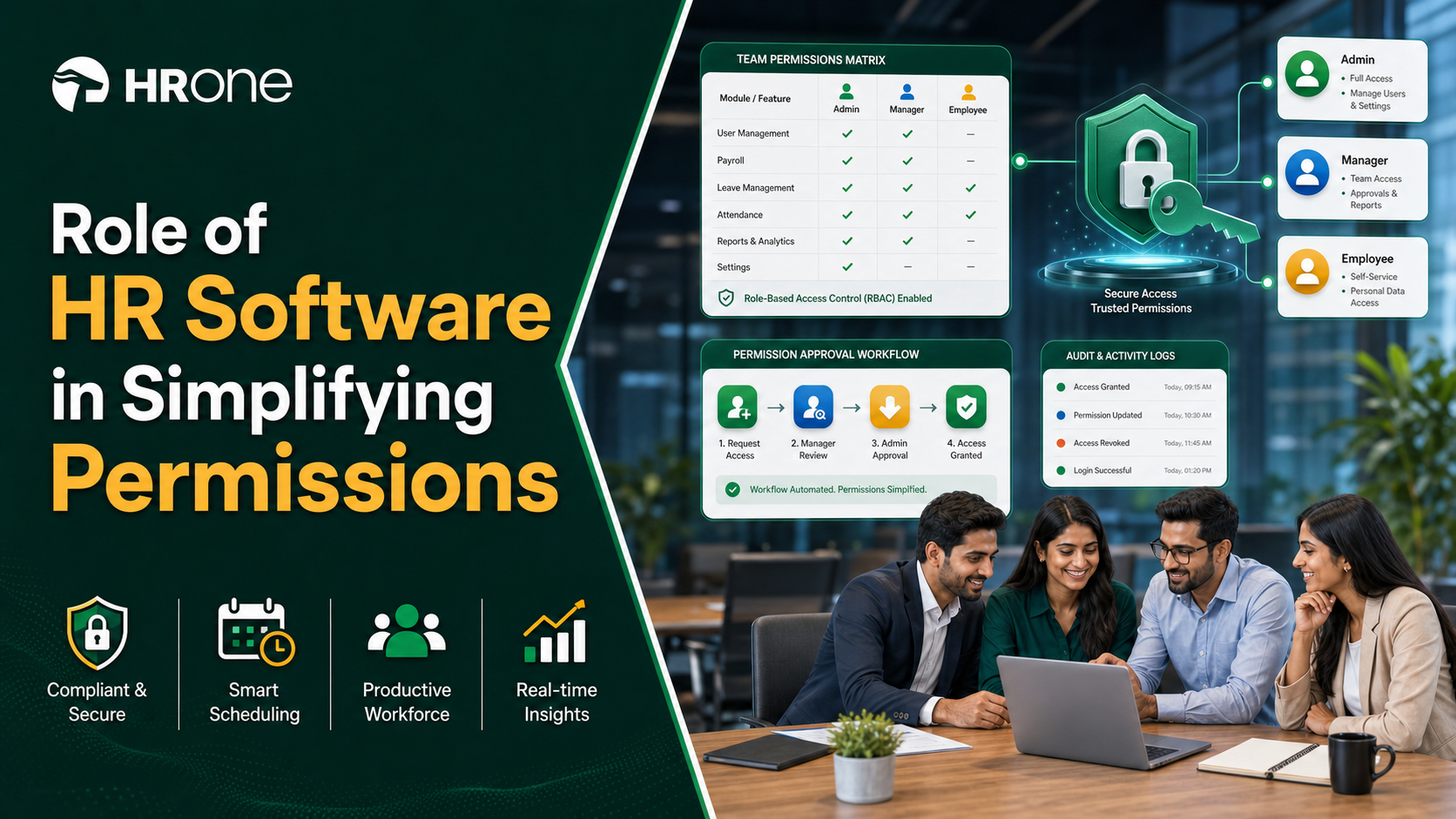
Q1. Why does scaling turn team permissions into a security nightmare?
As you scale, every new hire, promotion, and department multiplies who can see what. Handled manually, this creates the “everyone sees everyone’s salary” leak leaders quietly dread. The fix is not more admins. It is role based access control (RBAC), where permissions attach to a job role, not a person, so decentralizing approvals to managers no longer means decentralizing risk.
😰 The question every scaling CHRO is actually asking
I hear one version of the same worry from HR heads at 300 person companies. “How do I let my managers approve leave and expenses without a data leak where everyone sees everyone else’s salary?”
That sentence hides a deeper fear. Most scaling teams are still “person dependent” rather than “process and system dependent,” and one HR admin holds the keys, so every access request routes through her inbox. When that person is on leave, the whole approval chain stalls. That is not a scale problem. That is a design problem waiting to become a scale problem.
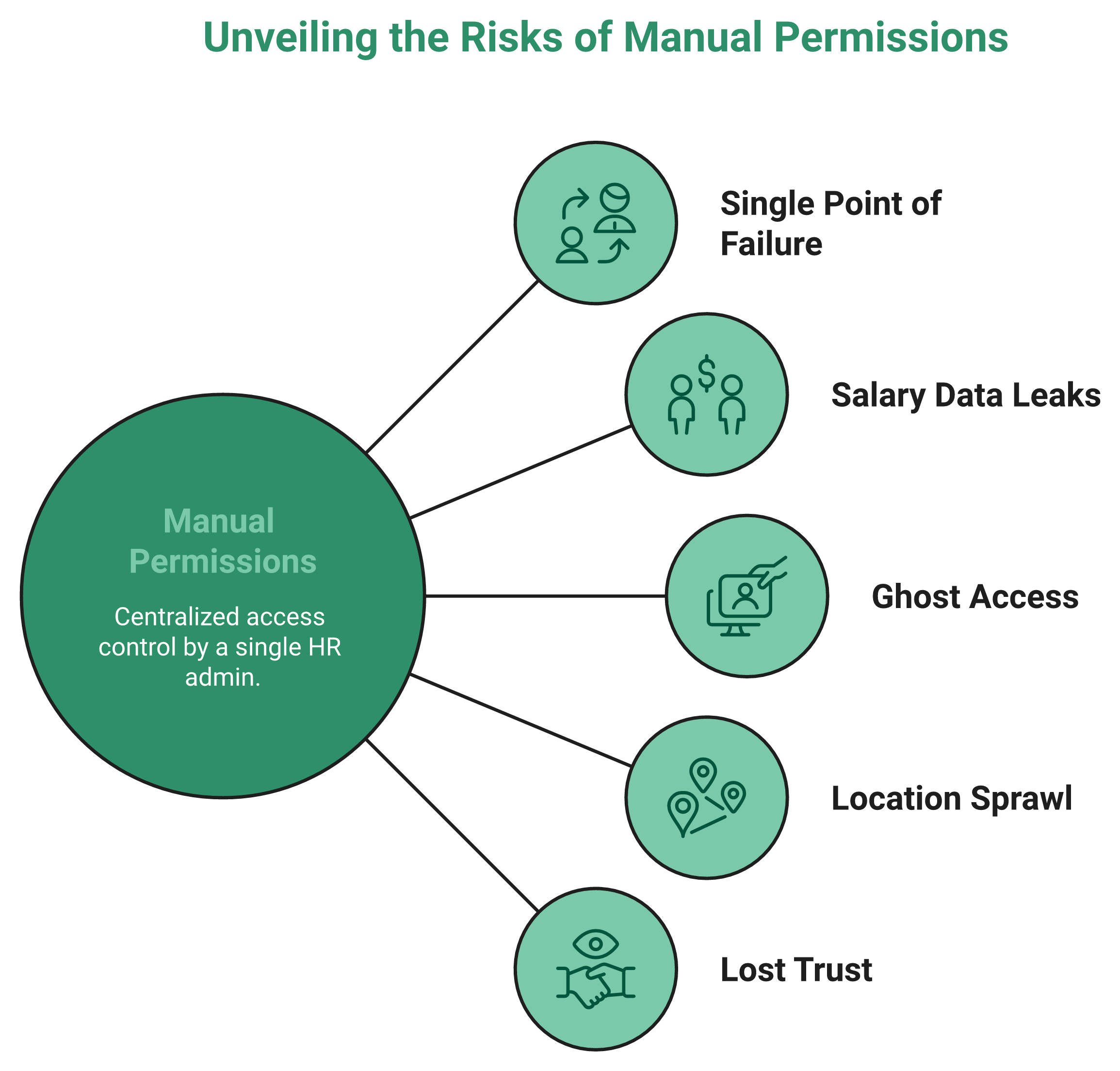
🔓 Why manual permissions break the moment you grow
Here is the mechanic nobody warns you about. At 50 people, you can hand set access for each employee in an afternoon. At 500, across five locations and three legal entities, that same approach quietly collapses.
Each new joiner, transfer, and exit becomes a manual permission edit. Miss one, and a departed employee still sees payroll. Rush one, and a junior analyst sees CTC data meant for the CFO. This is where zero transparency in operations starts breeding a lack of trust between employees and management. The leak is rarely dramatic. It is a slow drip of the wrong eyes on the wrong data, which is exactly why tighter core HCM access design matters as you grow.
✅ The shift that makes decentralization safe
The way out is not tighter control by one gatekeeper. It is a system where a manager’s role automatically shows them their team and nothing above it. Set the role once, and every new hire inherits the right access on day one.
Access then scales with your org chart instead of your admin’s memory. This is the exact problem HR software like HROne was built to remove, turning permission setting from a daily fire into a one time configuration. I might be slightly biased here after years inside this work. But from what surfaces when you actually run HR at scale, the teams that sleep well are the ones who stopped trusting people to remember and started trusting the system to enforce.
Q2. What exactly is role based access control (RBAC) in HR software?
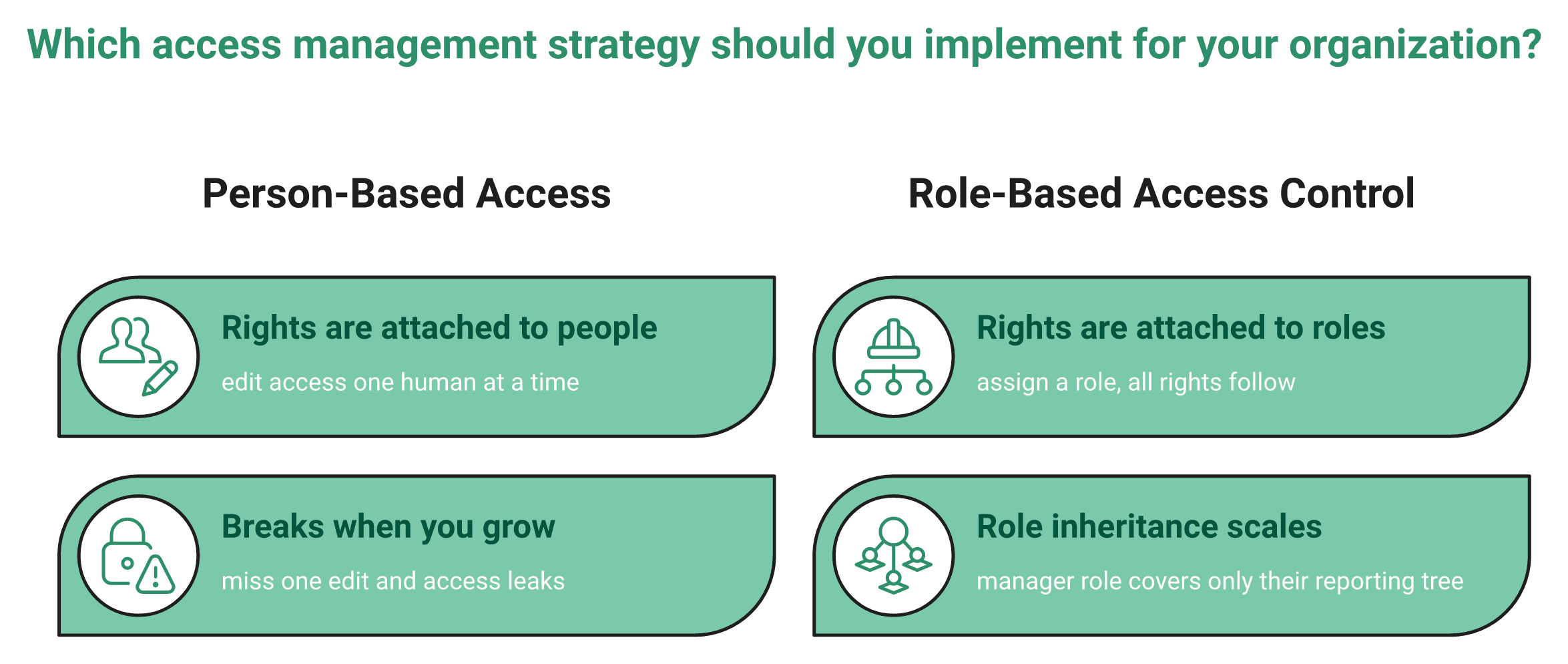
A role is a named job function like HR Admin or Employee. Permissions are the specific actions attached to it, such as viewing payroll or approving leave. RBAC puts a role layer between people and permissions, so assigning someone a role grants everything inside it automatically. Role inheritance means a manager’s role covers only their reporting tree, so access scales with your org chart.
🧩 Roles and permissions, in plain English
Think of a role as a job hat and permissions as what that hat lets you touch. The “Manager” hat can approve leave and view team attendance. The “Employee” hat can only apply for leave and see its own payslip.
RBAC simply says, attach the rights to the hat, not the head. When someone joins, you hand them a hat, and every right comes with it. This idea was formalized back in 1996 by Ravi Sandhu and colleagues, whose foundational paper on RBAC models has been cited over 10,000 times.
🎯 A concrete example, G5 versus G1
Here is how it plays out on a real approval. Say an employee at grade G5 raises a reimbursement request. Their role requires a reporting manager’s approval before it clears.
Now a G1 employee raises the same request. Their role is set so the request auto approves with no manager touch. Same system, same workflow, two different outcomes, decided entirely by the role, not by a person remembering the rule. That is role inheritance doing quiet work, and it is the backbone of clean leave management at scale.
🛠️ Your practical starting move
You do not need a hundred roles to begin. Start with three to five named roles, Super Admin, HR Admin, Manager, and Employee. Map each role to the data and actions it genuinely needs, then stop.
Resist the urge to hand tune individual people. This is where auto role assignment to employees based on predefined rules earns its keep, and it is exactly how we set up access inside HROne so a new hire lands in the right role automatically. This same logic drives a smooth onboarding process. The goal is not to remove humans from HR. It is to keep the human in human resources while the system handles the tactical plumbing.
Q3. How do core HR platforms simplify organizational structure and permissions?
Core HR platforms mirror your org chart as a permission tree. A manager automatically sees only their team, HR sees their entity, and conditional logic routes approvals by grade. Instead of provisioning each person, you set rules once, so a G5 request needs manager approval and a G1 auto approves, and the system applies every permutation as headcount grows.
🌳 Your org chart becomes the access map
The clever part of a good HR platform is that it does not ask you to invent a new access model. It reads the one you already have, your reporting structure.
A manager’s role inherits visibility over their direct reports and nobody else’s. Move an employee under a new manager, and their visibility follows the line without a manual edit. This is the connective tissue behind proper workforce management as you scale.
👁️ Department scoped visibility, so managers stop pinging HR
Here is a lived moment I hear often. A manager wants to know their team’s leave balance and, in a weak system, has to email HR and wait. With department scoped visibility, that manager sees their team’s data directly and nothing beyond it. One HROne user described exactly this shift.
“Its super easy for me to see how my teams attendance looks and how the leaves align. Having the entire visibility at one place makes it easy for me to lead my team of three members effectively.”
Naman G., Team Lead HROne G2 Verified Review
“Employees can apply for leave, check their balances, and view key information without having to ping HR. The approval process is generally smooth.”
Rahul C., HR User HROne G2 Verified Review
⚙️ Conditional logic and 3 layer access
The real simplification comes from conditional workflow logic. You define the permutations once, and the system runs them forever.
- A G5 request routes to a manager for approval.
- A G1 request of the same type clears automatically.
- Access itself is granted across three layers, so who sees what is scoped by level, not left open.
This is why scaling orgs need more than a login screen. They need something closer to 10 modules and 127 workflows covering everything from pre boarding to exit clearance, which is roughly the architecture we run inside HROne so the org chart, not the admin, drives access. Teams evaluating this often start with our manager solutions to see the payoff first. The standard read treats permissions as a security setting. From what surfaces when you actually run this at scale, it is really an org design decision wearing a security costume.
Q4. Why do permission systems break as you scale, and how is AI changing the fix?
Per team roles collapse at scale. Five roles across twenty branches becomes a hundred redundant roles nobody can audit. Research on role and attribute control (RABAC and ROBAC) fixes this by scoping one role dynamically by location, entity, or grade. The next frontier, patented in 2025, uses AI to explain effective permissions in plain language, so non technical HR can see exactly who can access what.
📈 The playbook everyone follows (and why it backfires)
The common instinct is simple, more control means more roles. So teams create “Manager Delhi,” “Manager Mumbai,” “Manager Chennai,” and on it goes.
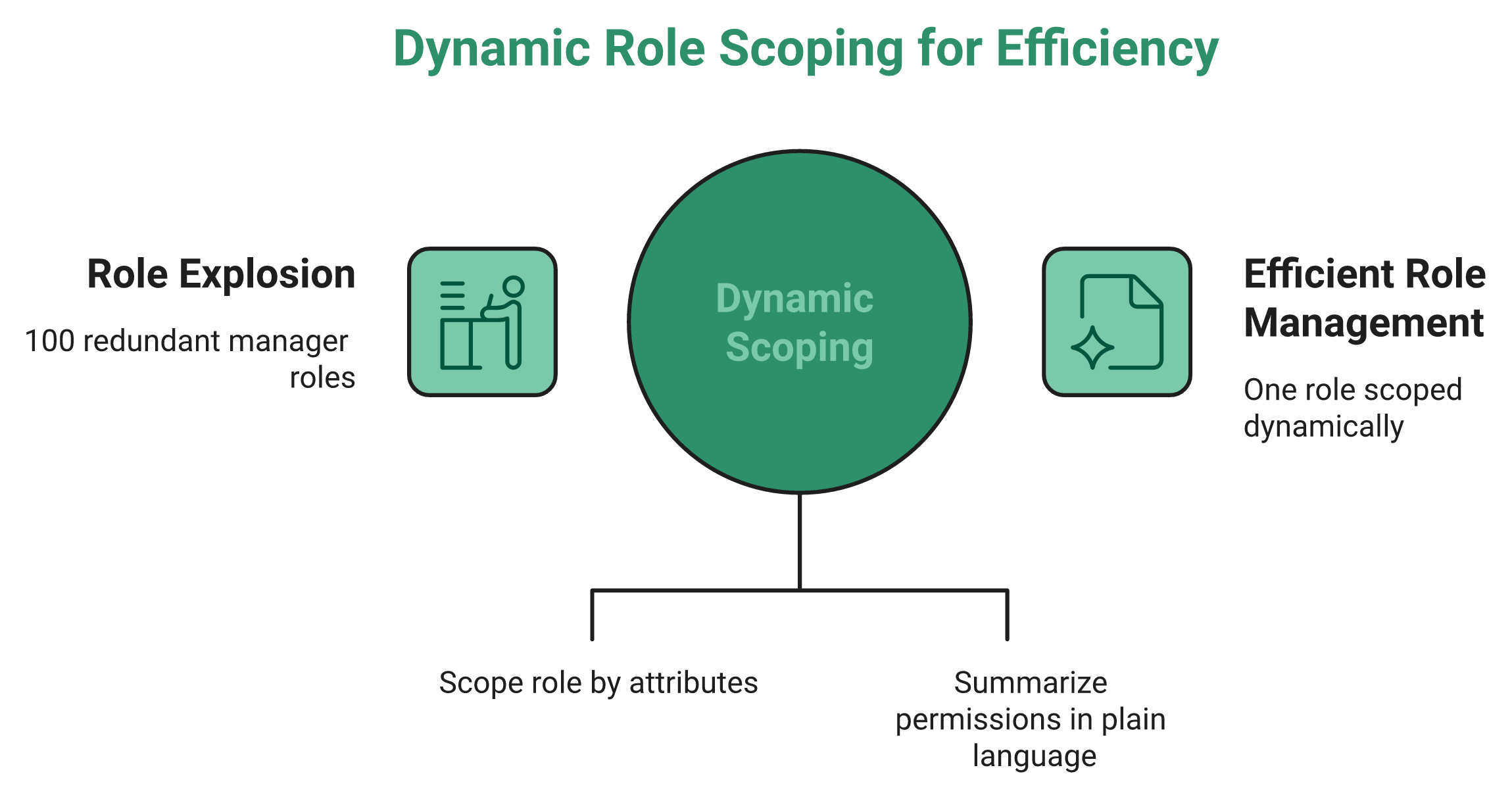
It feels safe. It is actually a trap. Five clean roles spread across twenty branches quietly becomes a hundred near identical roles, and now nobody can audit who can do what. Researchers call this role explosion, and the RABAC model was designed specifically to curb it by adding dynamic attributes like location and department. This is a common trigger for a full HRMS migration.
🧱 Where the data actually breaks
The breakage is not just messy roles. It is data that stops flowing. I have watched this on real shop floors.
When permissions and cost codes need to go 30 layers deep, a shallow system cannot bridge them, and suddenly your payroll system or your HRIS is not able to bridge and speak. You end up unable to export data in any form that means anything. That is the hidden tax of role explosion, and it is why HR software for multi entity companies has to be built differently. Teams get reactive to their growth, forced to just collect data without ever putting it into action.
🤖 The better model, and the AI twist
Here is the reframe I have come to believe. Most HR systems did not fail because they were unfair. They failed because they were too uniform.
The fix is scoping one role dynamically instead of cloning it, which ROBAC research describes as parameterizing a role by organization and object. One “Manager” role, reused across every branch, scoped by attribute. Inside HROne, this is how a single role travels across a multi legal entity environment rather than fracturing into a hundred copies, backed by our HROne AI suite.
Now the frontier moves again. A 2025 Microsoft patent uses a large language model to summarize a role’s effective permissions in plain language. My current thinking is that within two years, “who exactly can see this employee’s salary?” becomes a question you type, not an audit you dread. You can pressure test the payoff yourself with our ROI calculator. Design HR for equity, not equality, and let the machine explain the difference.
Q5. What is the difference between HRIS, HCM, and HRMS when it comes to scaling permissions?
HRIS stores data, HRMS adds process automation, and HCM manages the full employee lifecycle including deep permissioning. The trap is that many vendors sell an HRIS but call it HCM, which is apples to oranges. For permissions that scale, you need HCM grade role inheritance and conditional workflows, not a glorified employee database that quietly forces three system switches in four years.
🥣 Decoding the alphabet soup
Every buyer I meet hits the same wall of acronyms. HRIS, HRMS, HCM. It feels like alphabet soup, and every system falls into one of those three buckets.
Here is the plain version. An HRIS is a filing cabinet with a login. An HRMS adds automation on top, like leave and payroll, whereas an HCM software platform runs the whole path from hire to retire, and only that depth gives you permissions that scale.
⚠️ The apples to oranges trap
Here is where money gets burned. Most companies are sold a human resource information system, not a human capital management system. That is apples to oranges, and you find out only after the invoice clears.
| Bucket | What it really does | Permission depth | Scaling fit |
|---|---|---|---|
| HRIS | Stores employee records | Basic view and edit rights | Breaks past a few hundred |
| HRMS | Automates leave, payroll, and attendance | Role based, limited conditions | Mid market, single entity |
| HCM | Runs full lifecycle, hire to retire | Role inheritance, conditional logic, multi entity | 100 to 5,000 plus, multi entity |
The cost of guessing wrong is brutal. I have watched teams go through three system changes in less than four years, implementing, quitting, and re implementing before landing on something that actually fits. An honest HRMS evaluation checklist can save you that pain upfront.
💸 Why the wrong bucket costs you twice
Having served nearly 600 businesses and even advised a private equity group buying a payroll company, I have seen the same failure repeat. A buyer pays the implementation fee, then discovers the system cannot do what they thought it could at all.
That is not a pricing problem. It is a category problem, and no discount fixes a filing cabinet pretending to be an operating system. This is exactly why we built HROne as a full core HCM, with 10 modules and 127 pre built workflows spanning onboarding to exit, so your permission model does not hit a ceiling the day you add a second legal entity. I might be blunt here, but the standard buyer’s guide gets this backwards. Stop comparing feature checklists and first ask which bucket you are actually buying.
Q6. How do you set up scalable, self updating team permissions in 4 steps?
By the end of this, you will build a permission model that maintains itself. Map a 3 to 5 tier role hierarchy to your org chart, define permissions by data type on a least privilege basis, set conditional approval logic by grade, and enable lifecycle automation so access is granted on joining, changed on promotion, and revoked on exit. No IT ticket required.
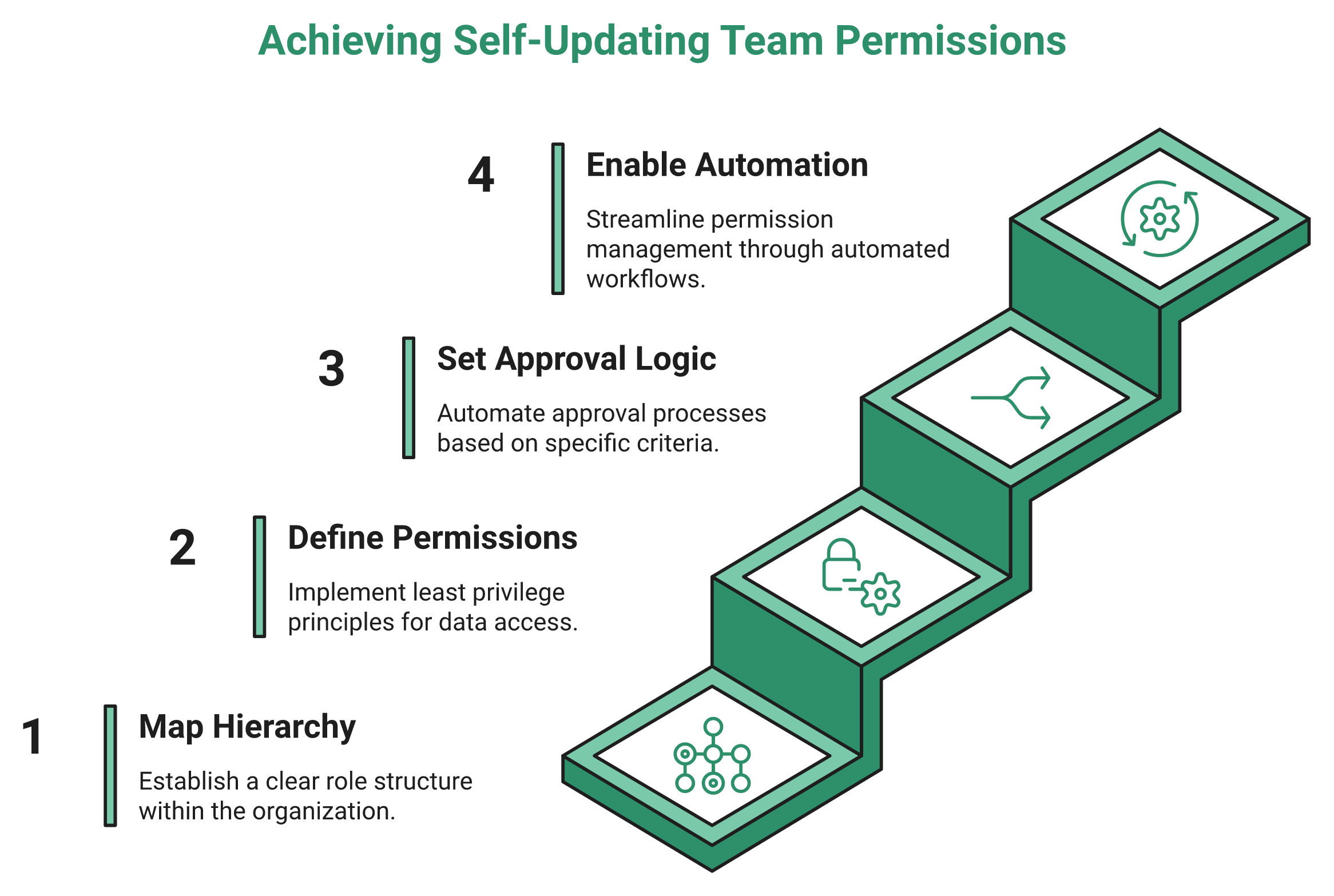
🪜 Step 1: Map a 3 to 5 tier role hierarchy
Start with your org chart, not a blank permissions grid. Create four named roles, Super Admin, HR Admin, Manager, and Employee.
Each role maps to a layer of your reporting tree. The expected outcome is that every future hire slots into an existing role instead of a hand built one, which is the foundation of clean workforce management.
🔒 Step 2: Define permissions by data type (least privilege)
Least privilege means each role gets the minimum access it needs, and nothing more. A Manager sees team attendance, not company payroll.
This is not just hygiene. Research shows role based access enforces role specific policies that align directly with regulatory compliance and simplify audit reviews. The expected outcome is that your access map doubles as your audit trail, which matters for any statutory compliance software requirement.
⚙️ Step 3: Set conditional approval logic by grade
Now add the rules that route work automatically. A G5 request needs manager approval, and a G1 request of the same type auto approves.
You define these permutations once, and the system runs them forever. The expected outcome is that approvals stop sitting in one admin’s inbox, which is the whole point of a proper HR inbox.
⏰ Step 4: Enable lifecycle automation
This is the step that makes permissions self updating. Access is granted on joining, changed on promotion, and revoked on exit, with no manual edit each time.
Inside HROne, this runs as auto role assignment based on predefined rules, and the entire setup module sits on the front end, so whosoever you provide the access with can configure policies across multi legal entity environments without a developer. This is the same engine behind our onboarding process.
“The workflows are pretty handy as they allow us to map our policies automatically. I also appreciate how HROne has streamlined our payroll management.”
Rishiraj R., HR User HROne G2 Verified Review
“I really like the reminder feature. It doesn’t allow the process to move forward until the checklist is fully completed. This brings more transparency and efficiency.”
Bindu P., HR User HROne G2 Verified Review
The goal is mastery without dependency. Your admins should be able to operate the Ferrari without the vendor sitting in the passenger seat.
Q7. What does India’s data law require for HR permissions (DPDP, POSH, EPFO)?
Indian HR data carries statutory access duties. The DPDP Act 2023 demands least privilege handling of personal data, the POSH Act 2013 requires the strictest restriction of complaint records, and EPFO, ESIC, and Code on Wages data must be scoped to authorized roles only. Well designed role based access turns compliance from a manual audit scramble into an automatic, logged access trail.
🇮🇳 Permissions are a legal duty, not just hygiene
Here is what US and UK guides miss entirely. In India, who can see a data field is often a matter of statute, not preference.
The Digital Personal Data Protection Act, 2023, treats employee records as personal data that must be handled on a need to know basis. Broad access is not just risky. It can be non compliant, which is why labour law compliance software now builds this in by default.
📋 The compliance to role matrix
The cleanest way to think about this is to map data types to the roles allowed to see them. Below is a working starting point.
| Data type | Governing law | Roles that should have access |
|---|---|---|
| Personal and contact data | DPDP Act, 2023 | Employee (own), HR Admin |
| POSH complaint records | POSH Act, 2013 | ICC members only |
| PF and ESI records | EPFO and ESIC provisions | Payroll Manager, HR Admin |
| Wage and CTC data | Code on Wages, 2019 | Payroll Manager, Finance |
POSH complaint data deserves the tightest lock. The Act requires confidentiality of the complainant’s identity, so only Internal Committee members should ever see those records, a principle you can codify with a clear POSH policy.
🧾 Why an audit trail changes everything
A permission model that logs every access request is your defense during an audit. Instead of manually reconstructing who saw what, the system shows it.
This is where role scoped access earns its rupee value for compliance heavy sectors like finance HR and manufacturing. We built HROne’s access controls so sensitive records stay locked to the right roles and every touch is logged, which is what a CHRO needs when the auditor asks the uncomfortable question. One honest caveat, statutory clauses get updated through fresh notifications, so verify the exact provision against the latest government circular before you finalize any policy. My current thinking is that treating compliance as a permission design problem, not a paperwork problem, is the shift most Indian teams still have not made.
Q8. What is the best core HR system for rapid scaling in India?
The best core HR system for rapid scaling is the one that scopes permissions to your org tree, automates the full lifecycle, and serves the mid market instead of locking it out. Enterprise giants like Workday sell mainly to 3,000 plus employee firms. For 100 to 5,000 employee Indian companies, an HCM with front end configuration, conditional workflows, and a dedicated support SPOC wins.
🎯 The criteria that actually matter
Ignore the feature checklists for a second. For a scaling Indian firm, four things decide fit, permission depth, front end configurability, India tuned compliance, and a support model that does not vanish mid migration.
The biggest and best enterprise systems are often restricted to the big businesses, selling only to firms with 3,000 employees or more. That leaves the mid market underserved, which is exactly the gap that the best mid market HR software platforms fight over.
📊 The scaling shortlist
1.1 HROne is our pick for the 100 to 5,000 mid market. Front end configuration, conditional workflows, a dedicated prior HR onboarding SPOC (9.8 NPS), India’s first inbuilt ROI Dashboard, and up to 1.5 crore tasks completed monthly across its base.
1.2 Keka brings clean UI but users report support and setup friction at scale.
1.3 Darwinbox carries enterprise brand weight, though customization and speed draw complaints.
1.4 greytHR handles SMB payroll adequately but caps out on flexible configuration.
1.5 Workday is powerful, but priced and scoped for 3,000 plus enterprises.
| Platform | Permission depth | Support model | India and ROI fit |
|---|---|---|---|
| HROne | Role inheritance, conditional, multi entity | Dedicated HR SPOC, 9.8 NPS | India first, inbuilt ROI Dashboard |
| Keka | Standard RBAC | Chat support gaps reported | India payroll, limited config |
| Darwinbox | Configurable workflows | Support responsiveness gaps reported | Enterprise, limited reports |
| greytHR | Basic, rigid | High dependency on vendor team | SMB payroll, weak customization |
| Workday | Deep | Enterprise tier | Global, 3,000 plus only |
💬 What real users report
The gaps below come straight from verified user reviews, and they are worth reading before you sign anything. If you are weighing options, our breakdowns of Keka alternatives and Darwinbox alternatives go deeper.
“I have been Keka user since 2021, and the service is decreasing day by day. The chat was not at all helpful.”
Verified User in Consulting Keka G2 Verified Review
“Transitioning from the old system to Darwinbox is quite difficult. User interface of Darwinbox is very outdated. Darwinbox Support team is not supportive.”
Ankush B., Darwinbox User Darwinbox G2 Verified Review
“There is a very high dependency on the greytHR team to customize and the customization is full of gaps. There is no escalation matrix.”
Verified User in IT greytHR G2 Verified Review
“I love HROne for its cost efficiency and holistic approach, which is why I prefer it over other vendors like Workday. The ability to manage various HR processes from a single platform is incredibly convenient and cost effective for mid level and enterprise customers.”
Priyanka S., HR Leader HROne G2 Verified Review
🧭 Who each one is (and isn’t) for
If you are a global generalist with light India needs, Zoho or BambooHR may do. If you are a 5,000 plus global enterprise, Workday earns its price. But for an Indian firm scaling from 300 to 3,000 across multiple entities, you want front end control and ROI proof for the board, which is where HROne’s model is built to fit.
See scoped, self updating permissions in action
Map your org chart to roles once and let access update itself on every join, move and exit, across multiple legal entities, from the front end.
Q9. How long does it really take to scale HR permissions (and what nobody tells you)?
Go-live in a month is realistic for configuring permissions and core workflows. But building the underlying structure, like job descriptions, grade logic, and performance frameworks, is closer to a 36-month journey. And integrations with external partners genuinely take time. Honest planning beats the “seamless” promise that leaves teams stuck when two softwares cannot talk to each other.
⏰ The one-month promise (and where it holds)
Every vendor pitches a fast go-live. The honest part is that one month is real for the right scope.
You can map your role hierarchy, switch on core workflows, and scope permissions inside about four weeks. That is the layer that makes daily HR run, and it genuinely moves fast when the setup lives on the front end, much like a well planned HRMS implementation timeline.
⚠️ The 36-month truth nobody prints on the sales deck
Here is what the demo skips. Configuring permissions is quick, but building the structure underneath is a long game.
Writing job descriptions, defining grade logic, and standing up a real performance framework is closer to a 36-month journey than a 30-day one. I have watched teams treat these as the same project and then feel cheated when month two does not deliver a finished org. A structured performance management module is what carries that longer build.
The other quiet trap is integration. When you bring in outside partners, like a learning and development vendor, it is taking time for those systems to speak to each other. That lag is not a bug in your rollout. It is the nature of stitching separate tools together, which is why native integrations matter so much.
✅ The phased fix: don’t eat the whole hog
My honest position, after years inside this, is that I have yet to find a system that is the end-all, be-all. Anyone claiming otherwise is selling.
So the smarter path is phased. As one operator framed it, you don’t want to buy the whole hog if you’re not going to eat the whole hog.
This is exactly why we let HROne teams switch on only the modules they need, when they need them, instead of a big-bang rollout that stalls. Turn on permissions and core HCM first, add performance later, and let the structure mature at its own pace.
I might be wrong for a very large enterprise with a dedicated project army. But for a 100 to 5,000 person Indian firm, phased adoption beats the “seamless everything” promise almost every time, a reality echoed across our guide to scaling HR processes. My current thinking is that the teams who plan for a slow structural build, and a fast permissions go-live, are the ones who never feel lied to.
Q10. What changes for your managers and HR team once permissions actually work?
When permissions work, managers stop bugging HR for team data. They get their own scoped report section and can schedule analytics straight to their inbox. HR reclaims mental space, with one team cutting HR operations occupancy sharply and finally sleeping peacefully knowing the data is correct. Permissions done right are not security overhead. They are the quiet engine of a lighter workday.
😮💨 The ordinary world: everyone bugs HR
Picture the HR ops lead most of us have been. Every morning brings the same pings, like “What’s my team’s leave balance?” and “Send me the attendance report.”
That HR person becomes a human query engine. She is not doing HR. She is fetching data that the asker could see themselves, which is exactly what a good employee self service layer removes.
🚀 The disruption: managers serve themselves
Working permissions flip this overnight. A manager gets their own scoped report section and stops having to bug HR for it.
Better still, they can schedule those reports to land in their inbox automatically, with no login required. A global search then pulls any record in a fraction of seconds instead of a folder dig, which is the everyday value of solid workforce management.
One HROne user described the shift in exactly these terms.
“Having the entire visibility at one place makes it easy for me to lead my team of three members effectively and make informed decisions.”
Naman G., Team Lead HROne G2 Verified Review
“Employees can apply for leave, check their balances, and view key information without having to ping HR. The approval process is generally smooth.”
Rahul C., HR User HROne G2 Verified Review
And the small human touches matter too. A recognition module lets a manager give an instant pat on the back, so appreciation stops waiting for the annual review, which is the heart of real employee engagement.
💰 The transformation: HR finally sleeps
Here is the outcome that stays with me. One team took HR operations that were running at 150 percent occupancy and brought that down by 70 percent.
The line I remember most was simple. “I peacefully sleep at night knowing the data is correct.” That is the real payoff, not a security setting, but a lighter mind, and it is a common theme in our customer success stories.
“It solves the problem of manual attendance tracking and complex leave management. It eliminates the need for paperwork and email chains for simple HR requests.”
Priti D., HR User HROne G2 Verified Review
The standard read treats permissions as a compliance chore. From what surfaces when you actually run this, permissions are how HR stops being a backlog and starts being a function that gives people their time back.
So here is the question I am sitting with, and I would genuinely like your take. If your managers could see everything they need, and nothing they should not, without a single email to HR, what would your team do with the hours you get back? We built HROne to answer that in practice, so if you want to compare notes, our CHRO solutions are the place I would start, and I am curious what your version of sleeping peacefully would look like.













 Secures Top Spot in
