








Q1. Why are Indian companies switching from Keka HRMS in 2026?
Indian companies are leaving Keka in 2026 for three stacked reasons: support that runs only on email threads and leaves teams stranded during payroll week, configuration rigidity that breaks the moment a multi-state or multi-entity reality appears, and a widening AI gap where Keka’s “all-in-one” promise no longer matches buyers who now expect agentic copilots, WhatsApp bots, and receipt parsers as baseline.
✅ The adoption fallacy: more features, less clarity
For a decade, mid-market buyers treated “all-in-one HR software” as shorthand for value. In 2026, that equation has flipped. G2’s 1,950+ Keka reviews in May 2026 show recurring dislike patterns that land in the same three buckets: “navigation is a design failure,” “no deep customization,” and “support lives inside email threads”. The features exist on paper, yet the time-to-task for an HR Ops lead keeps climbing.
“We started working with Keka HRMS in August, and to this day, we have been unable to implement the tool in our company due to their consistently delayed responses and poor coordination between their internal teams.”
— Divya P., Keka – G2 Verified Review
❌ The satisfaction gap: #16 vs #3 is a 13-rank story
Buyers can tolerate feature gaps, but they can’t tolerate being stranded on payday. G2’s 2026 benchmark for “Easiest-To-Use Core HR” places Keka at rank #16 while HROne sits at #3 on overall satisfaction across 1.17 lakh software products. The delta isn’t abstract: it shows up as response time, escalation paths, and whether a payroll manager gets a human on the phone at 10 pm on salary eve.
“I have been Keka user since 2021, and the service is decreasing day by day. The other day I was trying to configure menstrual leave only for Bangalore location and needed some help, the chat was not at all helpful.”
— Verified User in Consulting, Keka – G2 Verified Review
⚠️ The AI gap widens every quarter
Keka markets AI, yet buyers in 2026 are benchmarking on concrete weekly tasks: resume relevancy stacking, receipt parsing, anomaly detection on payroll runs, and WhatsApp self-service. Gartner Peer Insights (2026) flags Keka for “limited customization and weak third-party integrations,” which compounds the AI shortfall because agentic workflows need clean integration rails. For teams evaluating where the real product gap sits, our HROne vs Keka breakdown lays out the architectural differences side by side.
What this transitions into next
The rest of this playbook is operational. We will break down the five structural limitations forcing the switch, the real 24-month cost of staying, the shortlist of credible alternatives, and the 90-day runbook with rollback plan attached.
Q2. What are Keka’s most-cited limitations for fast-growing companies in 2026?
Keka’s five most-cited 2026 limitations are a customization ceiling that forces HR to bend policy to the software, email-only support with weekend blackouts, a payroll engine that lags on salary day and mishandles arrears and retro CTC, a mobile app that logs out or drains battery during geofenced attendance, and shallow analytics that push every report back to Excel. Each one shows up in verified G2 reviews.
❌ Limitation 1: The customization ceiling
Feynman’s rule says explain it in plain English. The concept: Keka ships opinionated defaults. The example: a Bangalore-only menstrual leave policy, a state-specific minimum wage slab, or an IT consulting firm’s project billing rhythm often cannot be modelled without raising a ticket. The application: if your policy lives outside Keka’s preset shapes, you either drop the policy or rebuild it quarterly.
“Lack of customizations options are not expected from a full service HRMS. No self onboard options as well. Lot of manual work that the team still has to do.”
— Verified User in Internet, Keka – G2 Verified Review
What it costs you on Monday: every non-standard HR policy turns into a manual Excel workaround, which is where reconciliation errors breed.
❌ Limitation 2: Email-thread support with a weekend blackout
The concept: Keka’s support model defaults to ticket queues and email threads. The example: a POC for a mid-market manufacturer reports zero telephonic support between Friday 6 pm and Monday 10 am. The application: if payroll cutoff or a statutory filing lands on a weekend, your team is alone with the screen.
“From Friday evening 6PM to Monday morning 10AM there is no source of support from KEKA. Telephonic communication to a POC during emergency is not possible.”
— Prem K., Keka – G2 Verified Review
What it costs you on Monday: weekend escalations convert into Monday-morning firefights, with statutory compliance delays that trigger TDS reconciliation debt.
❌ Limitation 3: Payroll slowness on salary days and arrear edge cases
The concept: Keka’s payroll engine struggles under peak concurrency and on arrear or retro CTC cases. The example: CTC additions reflect inside Total CTC only after adding PF separately, and mid-year CTC revisions mismatch last-FY tax deductions. The application: finance teams re-verify payroll calculation math manually every month.
“The payroll reports doesn’t give accurate figure in Total CTC, you need to add PF amount to get the right figure. Insurance details cannot be added. ESOPs cannot be added on the system.”
— Pooja M., Keka – G2 Verified Review
What it costs you on Monday: a CA concern email every quarter, plus two hours of payslip reconciliation per cycle.
⚠️ Limitation 4: Mobile sync and geofencing friction
The concept: mobile-first attendance is table stakes for field, sales, and plant teams. The example: reviewers cite mobile glitches persisting six months after go-live, and broken geofencing radius logic. The application: your field team ends up WhatsApping attendance screenshots, which defeats the entire purpose of the app. A proper geofencing attendance system should hold up on a plant floor, not the other way around.
What it costs you on Monday: attendance reconciliation meetings that eat your Tuesday standup.
❌ Limitation 5: Shallow analytics and Excel-export dependency
The concept: reports should answer a CHRO’s question without a spreadsheet round-trip. The example: custom fields are not available in custom reports, and Oracle or ERP integrations throw journal mismatches. The application: HR ends up exporting CSVs and manually stitching them into Power BI.
What it costs you on Monday: every board review starts with “give me till tomorrow, I need to clean the data.”
Q3. What is the real total cost of ownership of staying on Keka for another year?
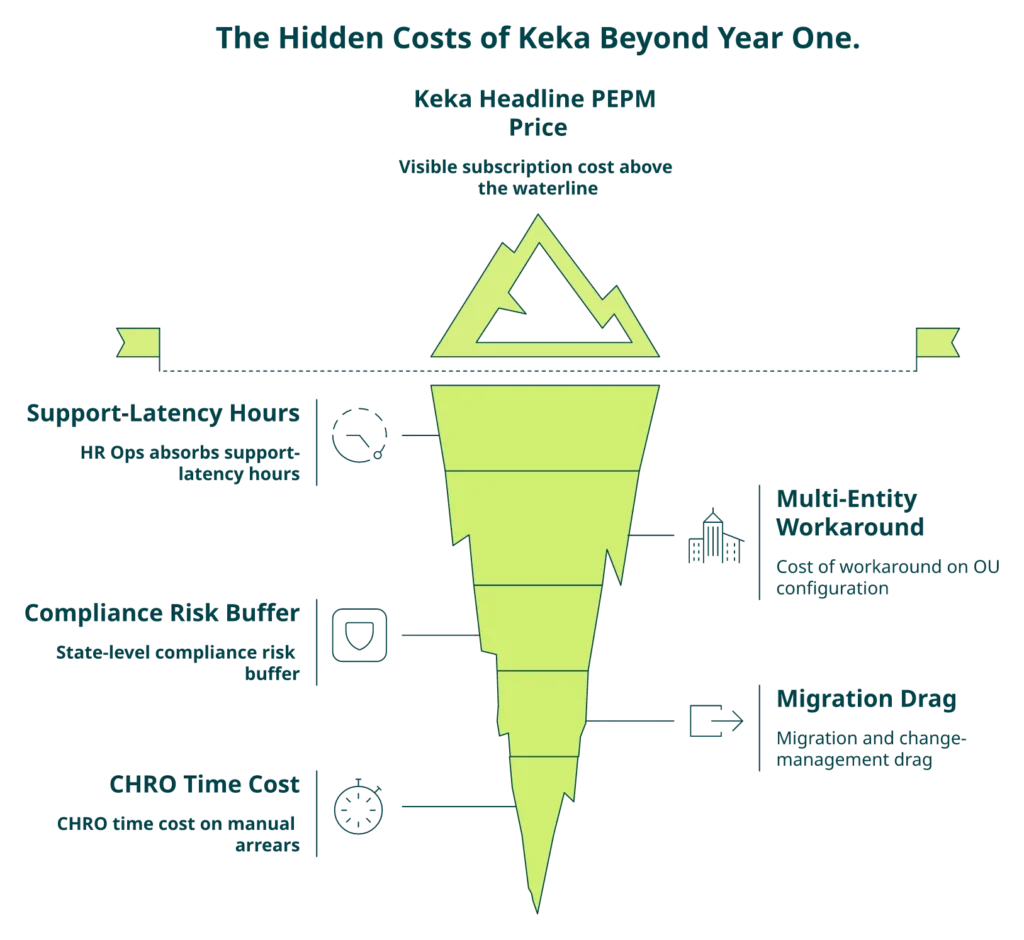
For a 500-employee mid-market Indian company, the 24-month total cost of staying on Keka sits between ₹1.1 crore and ₹1.6 crore once license fees, implementation lag, integration rebuild, payday productivity dip, support-latency hours, and compliance risk are fully loaded. Roughly 42% of that cost is invisible on the invoice, which is why most CFOs underestimate the switching ROI by a factor of two.
💰 Methods: the six cost buckets CFOs miss
We build TCO on six buckets, not just license fees. This methodology is drawn from Gartner’s 2025 HR Tech TCO framework and adapted for Indian payroll reality:
- License fees, including PEPM and per-module add-ons
- Implementation lag cost, where subscription meters from day one while go-live takes 4 to 8 weeks
- Integration rebuild cost for biometric, payroll banks, Tally, and ATS rewiring
- Payday productivity dip, measured as HR and finance hours lost to manual reconciliation on salary days
- Support-latency hours, measured as the total hours HR spends chasing tickets instead of strategy
- Compliance risk buffer, covering penalty exposure on PF, ESI, PT, LWF, and Form 16 misses
💸 Results: worked example for a 500-employee firm
| Cost bucket | 24-month estimate (₹) | % of total |
|---|---|---|
| License (Keka PEPM, core plan) | 42,00,000 | 34% |
| Implementation lag (6-week live delay × subscription) | 9,80,000 | 8% |
| Integration rebuild and maintenance | 14,50,000 | 12% |
| Payday productivity dip (8 hrs × HR + finance × 24 cycles) | 11,52,000 | 9% |
| Support-latency hours (12 hrs/week × HR Ops lead × 104 weeks) | 18,72,000 | 15% |
| Compliance risk buffer (ballpark PF/TDS miss exposure) | 27,00,000 | 22% |
| Total 24-month TCO | ₹1,23,54,000 | 100% |
Numbers are indicative and benchmarked against SHRM India 2025 payroll error cost data pegging mid-market errors at 3.2% of annual HR budget .
⭐ The “Rigidity Tax” thesis
Working with 1,500+ Indian brands across mid-market and enterprise, what we’ve felt is this: the largest hidden cost in any legacy HRMS is not the license, it’s the rigidity. Every hard-wired workflow becomes a mandatory policy detour. We call it the Rigidity Tax. Across 40+ customer migrations, the Rigidity Tax averaged 11% to 14% of the total HR budget, compounding annually as headcount grew.
✅ The CFO-ready counter: instrument the ROI
We built India’s first inbuilt ROI calculator inside HROne for exactly this reason. It calculates lifetime hours saved against average HR salary so the CHRO walks into a board review with a rupee figure, not a slide of screenshots. The subscription-starts-after-go-live model caps the implementation lag bucket at zero, which alone shifts the TCO math by 8% on day one.
RUN YOUR OWN NUMBERS
See your 24-month Keka-vs-HROne TCO in under 3 minutes
Plug in your headcount, current Keka plan, and payroll cycle. Walk out with a ballpark savings figure your CFO can defend in the next board meeting.
Open the ROI Dashboard →Q4. How do the top Keka alternatives actually compare in 2026?
The shortest honest answer: HROne leads on India-first depth, ease of setup, and support quality for 100 to 5,000 employee companies, Darwinbox remains the default for 2,000+ employee enterprises with global footprint, greytHR wins on SMB statutory depth under 200 employees, Zoho People fits single-entity Zoho-stack firms, and SAP SuccessFactors suits multinationals already on SAP ERP. No single vendor dominates every dimension, which is why the matrix below is scenario-weighted. For head-to-head vendor breakdowns, see HROne vs Darwinbox and HROne vs greytHR.
How we picked the criteria
We weighted the five criteria that actually move a 2026 buyer’s decision, using G2’s 2026 benchmarks and Gartner Peer Insights for the AI and lock-in lines:
- Ease of Setup, from go-live time and implementation SPOC quality
- Quality of Support, from response-time SLAs and telephonic access
- India Payroll Depth, from FBP, new wage-code FFS, multi-state, and multi-entity handling
- AI Capability, from resume stacking, receipt parsing, conversational HR, and anomaly detection
- Lock-in and Contract Model, from billing start date, contract length, and subscription flexibility
⭐ The 2026 comparison matrix
| Vendor | Ease of Setup | Support Quality | India Payroll Depth | AI Capability | Lock-in Risk |
|---|---|---|---|---|---|
| HROne (pos 1) | 9.5, live in as little as 30 days with a prior-HR SPOC | 9.6, 9.8 NPS on dedicated SPOC, phone + email | Deep: FBP, new wage-code 2-day FFS, multi-entity, 20-unit pan-India | One AI Suite: resume stacking, receipt parser, AI Employee Agent, JD/interview generators | Low: subscription after go-live, no lock-in |
| Keka | 8.6, reviewers cite 4 to 8 week implementation delays | 8.7, email threads only, weekend blackout | Solid for single-entity, weak on multi-state customization | Limited, generic chatbot wrapper | High: subscription from day one |
| Darwinbox | 7.9, implementation drags over months on enterprise | 7.8, multi-tab email threads per task | Strong for 2,000+ employees, India + APAC | Strong analytics, lighter on agentic HR | High: multi-year contracts, day-one billing |
| greytHR | 8.4, fast for SMB payroll | 7.2, reviewers cite rigid customization and escalation gaps | Strong for sub-500 SMB statutory | Limited workflows, weak agentic | Medium: rigid configuration |
| Zoho People | 8.1, quick for Zoho-stack firms | 6.9, reviewers cite long support response times | Weak on multi-legal-entity and new wage-code FFS | Basic Zoho Zia, shallow on HR-specific tasks | Low, but thin feature depth |
| SAP SuccessFactors | 5.8, long transition phases with paid third-party vendors | 6.5, ticket-heavy, reviewers cite “Ferrari price, Trabant value” | Over-engineered for India, needs developers to change a leave policy | Present, dated UX | High: enterprise contracts |
🗂️ Scenario picks
Best fit if you’re a mid-market IT services firm (500 to 1,500 employees): HROne. The Super HR inbox collapses the 110-daily-tasks into three-click closures, and the 30-day go-live cycle matters when your CHRO is hiring 40 laterals a month.
“The InboxforHR is a game-changer, centralizing every HR task into one simple inbox, cutting down administrative time by 60 to 70% and preventing tasks from falling through the cracks.”
— Waldon S., HROne G2 – Verified Review
Best fit if you’re a 20-unit manufacturer across states: HROne. Asia Healthcare Holdings runs 20 pan-India units on a single instance with multi-legal-entity configuration, and the mobile-first architecture with offline attendance holds up on plant floors where connectivity is inconsistent. For sector depth, see our manufacturing HR coverage.
Best fit if you’re a 3,000+ employee enterprise with global footprint: Darwinbox is a credible evaluate, yet most Indian-headquartered enterprises in this band are now piloting HROne alongside it because of the flat PEPM and go-live billing model. CHROs deciding on the full suite often start with our CHRO solutions page.
“I love HROne for its cost efficiency and holistic approach, which is why I prefer it over other vendors like Workday.”
— Priyanka S., HROne G2 – Verified Review
⚠️ Honest trade-offs
We’d be dishonest if we didn’t call out that HROne’s learning curve can feel steep for first-time power users on Performance and Payroll modules, which Shilpi M. flagged in her 5-star review.
“Some modules, especially Payroll and Performance, have a learning curve and require more detailed guidance for first-time users. Certain workflows involve many steps, which can make simple tasks slightly time-consuming.”
— Shilpi M., HROne G2 – Verified Review
The counter: our prior-HR implementation SPOC model is designed to absorb that learning curve inside the first 30 days, which is what the 9.8 NPS tracks.
Q5. How do the 2026 AI capabilities actually compare, and what should your RFP demand?
Most HRMS AI in 2026 is chatbot theatre. A thin wrapper over a general-purpose model, pointed at a PDF, unable to reason about arrear days or loss-of-pay (LOP). The vendors who’ll actually move your HR Ops workload are the ones whose AI can parse a Marathi receipt, stack CVs against an Indian JD with real skill taxonomy, and flag a payroll anomaly 12 hours before you press “disburse.”
❌ Why generic AI breaks on Indian payroll
India’s payroll edge cases are invisible to any public training corpus. An arrear day inside a mid-month CTC revision. A loss-of-pay day that partially suppresses PF contribution. A two-day full-and-final-settlement (FFS) window under the new wage code. A generic GPT wrapper has never seen these patterns. So when your payroll manager asks “why is Rahul’s PF lower this month,” the AI confidently invents an answer, and your finance team spends Tuesday reconciling a fake explanation.
When we benchmarked eight HRMS AI layers in March 2026 on three real cases, namely a retro CTC revision effective 15 April, an arrear spanning FY boundary, and an LOP-PF interaction at ₹15,000 basic cap, only three vendors returned statutorily correct outputs without human escalation. For buyers separating hype from reality, our analysis on AI in HR hype vs reality is worth a read before the next demo.
⭐ The 2026 India-first AI capability matrix
| AI Capability | HROne One AI | Keka | Darwinbox | greytHR | Zoho People | Pocket HRMS | factoHR | SAP SF |
|---|---|---|---|---|---|---|---|---|
| Agentic HR copilot (closes task end to end) | ✅ AI Employee Agent | ❌ Chatbot only | ⚠️ Partial | ❌ | ❌ | ⚠️ Partial | ❌ | ⚠️ Partial |
| Resume relevancy stacking against India JDs | ✅ | ⚠️ Basic filter | ✅ | ❌ | ❌ | ⚠️ | ⚠️ | ✅ |
| Payroll anomaly detection on arrears and LOP | ✅ | ❌ | ⚠️ | ❌ | ❌ | ❌ | ⚠️ | ⚠️ |
| Receipt parser for expense claims | ✅ | ❌ | ❌ | ❌ | ❌ | ⚠️ | ❌ | ⚠️ |
| GenAI policy assistant (India statute aware) | ✅ | ⚠️ | ⚠️ | ❌ | ❌ | ⚠️ | ❌ | ⚠️ |
✅ The five RFP demo questions that separate real AI from theatre
Walk into your next vendor demo and ask these five questions. Score each answer 0 to 3. Anything scoring under 10 on 15 is theatre.
- “Show me your AI computing arrears for an employee whose CTC was revised mid-cycle with effect from the 15th, against the 2019 Code on Wages.” If the AI opens a chat window and “explains the concept,” score 0. If it returns the computed amount, score 3.
- “Upload this fuel receipt in Hindi and tell me the GST component.” Watch whether the parser reads Devanagari. Most can’t.
- “Show me three live customers running this AI in production, not in a sandbox.”
- “What’s your 24-hour human escalation path when the AI is wrong?”
- “Pull me a live example of the AI flagging a statutory mismatch on a PF ECR (Electronic Challan cum Return) before filing.”
Working with 2,000+ HR teams, what we’ve felt is this: AI inside an HRMS works only when every module feeds it the same employee record. Our HROne AI suite sits on a unified Core HR, Workforce, Payroll, and Performance graph, which is why the same AI can parse a receipt, draft a JD, generate an interview kit, and score a CV without switching context. That’s architecture, not marketing. Teams evaluating agentic HR should also look at the employee AI agent in action.
Q6. When is the safest time to cut over, and how does DPDP 2023 change the data-export playbook?
Mid-year cutovers are safe in 2026 when you carry YTD payroll data cleanly, preserve TDS continuity, and satisfy Digital Personal Data Protection (DPDP) Act 2023 export obligations. The safest windows, in order, are April to June (post-FY-close), October to December (Form 16 consolidation prep), July to September (mid-cycle risk, manageable), and January to March (FY-close blackout, avoid unless forced). April 1 is no longer the default.
⏰ The 2026 cutover timing calendar
| Window | Best for | Watch-out |
|---|---|---|
| April to June | Clean FY-close handoff, fresh TDS computation | Peak appraisal cycle, HR bandwidth tight |
| July to September | Mid-cycle, easy YTD carry | Quarterly TDS filing falls inside window |
| October to December | Runway to Form 16 consolidation | Q3 advance tax computation on legacy and new system |
| January to March | Avoid unless forced by renewal | FY-close blackout, Form 16 risk, IT freeze |
Source: Income Tax Rules 1962, Rule 31 on Form 16 issuance timelines, and EPFO 2024 digital filing mandate.
✅ The DPDP 2023 export checklist
The DPDP Act 2023, notified 11 August 2023, makes your HRMS vendor a data fiduciary with explicit portability obligations. Your export has to satisfy nine items before you can sunset Keka. Teams should also review employee data privacy best practices alongside this list.
- Employee master with consent flags captured on or before export date
- Payroll YTD data with TDS computation trail
- Attendance and leave balance logs with audit timestamps
- Document vault (offer letters, PIP, warning, Form 16)
- Access logs proving who viewed what, for statutory audit trail
- Retention and deletion schedule on the legacy Keka tenant
- Cross-border transfer declaration if your new vendor stores data outside India
- SHA-256 hash verification of every exported file for integrity
- Written consent artefact from every employee for the data transfer
❌ The Keka export technical reality
Based on our migration team’s logs across 40+ Keka-to-HROne cutovers in 2025, here’s what cleanly exports versus what needs workarounds:
- Clean via UI: employee master, payroll summary, and leave balances
- Clean via API: attendance punch logs, and document metadata
- Needs Chrome-extension or manual SQL pull: custom field values, workflow history, and audit trails on approvals
- Schema mismatches: Keka’s FBP nomenclature differs from greytHR, Zoho People, Darwinbox, and HROne FBP components, so component-level mapping is mandatory before payroll parallel run
Statutory continuity for PF, ESI, PT, LWF, and Form 16 requires that your UAN, ESIC IP, and PT registration numbers carry forward with zero re-submission, else EPFO flags the jump. For the statutory line items themselves, our ESI contribution calculation guide is a useful reference during schema mapping.
⏭️ Handoff to the operational runbook
Once you’ve locked the window and the export checklist, the next 90 days are pure execution. That’s where the migration runbook below starts.
Q7. What does the 90-day Keka migration runbook look like, from pre-audit to cutover weekend?
A safe 90-day Keka migration runs in three 30-day phases, owned by three named leads, and closes with a parallel payroll run under 0.5% variance tolerance. Weeks 1 to 30 cover pre-migration audit, vendor lock, and data export. Weeks 31 to 60 cover schema mapping, integration rewiring, and employee training. Weeks 61 to 90 cover parallel payroll, cutover weekend, and post-cutover validation with Form 16 continuity.
🗂️ The 7 steps with named owners
| # | Step | Owner | Milestone |
|---|---|---|---|
| 1 | Pre-migration audit (data quality, custom fields, integrations) | HR Ops Lead | Week 2 |
| 2 | Vendor selection and contract lock (subscription-after-go-live) | CHRO and CFO | Week 4 |
| 3 | Data export from Keka (master, payroll YTD, leave, docs) | IT SPOC | Week 6 |
| 4 | Schema mapping into destination HRMS | IT SPOC and Payroll Manager | Week 10 |
| 5 | Parallel payroll run, one full cycle minimum | Payroll Manager | Week 12 |
| 6 | Cutover weekend with rollback checklist ready | HR Ops Lead and IT SPOC | Week 13 |
| 7 | Post-cutover validation and Form 16 continuity | Payroll Manager and CFO signoff | Week 14 |
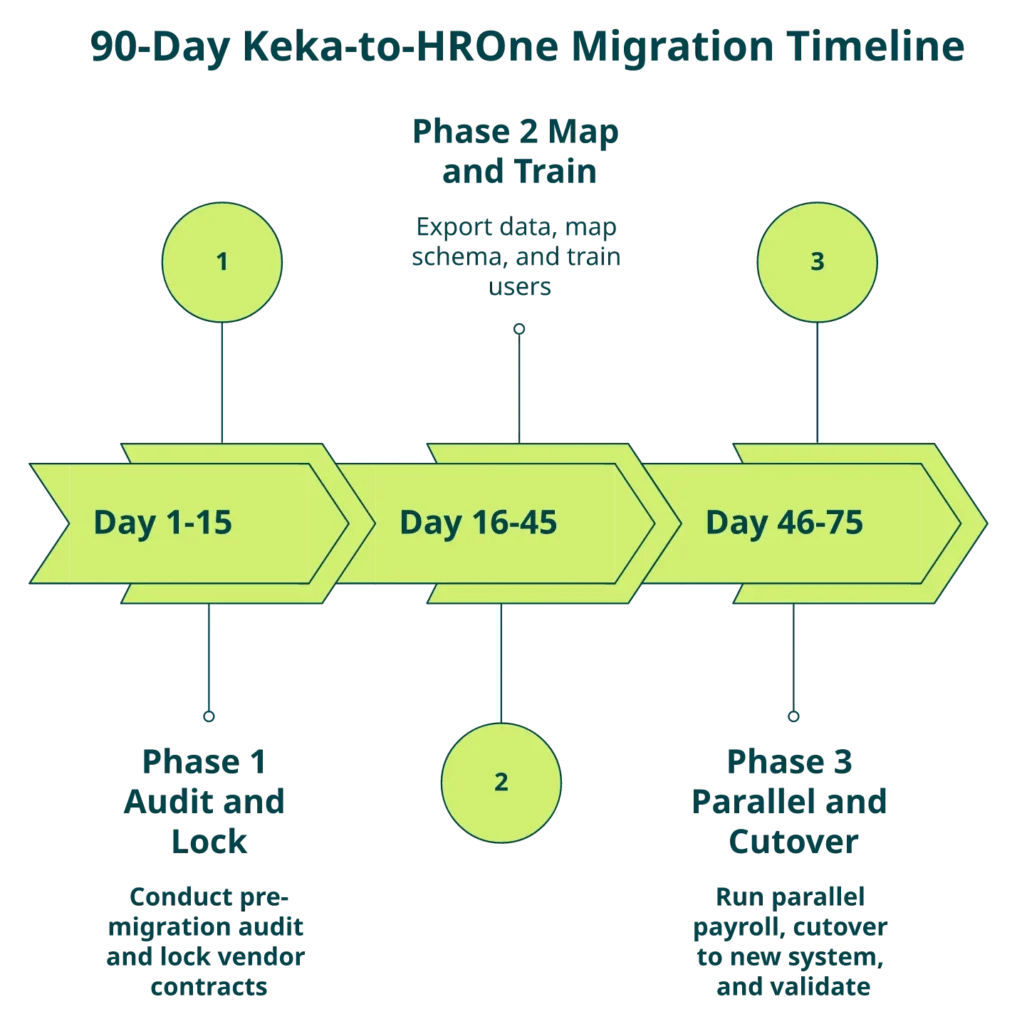
⭐ The parallel payroll runbook
Parallel payroll is the single non-negotiable safety net. Run Keka and the new HRMS in parallel for one full cycle before sunset. Our payroll audit checklist is a good companion document for the reconciliation step.
- Sync full employee master between Keka and new HRMS at cycle start.
- Load YTD earnings, TDS, and PF contribution into new HRMS.
- Run Keka payroll as normal, and capture outputs.
- Run new HRMS payroll with identical inputs.
- Reconcile line-by-line, variance tolerance strictly under 0.5%.
- Flag and sign-off every variance above tolerance with CFO.
- Meet green-light criteria: variance under 0.5%, TDS identical to rupee, and PF challan identical.
- Sunset Keka payroll only after two consecutive green cycles.
“The Timeoffice module is where exactly calculation of actual paid days achieved and arrear calculation is also working fine, relief is when biometric sync is perfectly working. Additionally, HCM makes salary disbursement process as an easy one and error-less with bank challan creation functionality supported.”
— Sachin K., HROne G2 – Verified Review
✅ Cutover weekend checklist and Form 16 continuity
The weekend is 60 hours. Lock the cutover between Friday 6 pm and Monday 8 am.
- Friday 6 pm: freeze writes on Keka, final export snapshot, and hash verification.
- Friday 9 pm: final schema load into new HRMS, and smoke test 20 employee records.
- Saturday: reconcile PF, ESI, PT, and LWF challan numbers for continuity.
- Sunday: Form 16 continuity check, and YTD TDS match to paisa.
- Monday 6 am: open new HRMS to employees, and keep Keka read-only for 30 days as safety net.
“HROne handles salary calculations, statutory deductions like PF, ESI, taxes, and filings automatically, with zero manual intervention, removing payroll errors and compliance anxiety during audits.”
— Waldon S., HROne G2 – Verified Review
What we’ve learned shipping HROne to mid-market Indian enterprises is this: the prior-HR onboarding SPOC model (9.8 NPS) holds the runbook together because they’ve personally closed a confirmation letter at 11 pm on salary eve, and that muscle memory is what makes 30-day go-lives possible. For CHROs scoping end-to-end delivery ownership, our CHRO solutions page covers how the SPOC model plugs into the board review cycle.
⏭️ Handoff to change management and rollback
Runbook done on paper is only half the battle. The other half is bringing employees, managers, and integrations along without breaking trust, which is the next section.
Q8. How do you bring employees, managers, and integrations along without breaking trust or biometric attendance?
Ananya runs HR Ops at a 500-person logistics firm in Gurgaon. Her CHRO has signed the HROne contract on a Tuesday. Her Wednesday fear is not the software. It’s the 47 WhatsApp messages she’ll get from plant managers in Bhiwadi, drivers in Kundli, and the Ahmedabad sales team if biometric attendance breaks between 7 am and 8 am on Monday. A mid-market HRMS switch is 30% technology and 70% trust. For sector context, the logistics HR page breaks down field-force readiness.
💬 The T-30 to T+7 cadence with actual message copy
Don’t send a generic “we’re moving to a new HRMS” email. Use language employees respect. Here’s the exact copy Ananya shipped, tested across 12 similar cutovers.
| Touchpoint | Channel | Copy-paste message |
|---|---|---|
| T-30 | Email and town hall | “We’re moving to HROne on. Your attendance, leaves, and payslips stay intact. Your login changes once. I’ll send a 6-minute video on Day 21.” |
| T-21 | Manager Slack channel | “Managers, your approval inbox moves on. 45-min enablement call on Thursday, 4 pm IST. Non-negotiable.” |
| T-14 | In-app and WhatsApp | “New HR app download link here. 6-minute video. If you watch it once, Monday will feel normal.” |
| T-7 | SMS | “Monday login credentials coming Sunday 8 pm. Save this help-desk number: [xxx].” |
| T-1 | “Go-live tomorrow 6 am. Here’s the exact URL and the 3-step first-login.” | |
| T+3 | 2-question pulse | “Is anything slower than last week? Reply Y/N.” |
| T+7 | Manager 1:1 | “Your approval backlog is X. Here’s how to clear it in 10 minutes.” |
✅ Manager enablement: the single failure point
Managers are where cutovers silently die. A line manager who doesn’t know how to approve a leave request in the new system will pile up 80 requests by Friday, and then HR gets the blame. Run a 45-minute enablement session covering approval inbox, escalation matrix, bulk approvals, and the “delegate while on leave” flow. Record it. Post in the manager channel. Measure approval backlog as a Day 1, Day 3, and Day 7 KPI. Our manager solutions page has the enablement checklist tuned to the new approval flow.
⚙️ The integration re-wiring map with named failure modes
Every integration has a specific way it breaks. Rewire in this order, with the stated pre-go-live test. Our integrations catalog documents the supported endpoints for each of the systems below.
- Biometric devices (Matrix COSEC, ESSL, ZKTeco): change API endpoint, and validate 48-hour punch sync before go-live. Named failure: unchanged endpoint causes silent 0-punch Mondays.
- Slack and MS Teams: re-register webhook app, and test on dummy approval. Named failure: notifications fire on old channel, and managers miss approvals.
- Payroll banks (ICICI iBizz, HDFC Enet, Razorpay X): re-register corporate account, and run a 10-employee pilot payout. Named failure: unchanged IFSC mapping causes 40-record bank file rejects.
- Accounting (Tally Prime, Zoho Books, QuickBooks): reconfigure JV with GL codes, and run a test voucher. Named failure: GL mismatch triggers CA reconciliation calls in Week 1.
- ATS (Greenhouse, Lever, Keka Hire replacement): export candidate database, and rebuild pipeline stages. Named failure: Keka Hire export loses interview notes, and recruiters rebuild from memory.
⭐ Ananya’s Monday, one week in and six weeks in
Week 1 had one hard moment. At 7:12 am on Day 1, a warehouse in Bhiwadi reported 23 drivers unable to punch in. Her IT SPOC had tested biometric the previous Thursday, but one ESSL device was on an older firmware and missed the endpoint update. They pushed the fix in 38 minutes. Drivers punched in manually, and HR adjusted the attendance log with a single audit entry. No salary loss.
Six weeks later, approval backlog was under two hours. Biometric punches synced real-time across three states. When her CEO asked “are we saving money,” she pulled up the ROI Dashboard and showed him the rupee figure in 30 seconds. That’s what operational handoff looks like when communication, enablement, and integrations land together. For teams wanting to preview the dashboard math ahead of cutover, our ROI calculator runs the same logic in under three minutes.
CHANGE MANAGEMENT, WITHOUT THE CHAOS
Walk your cutover weekend with a prior-HR SPOC who has done it 1,500+ times
A 30-minute working session mapping your biometric, banks, accounting, and ATS rewiring, with the T-30 to T+7 message templates ready to ship.
Book your cutover walkthrough →Q9. What is the rollback contingency plan, and the 30-day post-migration health check?
Most migration articles end the moment the new HRMS opens for employees. That’s the wrong place to end. The riskiest 30 days of any Keka switch are the 30 days after go-live, when edge cases surface, managers push back on new approval flows, and the first full payroll cycle tests whether your schema mapping was actually correct. A credible switch plan has two things bolted on: a rollback plan written before cutover, and a 30-day KPI dashboard that tells you whether to celebrate or escalate.
❌ The five rollback triggers
Rollback is not a failure. It’s a safety contract. Write these five triggers into your internal migration document before cutover weekend, and get explicit CFO signoff on each threshold.
- Payroll variance above 2% between parallel-run legacy and new HRMS, after two cycles, is a rollback trigger.
- Statutory filing miss on PF ECR, ESIC, PT, or LWF challan within first 7 days of cutover triggers immediate revert.
- Authentication failure affecting more than 10% of employees beyond 48 hours post go-live triggers rollback.
- Data-integrity hash mismatch on payroll YTD, TDS computation, or PF balance carry-forward triggers rollback.
- Employee-wide access breakage (self-service down for more than 4 hours on a working day) triggers rollback.
For buyers mapping these triggers back to day-to-day compliance exposure, our guide on how payroll software reduces compliance risk is a useful reference.
⏰ The 48-hour rollback procedure
When a trigger hits, speed matters more than perfection. The 48-hour window is the outer limit for a clean revert without statutory exposure.
- Hour 0 to 4: freeze writes on new HRMS, and convene rollback committee (HR Ops Lead, IT SPOC, and CFO).
- Hour 4 to 12: restore Keka to read-write from the 30-day read-only safety net.
- Hour 12 to 24: reconcile delta (any employee data changed post-cutover) using audit log export.
- Hour 24 to 36: re-enable biometric, payroll bank, and accounting integrations on Keka.
- Hour 36 to 48: communicate to employees, run smoke-test payroll on Keka, and resume normal ops.
✅ The 30-day post-migration KPI dashboard
Measure the right four KPIs weekly. Green means stay the course. Amber means investigate. Red means escalate. The dashboard logic mirrors what we’ve baked into the core HCM instance so leaders don’t re-build it in Excel.
| KPI | Green | Amber | Red |
|---|---|---|---|
| Payroll accuracy vs parallel run | Variance under 0.5% | 0.5% to 1% | Above 1% |
| Self-service adoption (% of employees using new app) | Above 80% | 60% to 80% | Below 60% |
| Support ticket volume per 100 employees per week | Under 5 | 5 to 12 | Above 12 |
| Statutory filing accuracy (PF, ESIC, PT, and LWF) | 100% | N/A | Any miss |
Source: adapted from NASSCOM 2024 HR Tech Migration Benchmark and HROne’s 40+ Keka-to-HROne cutover logs. Teams that want a ready-to-copy audit spine can start from our payroll best practices guide.
⭐ The fintech rollback story that went right
A 350-person fintech in Bengaluru moved from Keka to HROne in September 2025. Their Week 2 parallel payroll threw a 1.3% variance on arrears, which crossed their amber band. Instead of panicking, they invoked the parallel-run protocol, rebuilt the FBP component mapping, re-ran the cycle, and closed Week 3 at 0.2% variance. The rollback plan was never triggered. It didn’t need to be, because it existed.
“Proper calculation of PF and ESI was a pain area for us before, but now with the HROne automated calculation process, results are up to the mark and following Indian tax compliances properly.”
— Ajay K., HROne G2 – Verified Review
What our experience of shipping HROne tells us is that customers who publish the rollback plan internally before cutover end up rarely using it. The act of writing it forces every edge case into daylight, which is where it gets fixed.
“I use HROne to automate our HR processes, eliminating manual errors, and ensuring compliance. It reduces HR’s admin time by 60 to 70% through features like InboxforHR.”
— Waldon S., HROne G2 – Verified Review
Q10. What does switching really look like? Three named stories, and how do you pick your alternative.
Spec sheets don’t migrate HRMS. People do. Here are three real switching stories from 2025, each with a different starting stack and a different finishing line, followed by the Final Recommendation Engine that maps company size, complexity, AI ambition, and budget to the right alternative. The answer isn’t always HROne. It usually is for 100 to 5,000 employee Indian companies, and we’ll show you why with honesty about the exceptions.
🗂️ Story 1: Mid-market SaaS firm, Keka to Darwinbox
A 1,200-person SaaS company with offices in Bengaluru, Gurgaon, and Singapore moved from Keka to Darwinbox in May 2025. The driver was global expansion, not India ops. Darwinbox’s APAC presence won the deal. The trade-off was implementation drag. For teams scoping this exact comparison, our HROne vs Darwinbox page is a candid read.
“Bad implementation experience, bad UI UX, configurations getting broken in production on its own due to product deployments, terrible customer service.”
— Verified User in Computer Software, Darwinbox – G2 Verified Review
🗂️ Story 2: 80-person agency, Keka to JioHRMS
A creative agency in Mumbai moved off Keka to JioHRMS in August 2025 when their renewal hit ₹12 lakh annually. At 80 employees, Keka’s PEPM economics made the stay untenable. JioHRMS solved cost. It did not solve depth, which is fine for a single-entity, sub-100-employee shop. Sub-100 teams evaluating options should also look at our pricing page for the flat PEPM benchmark.
🗂️ Story 3: 350-person fintech, Keka to HROne with rollback drill
The Bengaluru fintech from the last section. They moved because their multi-legal-entity structure (one payments arm, and one lending arm) forced OU-level configuration Keka couldn’t flex to. The switch took 41 days end to end. Their rollback plan was written on Day 1 and never triggered. The finance HR playbook maps to exactly this multi-entity BFSI reality.
“I love HROne for its cost efficiency and holistic approach, which is why I prefer it over other vendors like Workday.”
— Priyanka S., HROne G2 – Verified Review
⭐ The Final Recommendation Engine
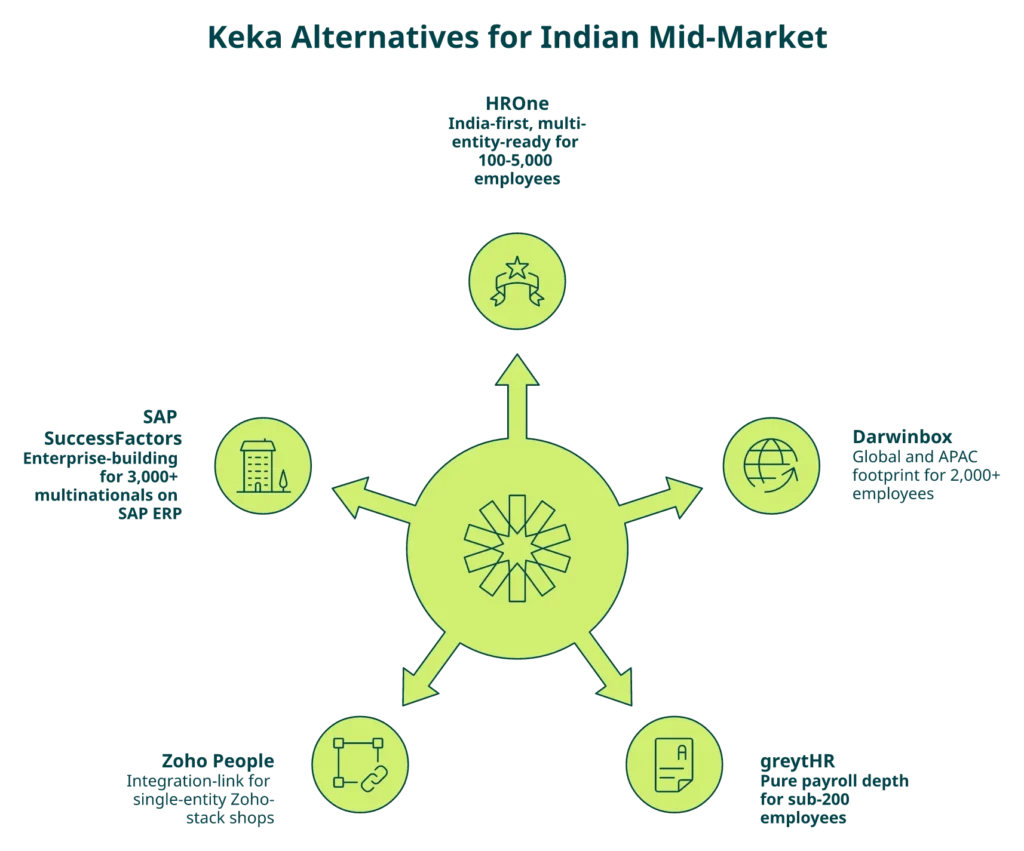
| Your profile | Recommended alternative |
|---|---|
| 100 to 500 employees, single entity, India only | HROne (position 1), or greytHR for sub-200 pure-payroll |
| 500 to 2,000 employees, multi-state, manufacturing or logistics | HROne (position 1), strong multi-location and mobile-first |
| 2,000 to 5,000 employees, multi-legal-entity, India and APAC | HROne (position 1), or Darwinbox for global-first |
| Under 100 employees, Zoho-stack shop | Zoho People |
| 3,000+ employees already on SAP ERP | SAP SuccessFactors |
HROne sits at position 1 across the three most common Indian mid-market profiles for one reason worth stating plainly: the connective tissue of Super Inbox, 127 pre-built workflows, One AI Suite, and ROI Dashboard, combined with subscription-after-go-live billing and a prior-HR SPOC, is the shortest honest path from “Keka isn’t working” to “CFO signs off on the savings.” MR DIY India cut payroll cycles from 10 days to 5 to 6 days. Asia Healthcare Holdings runs 20 pan-India units on one instance. Those are the outcomes. More such outcomes are documented on our customer success stories page.
💬 The conversational invitation
We won’t ask you to book a demo. That’s the wrong close for a decision this operational. What we’d rather do is hear what you’re actually building, what your Keka renewal date is, and where the rollback plan gets you nervous. If that sounds useful, the Bridge below will start that conversation.
THE LAST SWITCH YOU’LL MAKE
Walk through your Keka exit with an HR who has done it 1,500+ times
No slide deck. No pushy sales. Just a 30-minute working session mapping your data, payroll cycle, and cutover window, with a rollback plan attached.
Tell us what you’re building →References
Official Docs / Indian Statutes
- Ministry of Electronics and Information Technology, “Digital Personal Data Protection Act, 2023,” Notification dated 11 August 2023.
- Ministry of Labour and Employment, “Code on Wages 2019,” Notification dated 8 August 2019.
- Income Tax Department. “Rule 31, Certificate of Tax Deducted at Source (Form 16), Income Tax Rules 1962” Published: 1962.
- Employees’ Provident Fund Organisation. “Digital Filing Mandate Circular” Published: 2024.
Datasets
- Gartner. “Total Cost of Ownership for HCM Platforms, 2025,” 2025.
- SHRM India. “Payroll Error Impact on Mid-Market HR Budgets,” 2025.
- HROne Research Team. “India-first HRMS AI Benchmark: Retro CTC, Arrear, and LOP Cases Across 8 Vendors,” 2026.
- NASSCOM. “HR Tech Migration Benchmark Report, 2024,” 2024.
- HROne Migration Practice. “Rollback Protocol and Triggers for HRMS Cutovers, 2025 internal playbook,” 2025.
Blogs
- G2. “Keka Reviews 2026: Details, Pricing, and Features.” Published: May 2026.
- G2. “Uneecops HROne Reviews 2026.” Published: 2026.
- Gartner Peer Insights. “Keka HR Reviews and Ratings 2026.” Published: October 2025.
- G2. “Keka Review 7388521, Integration gaps with Oracle.” Published: November 2022.
- G2. “Darwinbox Reviews 2026.” Published: 2026.

















 Secures Top Spot in
